Why is Credential Redirection a Deprecated feature?

Hello everyone :)
I have been using Credential Redirection and setting this up, and then our IT department gets around to update RDM-Server
Now the Credential Redirection is marked as Deprecated, and only usable if we workaround this by duplicating the old ones, as this is no longer being able to be selected
I have checked and tested with the other options, which either requires me to save my Credentials (User/MasterPass) to the Password Manager within RDM (Either local or DB)
or requires me to write the master password manually each time I need to fetch user/pass for servers I'm accessing
Compared I do not see this new option is a better solution, as to keep Server Info and Sign-In Info Separated?
Why did the Credential Redirection get Deprecated?
Would it be possible to get this as a feature again - as we would really like to use the ease of use to fill out using a password manager, but also wants to keep the data separated
We are not using Devolutions Password Manager
For those not knowing what this is as it is no longer a selectable option
When trying to access X server, it would await for browser window to open with 2 fields User / Password form, this could be filled manually or using your favorite Password Manager to fill these
and send the filled info back to RDM
It were also possible to add a field-ID which most managers can be configured to differentiate on so it can show the correct credentials each time rather than giving you a list of 20 different possible related
In case you don't know why it were deprecated, but have related input, agree/disagree - please write, as I have searched Google and these forums for a long time for an explanation
Best Regards,
Niclas
All Comments (18)
Hello,
Do you know which credential redirection you were using? I think that it was supported for LastPass and 1Password? We deprecated it just because it was creating some confusion. I'm the one that implemented it as a workaround for some password manager that we were not able to support. Since we have native integration of those now, I thought it was a good idea to remove some complexity in RDM. Seems that it was a bad idea :)
Regards
David Hervieux
Hi .. I suddenly noticed it also.
I was using 1Password as a Password Manager w/ RDM as the Connection Manager.
What confusion are you referring to ? I don't see any confusion in using a third-party password safe.
Please don't go the way of vendor lock-in ("you have to use our password manager or nothing"), it would be a shame to see a bad move like that.
Well the one I'm referring to is the one that LastPass were used with, but we are switching to another soon (Big Surprise...)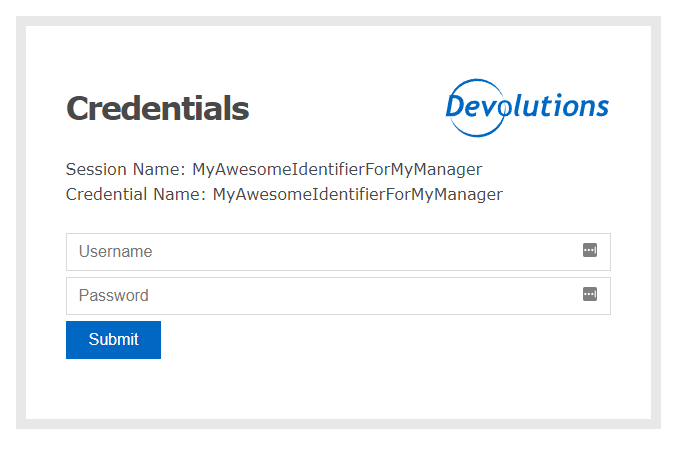
The thing is that I have tried using the native one and it seems to work just fine, but our IT Dept. and I for that sake, does not see a great idea in storing the master passwords, as the thought of doing this were to separate IP/Service Info from the Login Credentials -- as otherwise we could just type in the creds directly into Credential Entities in RDM and just select them from there.
Using the password is also not good either e.g. typing my MasterPassword for my 3rd-party manager in RDM
Also we were able to with that Form and LastPass to give access to servers for everyone that needed, but keep hold on the credentials, so if I am allowed to access X server with Y login which gave me restrictive access I could do so, but someone else might have Z Login which could be elevated.
I do indeed see the thought of why to make it native, for convenience and to skip steps like that form.
But making it that stupid also separates RDM from having data about User/MasterPasswords, so In case of a leak for our RDM DB, only the IPs etc. is compromised, but not the credentials as well -- other way around, if our Password Manager is compromised one with said info would not know where to go...
So what I'm trying to say is that we (my company) actually liked the "stupid" form-login <3
I don't think the native ones should go away, as I think others like that and as I said is smart and can be useful - just not in our case
As for confusion, couldn't it be a "new" credentials entity type - called Login Box or something, and if special needs having a dropdown in the settings part to choose which manager is used - for the form to present better for that specifically manager, and have a none or other, setting as well - which would go perfectly with managers/systems that are not supported.
If this were removed, we were possibly forced to go into our Manager Vaults to get the passwords instead of this :(
We are currently duplicating the old Entities that are still marked as Credential Redirection Deprecated, and make new ones from here as a workaround
But from your answer David Hervieux, it seems that you are already getting the idea and where I come from, which I hope you are able to either just restore or make it even better <3
IvanMarshall, I think what he meant by confusion were to have both the native method and the login-form method
Deprecated Login-Form.png
Exactly, the confusion was mostly related to how we document the credential redirection since now we have a native third party. I think that a new credential entry is a good idea and we could explain it without binding it to LastPass or 1Password. It could be related to any external password application.
By the way, don't worry we don't try to do the vendor lock-in. The only reason we usually remove third party integration is when we are no longer technically able to offer an integration and or we don't get the support from the third party. We strongly believe in integrating as many technologies as possible into RDM.
Regards
David Hervieux
Thanks David .. as ever you guys are good at the support side of things (hence why I was worried you were slipping).
When do you think 1Password will be back as an option for a Credential entry ? I am on 2022.3.29.0 (latest), and 1Password entries are not showing anything to edit anymore.
They work (so something must be still in the system doing the job) .. but the UI shows just the name.
If AgileBits aren't collaborating with you guys, is there anything as a customer of both that I can do to help ?
I'm happy to install the command line tools onto my machine as a 'go between' if that is a requirement ?
(...)
When do you think 1Password will be back as an option for a Credential entry ? I am on 2022.3.29.0 (latest), and 1Password entries are not showing anything to edit anymore.
They work (so something must be still in the system doing the job) .. but the UI shows just the name.
(...)
If you're talking about the Credentials Redirect -- a workaround is to Duplicate an entry using this, and alter the duplicate with correct info
Thanks for the clarification David :D
I'll keep an eye out for the new Credential Entity Type <3
OK .. maybe we are talking about two different things.
When I go to create a new credential entry, whereas before I had a whole list of third-party password applications; now I just have OTP..Password List..Private Key & User/Pass.
And when I look at past created 1Password Credentials, I don't see anything but a Name & Folder.
There doesn't appear to be an add-in or anything for 1Password .. or any of the other password applications.
So, my only choice is to paste in creds to data source from the password application.
Which as a workaround isn't too hard, but it does mean that the password app is basically out of the equation and I need to keep the two in sync.
Hello Ivan,
It seems you are missing your RDM Team (Enterprise) license. Could you please confirm it is entered in Administration > Licenses - https://help.remotedesktopmanager.com/installation_registration_enterpriseedition.html
If it does not work, can you please confirm what type of data source you are using (File > Data Sources). Also, if you are using a personal edition, only SQLite and Password Hub Personal can be registered.
Best regards,
Richard Boisvert
Hello David,
Currently we are having our old (Deprecated) in LastPass Credential Redirect -- Do you know if the 1Password one, were built differently?
As it does not recognize that I'm trying to fill the form - only the web extension when clicking on it, but then it suggests all on the "127.0.0.1"-domain
If they are technically equal, is there any tricks in RDM I can do to get 1Password to actually know which one to use?
With LastPass I got it to work only showing 1 single entry, which was the one that should be used for that particular credential
As I will try to work with what I've got until a possible new entry type is made available :)
If it does not work, can you please confirm what type of data source you are using (File > Data Sources). Also, if you are using a personal edition, only SQLite and Password Hub Personal can be registered.
>>>
OK .. that fixed it. The version before was licensed, then it became free; probably because I was using XML as a Data Source.
Is there a table somewhere that lists the different Data Source types with the pro/cons for each ?
I don't really care .. but it shows that you now prefer we only use two (2) types for the artist formally known as Enterprise (rebranded Teams, very confusing).
Hello Ivan,
You can refer to this page: https://help.remotedesktopmanager.com/datasource_types.html and https://helpmac.remotedesktopmanager.com/datasource_individuals.html
In short, to use the Team version on an individual data source, you would need SQLite if you want to have it locally, or Password Hub Personal is you with to use our Cloud offering.
Best regards,
Richard Boisvert
I use XML data sources, so now to get back my local PasswordSafe (pwsafe.org) vault integration, I had to switch back to SQLite. I figured that out (export xml to rdm, import), and had to re-enter our Enterprise Site License key, which re-enabled the plugins. I shouldn't have had to do a ton of research to find out what happened. Instead, my workflow was disrupted for several hours.
This is our current license status:
As you can see, it expires soon, and we're about to renew, but we don't see the options we've had for YEARS. I need to speak to a rep or something, because this is a BIG change to our workflows and licensing.
Hello kenwms,
Our apologies you had this experience, please note you can always reach us by email (service@devolutions.net), or on the phone and chat during our hours of operation for quick support - https://devolutions.net/support
We never want you to have to spend hours on finding a solution on your own.
Regarding the renewal, the unlimited license is no longer being offered, so I would advise talking to our sales team to see what would suit you best. I will open a case for you, but you can always write to sales@devolutions.net when needed, it will be their pleasure to assist you.
Best regards,
Richard Boisvert
Hi .. I do agree with kenwms .. it used to be OK to have an XML Data Source & Enterprise, but that now appears to have changed.
I am lucky .. I am a one man shop and I can fix this; with some of the same work.
Is there some sort of mailing list or something we can look to for changes such as this ?
I checked out the 'Release Notes' and I don't see anywhere a mention that XML will no longer be a supported "Enterprise" license type.
(Or maybe I am wrong .. ?)
Hello,
I will add a message in the release notes. Indeed it was missing. We recommend SQLite or Hub Personal instead. This is a side effect of how we handle the license now. There is no local license anymore.
Sorry about that.
Regards
David Hervieux
No worries .. but you have to understand that most of us already have a password program (in fact, it was you guys that initially pushed me to 1Password).
So 'Hub Personal' isn't really going to be an attractive option.
For some people (kenwms) they've built an entire flow around your program, so depreciating something without forewarning is going to push people away from your product.
As developers yourself, you know how code-pushes & sprints make things hard for people to just change.
And as the ex-IT guy (now consultant), you will always get the push to use 'standard' applications (i.e. whichever someone likes at whatever Head Office, and they took out for lunch for).
That being said .. as usual .. at least I am thankful you reply to threads and listen to your users.
Hello,
A new credential named "Credential Redirection" will be available starting from the version 2023.1.0.0 of RDM. This credential will allow you to do what you did in your LastPass or OnePassword entries but on a wider scale as it is not restrained to a specific credential type.
Best Regards,
Michaël Beaudin
Hello Michael Beaudin,
Thanks for the great news just prior to weekend :)
And thanks to you, Michael, David and the rest of Devolutions Team for fitting in this request and making it available on such short time