No enterprise license found
I just updated to 2022.3.14.0 and now the application is unusable. I've lost access to all my connections.
Administration > Licenses shows a valid license. When I open the application, everything appears to work normally.
When I try to search in the navigation pane, every connection/credential disappears and just says "No enterprise license found". If I exit out, all appears normal again when I log back in (all connections appear in navigation pane). Instead of searching, just trying to open a connection, and the License administration window opens and shows my valid license.
All Comments (47)
Hello,
Thank you for contacting us on that matter!
Would it be possible to confirm that the license has been assigned to the user you are currently logged with as well? To do so, please refer to this link: https://help.remotedesktopmanager.com/rdm_administration_assign_licenses.html
Also, what type of data source are you currently using?
Best regards,
James Lafleur
License is assigned, appears to be anyway. If I go to Administration > Licenses - click the assign button as shown in the documentation, my user is listed and "Assigned" is checked.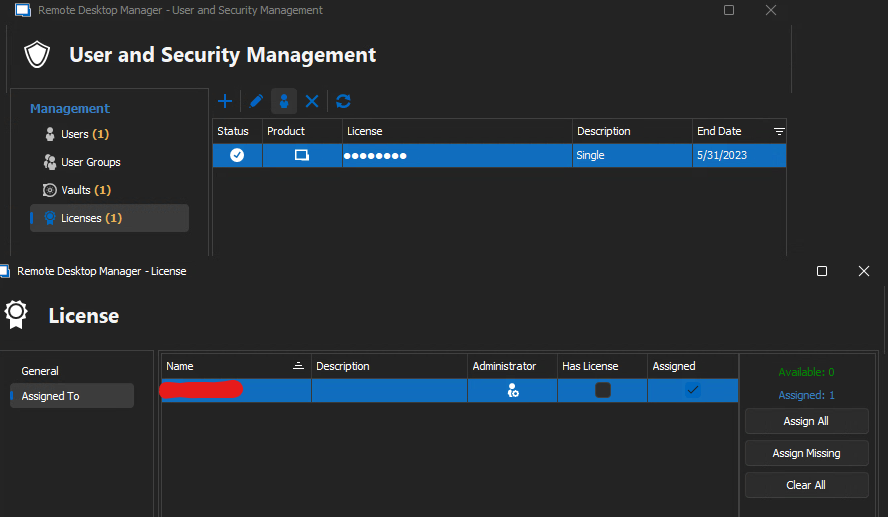
However, in the scenario above, when it opens the Licensing administration when I try to open a connection - when I click the assign button, no users are listed.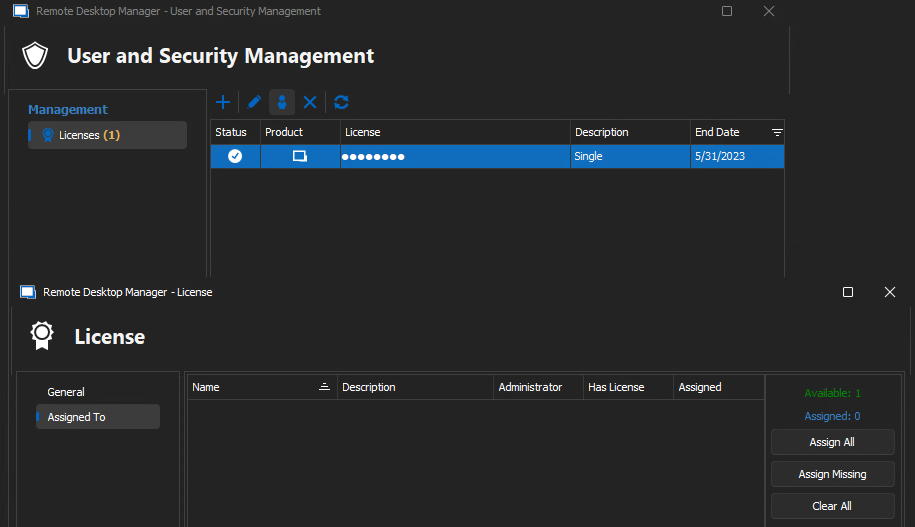
02_user_missing.png
01_administration_licenses.png
Hello,
Thank you for your swift reply!
Would it be possible for you to create a portable installation of RDM and see if this issue still occurs? To do so, you will need to do the following:
1- Download the .zip file below:
https://remotedesktopmanager.com/home/thankyou/rdmbin
2- Create a new folder on your Desktop
3- Extract the content of the .zip file into the folder created at #2
4- Go in this folder once the .zip file has been extracted and run remotedesktopmanager64.exe
5- Connect to your data source
I would like to know if the issue is tied to the local installation of RDM.
Best regards,
James Lafleur
That seems to work. I didn't need to reconfigure anything and seems to be working properly out of the portable folder.
Hello,
What type of datasource are you using?
regards,
Alexandre Roy
SQL source. I've tried uninstalling and reinstalling to no effect.
Hi,
Same prob here when updating from version 2022.3.12 to 2022.3.15.
Also same License message via a new separate install portable version as asked above and linking of data source. 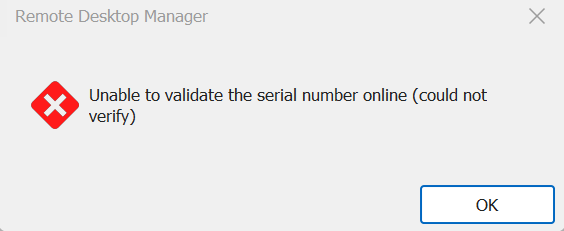
Bottom info indicates 'Licensed' 
Datasource: Team - Microsoft Azure SQL / Active Directory Interactive (With MFA Support)
Regards, Marcel
RDM2.png
RDM1.png
@Edifus
I could give you a quick possible fix,
Close the application and if you go in the followed folder, %localappdata% > Devolutions > RemoteDesktop Manager > and edit the file RemoteDesktopManager.cfg.
There should be a string like this
SafeLocalLicenseToken, please delete this string and if possible, re-enter your license in your SQL server license section.
From what we suspect, something went wrong when the license has been migrated locally to your SQL server, resulting in this bug, but we've done many test internally and we've never seen a behavior like this.
Doing these steps should fix the issue I believe, the one thing where there could be an issue in those steps is when you're going to try and delete the license to add it again, I think if you only have one license, the delete won't performed but I might be wrong.
Regards,
Alexandre Roy
@Marcel
The license validation is done through contacting one of our servers, is there anything that could prevent the communication to reach the validation server ?
A proxy running maybe ?
No Internet connection?
Regards,
Hi,
Same prob here when updating from version 2022.3.12 to 2022.3.15.
Also same License message via a new separate install portable version as asked above and linking of data source.
Bottom info indicates 'Licensed'
Datasource: Team - Microsoft Azure SQL / Active Directory Interactive (With MFA Support)
Regards, Marcel
Alexandre Roy
Hi,
Quickly done but unfortunately same result. I will try tomorrow with a new fresh copy of the relevant RDM environment and will repeat these steps again, ok?
I will inform you about this.
Regards, Marcel
Still have the same issue where it shows the "No enterprise license found" message. When I go to assign it shows "Available:1" but not users to choose from.
I deleted and readded the license but the <SafeLocalLicenseToken> line did not get recreated in the cfg file.
Gotcha, ok for tomorrow please,
@edifus I'd like to know which method of login you're using to connect, is it Integrated Security (Active Directory) or is it a Database Login user?
I understand that when you're going in the license window manually you have your license assign but when you're opening a connection you get the same license prompted but your user isin't shown on the list so now it seems that it is the user that has trouble to be loaded at some point and we need to figure out why.
Regards,
Alexandre Roy
I am using AD login to the SQL database.
Update:
- Made a new fresh copy from the current DB in Azure (default running for clients running on version 2022.2.29)
- Did a fresh install client RDM 2022.2.29
- All working
- Updated client with RDM 2022.3.15
- Connected to Copy DB
- All working, No problems like before with licenses etc..
Perhaps the previous issues here arise as the test machine on which this was done was a Windows 11 Insider preview pre release in which all sorts of things had changed.
I will look into this further in passing and inform you about it.
For now, case closed... update can be performed here without any problems so far.
Thanks for the support!
Regards, Marcel
@edifus
What OS are you running the application on ?
Still trying to figure out why you have issues with loading your user.
Could you edit your datasource options and switch intelligent caching mode to disabled temporarily see if the issue goes away ?
Regards,
Alexandre Roy
@marcelgossens
Thanks for the quick response, we're going to do some test around the The windows insider build preview see if we could replicate the issue.
Much appreciated for the tips.
Regards,
Alexandre Roy

Disabled
Hi,
Our Panda antivirus blocked the license somehow.
Please try to disable your antivirus and see if it works after that.
@papimreh,
Thank you so much for this important bit of info.
Alexandre Roy
Same exact issue after I disabled intelligent caching. Portable version works.
I am not having the issue that papimreh reported on _my_ thread. This is not a firewall/network blocking issue.
When I open the application, it shows entries under Navigation. If I try to interact with navigation pane in any way - I get a licensing popup but no users listed.
If I close out of this window - everything disappears and the application is unusable/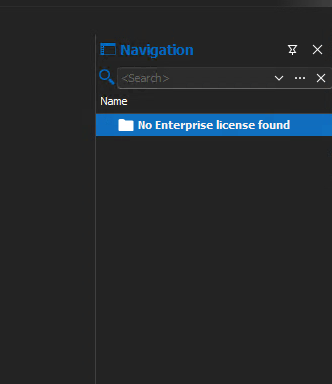
02_no_enterprise_license.png
01_no_user.png
I take that back. The portable version does not work any longer. I downloaded ZIP for 2022.3.15 and now that also has the exact same issue.
Not sure exactly what fixed things, but it's working now? All of this was done with the _installed_ version of RDM - not the portable version.
I wanted to see if it was a SQL database source issue. I wanted to test if creating a new RDM database in SQL would resolve the issue. I did not have a recent export from RDM so I figured I would try to export before being locked out since my last export was 2 months ago.
-Opened SQL source and it was letting me export from the SQL source before the Navigation pane locked down with "No enterprise license found"
-I added a new SQLite source and initialized the new file
-I realized I had not actually saved the export anywhere - went back to SQL source and exported
--I noticed that the File menu was not locking me out - previously when this issue was occurring the only options available in the File menu were Data Sources and Options (everything else was greyed out) but everything was available.
-Finished the export from SQL and import into SQLite source
-I went back to the SQL source and everything is working - not being locked out of File menu options and the data source is usable again.
@edifus
Very sorry for my late reply and the following of this,
Maybe duplicating your datasource link to your SQL server would have solved your issue initially, I cannot tell, this is a very odd bug.
If everything work now its fine, but to be certain here, did you imported you MS SQL entries into a SQLite database because this does not support certain settings on entries such as permission, which could be wiped out on import.
Give me some news if you still need help around this issue because this one is very worrying as you presented it
Regards,
Alexandre Roy
Disabled
I take that back. The portable version does not work any longer. I downloaded ZIP for 2022.3.15 and now that also has the exact same issue, check here.
As I understand it, when you manually assign your license in the license window, your user is not listed in the list when you open a connection. We need to figure out why the user has trouble loading at some point.
Updated to 2022.3.16.0 this morning and back to the same problem.
Same issue here on one windows machine.. have deleted the appdata folder, and reinstalled RDM.. but same issue... works on other machines with same user though..
E
Hi all,
Exactly the same issue... but only on some laptops.
It seems computer related and not user related...
Reinstalling, cleaning the appdata folder and reencoding the licence number have no effect.
Best regards,
Vincent
@vincentthomas
Is it the same database? The licenses are no longer local and need to be re-apply in each data source/database.
Regards
David Hervieux
@vincentthomas
Is it the same database? The licenses are no longer local and need to be re-apply in each data source/database.
Regards
Yes, SQL DB as before. The licenses shows up from the DB in RDM admin and looks ok, but error says "unable to validate the serial number online (could not verify).
e
Yes, the licenses are pushed through the database access for a long time.
Nobody enters the license manually.
is there any official support for this bug ??
Hello Vincent,
We would like to do a remote session with you to see what can be done to fix this issue. To this end, the support case 00013013 has been opened on your behalf and a member of our team will contact you shortly to schedule a remote session at your convenience.
Best regards,
James Lafleur
There is no error "unable to validate the serial number online".
Different issue entirely.
The license validation is done through contacting one of our servers, is there anything that could prevent the communication to reach the validation server ?
A proxy running maybe ?
No Internet connection?
Great! Have we understood correctly? That now an Internet connection is imperative? What about networks where an Internet connection is not possible at all?
I should have read the small letters better... not happy.
Thanks!
Hello,
RDM will try to connect on the Internet if it's available and will verify that you haven't redirected devolutions.net in your host file. I have added a debug information in RDM 2022.2.16 and you can enable it in Help-> Profiler. Could you check if you get a debug message when you enter the license?
Regards
David Hervieux
Hello David,
We'll try tomorrow and check about the debug. What's really puzzling us is that we had already the license stored in the database, and indeed it states it is valid when editing it. But, I suppose due to the new requirement, it will never be able to reach any Internet site, hence it becomes "invalid" after few seconds. If this situation is going to be the norm, I am afraid we will be forced to look for a different product.
Thanks.
Hello,
It's not the expected behavior. We are well aware that sometime you are unable to reach our servers. We will have an offline validation alternative the day this become a requirement. I just want to track why it does not detect the unreachable server.
Regards
David Hervieux
Hi Alexandre,
Problem here arose because I had the test environment (snapshot) deployed in an internal cluster which indeed allows less outgoing traffic, the indicated new fresh Win 11 deployment was done in the correct cluster which could communicate with your servers.
Thank you.
@Marcel
The license validation is done through contacting one of our servers, is there anything that could prevent the communication to reach the validation server ?
A proxy running maybe ?
No Internet connection?
Regards,
Hi,
Same prob here when updating from version 2022.3.12 to 2022.3.15.
Also same License message via a new separate install portable version as asked above and linking of data source.
Bottom info indicates 'Licensed'
Datasource: Team - Microsoft Azure SQL / Active Directory Interactive (With MFA Support)
Regards, Marcel
RDM will try to connect on the Internet if it's available and will verify that you haven't redirected devolutions.net in your host file. I have added a debug information in RDM 2022.2.16 and you can enable it in Help-> Profiler. Could you check if you get a debug message when you enter the license?
Hello David,
Main thread (UI)
----------------------------------------
Silent: System.Net.WebException: The remote name could not be resolved: 'cloud.devolutions.net'
   at System.Net.HttpWebRequest.GetRequestStream(TransportContext& context)
   at System.Net.HttpWebRequest.GetRequestStream()
   at Devolutions.RemoteDesktopManager.Managers.RegistrationManager.CheckBlackListed(String serial)
Our closed DNS is falsely authoritative for '.' (the Internet DNS root) to speedup the (failed) resolution of any query toward the not-reachable Internet, a quite common trick for closed networks. Maybe your application is fooled by that, I don't know.
Thanks.
Hello,
Thank you for the log. I think that we have identified the root cause and this should be fixed for the next minor update. The application should go to QA this afternoon.
Regards
David Hervieux
Hello,
.18 is out with a possible fix around this issue, we're eager to get some news to see if It's solved for you.
Regards,
Alexandre Roy
2022.3.18 appears to be working for now
.18 is out with a possible fix around this issue, we're eager to get some news to see if It's solved for you.
Hello Alexandre,
We are glad to report this new version solves the issue on the closed network.
Thank you!
Same issue here on one windows machine.. have deleted the appdata folder, and reinstalled RDM.. but same issue... works on other machines with same user though..
E
i have exactly the same problem
Installed version 2022.3.29.0
I've tried it in a virtual machine and it works without a problem. This error only occurs on my main computer.
If I downgrade to version 2022.2.29.0 then it works. With version 2022.2.29.0 the EXE is called RemoteDesktopManager64.exe and with 2022.3.29.0 just RemoteDesktopManager.exe
My environment is a ms sql server express 2019 and my computer has installed windows 11 latest version and up to date.
Best regards,
Lars
Hello Lars,
Within RDM 2022.3.x , the licenses are not handled inside the database directly.
That being said, if you go in Administration -> Licenses, is there a license assign to your user?
Best regards,
Jeff Dagenais
Hello Jeff,
yes, i know.
I reinstalled rdm and created a new local data source. The same message appears there too: unable to validate the serial number online.
I have now reinstalled my computer with a fresh operating system. whatever the problem was, i don't know. Now it works again.
Thanks
Best regards
Lars
Hello,
Very strange situation, sorry about that.
Glad that is now working.
Happy holidays
Best regards,
Jeff Dagenais