Datasource drop-down empty after loading Password Hub Business datasource in RDM 2022.2.9
Datasource drop-down empty after loading Password Hub Business datasource in RDM 2022.2.9

Hi,
Starting from version RDM 2022.2.8 and newer, I also encountered an issue where starting RDM, selecting Password Hub Business as datasource during startup (prompt for datasource is enabled) results in the drop-down of datasources not being populated:
Clicking the (...) button does show the datasources and can be selected from there.
Additionally, the Dashboard also seem to remain empty, similar to the bug report I made earlier for MySQL datasources.
All Comments (6)
Hi jellehillen,
I can't reproduce this issue. If I setup RDM to "Prompt for data source", quit and launch again, I can chose my Hub Business data source and the content of the Datasources popup button get fills properly.
Just like for the other issue, I'd suggest looking up the Help -> Application Logs for any error that might explain this.
Best regards,
Xavier Fortin
Hi,
I've checked the error logs but could not find any significant info:
[8/17/2022 3:06:22 PM - 2022.2.9.0 64-bit]ERROR HTTP Response:


Devolutions.Hub.Lucid.Clients.ApiException: The HTTP status code of the response was not expected (401).

Status: 401
Response:

  at Devolutions.Hub.Lucid.Clients.LucidClient.ApiV1AccountEncryptionContextAsync (System.String device_key_id, System.Threading.CancellationToken cancellationToken) [0x005ad] in <6ce68003b6eb4d048fa282fa5dd3a161>:0
  at Devolutions.Hub.Lucid.Clients.LucidClient+<>c__DisplayClass48_0.<ApiV1AccountEncryptionContext>b__0 () [0x00072] in <6ce68003b6eb4d048fa282fa5dd3a161>:0
  at Devolutions.Hub.Lucid.Clients.LucidClient.ApiV1AccountEncryptionContext (System.String device_key_id) [0x00029] in <6ce68003b6eb4d048fa282fa5dd3a161>:0
  at Devolutions.RemoteDesktopManager.Managers.DevolutionsHubDataSourceManager.GetLucidEncryptionContext (Devolutions.RemoteDesktopManager.Business.DataSources.HubConnectionDataSource dataSource, System.Net.Http.HttpClient httpClient) [0x00027] in <22083b6dadd64f75a8dea868ddd5309e>:0
  at Devolutions.RemoteDesktopManager.Managers.DevolutionsHubDataSourceManager.ConnectFromDeviceKey (Devolutions.RemoteDesktopManager.Business.DataSources.HubConnectionDataSource dataSource) [0x0004b] in <22083b6dadd64f75a8dea868ddd5309e>:0
When toggling the Dashboard button, this error appears:
[8/17/2022 3:07:55 PM]ERROR SILENT System.NullReferenceException: Object reference not set to an instance of an object
  at Devolutions.RemoteDesktopManager.Business.DataSources.HubLogSubDataSource.GetLog (Devolutions.RemoteDesktopManager.Business.DataSources.LogFilter filter) [0x00064] in <22083b6dadd64f75a8dea868ddd5309e>:0
  at Devolutions.RemoteDesktopManager.ConnectionLogListViewController+<>c__DisplayClass82_0.<RefreshData>b__0 () [0x00257] in <b0003099964f4bbfa8ed9e34e888107a>:0
Is there any way to get more detailed log or debug information? Thanks.
Best regards,
Jelle Hillen
The second error is already fixed internally, but nonetheless, I was also getting it in my test with 2022.2.9 and it didn't cause the other issue you've described.
As for the first one, I've tried to "simulate" it by injecting the exception in the code directly, but it gives me a GoOffline window: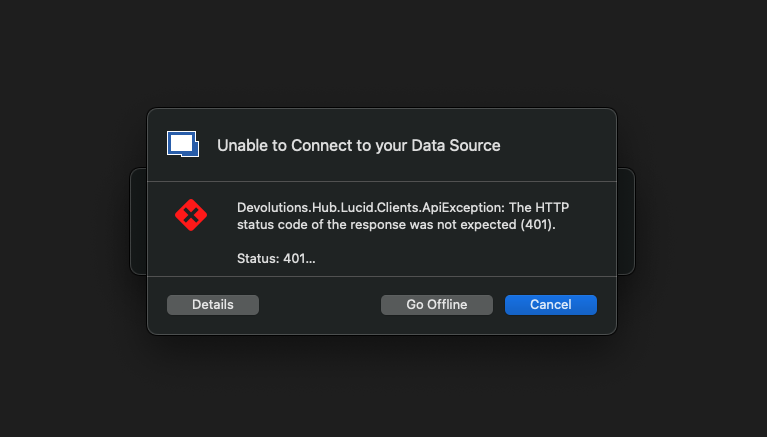
Is that not the case for you?
Is that with the same large vaults you mention here: https://forum.devolutions.net/topics/37880/dashboard-and-sort-order-issue-since-rdm-enterprise-202228-and-newer#165417?
Best regards,
Xavier Fortin
GoOffline.png
Hi,
I do not get the error. The 401 gets logged silently in the Application log.
Is that with the same large vaults you mention here: https://forum.devolutions.net/topics/37880/dashboard-and-sort-order-issue-since-rdm-enterprise-202228-and-newer#165417?
It is indeed the same datasources and vault. One is a MySQL, the other in Password Hub for Business. In both instances, the Dashboard and sorting error seem to be present. In smaller vaults (within the same datasource) the sorting does work and the dashboard gets updated properly when selecting entries. The two issues are always present or absent together.
Best regards,
Jelle Hillen
Hi,
As the two problems seem to be related, I suggest we continue the troubleshooting in the other thread?
https://forum.devolutions.net/topics/37880/dashboard-and-sort-order-issue-since-rdm-enterprise-202228-and-newer#165417?
Best regards,
Jelle Hillen
This will indeed makes thing simpler.
Best regards,
Xavier Fortin