Dashboard and sort order issue since RDM Enterprise 2022.2.8 and newer
Dashboard and sort order issue since RDM Enterprise 2022.2.8 and newer

Hi,
Since RDM for Mac 2022.2.8 and newer (currently using 2022.2.9), there are issues with the loading and refreshing of the Dashboard and sort order in the navigation bar. The Dashboard issue seems to be limited to the MySQL datasource (SQLite doesn't show the same behaviour), and have not tested the sort order with any other datasource type than MySQL.
Upon starting RDM and connecting to the MySQL datasource, the Dashboard does not show up (as if it is turned off). Clicking the Dashboard button twice (View > Dashboard) allows the Dashboard to appear but when selecting an entry, it does not update until I click the button again. This behaviour only seems to be with the MySQL datasource.
I also noticed a difference in sort order since 2022.2.8 and higher. Our entries all start with [$IP$], where the variable is substituted from the host field. In older versions, the navigation pane would substitute variables, then perform the sorting, which resulted in the entries sorted by IP address. This no longer seems to be the case as the sorting engine seems to ignore the variable (treating it as plain text), resulting in a different sort order (see the attached screenshot).
I already tried deleting all settings (via Library/Application Support/com.devolutions...) to start fresh but the problem seems to remain.
RDM version 2022.2.5 did not have this problem: sorting worked and the Dashboard updated correctly.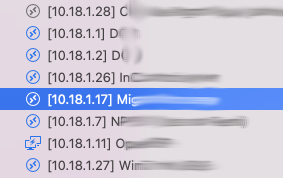
Screenshot 2022-08-17 at 11.50.17.png
All Comments (14)
Hi,
I can't reproduce either of your problems with RDM 2022.2.9.0. I can launch RDM with a MariaDB (functionally the same as MySQL for RDM) as the default data source and the Dashboard appears as expected and refresh without any issues.
Same for the sort, I've setup an example that would produce 2 differents sorting result depending if the $IP$ variable get resolved or not, and the sort clearly occurs after the resolving: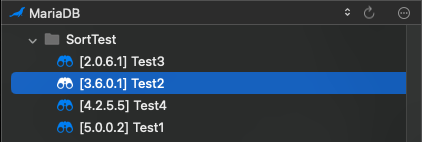
Do you perhaps have an error in the Help -> Application Logs that would perhaps corrupt the state of RDM and explain those weird behaviour?
Best regards,
Xavier Fortin
Sort.png
Hi,
I've checked the application logs and could not find anything in the logs during startup, nor during the toggling of the Dashboard.
Is there any way to get more detailed (debug) information from RDM?
A theory I'm having is that it has got something to do with the vault containing a large amount of entries. In all cases, the datasource (both MySQL and Hub) were pointing to a vault with a large amount of entries. When I try connecting to a smaller vault within the same data source, everything works as expected but as soon as I select the vault with the large amount, the dashboard stops updating again.
The odd thing is that RDM 2022.2.5.0 does not exhibit this behaviour and the application works as expected, even with the large amount of entries in the vaults.
Best regards,
Jelle Hillen
How many entries are we talking about here?
To be fair, to many sessions will definitely affect the performance of the application (loading, refreshing, etc.), I'm not sure I can see how it could cause such an issue though. Is this the only repository with which you reproduce the issue?
Best regards,
Xavier Fortin
Hi,
Quite a lot actually. I've attached the vault information:
Repositories:         8
Entries/Items:    10745/10745
  Sessions:        3466
  Data entries:    2259
  Credentials:     2558
  Sub connections:  734
  Documents:         44
  Contacts:         385
  -->Sub total:    9446

  Session tools:      0
  Folders:         2033
  --> Total:      10745
Right up until and including version 2022.2.5.0, performance was not very good but everything was functioning. Starting from version 2022.2.8.0, the functional issues started. If I downgrade back to 2022.2.5.0, the issue is gone again and the application works as expected.
As it is the only vault which such a large amount of entries (the second most is around 1100), I can only reproduce the issue with that particular vault. As the vaults in MySQL and Password Hub are duplicates (we are in the process of migrating towards Password Hub), the issue occurs on both datasources, which may indicate that it is not a problem with the datasource itself but rather with the sheer volume of the database.
Best regards,
Jelle Hillen
This is indeed a lot of entries. We would usually advise against having such large vaults. But in any case, the issue you are describing should not happen regardless of the amount of entry.
I'll open a ticket to investigate. As this is so far the only particularity we know about this vault, we'll start by trying to create a similarly large vault and see if we can reproduce.
Best regards,
Xavier Fortin
We should also keep in mind that there might very well be something more specific about the two vaults that causes the issue (a corrupted, or unsupported entry type that is incorrectly handled by RDM for instance). Since the two vaults are clones, this is very likely. That being said, I hoped we would see a trace of this in the Application Logs.
Xavier Fortin
We should also keep in mind that there might very well be something more specific about the two vaults that causes the issue (a corrupted, or unsupported entry type that is incorrectly handled by RDM for instance). Since the two vaults are clones, this is very likely. That being said, I hoped we would see a trace of this in the Application Logs.
That could of course be the case. Is there some way we can figure this out? The migration from MySQL to Password Hub was done by export/import using .rdm files. Other than having to remove larger secure notes (which were in RTF-format), there were no issues or error messages during the migration.
Additionally, would a useful test case be to also perform the export/import to a non-deprecated datasource such as MSSQL?
Best regards,
Jelle Hillen
Hello,
After switching a few times between vaults in the SQL datasource, I finally got this application error during the switch to the vault with the large amount of items. Maybe it helps finding the issue.
NullReferenceException - Object reference not set to an instance of an object

  at Devolutions.RemoteDesktopManager.Managers.VariableManager.SafeReplaceString (System.String input, System.String variable, System.String value) [0x0004c] in <22083b6dadd64f75a8dea868ddd5309e>:0
  at Devolutions.RemoteDesktopManager.Managers.VariableManager.Replace (System.String text, System.String variable, Devolutions.RemoteDesktopManager.Managers.VariableManager+ProcessVariableAction action, Devolutions.RemoteDesktopManager.Business.Connection connection, Devolutions.RemoteDesktopManager.VariableMode variableMode, System.Boolean isUri, System.Boolean isAddhoc, System.Int32 nesting) [0x0005d] in <22083b6dadd64f75a8dea868ddd5309e>:0
  at Devolutions.RemoteDesktopManager.Managers.VariableManager.ProcessVariables (System.String value, System.Boolean isUri, System.Boolean isAddhoc, Devolutions.RemoteDesktopManager.Business.Connection connection, Devolutions.RemoteDesktopManager.Business.Connection parent, System.Int32 nesting) [0x00283] in <22083b6dadd64f75a8dea868ddd5309e>:0
  at Devolutions.RemoteDesktopManager.Managers.VariableManager.ReplaceVariables (System.String value, System.Boolean isUri, System.Boolean isAddhoc, Devolutions.RemoteDesktopManager.Business.Connection connection, System.Int32 nesting, System.Boolean resolvePassword, System.Boolean resolveDynamicPort) [0x00050] in <22083b6dadd64f75a8dea868ddd5309e>:0
  at Devolutions.RemoteDesktopManager.Managers.VariableManager.FormatAddhoc (System.String str, System.Boolean isUri, Devolutions.RemoteDesktopManager.Business.Connection connection, System.Int32 nesting) [0x00000] in <22083b6dadd64f75a8dea868ddd5309e>:0
  at Devolutions.RemoteDesktopManager.Services.BusinessVariableService.FormatAddhoc (System.String str, System.Boolean isUri, Devolutions.RemoteDesktopManager.Business.Connection connection) [0x00000] in <b0003099964f4bbfa8ed9e34e888107a>:0
  at Devolutions.RemoteDesktopManager.Business.Connection.get_NameFormatted () [0x00065] in <85fbf0d0961d40c9b5f9339cbce46aff>:0
  at Client.ConnectionTreeViewModel.ToValues (Devolutions.RemoteDesktopManager.Business.Connection connection) [0x0000e] in <b0003099964f4bbfa8ed9e34e888107a>:0
  at Client.ConnectionTreeViewModel.LoadConnectionInTreeNode (Client.ITreeListNode root, Client.ITreeListNode parent, Devolutions.RemoteDesktopManager.Business.Connection connection) [0x00113] in <b0003099964f4bbfa8ed9e34e888107a>:0
  at Client.ConnectionTreeViewModel.LoadConnectionInTreeNode (Client.ITreeListNode root, Client.ITreeListNode parent, Devolutions.RemoteDesktopManager.Business.Connection connection) [0x00180] in <b0003099964f4bbfa8ed9e34e888107a>:0
  at Client.ConnectionTreeViewModel.LoadConnectionList (Devolutions.RemoteDesktopManager.Business.Connection[] connections) [0x004ea] in <b0003099964f4bbfa8ed9e34e888107a>:0
  at Client.BaseConnectionListViewModel.LoadConnectionList (Devolutions.RemoteDesktopManager.Forms.IFilter clientFilter, Devolutions.RemoteDesktopManager.Business.Connection[] connections) [0x0003b] in <b0003099964f4bbfa8ed9e34e888107a>:0
  at Devolutions.RemoteDesktopManager.ConnectionTreeViewController.InternalLoadConnections (Devolutions.RemoteDesktopManager.Business.Connection[] connections, System.Boolean saveState) [0x0005e] in <b0003099964f4bbfa8ed9e34e888107a>:0
  at Devolutions.RemoteDesktopManager.ConnectionTreeViewController.LoadConnectionList (Devolutions.RemoteDesktopManager.Business.Connection[] connections, System.Boolean saveState) [0x00000] in <b0003099964f4bbfa8ed9e34e888107a>:0
  at RemoteDesktopManager.MainWindowController.LoadAllConnectionView (System.Boolean saveState) [0x00030] in <b0003099964f4bbfa8ed9e34e888107a>:0
  at RemoteDesktopManager.MainWindowController.ApplyFilter () [0x0005c] in <b0003099964f4bbfa8ed9e34e888107a>:0
  at Devolutions.RemoteDesktopManager.Managers.UIManager.set_ViewMode (Devolutions.RemoteDesktopManager.ViewMode value) [0x0002b] in <b0003099964f4bbfa8ed9e34e888107a>:0
  at Devolutions.RemoteDesktopManager.NavigationViewController.set_CurrentViewModeIndex (System.Int32 value) [0x00093] in <b0003099964f4bbfa8ed9e34e888107a>:0
  at (wrapper managed-to-native) ObjCRuntime.Messaging.void_objc_msgSendSuper_IntPtr(intptr,intptr,intptr)
  at Foundation.NSObject.DidChangeValue (System.String forKey) [0x00042] in <7db9c414b4e84831b18569ba27d0b626>:0
  at Client.Controls.RDMTabBarView.set_SelectedIndex (System.Int32 value) [0x00056] in <b0003099964f4bbfa8ed9e34e888107a>:0
  at Client.Controls.RDMTabBarView.set_SelectedTabBarItem (Client.Controls.RDMTabBarItem value) [0x00029] in <b0003099964f4bbfa8ed9e34e888107a>:0
  at Client.Controls.RDMTabBarView.SelectTabBarItem (Foundation.NSObject sender) [0x00056] in <b0003099964f4bbfa8ed9e34e888107a>:0
  at (wrapper managed-to-native) ObjCRuntime.Messaging.void_objc_msgSendSuper_IntPtr(intptr,intptr,intptr)
  at AppKit.NSWindow.SendEvent (AppKit.NSEvent theEvent) [0x0003a] in <7db9c414b4e84831b18569ba27d0b626>:0
  at Client.BaseWindow.SendEvent (AppKit.NSEvent theEvent) [0x00000] in <b0003099964f4bbfa8ed9e34e888107a>:0
Best regards,
Jelle Hillen
It could very well be it. I've just confirmed that this method (SafeReplaceString) did not exists prior to RDM 2022.2.8.0. Although I would have expected this error to have more evidently appear in the application logs.
I'll fix it and include the fix in the next release. I'll notify you when it is available so you can test.
Best regards,
Xavier Fortin
Hi,
I've been trying to figure what triggers the issue. After some extensive testing it does not seem to be related to the number of entries in the vault but rather something in its contents, though for the moment it is unclear what it is. One thing I can say is that the issue occurs when performing an export/import using RDM-files and that I can simulate the issue with only a subset of data (far below 2500 entries). The issue also occurs with exports with or without credentials included, which leads me to believe the issue is unrelated to credentials but something in the entries or folders itself. I'll keep you posted if I find anything more useful.
Best regards,
Jelle Hillen
Hi Jellehillen,
If it helps, if it has something to do with the stacktrace you've shared previously, the error occurs in the resolving of a variable (we cannot know which one from the stacktrace). I.e. the value of the variable would be null and we are not properly handling it.
Thanks for taking the time to investigate this on your side!
The release I mentioned earlier is going through the QA at the moment, it should be available somewhere next week.
Best regards,
Xavier Fortin
Hi jellehillen,
RDM and RDM Free for Mac 2022.2.11.0 is now available with a fix for the NullReferenceException error you mentionned in a previous post. It's difficult to confirm if this is a the cause of the other issues, but you could try the version and see for yourself.
Best regards,
Xavier Fortin
Hi,
I've tested with 2022.2.11.0 and can confirm the issue seems to be resolved.
Best regards,
Jelle Hillen
Glad to hear it!
Do not hesitate to reach back if you have any other issues.
Best regards,
Xavier Fortin