wsl terminal support
0 vote
can you add support for wsl?
not as default ssh engine, but as a session?
don't want to use a powershell script for that like here - https://forum.devolutions.net/topics/26075/windows-subsystem-for-linux
want it natively like in mobaxterm for example.
thanks in advance!
All Comments (10)
Thank you for the suggestion, we have opened a ticket.
Regards,
Hubert Mireault

Hello there,
Do you have some news about this topic ?
Kelian
Hello,
Nothing new for now.
Regards,
Hubert Mireault
Ok, thanks, do you any idea when you'r able to post some news ?
Hello,
We still have yet to investigate what it will take to implement this in RDM, so I can't be sure. As with many requests though, when our community shows that there's interest in a feature, we do what we can to prioritize it. Your interest is noted.
If I may ask, at the moment do you use MobaXTerm to solve this need? Otherwise, what technology do you use?
Regards,
Hubert Mireault
Hello,
I switched from mobaxterm to RDM, I use for the moment the windows terminal for the WSL sessions, I hope I will be able to use RDM only soon ^^
Regards,
Kélian
Hi,
Here is a slightly better solution using the "Command Line (External Application)" session type instead of PowerShell: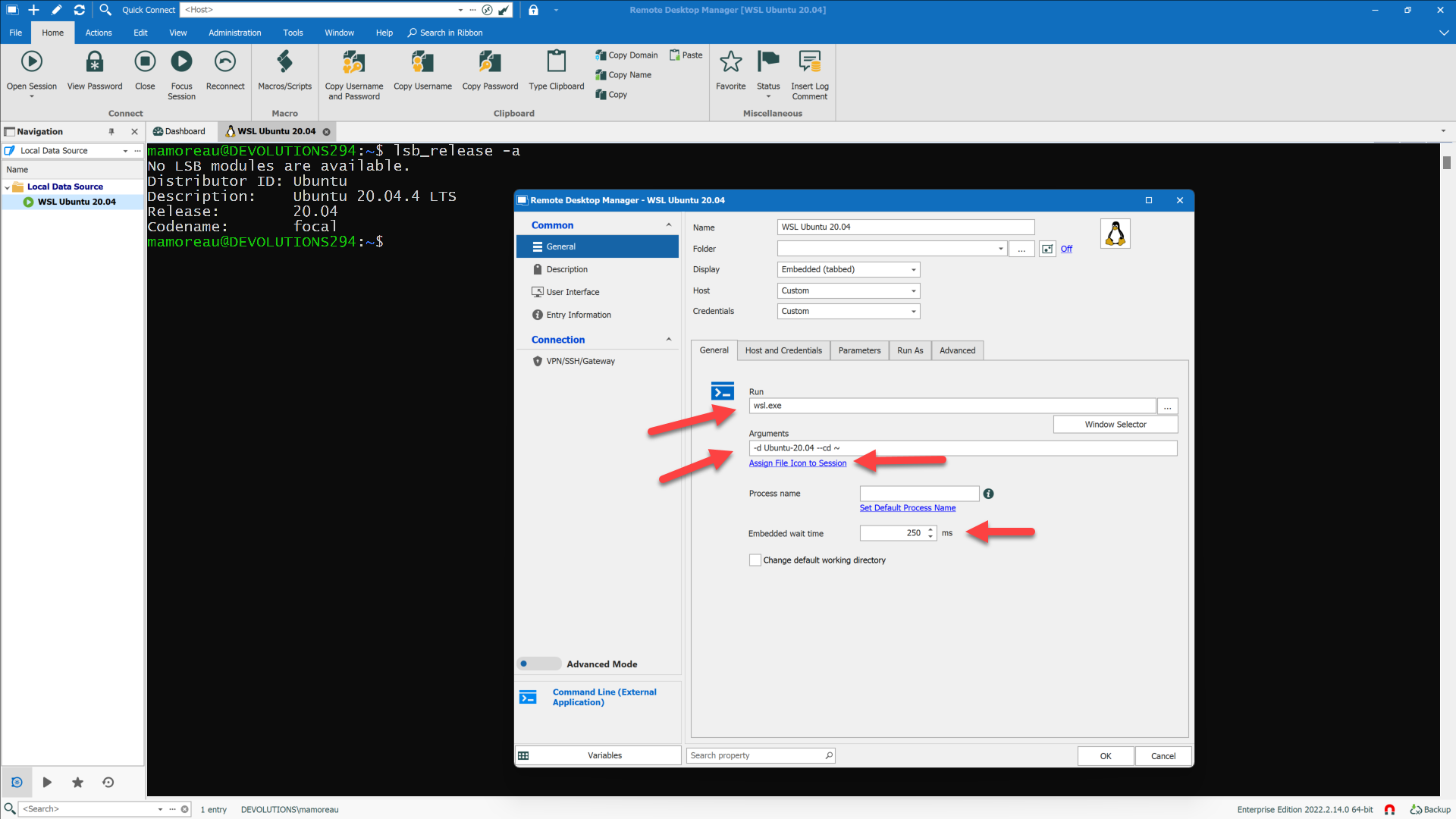
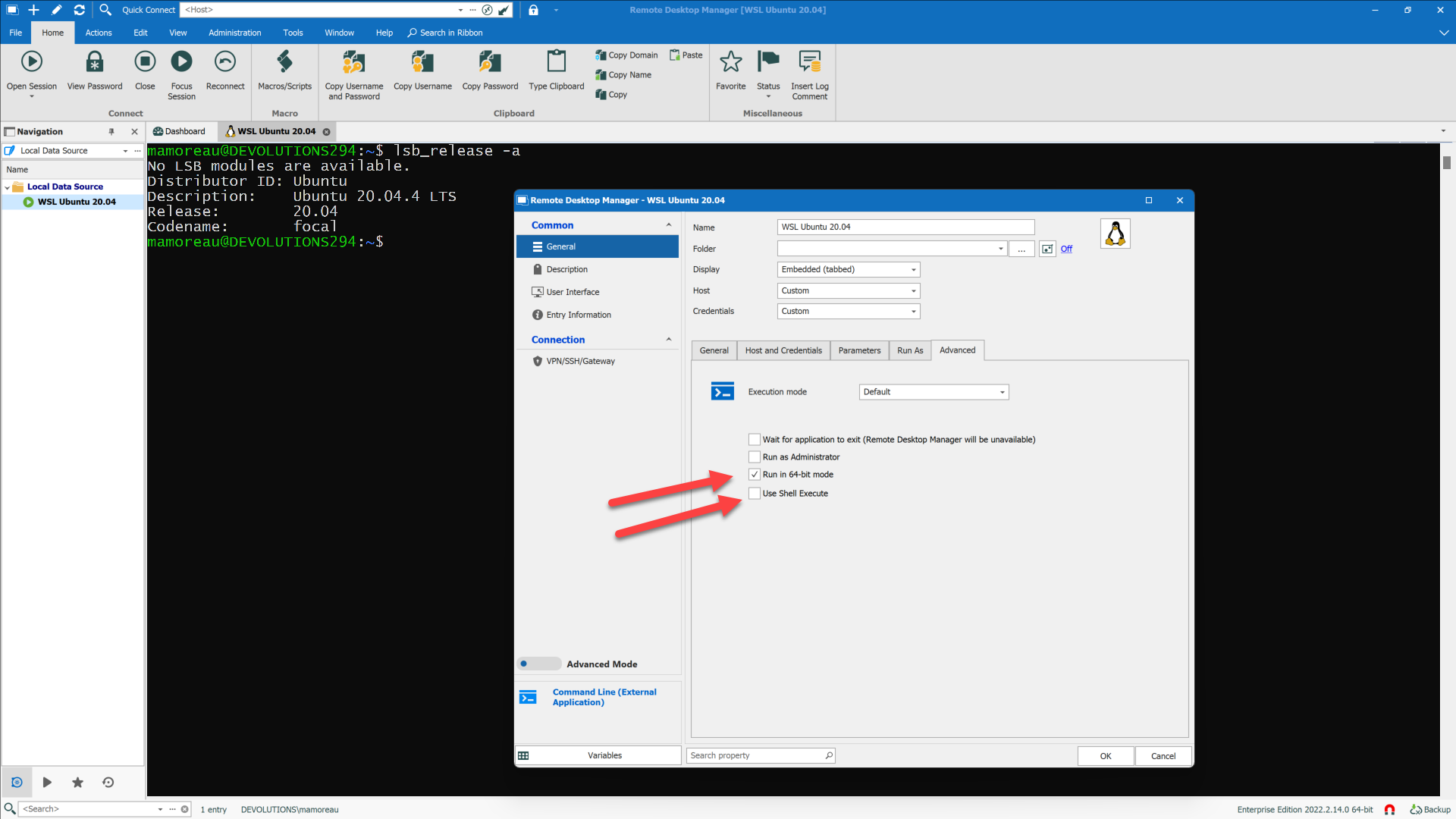
It even works with WSLg on Windows 11: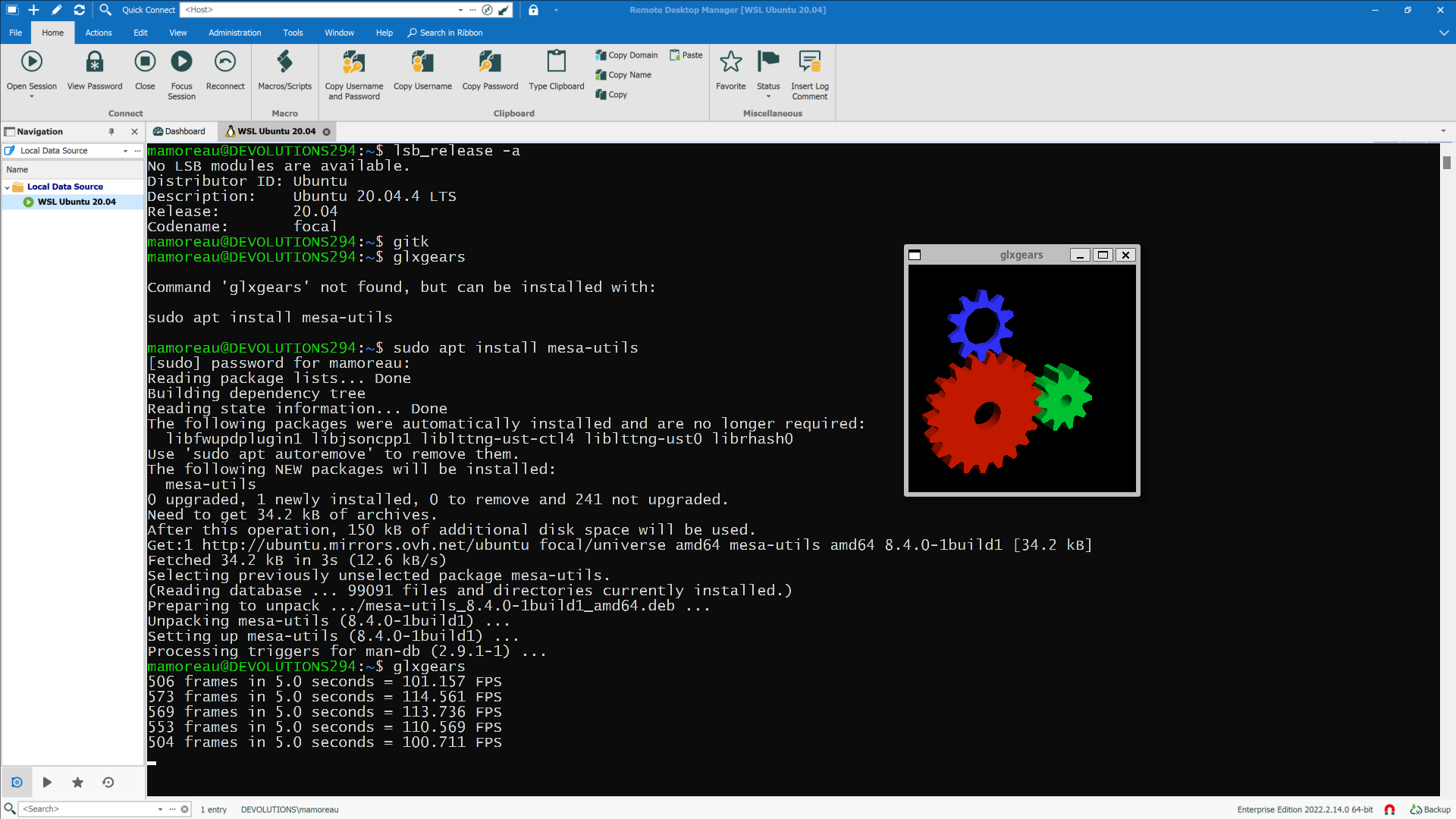
I know it isn't ideal to manually create WSL entries this way, so we're looking into creating a new WSL entry type instead. I have tried mobaxterm to see what kind of integration they're doing, and here's the list of things I came up with:
1) Automatic detection of WSL distros, lets you launch them
2) Automatic injection of embedded X11 server in WSL sessions
3) WSL filesystem browser tab to the left of WSL terminal by default
While many of these features are nice-to-have, I would like to know what you consider essential. If you're on Windows 11, then WSLg is already there, so you don't need an X11 server. Maybe GUI apps are not even a requirement for you. The embedded filesystem browser is nice, but the Windows 11 file explorer added simplified WSL filesystem browsing already (otherwise, just type "explorer.exe ." in a WSL terminal). As for listing WSL distros, we could probably list them when creating new WSL entries, as a shortcut. After that, it would be a matter of creating options matching the command-line arguments accepted by wsl.exe when launching a new WSL session.
Let me know what you think,
Best regards,
Marc-André Moreau
rdm_wsl_cmd3.png
rdm_wsl_cmd2.png
rdm_wsl_cmd1.png
Hi,
Here is a slightly better solution using the "Command Line (External Application)" session type instead of PowerShell:
It even works with WSLg on Windows 11:
I know it isn't ideal to manually create WSL entries this way, so we're looking into creating a new WSL entry type instead. I have tried mobaxterm to see what kind of integration they're doing, and here's the list of things I came up with:
1) Automatic detection of WSL distros, lets you launch them
2) Automatic injection of embedded X11 server in WSL sessions
3) WSL filesystem browser tab to the left of WSL terminal by default
While many of these features are nice-to-have, I would like to know what you consider essential. If you're on Windows 11, then WSLg is already there, so you don't need an X11 server. Maybe GUI apps are not even a requirement for you. The embedded filesystem browser is nice, but the Windows 11 file explorer added simplified WSL filesystem browsing already (otherwise, just type "explorer.exe ." in a WSL terminal). As for listing WSL distros, we could probably list them when creating new WSL entries, as a shortcut. After that, it would be a matter of creating options matching the command-line arguments accepted by wsl.exe when launching a new WSL session.
Let me know what you think,
Best regards,
Hello,
Thanks, i'll try this.
Kélian
Hi,
Here is a slightly better solution using the "Command Line (External Application)" session type instead of PowerShell:
It even works with WSLg on Windows 11:
I know it isn't ideal to manually create WSL entries this way, so we're looking into creating a new WSL entry type instead. I have tried mobaxterm to see what kind of integration they're doing, and here's the list of things I came up with:
1) Automatic detection of WSL distros, lets you launch them
2) Automatic injection of embedded X11 server in WSL sessions
3) WSL filesystem browser tab to the left of WSL terminal by default
While many of these features are nice-to-have, I would like to know what you consider essential. If you're on Windows 11, then WSLg is already there, so you don't need an X11 server. Maybe GUI apps are not even a requirement for you. The embedded filesystem browser is nice, but the Windows 11 file explorer added simplified WSL filesystem browsing already (otherwise, just type "explorer.exe ." in a WSL terminal). As for listing WSL distros, we could probably list them when creating new WSL entries, as a shortcut. After that, it would be a matter of creating options matching the command-line arguments accepted by wsl.exe when launching a new WSL session.
Let me know what you think,
Best regards,
Hello,
Thanks, i'll try this.
Kélian
Hello,
That's work but whitout the -d argument 
Thanks for the tips :)
Kélian
For the 2nd part of your post, I think this is not bad for WSL sessions, a shortcut and you choose the arguments for the sessions.
Kélian