Cannot register security key for Devolutions Account

Hi there!
I wanted to enable 2FA with Security key for my account. I have a Yubikey 4 Nano key which already works with many websites, e.g. Google, GitHub. It displays an error when trying to connect.
Step 1 - before touching the key - https://i.imgur.com/Sbvzxte.png
Step 2 - error after touching the key - https://i.imgur.com/7kgB9YO.png
Step 3 - request in developer tools - https://i.imgur.com/Y4H3o5q.png
The same in Firefox and in Chrome, also in Private browsing mode.
Second issue: there's no way to disable 2FA from the account settings, how to do that provided that I can't pair my key? I don't want to enter email code every time.
Thanks in advance.
All Comments (11)
Hello RDMTinkerer!
Thanks for reaching out! Just wanted to let you know that the security key issue is a known issue and will be fixed in our next update (target tuesday).
As for the second issue, there actually is a way to disable SMS and Email 2fa from our portal (https://portal.devolutions.com).
See the screenshot bellow.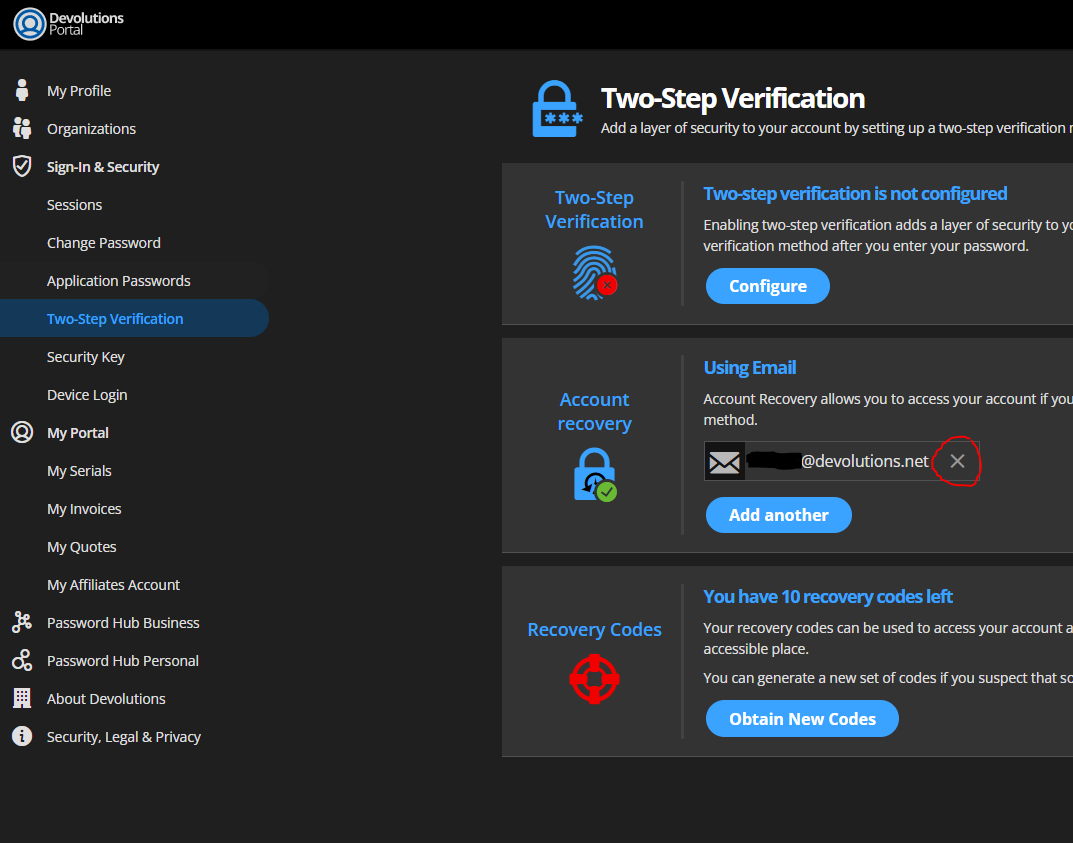
Luc Fauvel
Capture.PNG
Thank you Luc for a quick response. Really appreciate your useful answer.
As for disabling 2FA - maybe a more apparent "Disable Two-Step Verification" button would be nice to have :-)
Have a good day!
Thank you for your feedback, we'll look into your suggestion.
Thanks and good day to you too!
Luc Fauvel
Hi again,
Just wanted to let you know that you should be able to add a security key to your account now.
Cheers,
Luc Fauvel
Thank you very much for the update!
I was able to add 2 out of my 3 security keys. The last one fails consistently with the same message as above. I've tried several times, this issue is 100% reproducible. It's a USB-C Nano key like this one, known as Gnubby. I use this key for various services, so it's working fine, just for some reason it's not accepted by Devolutions. However one of the 2 working keys is also Gnubby, just USB-A.
This is absolutely not an urgent issue, just letting you know. Here's the response from the server:
https://i.imgur.com/LULjcx7.png
Thanks for fixing this!
It's more complicated than that.
My keys look like this:
https://i.imgur.com/LIPL4Pg.png
The first one works correctly and the login is passwordless. Hurray! But the key itself is large, I was using it as a backup ;-)
The second one (USB-A gnubby) added successfully, but cannot be used to log in:
https://i.imgur.com/0kCny0h.png
The USB-C gnubby cannot be registered or used as written in the previous post.
So I suppose you're using a newer feature which is not available in previous generation of keys. Or is it just a bug? ;-)
Sorry for posting several times, but as I test I discover new things. I think there's a bug here, because in a new browser, in an incognito window it allows me to log without using security key. I can select "Choose another way to sign in", give password and I am logged in. So 2FA is bypassed.
You're welcome :)
So for security keys we enforce that keys support the user verification feature, if the keys do not support user verification, you should be able to register it as a second factor only, its seems that fallback for the second factor doesn't work with that specific key so we'll have to look into it and try to reproduce the issue.
For the choose another way to sign in, when the key is used as a first factor we allow users to use their password instead (if they forgot or lost their security key), the key can be set as a second factor if that is what is preferred.
Thank you,
Luc Fauvel
Thank you Luc for your response.
In the 2FA setup, when a second factor key is not available, I'm choosing another way, giving my password, and then I should be forced to use one of my 2FA recovery codes that I saved during 2FA setup. If only the password is sufficient, what's the purpose of 2FA at all?
We could force users to use their 2FA codes in that specific case, when we implemented this we saw it as the key with user verification is the first factor and so you can pair it with an other second factor. We'll look into a way to improve this.
Thank you,
Luc Fauvel
Yeah, security is hard. This topic will return to you sooner or later as a CVE classified as "2FA bypass vulnerability". So let's address it while the feature is just being developed and it's not urgent yet ;-)