Split Tunnelling

Disabled
Are there any must have IP ranges I should have entered into my routing table for RDM?
While on VPN, I seem to have occasional issues connecting. Once connected it's reasonably reliable, until I try add an entry - at which point, it errors and I have to restart but weirdly it does add the entry.
All Comments (4)
Hello,
Thank you for contacting us on that matter!
Which version of RDM and what type of Data Source you are currently using? Also, what type of VPN are you currently using? Does the same issue occur if you launch your VPN manually outside of RDM?
Best regards,
James Lafleur
My problem is that when I am working from home on RDM over a Windows built in L2TP/IPSec VPN with split tunnelling (i.e. I have rules to go through the office for certain IP's because our RDM database is an Azure database which is IP restricted to our Office) that although RDM works most of the time without any problem for viewing items, if I try modify/add an item it crashes with the following error :
InvalidOperationException - Invalid operation. The connection is closed.

   at System.Data.SqlClient.TdsParserStateObject.ReadSniSyncOverAsync()
   at System.Data.SqlClient.TdsParserStateObject.TryReadNetworkPacket()
   at System.Data.SqlClient.TdsParserStateObject.TryPrepareBuffer()
   at System.Data.SqlClient.TdsParserStateObject.TryReadUInt32(UInt32& value)
   at System.Data.SqlClient.TdsParserStateObject.TryReadPlpLength(Boolean returnPlpNullIfNull, UInt64& lengthLeft)
   at System.Data.SqlClient.TdsParser.TrySkipPlpValue(UInt64 cb, TdsParserStateObject stateObj, UInt64& totalBytesSkipped)
   at System.Data.SqlClient.SqlDataReader.TryResetBlobState()
   at System.Data.SqlClient.SqlDataReader.TryCleanPartialRead()
   at System.Data.SqlClient.SqlDataReader.TryReadInternal(Boolean setTimeout, Boolean& more)
   at System.Data.SqlClient.SqlDataReader.Read()
   at Devolutions.RemoteDesktopManager.Business.DataSources.DatabaseConnectionDataSource.cca8119a110bebd9f7c66a9b8aa671a9c(IDataReader cb8306497615195e4d2b0b196997bb844, List`1 c956c86e3e516742fdb9aca7e24607786)
   at Devolutions.RemoteDesktopManager.Business.DataSources.DatabaseConnectionDataSource.cca8119a110bebd9f7c66a9b8aa671a9c(IDbCommand c469787a81372d641f189d46c8cbb1738, List`1& c8b9dc1f68940a43e7cd099cb1e4646fe, Byte[]& c9bd301a2fd1db0ad012d647646537ec1, Int32& c0d10ab04b5b18d594b7605de6eda18b5, RepositoryEntity& c1f8ddfa1eaeaf7bf35c25d5d9b952cc6)
   at Devolutions.RemoteDesktopManager.Business.DataSources.DatabaseConnectionDataSource.GetConnections()
   at Devolutions.RemoteDesktopManager.Managers.ConnectionManager.ca4799bebd8b706f34eea94a778843b55(ConnectionEngine cb85976372b62c8c45ee9bbcc16483427, Boolean cfe205b02d73750f8fd14d199343fe545)
   at Devolutions.RemoteDesktopManager.Managers.ConnectionManager.LoadConnections(BaseConnectionDataSource dataSource)
   at Devolutions.RemoteDesktopManager.Managers.ConnectionManager.RefreshConnections(ConnectionEngine engine)
   at Devolutions.RemoteDesktopManager.Forms.FrmMainDocumentManager.RefreshAllConnectionView(Boolean saveState, Boolean checkOnline, Boolean force)
   at Devolutions.RemoteDesktopManager.Forms.FrmMainDocumentManager.RefreshViewBase(Boolean saveState, Boolean checkOnline, Boolean force)
   at Devolutions.RemoteDesktopManager.Managers.UIManager.RefreshView(Boolean checkOnline, Boolean forceRefresh)
   at Devolutions.RemoteDesktopManager.Managers.UIManager.EndUpdate(Boolean checkOnline)
   at Devolutions.RemoteDesktopManager.Managers.SessionMenuManager.cb5f4370dc0bade8ad60e1eb90902f742()
   at Devolutions.RemoteDesktopManager.Managers.SessionMenuManager.cccf438048160b2c926db445b80d41678(Object c19f185fd70cefc696ba148af1c4faf54, EventArgs cf1018bb83ec7debd818319fd3cb4844e)
   at DevExpress.XtraBars.BarItemLink.OnLinkClick()
   at DevExpress.XtraBars.BarButtonItemLink.OnLinkAction(BarLinkAction action, Object actionArgs)
   at DevExpress.XtraBars.ViewInfo.BarSelectionInfo.ClickLink(BarItemLink link)
   at DevExpress.XtraBars.ViewInfo.BarSelectionInfo.UnPressLink(BarItemLink link)
   at DevExpress.XtraBars.Controls.CustomLinksControl.OnMouseUp(MouseEventArgs e)
   at System.Windows.Forms.Control.WmMouseUp(Message& m, MouseButtons button, Int32 clicks)
   at System.Windows.Forms.Control.WndProc(Message& m)
   at DevExpress.XtraBars.Controls.CustomControl.WndProc(Message& msg)
   at System.Windows.Forms.NativeWindow.Callback(IntPtr hWnd, Int32 msg, IntPtr wparam, IntPtr lparam)
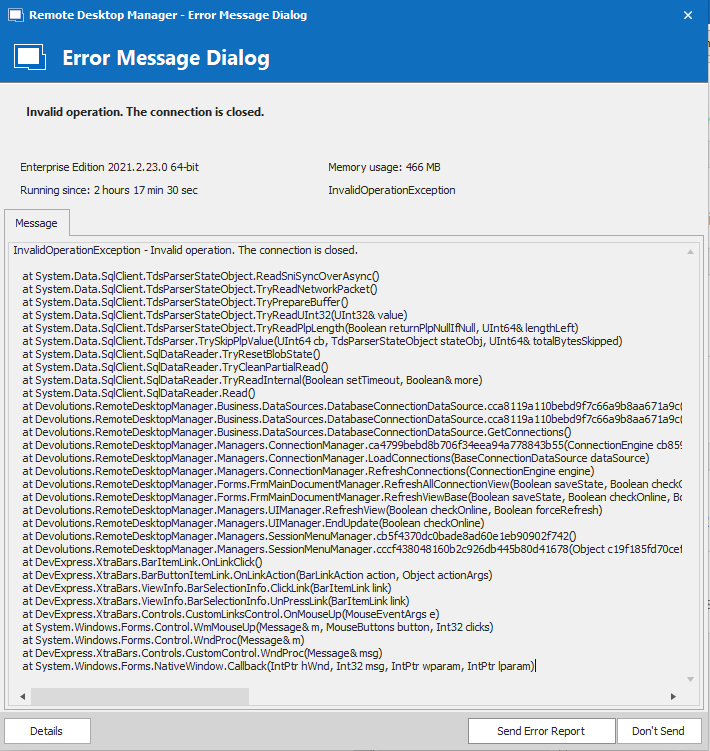
While in the office on the same machine I don't have any problems. If I modify/add/delete an entry, although it crashes, it still does the action I requested however I have to restart RDM to get connected again. Also, some times it does work just fine. I can add an item and it doesn't complain and then I can delete same said item literally seconds later and it crashes.
I'm running the current latest version (although I note there's a new one today), but I've had this problem since I setup RDM about 2 years ago and lived with it. I just had some spare time during the xmas lull so I thought I'd try resolve it :)
My thoughts were that if there are any other IP addresses I need to route through my VPN rather than go directly to the internet for RDM to work other than the Azure server hosting our SQL Database.
Capture.PNG
Hello,
Thank you for your swift reply!
I understand, in that case, I would recommend consulting this list of Endpoints that are used by RDM: https://kb.devolutions.net/rdm_internet_access.html
If routing these addresses does not help, I will need screenshots of the configuration of your data source. I will need to see every tab found under File -> Data Sources. Just make sure to blur any sensitive information that these fields contain.
Best regards,
James Lafleur
i'll give that a go.
thanks :)