Splashtop Integration Questions (Request)
0 vote

Hello,
so, since Wayk Bastion was cancelled, I have chosen Splashtop as an alternative, since RDM has an add-in for it.
Additionally to the previous request (which isn't possible), I have two other questions:
Why do I have to put in the MAC-Address? I have to log into each client, cmd, ipconfig /all, copy paste... ugh. WHY?
Also, would it be possible to implement some kind of login/password injection for us that are using windows credentials for remote login? (you know, the blue window that pops up, if there are no credentials saved in the Splashtop)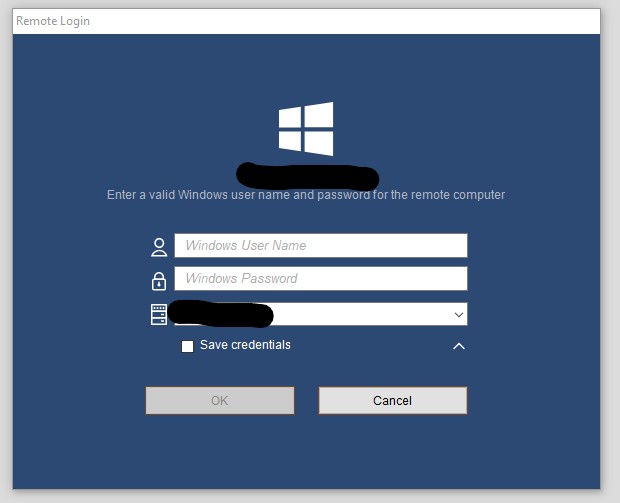
It would be very helpful if Splashtop add-in would use the credentials stored in the RDM, so that I don't have to save them on each machine I am using Splashtop on (80 clients x 4 management machines... ugh). Pretty please!
Also, additional features like session zoom (I prefer Original Size) in the entry properties?
Screenshot 2021-08-09 213903.jpg
All Comments (13)
Hello,
We generate a temp file with the extension .url to open Splashtop. I have sent a message to my contact at Splashtop and I will check with them what we can do to improve the integration.
Regards
David Hervieux
Awesome. I also wrote to Splashtop about some improvements they could implement in Splashtop itself and also told them that I'm using RDM to integrate and to look into improving the integration.
Looking forward to results.
Hello David
What's the current status of the Splashtop Integration?
We want to switch from Teamviewer to a new solution and are testing Splashtop and ISL Light at the moment.
Thanks and kind regards
Patrick
Hello,
We generate a temp file with the extension .url to open Splashtop. I have sent a message to my contact at Splashtop and I will check with them what we can do to improve the integration.
Regards
Hello,
We don't have a good way to do an integration. They don't offer an SDK. Do you know if we could call an url or invoke a command line?
Regards
David Hervieux
Hi
I dropped them an email, asking about any integration possibilities. Will let you know what they answer.
ISL Light seems to be integrated very well? Is there one in particular you would say is the most integrated remote support tool?
Regards
Patrick
Hello,
Good news. We are now in contact with the Splashtop team and we have now everything we need to improve our integration. We hope to have something at the beginning of 2024.
Regards
David Hervieux
Hi David
Great to hear that you are in contact with Mark. Sounds like a real great company.
While you are Integrating, here are some features we would of be to see, which we missed until now.
-Display the status of a remote machine in RDM (online or offline)
-Easy Import of new entries from Splashtop into RDM
-Session recording (so opening Splashtop in RDM and not just an external window)
-Option to choose if I want to access a machine with the saved password or ask for permission (if you know someone is sitting in front of it)
Looking forward to test it.
Cheers
Patrick
Hello Patrick,
Thanks for the ideas. We're thinking of creating a dashboard entry for Splashtop in RDM, where you could list your hosts from Splashtop, and open them from there. We will have to look at what the API offers for the details of the functionalities, but it will be inspired by the type of dashboard we have for something like CyberArk.
Regards,
Hubert Mireault
Hi Patrick,
Could you clarify what you mean when you say:
-Option to choose if I want to access a machine with the saved password or ask for permission (if you know someone is sitting in front of it
What is the behavior you want with that exactly.
If there's anything we need to activate in Splashtop could you provide screenshot.
Regards,
Hi Olivier
With Teamviewer you can double click an entry in the Host List and it will connect to it without asking the user in front of it to allow the session, if you saved the password in the entry. But if you right click the entry and say "ask for permission" it will ask the user if you want to allow the remote support.
Hope that clears it up!
Cheers
Patrick
Hi Patrick,
I found this https://support-splashtopbusiness.splashtop.com/hc/en-us/articles/115004192946-What-is-the-Request-Permission-option
I think by setting it to : Reject connection after request expires (At login screen, allow automatically)
- A popup shows on the remote computer to Accept or Decline, if nothing is clicked within a period of time (30 seconds), the connection will automatically decline. If the computer is not logged into a user, and is at the login screen, it will bypass the request permission option and connect automatically.
I did some test and I think with that you should have the behavior you're looking for. Let me know if you have anymore questions.
Regards,
Hi Olivier
Thanks that works for us!
How is your integration and fhe dashboard entry coming along? What is possible now?
Kind
Regards
Hi Patrick,
We just finished implementing the new Splashtop Dashboard entry, you'll be able to Connect to your computers, Import Splashtop entries from it and see if your computers are online or not. This feature will be available starting from the version 2024.2.0.0 of RDM.
Regards.