Username/Password for Website Login

Hello,
I have for SSH and RDP Session a Login/password on Tresor!
That one the login are done automaticly.
How can i using such with website?
The key symbol on Website is in my RDM grey out an i did't find any solution how can i login automaticly.
Many thank for helping.
All Comments (7)
Hello,
Could you instead of using the Website information entry try with the Web Browser session? In the Login section you will be able to set up the Login information.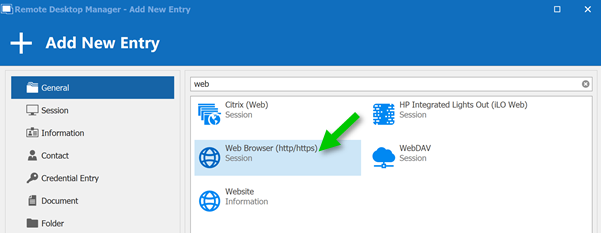
If the automatic discover fail, here is a topic about how to inspect the logon fields: https://kb.devolutions.net/rdm_web_browser_web_authentication.html
Best regard,
Christine Breault
WebBrowser.png
GM Christine,
many thank's for replay!
For HTML Site you soluton works, but what can i doing with JAVA Sites like Graylog?
Is there also a solution?
Many thanks!
R.
You are welcome @RH
Could you provide the URL of this site so we could have a look at it?
Best regards,
Christine Breault
GM Christine,
that's a problem because Graylog is a Syslogserver and that one is only available at our Intranet.
Myby that one helps you?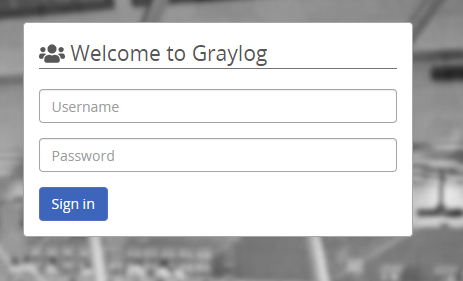
Quellcode:
<!DOCTYPE html>
<html>
  <head>
    <meta http-equiv="X-UA-Compatible" content="IE=edge">
    <meta name="robots" content="noindex, nofollow">
    <meta charset="UTF-8">
    <title>Graylog Web Interface</title>
    <link rel="shortcut icon" href="https://x.x.x.x:1515/assets/favicon.png">

  </head>
  <body>
    <script src="https://x.x.x.x:1515/config.js"></script>

    <script src="https://x.x.x.x:1515/assets/vendor.594b2a39cb22b445205e.js"></script>

    <script src="https://x.x.x.x:1515/assets/polyfill.a41ce78e1beaf9cde903.js"></script>

    <script src="https://x.x.x.x:1515/assets/builtins.a41ce78e1beaf9cde903.js"></script>

    <script src="https://x.x.x.x:1515/assets/plugin/org.graylog.plugins.threatintel.ThreatIntelPlugin/plugin.org.graylog.plugins.threatintel.ThreatIntelPlugin.3ffe487c5932d920ffec.js"></script>

    <script src="https://x.x.x.x:1515/assets/plugin/org.graylog.plugins.collector.CollectorPlugin/plugin.org.graylog.plugins.collector.CollectorPlugin.4d259ce7c45134eff0fb.js"></script>

    <script src="https://x.x.x.x:1515/assets/plugin/org.graylog.aws.AWSPlugin/plugin.org.graylog.aws.AWSPlugin.a03644a3671e94e1f717.js"></script>

    <script src="https://x.x.x.x:1515/assets/app.a41ce78e1beaf9cde903.js"></script>

  </body>
</html>
Is that one helpfully?
Many thank's and best regards
RH
Gray_login.PNG
Hello,
I would simply like to confirm that I've understood correctly.
On this new website have you already tried the first method proposed in the article provided by my colleague Christine?
https://kb.devolutions.net/rdm_web_browser_web_authentication.html
If so, am I correct in assuming both methods were unsuccessful?
Let me know,
Best regards,
Samuel Dery
Hello Samuel,
sorry for my late replay!
I have checked the configuration again and found the Problem:
On HTML Control element the discover puts on "Domain-ID" the "password".
I have to delete that an now it's working!
I don't now why I have not seen this before!
So sorry about my fault and many thank's for your helping!
wrbrgds
RH
Hello,
I'm glad to hear that this is now working for you!
Best regards,
Samuel Dery