Web form login with multiple buttons
0 vote

Is there a way to handle multiple buttons on login to a website?
Connecting to Office 365 asks for Username, press button, Password, press button, OTP, press button.
At the moment RDM handles the username, button and password, but it would be nice to handle the entire process. More and more sites seem to be using this type of authentication separating the different fields to different forms.
Cheers,
Ray
All Comments (8)
Hello,
This thread contain a working office 365 session. Could you give it a try?
https://forum.devolutions.net/topics/35176/azureoffice365-portal--autologin-with-user-specific-credentials
Best regards,
Jeff Dagenais
Hi Jeff,
I've been using that for a little bit and it does some of what's needed, but there are 3 pages for O365 login.
Username - Submit
Password - Submit
OTP - Submit
I would like to pass each of these into the login all from a Keeper Vault credential.
The linked thread only does
Username - Submit
Password
At this point you have to Submit the Password by clicking which isn't a big deal, but then having to find the OTP and enter that in is a little more frustrating.
Ideally there would be an option to have multiple button presses and a control ID for OTP field
I hope that makes sense.
Cheers,
Ray
Hello Ray,
Thank you for your feedback.
I just opened a ticket with our Engineering Department to see what can be done on that matter.
We will be in touch as soon as we will have an udpate.
Best regards,
James Lafleur
Hello Ray,
After having a discussion with our Engineering Department on that matter, they explained that this cannot be done directly in RDM using the embedded browser.
The only way to work around this would be to create a Custom Script, which is only available when using Chrome as your web browser, to fill in your OTP and submit the information. To achieve this, you could use the variables $USERNAME$, $PASSWORD$ and $ONE_TIME_PASSWORD$: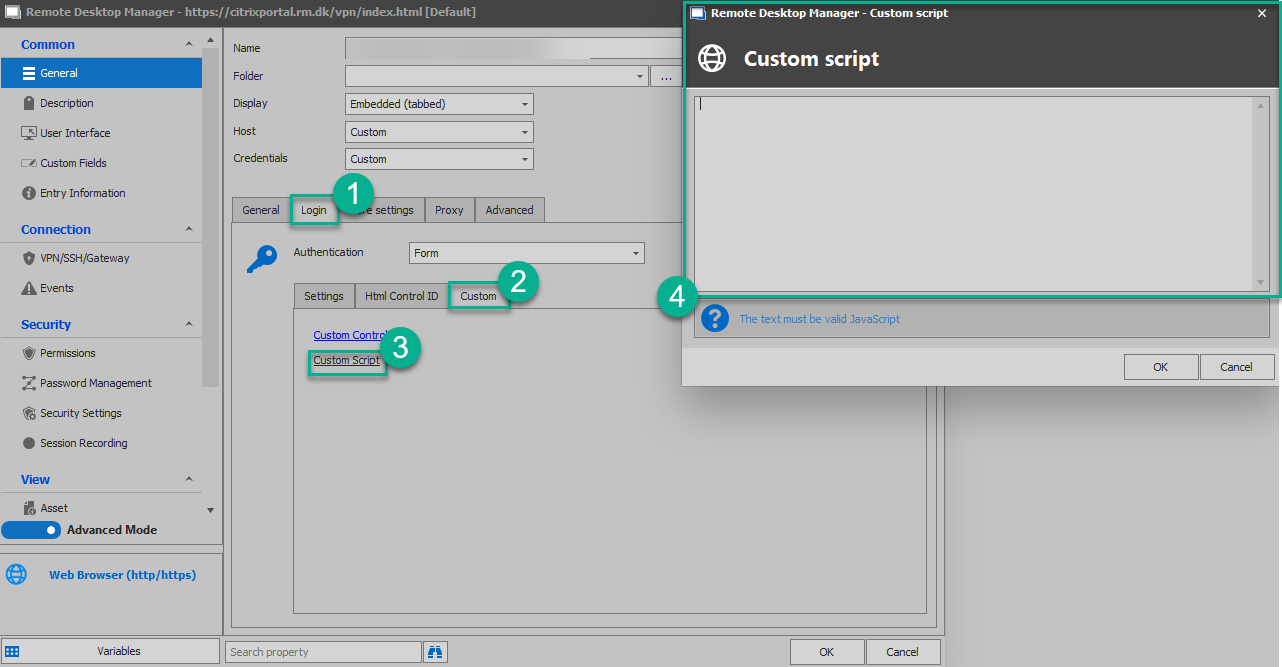
Let me know if that helps!
Best regards,
James Lafleur
CustomScript.png
I gave it a shot but was unable to figure out how to get the custom script to run.
I tried something along the lines of:
document.getElementById('i0116').value="$USERNAME$"
but nothing seems to be running, is there some examples on how to setup Custom Scripts. I think i've got the javascript working (when using Chromes dev tools)
Cheers,
Ray
Hello Ray,
Thank you for your reply!
I will see with our Engineering Department if we have an example that I can provide you to do this.
I will be in touch once I have an update on that matter.
Best regards,
James Lafleur
Hey Folks,
Has there been an update regarding this? I'm facing the same issue.
An example would be perfect.
Cheers,
Max
Hello Max,
Unfortunately, we do not have any new development on that matter.
As for an example, I am not familiar enough with this to be able to provide one.
Sorry for the inconvenience.
Best regards,
James Lafleur