RDM Themes - Please, add "neutral gray" theme
0 vote

Hello,
RDM seems to be very a promising to me, but there is one annoying feature - lack of neutral "all gray" theme.
I don't like Dark theme, I can use only Light theme. But I don't like the main blue color - in form headers, top panel, status bar, etc. Simply it is too conspicuous.
Blue is a decent color in general, but in such management tool for advanced users, I need concentration on remote desktop content itself, and for this I really loved mRemote/Terminals neutral gray colors everywhere in the app.
Please, will it be possible to add such neutral "all gray" theme? Or even better, will it possible to edit theme colors itself?
I suppose neutral theme (or user-defined one) will be very useful for all other users.
Thank you for your effort!
Peter.
All Comments (15)
Hello,
We use to have a Gray theme but with the latest update, we decided to focus only on Light and Dark theme, There is a lot of minor adjustment/bugs to fix each time we support a color scheme and I prefer to focus on the remote desktop features.
Sorry about that.
David Hervieux
I agree with Peter, it's a pity that the themes have gone. Since we have an intricate environment with sometimes multiple hop/jump servers where we need to jump from one to another, and even further (sometimes 3 or 4 deep) we'd like to keep the theme for the outer session black, the second session gray, the third level default blue. it would give some indication where you are, on screen, and on which menu item to click.
Especially since the themes were there in the previous version, it is really sad it is removed.....
Regards,
Ben van Zanten
Hello,
The gray theme is still available but not listed in Options. This mean that if you already have it configured, it will be used. You can edit the remotedesktopmanager.cfg file and set the Theme to Office2016Dark.
I can't guarantee for how long we will maintain the theme in the futur and this is why it's no longer listed. @Ben I will create a ticket for you requirement. I think we could find another way to change the menu color and not impact the whole application.
Regards
David Hervieux
Hello David.
Being developer itself, I understand some difficulties in the development process, but user/application ergonomics is the main part of usefulness of every product.
I can live with the light theme, but I need to have just one option - show default gray color instead of conspicuous blue one.
I really believe that this one change will be feasible.
Thank you in advance!
Peter.
RDM_Background.png
Hello,
Could you use an arrow to show me exactly which gray you have in mind? I will check what we do but we use the DevExpress theme and sometime (I know it might sound weird) we are unable to customize the colors.
Regards
David Hervieux
Hello David,
I hope this picture will help you better. I suppose this is a default windows "panel/button" gray color - probably default color without themes applied.
Thank you,
Peter.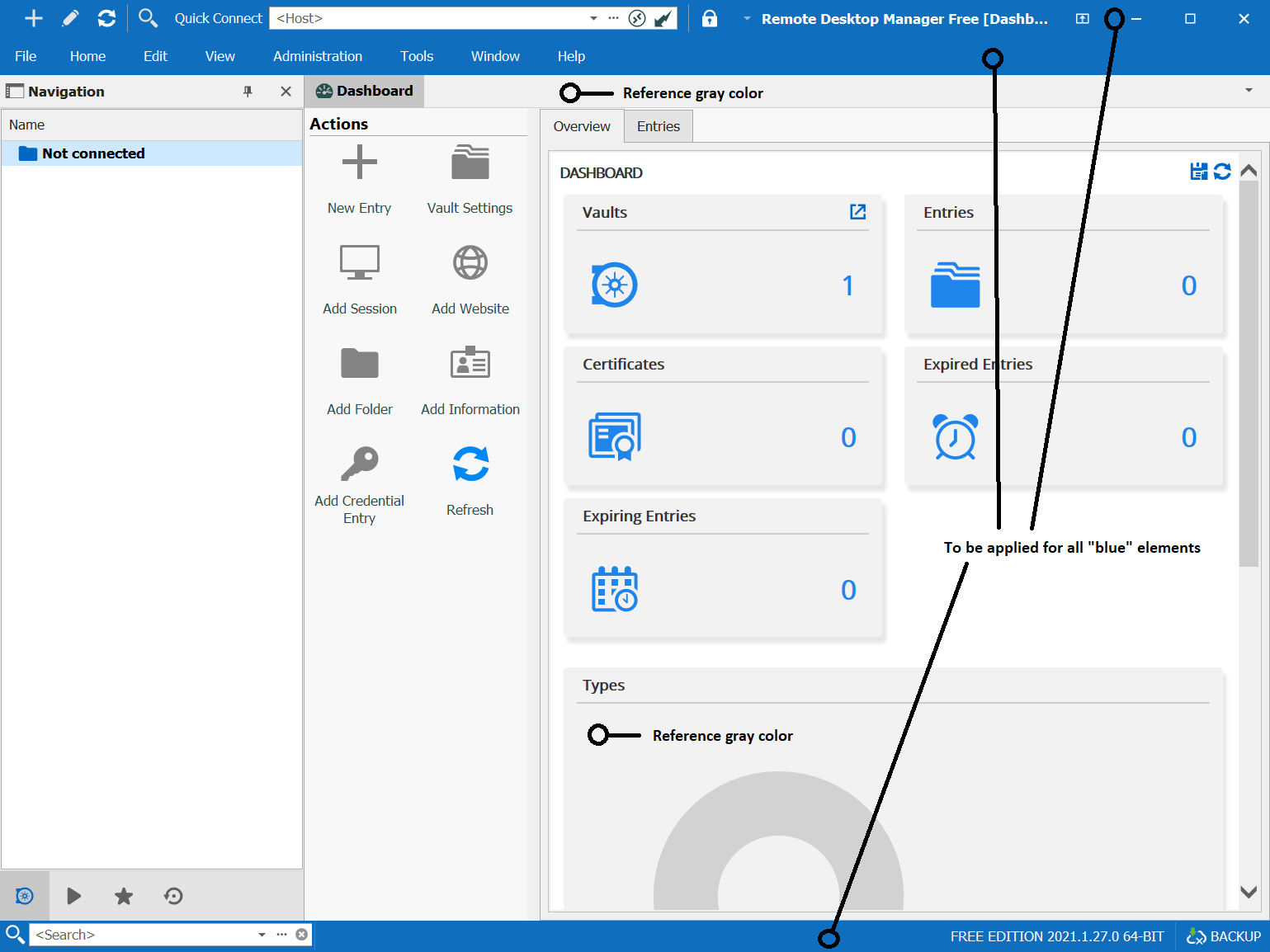
RDM_Background_1.png
Hello,
Thank you. I will check what I can do but just to let you why it's not simple: look at the icon color; it's white. This means that it has to be another color if I change the background for gray. This is the kind of minor issue we get everywhere when we don't control the color.
Regards
David Hervieux
Hello,
I did some test with the third party we use and I'm able to customize the title bar/status bar color. I will create a feature request to add an option for a custom colors. This should work well if you use a dark color (I don't want to change the icon colors to keep it simple). The good thing about this is that you will be able to set a color for each level of nesting. For example:
Blue -> Gray -> Dark Red
Dark red could be the production server after few jump. What do you think?
Regards
David Hervieux
Hi David. I think this would be a great idea. It allows us to have some visibility of the jump depth, without introducing other coloring problems on your side.
Regards, Ben van Zanten
Hello David,
perfect, it sounds promising. Will be the menu bar color also customizable?
If bi-color icons are hard to maintain (white/black), it seems to be acceptable use only white version.
Thank you!
Peter.
Indeed,
The menu bar color will be customizable.
Thank you for your help guys, it's was really helpful and together we have been able to find a solution which I think will even be better.
Regards
David Hervieux
Hello,
I have squeezed this feature in the latest minor update 2021.1.31.0
https://remotedesktopmanager.com/home/downloadenterprise
Regards
David Hervieux
Hello David, excellent!
And the color pickers are great too. I use System/Scrollbar color with ease!
If there will be some possibility in the future to add "contrast icons/text" option to show text and icons in the black, it would be even better.
But for now, RDM is much user friendly and pleasant to use for whole-day work.
Thank you for this update!
Regards, Peter.
Is this the place to vote for the grey theme? We switched to 2021.2 two weeks ago, and miss it. Any way to get something back, that lies in between light and dark?
--
Citrix Technology Advocate (CTA) at https://www.meinekleinefarm.net
Hello,
Our next theme update task will be related to Windows 11. I will check can be done.
Regards
David Hervieux