Quick Connect missing after upgrade to 2021.1.20.0

The Quick Connect box disappeared after the upgrade, it didn't reappear after performing a "Reset Layout"
All Comments (11)
Hello,
Could you send a Screenshot of how your Top Pane looks like?
Best Regards,
Etienne Lord
Sure thing.
Here's the current top panel, after a "Reset Layout" and unpinning Navigation: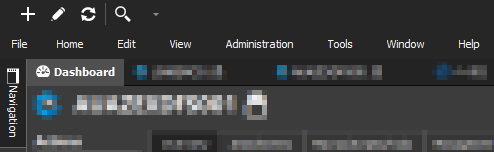
20210406_Remote Desktop Manager.png
Hello,
As per our KB at https://kb.devolutions.net/rdm_user_interface_error.html?q=reset+layout
The reset layout might not resolve all the issues. Close the application and delete the layout files (*.lyt) in %LocalAppData%\Devolutions\RemoteDesktopManager to completely restore the layout.
Please let us know if that solves the issue
Maurice
Hi Maurice,
Thanks for the suggestion, removing those files reset the layout, but Quick Connect is still missing.
Hello,
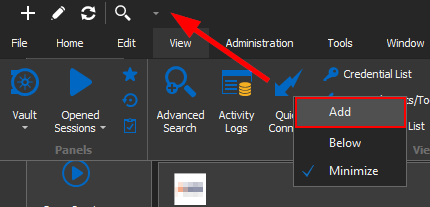
If you click on that small arrow, do you have the Quick Connect option checked? If it is, could you uncheck then check it back? 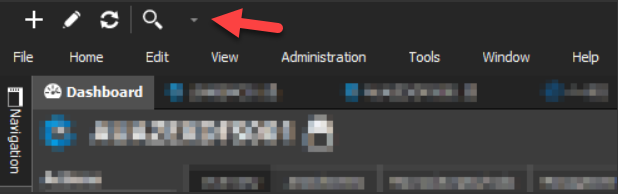
Best Regards,
Etienne Lord
quick.png
Hi Etienne,
Yes, the "Quick Connect" icon appears in the toolbar, and the icon can be toggled using the drop down menu, but it isn't showing the text field.
This is the icon that checkmark toggles:
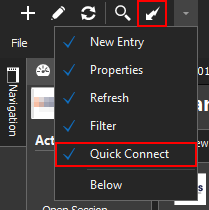
But this is how it appeared before the upgrade (this is from a screenshot on the Devolutions site):
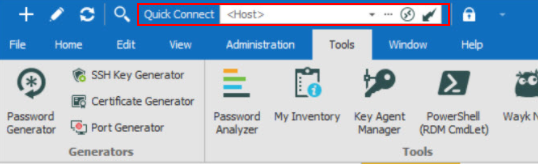
Not sure if there's a different way to add the full version, the icon wasn't appearing by default, only after adding it from the ribbon:
20210407_Remote Desktop Manager_QuickConnectToolBar_Example.png
20210407_Remote Desktop Manager_QuickConnectIcon.png
20210407_Remote Desktop Manager_QuickConnectToolBar.png
Hello,
If you head over to File - Options - User Interface, do you have the "Hide quick connect label" option checked?
Best Regards,
Etienne Lord
Hi Etienne,
Yes, I had that option enabled. It looks like that's now toggling the entire quick connect box, rather than just the label? A bug?
Hello,
Just to confirm, unchecking the option brought back the Quick Connect option (as a whole)?
Best Regards,
Etienne Lord
Hi Etienne,
That's correct, unchecking the option "Hide quick connect label" shows the entire Quick Connect box:

It takes effect immediately, even though there's a pop-up indicating that changes won't take effect until the application is restarted.
20210408-Remote Desktop Manager.png
Hello,
That's good to know, not quite sure why the issue happened but we will keep an eye open for any other similar reports.
Best Regards,
Etienne Lord