Problems using 2 of 3 displays

Hi
I would like to use only 2 of my 3 screens (Same resolution) for 1 RDP connection.
But I can't seam to get it to work.
The connection is imported from a RDP, not sure if this can "corrupt" things, but I need NLA disabled, and I couldn't find a way to do it in the settings.
But I have set the following to both 1 3 (Windows Setting ID number) and 2 3 (Devolutions Window ID) but when ever I have 2 number it still only connects on 1.
If I select All in the dropdown, then it uses all 3 without problem.
Regards Lars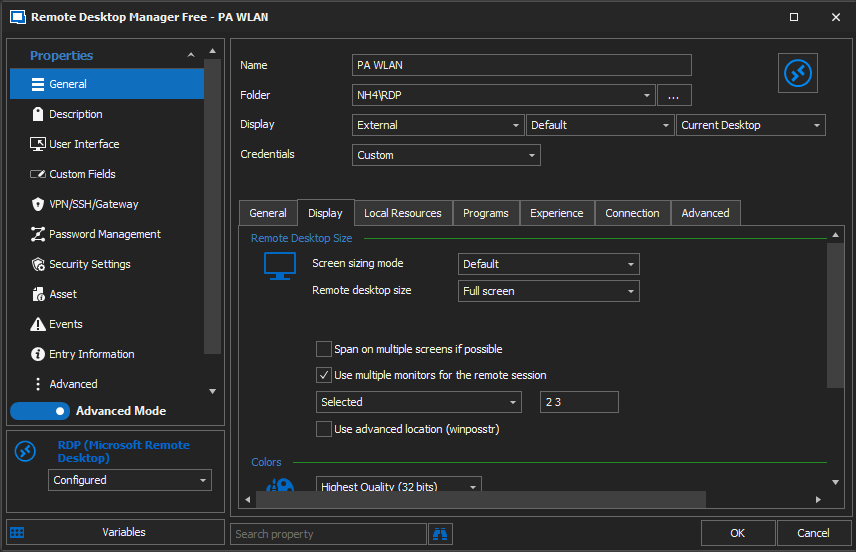
Remote Desktop Manager connected with Devolutions Server running newest versions.
------------------------Signature------------------------
Sorry if any of above sounds harsh or provoking, it is NOT meant as such, but I have Asperger's and don't always know.
My intentions is always to be friendly.
-------------------------------------------------------------
Screenshot 2021-02-25 132038.png
All Comments (13)
Hello,
Could you try entering it using the following format: 2,3 (a comma between the monitor numbers)
Regards,
Hubert Mireault
Actually, could you make sure to check "span on multiple screens if possible"? I might be wrong on needing a comma, I think spaces are supported. We have a knowledgebase article that mentions this scenario: https://kb.devolutions.net/rdm_microsoft_rdp_display_issues.html
Regards,
Hubert Mireault
Hi
Thank you for you answer, but I have tried both , . ; and space.
I have tried SPAN - But it overrules and spans the screen to all 3 screens.
I have now tried to make a copy of my RDP file, remove all lines except for the hostname, the two needed for connection and the redirection of drives. But it gives the same, so I do not believe that this is due to the RDP file being imported.
I'm wondering if it could be something with the 3 line in the screenshot I posted "Display".
Is External, Default, Current Desktop the correct setting?
Regards Lars
Remote Desktop Manager connected with Devolutions Server running newest versions.
------------------------Signature------------------------
Sorry if any of above sounds harsh or provoking, it is NOT meant as such, but I have Asperger's and don't always know.
My intentions is always to be friendly.
-------------------------------------------------------------
Hi Lars,
Would you be willing in testing this setup and see if it resolves your issue. Since you wish to display from screen 2, change the display setting of your entry from Current desktop to Desktop #2.
Let us know if this works for you.
Best regards,
Christine Breault
Hi
I'm willing to test everything, also more technical if need be, I'm an IT technician, so if any regedit or the likes is necessary I can do this too.
But this doesn't seam to change anything either.
My Windows setup is like this: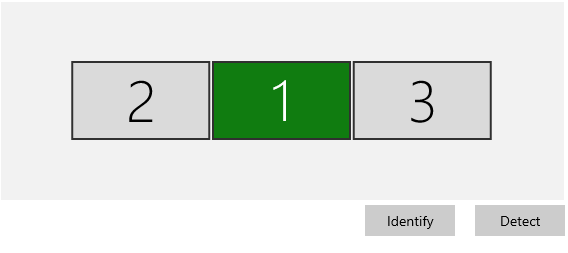
But when changing "selected" to only 3 as example.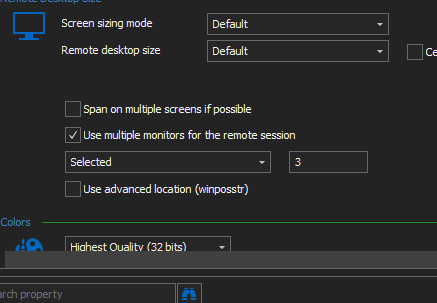
It opens on the center monitor which Windows identify as 1.
If I set it to 2 it opens on the right monitor Windows identify as 3 which is the two monitors I would like to use.
So I though then it probably should be "3 2" (also tried 3,2) but it only opens on the right monitor.
So my deduction is either I have some setting the prevents "not all" screens to be used(aka only 1 or all), or there is a bug with the text field.
Regards Lars
Remote Desktop Manager connected with Devolutions Server running newest versions.
------------------------Signature------------------------
Sorry if any of above sounds harsh or provoking, it is NOT meant as such, but I have Asperger's and don't always know.
My intentions is always to be friendly.
-------------------------------------------------------------
Screenshot 2021-02-25 193035.png
Screenshot 2021-02-25 192810.png
Hello Lars,
Thank you for your quick reply!
I just wanted to inform you that a ticket has been opened with our QA department in order to see if they are able to reproduce this issue on our end.
We will provide you an update on this thread when progress will be made on this case.
For further reference, the ticket number is QA-1786.
Best regards,
James Lafleur
Thanks.
For reference this is my Windows specs:
Remote Desktop Manager connected with Devolutions Server running newest versions.
------------------------Signature------------------------
Sorry if any of above sounds harsh or provoking, it is NOT meant as such, but I have Asperger's and don't always know.
My intentions is always to be friendly.
-------------------------------------------------------------
Hi
Any news on this?
Regards Lars
Remote Desktop Manager connected with Devolutions Server running newest versions.
------------------------Signature------------------------
Sorry if any of above sounds harsh or provoking, it is NOT meant as such, but I have Asperger's and don't always know.
My intentions is always to be friendly.
-------------------------------------------------------------
Hello,
Not at this time. We will contact you as soon as we will have an update on that matter.
Best regards,
James Lafleur
Hello @norphf,
Our QA team as been able to reproduce the issue and the ticket RDMW-8126 was open at engineering.
We will update this link when the bug fix will be released.
Best regards,
Christine Breault
Hi @norphf,
if I'm not mistaken your monitors should actually be from 0 to 2. Could you try using 0, 1 or 0, 2. You can interchange the numbers as needed as long as both monitor are next to each
other this should work. We also have added a new button to help users choose their monitors in version 2021.2.8.0
Hopefully this work for you.
Regards,
Jean-Francois Duchesne
Hi
I have updated to the newest beta, but could only get 2021.2.7.0 so I haven't seen the button, but I can confirm that 0,1 and 0,2 is working for me.
0,1 Gives me left and middle screen
0,2 Gives me middle and right screen
1,2 gives me only middle screen
Not sure if that is intended, but is works.
Regards Lars
Remote Desktop Manager connected with Devolutions Server running newest versions.
------------------------Signature------------------------
Sorry if any of above sounds harsh or provoking, it is NOT meant as such, but I have Asperger's and don't always know.
My intentions is always to be friendly.
-------------------------------------------------------------
Hi,
Happy to hear that solution worked.
As for the [1, 2] giving only the middle screen, RDP does not support having a gap between the selected displays and since your current setup is [1,0,2] RDP default to your main
display. For the button not showing up, the feature was added in 2021.2.8 which should be available in the near future.
Regards,
Jean-Francois Duchesne