Import mRemoteNG with PuTTY session attribute

Greetings all,
First off, thanks for the forum capability and support online, this is really a great feature, kudos for that from a new user.
Now, to my "problem" and request for assistance:
I have several mRemote connections created that I'd like to import to RDM with the minimum trouble possible.
Let me try to explain my particular use case of mRemoteNG so that you can better understand it and offer the best path for import:
Each mRemoteNG session uses one PuTTY session, as shown in the picture below: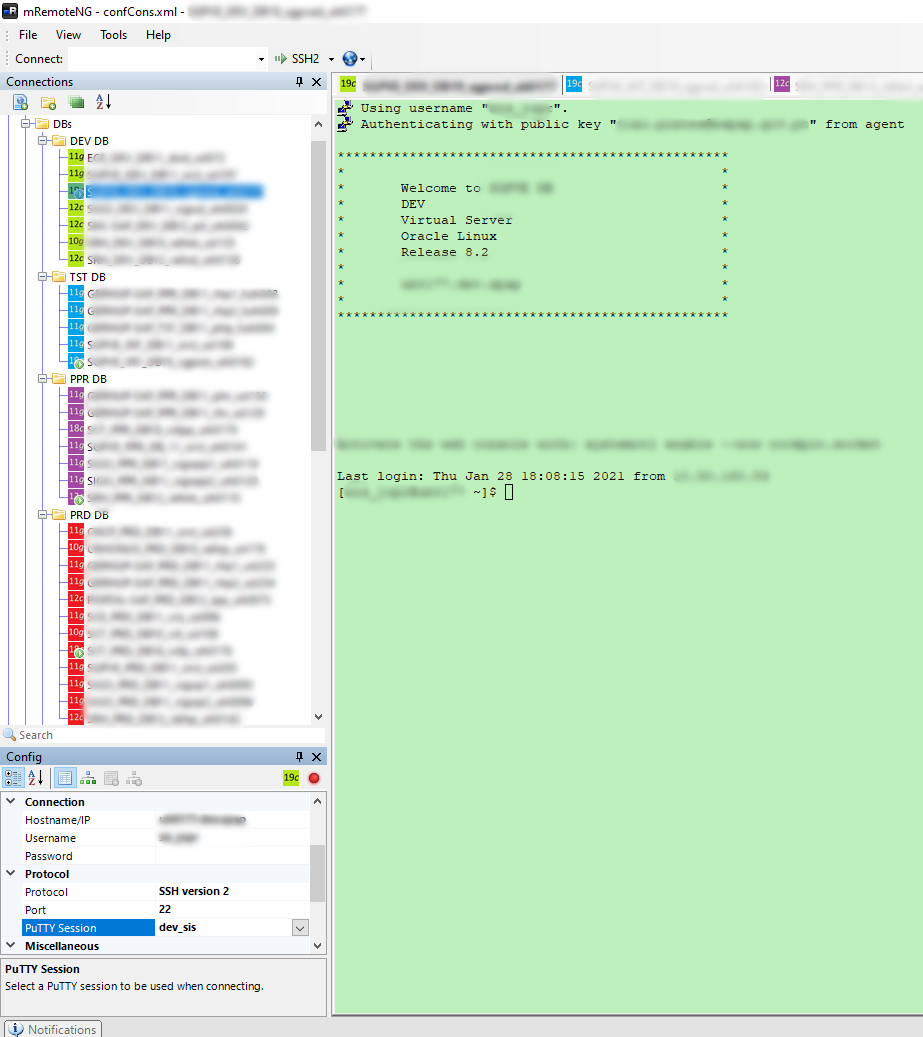
The PuTTY Session has several attributes not set on mRemoteNG that make my life easier, namely:
- Separate color scheme for visual cues on what type of env I'm connected to, i.e. DEV, PRD, etc.;
- Choice of private key appropriate for that particular session, along with SSH authentication options such as agent forwarding;
With this setup on mRemoteNG I don't need anything to log into my servers but for a double click on the server node.
Now I've tried to import the mRemoteNG xml file and it worked, kind of, but far from ideal:
- Connections were all imported as PuTTY type sessions, and upon clicking them it was the external PuTTY that was called;
- I experimented deleting one of the PUTTY sessions, and sure the color background got black, proving the RMD session was not self contained;
I also tried to "special edit" the imported PuTTY session, converting it to SSH, but then all color and authentication metadata was lost in the process.
So, what is the correct import path you recommend me following, in order to really full import the sessions without relying on external PuTTY, while keeping all needed session attributes?
Cheers,
-jprates
mR.png
All Comments (9)
Hello,
You could try the following: once you have imported from mRemoteNG, select your PuTTY sessions and do right click > edit > edit (special actions) > convert PuTTY session to embedded PuTTY session. By doing this, RDM fetches the information within the PuTTY session and saves it to RDM directly.
Let me know if this works for you.
Regards,
Hubert Mireault
Thanks for your answer.
Unfortunately I could see no effect whatsoever after applying the "edit - special action" convert to embedded PuTTY:
apparently nothing changed:
It's still using a PuTTY defined registry session just as in the original pre-edit session.
I wonder what, if anything, did change in the process of conversion to embedded PuTTY.
Ideally the mRemoteNG sessions would have been imported/converted to SSH sessions in the first place.
I even found this 2 year's old thread where you mentioned next versions would do that, but it seems 2 years later RDM is still importing to PuTTY.
Did I import it wrongly?
Is there a special option to import from mRemoteNG to SSH directly without going through PuTTY?
I'm on this version by the way:
Hello,
On the other thread, what we fixed was the password not importing correctly. I think for the user, they weren't using putty sessions or complex settings, and the convert worked fine for them.
At the moment, there is no way to directly import from mRemoteNG to our SSH Shell type, and I have a feeling the convert to embedded PuTTY might have a bug (or I misunderstood how it worked). I've opened two tickets, one to improve the mRemoteNG import, and one to verify the convert to embedded PuTTY. We'll update this thread once we have an update on either of these tickets.
Regards,
Hubert Mireault
Hi,
On the other thread, what we fixed was the password not importing correctly.
Yes, that was the first of two issues the OP had, but you never answered the second issue, i.e. import mRemoteNG to SSH directly:
Also, once imported (many of them are SSH connections) i see they are configured as putty.
Is there any way we can change the configuration to use the internal ssh shell instead of putty for all ?
James also stated on this exact post that, and I quote:
I forgot to mention that our engineering department will change how entries from mRemoteNG are imported in RDM. After this change, the entries will be imported as SSH Shell entries by default.
While your're in the "open ticket mode", do open another ticket for the current import from mRemoteNG which not only imports the sessions as PuTTY but also keeps references to PuTTY sessions on windows registry, instead of creating self contained sessions.
When we import something, we don't want RDM to keep references to the external environment, and certainly not to windows registry.
Luckily for me I did a backup of PuTTY sessions from registry before deleting all PuTTY sessions, and could restore them back.
Had i trusted the import done with RDM was well done and self-contained, and I would have lost my settings.
I had already put forward this bug in my original post:
Connections were all imported as PuTTY type sessions, and upon clicking them it was the external PuTTY that was called;
I experimented deleting one of the PUTTY sessions, and sure the color background got black, proving the RMD session was not self contained;
Hello,
I went to look in the code to verify, we only import directly to SSH Shell entries if the entry in mRemoteNG did not refer to a PuTTY session, otherwise it will import it as PuTTY. This is currently intended, as the import doesn't extract the information from the PuTTY sessions, it simply refers to it (as you mentioned). The first ticket I've opened is to improve this, since it would indeed be better for our users to import as our own SSH Shell type under all circumstances.
Regards,
Hubert Mireault
Hello,
Just to let you know, we've made the changes to fix and improve the Convert PuTTY to Embedded PuTTY special action. This will be available in RDM 2021.1.
With these changes, it should at least let you import from mRemoteNG, and after the convert, the information from the putty session will be embedded within RDM (so other users on the same datasource will benefit from the same configurations).
Our ticket to directly import from mRemoteNG to our SSH Shell entry is still open. We will update this thread again once we have news on that.
Regards,
Hubert Mireault
Appreciated.
Hi,
We have added support for mRemoteNG import as SSH Shell. With this feature if the computer recognize the putty session from it's registry, it should convert the settings to match with SSH Shell. This should be available starting with version 2021.1.26
Best regards,
Jean-Francois Duchesne
Cool, thanks.