Quick Connect : Config : Credential

Hi .. Is there a way to configure the 'Quick Connect' bar to use a credential entry for the different connection types ?
For the servers I connect to on a day-to-day, I have Sessions created in my Navigation pane.
But as part of the job, I have to connect to random servers to fix things ; and I don't want to create a Session each time for those.
I'd rather tell the Quick Connect .. for RDP .. this is my default credential .. so when I ask you to connect you use it first.
Possible ?
All Comments (2)
Hello,
I believe using a "template" would help you achieve this. Templates can be created by going in File -> Templates -> Templates.
From there you can create an RDP template and link your desired credential. Once this is done, your template can be selected as the default way to open your session in the quick connect bar.
Please take note that there are "Database" and "Local" templates. If you do not wish to cloud other users with your templates I would recommend using a "Local" template. If the local template option doesn't appear this would mean it hasn't been activated in Administration -> System Settings -> Applications -> Allow templates (local)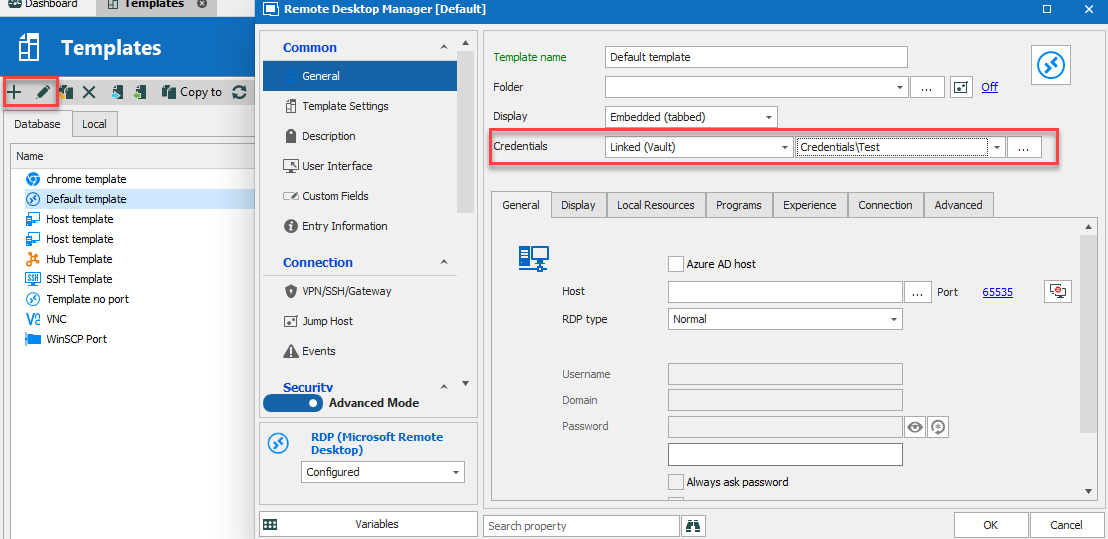
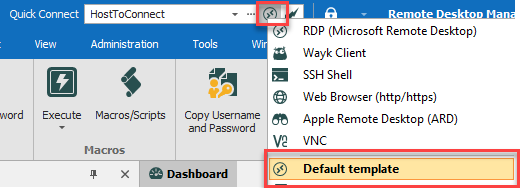
Regards,
Michaël Beaudin
TemplateEdit.png
QuickConnectTemplate.png
Works like a champ.
Thanks for that.