SSH Entry Error

SSH Shell Session. Works fine in Putty. RDM 2020.3.24.0. Thoughts?
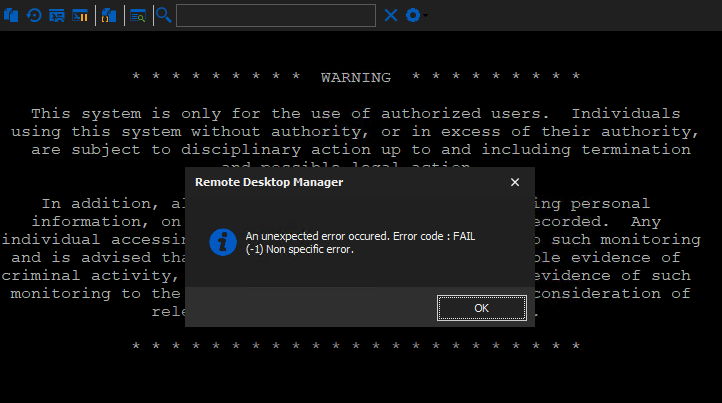
Screen Shot 2021-01-15 at 1.47.34 PM.png
Screen Shot 2021-01-15 at 1.43.59 PM.png
All Comments (18)
Hello,
Thank you for contacting us on that matter. Remote Desktop Manager has now a selection of algorithms for the SSH session type. Please note that the unsecured ones are not enabled by default. We therefore recommend that you check the algorithms directly on your server for security purpose.
Here is a topic with more information: https://kb.devolutions.net/rdm_ssh_algorithm_support.html
Best regards,
Christine Breault
Hi Christine - Yes, I have already enabled all algorithms by default under options in RDM. Prior, I was receiving an algorithm error until I turned them all on. Now I receive the error above.
Hi, yes my bad I meant to send this topic related with your error: https://kb.devolutions.net/rdm_error_code_fail_1_non_speciffic_error.html
But it is also link to the algorithm. Have you restarted RDM for it to take effect?
Best regards,
Christine Breault
:) No worries, your team has the best response time and forum community out of any vendors I work with.
Unfortunately even after a restart (and then confirming all were checked in options again) I still receive that same error. The device is a Cisco router, slightly older, and I'm not sure what it supports. The entry is also set to "default" and isn't set to custom, so no override.
Thank you for your comment, greatly appreciated 😊
I have been poking around with a colleague and the only thing we could think of, is that maybe some in the list where not activated?
You have check the four tabs available?
Best regards,
Christine Breault
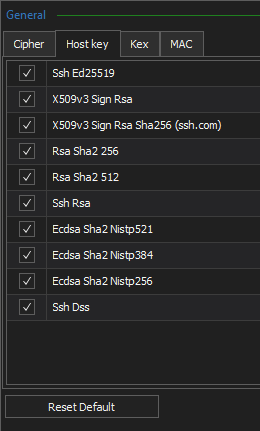
Yea, all were checked: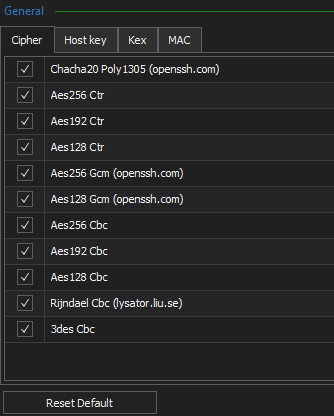
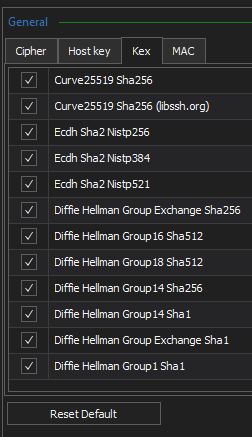
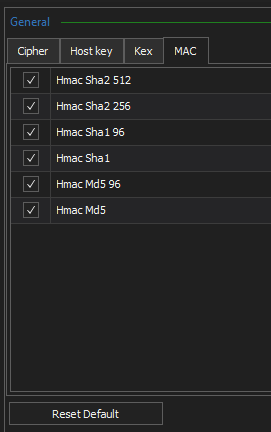
Screen Shot 2021-01-15 at 3.22.02 PM.png
Screen Shot 2021-01-15 at 3.22.14 PM.png
Screen Shot 2021-01-15 at 3.22.22 PM.png
Screen Shot 2021-01-15 at 3.22.34 PM.png
Hello,
could you give the Use Legacy terminal option a try?
Located at File => Options => Types => Terminal
Regards,
Min
That did the trick. Now for the follow-up :) :
Is it possible to enable that function on a entry by entry basis?
What am I missing out on by using this?
From my device:
Screen Shot 2021-01-15 at 4.01.26 PM.png
Hello,
perfect thanks for your feedback! 😀
For the follow-up - it's a global option and can't be enabled session based.
This option just enable (even) older algorithms / ciphers based on putty. So you'll not miss any of the existing SSH terminal functions 😉
Regards,
Min
Awesome, thanks so much for the quick assist, have a great weekend.
Hello,
Enabling the Use Legacy Terminal option will bring back our old code based on Putty. It's not impossible that this option will be removed some day.
That being said, I had a chat with our engineering department regarding your threat and we would like you to test an option for us if possible.
- Disable the Use Legacy Terminal option
- Edit your SSH Entry, go in Advanced tab and check the Skip environment variable setup option

Let us know if that work or not please.
Best regards,
Jeff Dagenais
Hi @Jeff. Thanks so much for the follow-up. I wasn't thrilled about needing to enable the legacy option and while I recognize the problem is really the device I'm connecting to, unfortunately it's the wonderful world of IT and it won't be replaced solely because of the SSH connection error.
Fortunately, what you suggested did indeed work. I disabled the legacy terminal and tested that the connection failed again. I then enabled the "skip environment variable setup" and I am now able to connect. I'm so happy you reached out, because having to reach out to individual users to configure the legacy terminal option wasn't going to be easy and I was hoping I could fix this by modifying the datastore entry. This works great, thanks!
Hello,
Thank you for your feedback. Glad that is now working with this option on.
We have updated our documentation as well https://kb.devolutions.net/rdm_ssh_algorithm_support.html
Best regards,
Jeff Dagenais
I was trying to batch edit a bunch of entries in a directory to check the "Skip environment variable setup" box, but see that it is not supported for the "SSH Shell" type. Is this going to be added in the future? 2020.3.27.0
Can this be done with the powershell?
Hello,
regarding the Custom PowerShell command, you can use this:
$Connection.Terminal.SkipEnvironmentVariableSetup = "true";
$RDM.Save();
Regards,
Min
Thanks Min! As Min said, this is how you could accomplish it with the custom powershell action (edit > edit (special actions) > custom powershell command).
I've also opened a ticket to support the "session specific" batch edit for SSH Shell, since it's more intuitive to use.
Regards,
Hubert Mireault
Ah ok, I was starting to code it in powershell with the RDM cmdlet, this is awesome and I didn't know this existed, thanks Min and Hubert.