Fullscreen/Maximize View of ARD client

New to the app so maybe I'm missing something...
I'm running the app on windows, connecting to a MacBook using ARD. The connection works fine (way smoother than any other apps I've found!) but the view is pretty small, with big black borders around it on every side, and then on top of that there's like five rows of UI from the Remote Desktop Manager taking up screen space too. I'd like to just have the title bar, and then the rest of the window is taken up by the view of my Mac, or a way to just fullscreen the view. Having black bars on two sides may be unavoidable due to aspect ratios, but having them on four sides makes no sense, it should be able to just scale the view bigger. If I make the window even smaller, the view will scale down fine, but it just stops at a certain point instead of scaling up. If I connect to the Mac via a VNC client instead, this works fine and I get an almost full screen view like I want. I did some playing around and found that by changing the 'scaling' of the display on the mac, I could make the view in RDM bigger or smaller, but even with the smallest text size there's still black borders on all four sides.
All Comments (1)
Hello,
Thank you for reaching out to us and taking the time for telling us how much you appreciate our product. I did search for options and did find this one in the properties on the ARD entry Settings - Scaled. Could you enable it and try launching your sessions and see if it is better?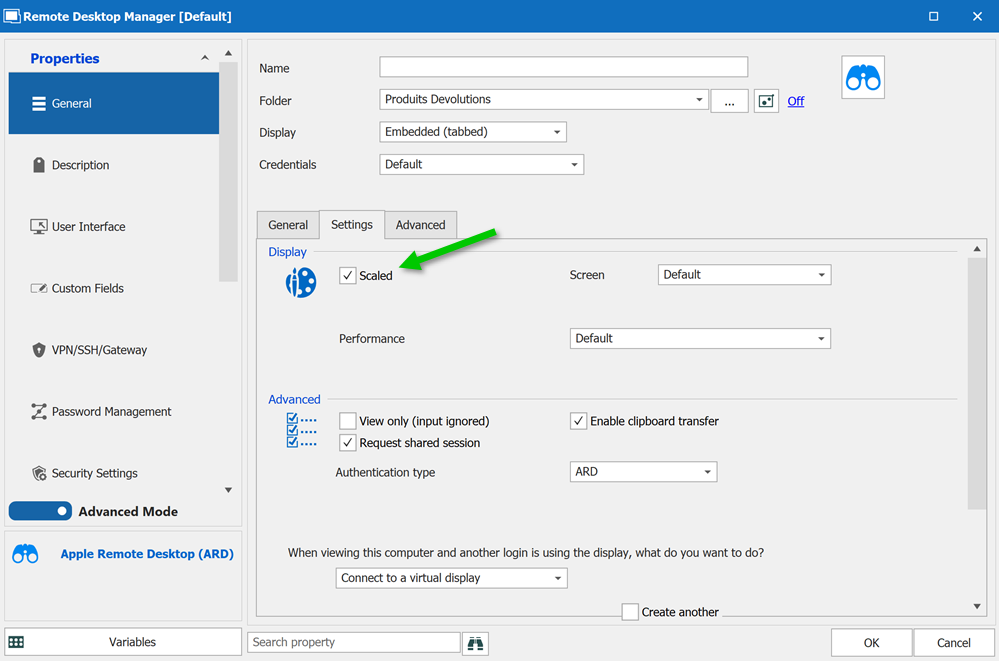
Best regards,
Christine Breault
ARD-Scaled.png