An unexpected error occured. Error code: FAIL (-1)
Hi everyone,
I'm getting such an error when I'm trying to login into a few my servers via ssh. Please look at the screenshot attached.
Please provide me with debugging steps so I'll be able to gather all necessary information for you .
Thanks in advance. 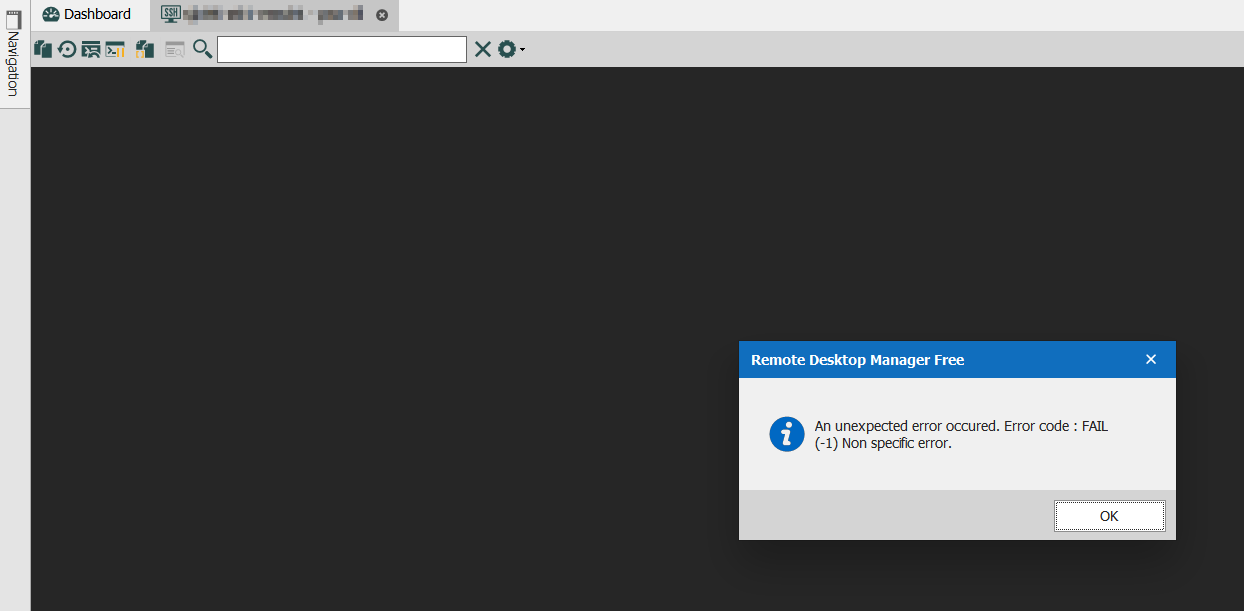
Image 646.png
All Comments (33)
Hello,
what RDM version do you use? There was a bug with SSH starting with version 2020.2.19.0 - you'll find more information's about here.
Regards,
Min
My RDM version is:
2020.3.8.0 64-bit
Thanks for the link but this is another issue.
Hello,
Can you reproduce the issue with the Logs enabled and provide us with said logs? Here's how to do this,
Go into your entry "Properties" -> "Logs" then hit the check-box for "Enable logging" and set to "Custom"
Then go into the "Advanced" tab and set the "Verbose" to "2"
You can provide the log to us here, or you can send them to me using private message if you prefer.
Best regards,
Samuel Dery
Hi Samuel,
please review the logs.
[10/19/2020 18:29:56] Starting SSH, verbose level: 2
[10/19/2020 18:29:56] Setting up connection
[10/19/2020 18:29:56] Connecting as lalala
[10/19/2020 18:29:56] SSH banner: SSH-2.0-SSHD-CORE-0.13.0
[10/19/2020 18:29:56] Sending kex init
[10/19/2020 18:29:56] Received kex init
[10/19/2020 18:29:56] Selected algorithms: ecdh-sha2-nistp256, ssh-rsa, aes128-ctr, aes128-ctr, hmac-sha2-256, hmac-sha2-256, none, none
[10/19/2020 18:29:56] Sending ECDH kex init
[10/19/2020 18:29:56] Received ECDH kex reply
[10/19/2020 18:29:56] Successfully authentified server
[10/19/2020 18:29:56] Sending new keys message
[10/19/2020 18:29:56] Sending userauth service request
[10/19/2020 18:29:57] Received new keys message
[10/19/2020 18:29:57] Received service accepted message
[10/19/2020 18:29:57] Sending userauth init request
[10/19/2020 18:29:57] Received userauth failure: password,keyboard-interactive,publickey
[10/19/2020 18:29:57] Starting interactive authentication
[10/19/2020 18:29:57] Sending userauth interactive request
[10/19/2020 18:29:57] Received userauth info request: Password authentication / {Password: }
[10/19/2020 18:29:57] Sending userauth interactive response
[10/19/2020 18:29:57] Received userauth success
[10/19/2020 18:29:57] User authenticated successfuly by password interactive
[10/19/2020 18:29:57] Sending session channel open request: 0/-
[10/19/2020 18:29:58] Received channel open confirmation: 0/0 WS 200000/2097152 MPS 32000/32768
[10/19/2020 18:29:58] Sending pty request: 0/0 xterm
[10/19/2020 18:29:58] Received channel failure: 0/0
[10/19/2020 18:29:58] Error starting the terminal
[10/19/2020 18:29:58] Disconnection in progress
[10/19/2020 18:29:58] Sending channel close request: 0/0
[10/19/2020 18:29:58] DisconnectingHello,
Thank you for providing the logs, I will forward this to our engineering team and we'll get back to you as soon as possible.
Best regards,
Samuel Dery
Hello,
Our engineering department, would like to know if you're able to connect to this server using another client?
Best regards,
Samuel Dery
Our engineering department, would like to know if you're able to connect to this server using another client?
Yes, sure. I can connect these servers using default PuTTY client without any problems.
Hello,
Thank you for testing, I will forward this to the engineering department and let you know when I have news.
Best regards,
Samuel Dery

Disabled
I am having the same issues when connecting to a Cisco XR router through either the Mac or iPad Apps, have no issues when using RoyalTSX (iTerm)
Hi devolutions43,
Can you create a new post in the Mac board? We'd like to avoid mixing issues up and making this thread hard to follow.
Best regards,
Xavier Fortin
Hi,
When connection to Cisco devices fails, one possible fix is to check the "Skip environment variable setup" option in the "Advanced" tab. If that does not fix the problem, it would be nice to have logs (with verbose level 2) of the failing connection.
Regards,
Denis Vincent
Disabled
I'm running into the same issue with SSH'ing into Cisco devices with the (-1) error but it does work with linux boxes (at least the two I've tried). I have checked the 'Skip environment variable setup' box but that hasn't worked.
Here are the logs, which does appear to be an issue with the algorithm mismatch, any way to change that?
[10/28/2020 8:58:42 AM] Starting SSH, verbose level: 2
[10/28/2020 8:58:42 AM] Setting up connection
[10/28/2020 8:58:42 AM] Connecting as aurora
[10/28/2020 8:58:42 AM] SSH banner: SSH-1.99-Cisco-1.25
[10/28/2020 8:58:42 AM] Sending kex init
[10/28/2020 8:58:42 AM] Received kex init
[10/28/2020 8:58:42 AM] No match for kex algorithm:
Client sent: curve25519-sha256,curve25519-sha256@libssh.org,ecdh-sha2-nistp256,ecdh-sha2-nistp384,ecdh-sha2-nistp521,diffie-hellman-group-exchange-sha256,diffie-hellman-group16-sha512,diffie-hellman-group18-sha512,diffie-hellman-group14-sha256,ext-info-c,ext-info-c
Server sent: diffie-hellman-group-exchange-sha1,diffie-hellman-group14-sha1
[10/28/2020 8:58:42 AM] Disconnection in progress
[10/28/2020 8:58:42 AM] Disconnecting
Hi,
Yes there is a way to change that, and it is a brand new feature! You can select which algorithms are enabled in the "Advanced" tab: set the "Algorithm support" to "Custom", then click on the elipsis to open a dialog box where you can select which algorithms will be proposed at connection time. In your case you'll have select the appropriate algorithms in the "Key" tab.
Regards
Denis Vincent
Disabled
That did the trick, is there to set that as a default across the board? I've found a way to do this by setting up a custom template and applying that template to the various ssh entries but would be nice to not have to slam a custom template on all the ssh entries.
Yes there is: set in the "Advanced" tab the "Algorithm support" field to "Default. And in File -> Options -> Types -> Terminal -> Algorithm support, you can select the default algorithms for all SSH entries.
Regards
Denis Vincent
Disabled
Thanks for the help, did the trick.
Disabled
I can't find any of these options in the Mac version
Goodmorning,
same here:
[29/10/2020 09:48:36] No match for kex algorithm:
Client sent: curve25519-sha256,curve25519-sha256@libssh.org,ecdh-sha2-nistp256,ecdh-sha2-nistp384,ecdh-sha2-nistp521,diffie-hellman-group-exchange-sha256,diffie-hellman-group16-sha512,diffie-hellman-group18-sha512,diffie-hellman-group14-sha256,ext-info-c,ext-info-c
Server sent: diffie-hellman-group-exchange-sha1,diffie-hellman-group14-sha1,diffie-hellman-group1-sha1
on RDM Free 2020.3.12.0
Leonardo
Hi devolutions43,
This is because those settings are not available in RDM Mac yet. A ticket is opened for it though.
I'll post back here when it's done.
Best regards,
Xavier Fortin
The error I reported above is also present in the latest beta 2020.3.13.0. I have a lot of Oracle Linux 5.11s (which obviously cannot be upgraded).
Leonardo
Hello,
RDM Windows has now a selection of algorithms for the SSH session type. It's possible to globally reactivate all the algorithms in RDM via the File -> Options -> Types -> Terminal -> Algorithm support menu.
Best regards,
Jeff Dagenais
Yes, I had to enable all the possibile algorithm an then my ssh connections (mostly to Cisco devices) started to work again
Hello,
RDM Windows has now a selection of algorithms for the SSH session type. It's possible to globally reactivate all the algorithms in RDM via the File -> Options -> Types -> Terminal -> Algorithm support menu.
Best regards,
Ok now it works. Thanks!
Leonardo
Hi guys,
I still have an issue with login to me servers.
Maybe i can provide you with some more debug information and details?
@malinovskiypavel,
Are you running RDM Mac or RDM Windows?
Which version are you using?
What is the exact message that you receive?
Best regards,
Jeff Dagenais
I can't find any of these options in the Mac version
Hi,
RDM and RDM Free Mac 2020.3.2.0 will be available shortly. It will now include the SSH settings "Skip environment variable setup" and "Algorithm support".
Best regards,
Xavier Fortin
@malinovskiypavel,
Are you running RDM Mac or RDM Windows?
Which version are you using?
What is the exact message that you receive?
Best regards,
Hi,
nothing has changed from the time of my initial message
RDM Win version 2020.3.19.0 64bit
The message is the same.
@malinovskiypavail,
If you still receive the -1 error message, please consult this KB article on that matter
https://kb.devolutions.net/rdm_error_code_fail_1_non_speciffic_error.html
Best regards,
Jeff Dagenais
@malinovskiypavail,
If you still receive the -1 error message, please consult this KB article on that matter
https://kb.devolutions.net/rdm_error_code_fail_1_non_speciffic_error.html
Best regards,
I've done this (matched all settings in Algorithm support) but still have the Error code FAIL (-1) non specific error
Version 2020.3.23.0 64-bit
Hi @malinovskiypavel
One thing you could try is changing the "Override terminal type" (in the "Terminal" tab) to vt100
I would be surprised it works but it is still worth a try. In the event it does not work, I will ask you to send a log (again, I know, but they have been improved since the last time you sent logs).
Apparently, there is something this Cisco device does not like in the way the terminal is opened by RDM. I may need a few tries before I get it right. Sorry for the delays.
Regards
Denis Vincent
Hi Denis,
vt100 didn't help
Here is the log for connection with this setting:
[12/23/2020 12:36:02] Devolutions Protocols version: 2020.12.14.1 Windows
[12/23/2020 12:36:02] Starting SSH, verbose level: 2
[12/23/2020 12:36:02] Setting up connection
[12/23/2020 12:36:02] Connecting as lalala
[12/23/2020 12:36:02] SSH banner: SSH-2.0-SSHD-CORE-0.13.0

[12/23/2020 12:36:02] Sending kex init
[12/23/2020 12:36:02] Received kex init
[12/23/2020 12:36:02] Selected algorithms: ecdh-sha2-nistp256, ssh-rsa, aes256-ctr, aes256-ctr, hmac-sha2-256, hmac-sha2-256, none, none
[12/23/2020 12:36:02] Sending ECDH kex init
[12/23/2020 12:36:02] Received ECDH kex reply
[12/23/2020 12:36:02] Successfully authentified server
[12/23/2020 12:36:02] Sending new keys message
[12/23/2020 12:36:02] Sending userauth service request
[12/23/2020 12:36:02] Received new keys message
[12/23/2020 12:36:03] Received service accepted message
[12/23/2020 12:36:03] Sending userauth init request
[12/23/2020 12:36:03] Received userauth failure: password,keyboard-interactive,publickey
[12/23/2020 12:36:03] Starting interactive authentication
[12/23/2020 12:36:03] Sending userauth interactive request
[12/23/2020 12:36:03] Received userauth info request: Password authentication / {Password: }
[12/23/2020 12:36:03] Sending userauth interactive response
[12/23/2020 12:36:03] Received userauth success
[12/23/2020 12:36:03] User authenticated successfuly by password interactive
[12/23/2020 12:36:03] Sending session channel open request: 0/-
[12/23/2020 12:36:03] Received channel open confirmation: 0/0 WS 200000/2097152 MPS 32000/32768
[12/23/2020 12:36:03] Sending pty request: 0/0 vt100 width = 186 height = 37
[12/23/2020 12:36:03] Received channel failure: 0/0
[12/23/2020 12:36:03] Error starting the terminal
[12/23/2020 12:36:03] Disconnection in progress
[12/23/2020 12:36:03] Sending channel close request: 0/0
[12/23/2020 12:36:03] Disconnecting
Here is without vt100:
12/23/2020 12:39:30] Devolutions Protocols version: 2020.12.14.1 Windows
[12/23/2020 12:39:30] Starting SSH, verbose level: 2
[12/23/2020 12:39:30] Setting up connection
[12/23/2020 12:39:30] Connecting as lalala
[12/23/2020 12:39:30] SSH banner: SSH-2.0-SSHD-CORE-0.13.0

[12/23/2020 12:39:30] Sending kex init
[12/23/2020 12:39:30] Received kex init
[12/23/2020 12:39:30] Selected algorithms: ecdh-sha2-nistp256, ssh-rsa, aes256-ctr, aes256-ctr, hmac-sha2-256, hmac-sha2-256, none, none
[12/23/2020 12:39:30] Sending ECDH kex init
[12/23/2020 12:39:30] Received ECDH kex reply
[12/23/2020 12:39:30] Successfully authentified server
[12/23/2020 12:39:31] Sending new keys message
[12/23/2020 12:39:31] Sending userauth service request
[12/23/2020 12:39:31] Received new keys message
[12/23/2020 12:39:31] Received service accepted message
[12/23/2020 12:39:31] Sending userauth init request
[12/23/2020 12:39:31] Received userauth failure: password,keyboard-interactive,publickey
[12/23/2020 12:39:31] Starting interactive authentication
[12/23/2020 12:39:31] Sending userauth interactive request
[12/23/2020 12:39:31] Received userauth info request: Password authentication / {Password: }
[12/23/2020 12:39:31] Sending userauth interactive response
[12/23/2020 12:39:31] Received userauth success
[12/23/2020 12:39:31] User authenticated successfuly by password interactive
[12/23/2020 12:39:31] Sending session channel open request: 0/-
[12/23/2020 12:39:31] Received channel open confirmation: 0/0 WS 200000/2097152 MPS 32000/32768
[12/23/2020 12:39:31] Sending pty request: 0/0 xterm-256color width = 186 height = 37
[12/23/2020 12:39:31] Received channel failure: 0/0
[12/23/2020 12:39:31] Error starting the terminal
[12/23/2020 12:39:31] Disconnection in progress
[12/23/2020 12:39:31] Sending channel close request: 0/0
[12/23/2020 12:39:31] Disconnecting
And one amendment - the destination server isn't a Cisco device, this is a common Linux server.
Hi @malinovskiypavel
I made a change I hope will do the trick. It should be available in RDM's next version. You can make sure by checking the first line of the log "Devolutions protocols version" if it is 2020.12.23.1 or higher.
And sorry for the mistake on the destination server: the SSH banner is not "OpensSSH" so my mind played a trick on me and I assumed it was coming from a Cisco device.
Regards
Denis Vincent
No problem at all, Denis.
Thank you for your help.
I'm waiting for the new version =)