DameWare entries with credentials

Hi there,
We've been using RDM since Jan this year and it's proven to be pretty amazing. However - I've just noticed that when launching DameWare connections with credentials, the user name and password appears as clear text within Task Manager:

Unfortunately this clear text means it's logged in Anti-Virus logs and can been easily spotted by other users on multi-user jumpboxes.
As a workaround - I thought I could configure a new Command Line (External Application) session that starts the DameWare.exe process as the designated user utilising the Run As tab, but unfortunately there's no Inherit nor Private Vault Search options.
The idea being to configure DameWare itself to "use current credentials":
When it's launched using the Run As feature, it'll connect to the host using the credentials DameWare was started with.
I've given it a test using "custom" credentials and the username/password doesn't appear in Task Manager:

Just wondering if it's possible to either enable the option to start DameWare using Private Vault Credentials or allowing Inherit and Private Vault Search credential options in the Run As tab for Command Line (External Application) sessions?
Thanks in advance!
Cheers.
All Comments (3)
Hello Steven,
Thank you for contacting us on that matter. It is possible in the dropdown menu of the Command line and DameWare entry to select the Private vault or the Inherit credential option. That being said, I will validate with engineering for the Run as tab, where these two options are not showing.
Best regards,
Christine Breault
Sorry Steven, I forgot the screenshot. Here it is: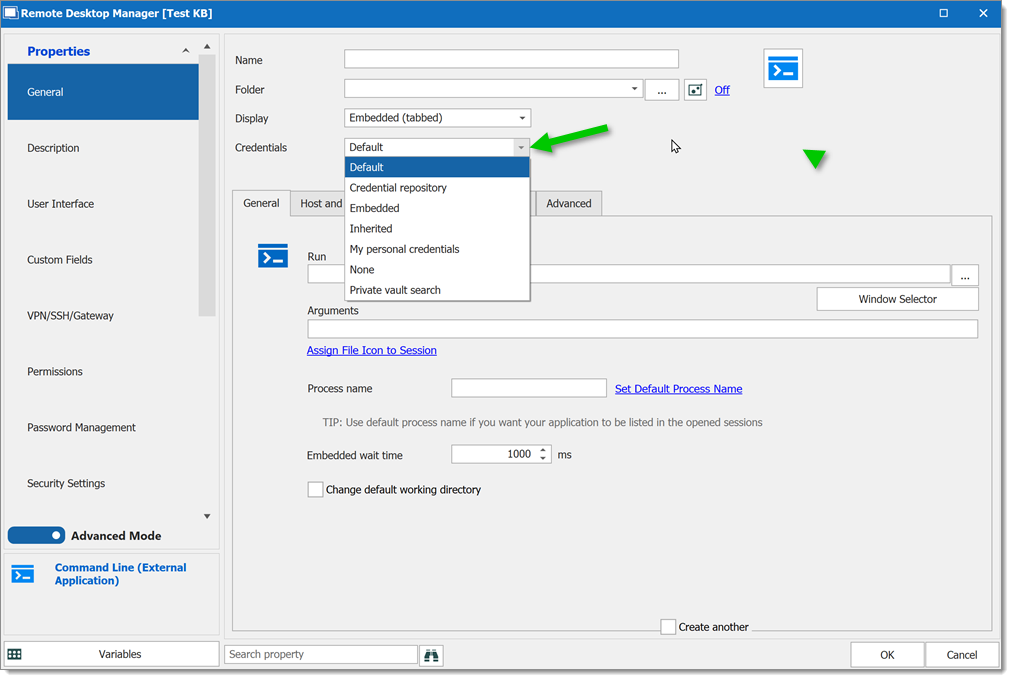
Christine Breault
2020-10-15_09-31-07.png
Hi Steven,
I have open an improvement ticket after a discussion with engineering to add Private/User vault and inherited. This Forum will be updated when available.
Best regards,
Christine Breault