RDM Install: Warning, when new database version is needed
RDM Install: Warning, when new database version is needed
0 vote

Hi,
a prominent warning *before* the installation of RDM updates would be nice.
I (again) installed the beta to test new features and afterwards, when starting RDM, I had a warning regarding the database version.
As a lot of my colleagues also use RDM, I can not update the database nor should they update RDM to a beta, so I had to uninstall again and install
the older version again. Luckily the settings got kept.
That's no drama, but it would be more comfortable, if I could be held, doing an update, which won't work, because the database must be upgraded.
So in short:
1. A prominent warning: Don't update, you need to update the DB and all other users can not work with the oder RDM Version
2. Installation
...not the other way around.
If I totally misunderstand something in that process, please feel free to correct me.
Best regards,
Daniel
All Comments (11)
I can follow your logic, but for non-beta version I check the release notes
https://remotedesktopmanager.com/release-notes
Here you can see if a database update is required? Is this not available for beta versions?
Hello tom17,
for the actual beta "VERSION 2020.3.8.0 (October 9th 2020) Beta" it is not documented - as far as i see.
But also if it would be ... I'm reading hundreds of documentations day in day out, so sometimes I only read across things.
To clarify: It's totaly understandable, that one has to read a documentation, but a better/more comfortable way
would be to do a software-based check in the install-process. Before.
Also i may not expect, that my 1st level colleagues ever read through the release notes, when they are prompted for updating.
It would be nice, but in the real world, no one would allways read through every detail. ;-)
Neither me - and i write/wrote a lot of documentations and also read a lot.
It's just to do things in a more comfortable way...
Best regards,
Daniel
Hello dcapilla,
I understand your feedback. As system administrators we run the upgrade cycle of the application. So i always check the release notes, the clearly display database upgrade required. But i agree that an additional notification by RDM would be a nice feature.
But more importantIy I also don't want my users to upgrade on there own impuls. In RDM there a settings to prevent update notifications being sent to datasource users. Also a minimal and maximum version check can be preformed. So they do not connect with the wrong version. But i would like to see a more advanced upgrade management system implemented. I have added this as a feature request, i would also be interested in your point of view on this matter.
https://forum.devolutions.net/topics/34521/rdm-update-management
PS: i don't use beta versions of the application, so on this subject I cannot really give any feedback.
Thx for your feedback.
Hello tom17,
I gave you feedback in the regarding thread. That would some kind of "final" solution. I agree so far.
As I may not assess, how much work it will be and how many requests there have been in the past time, a pragmatic solution would be a nice fix in first place for me.
Best regards,
Daniel
Agreed
Hello,
I will try to improve the process and make it more obvious that a database upgrade is required. You can see the beta release notes here:
https://remotedesktopmanager.com/release-notes/beta
And you can also see that a database upgrade is required: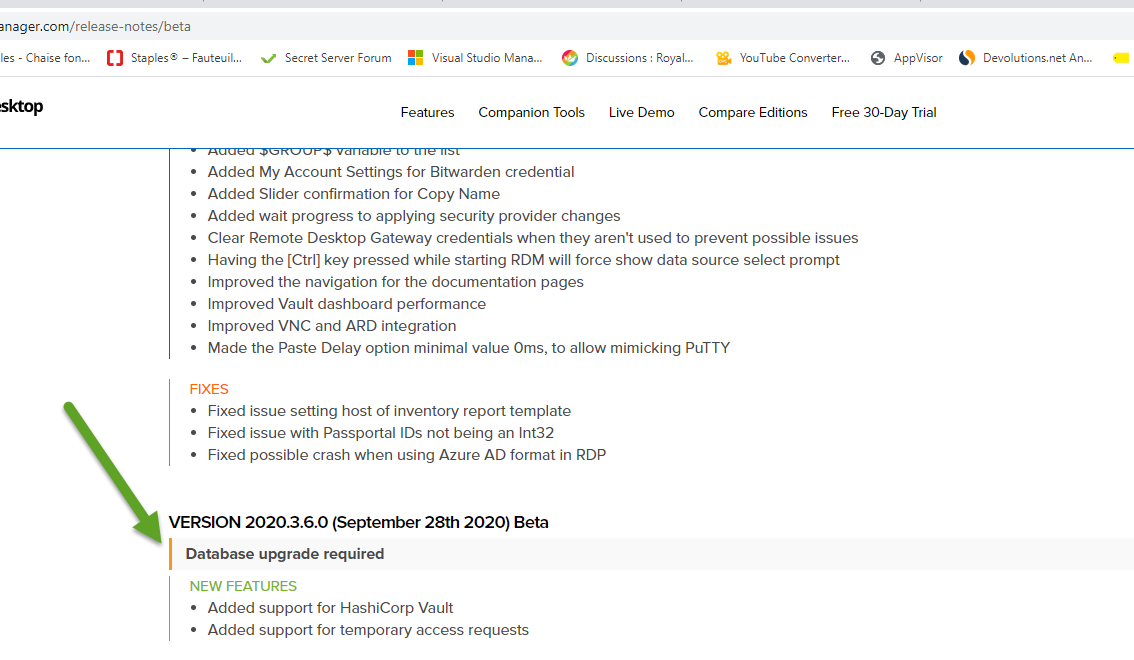
Like I mentioned, I will try to add a little icon an maybe increase the font size.
Regards
David Hervieux
2020-10-13_08-27-02.png
Hello David,
thank you for your feedback.
The information "Database upgrade required" is noted at "VERSION 2020.3.6.0 (September 28th 2020) Beta" - if one scrolls down,
but on top at "VERSION 2020.3.8.0 (October 9th 2020) Beta" *not*
If I read all the notes from bottonm to the top, I may count 1+1 together and see, that the db-update must also count for the newer entries ... if
I have the time to read through all the notes to find the information inside the text. But that's not my issue.
My issue is, to integrate a check inside the installation process before finishing it instead of afterwards getting the message, that the
database has to be upgraded.
Best regards,
Daniel
Indeed if you are upgrading from 2020.3.7 to 2020.3.8 you don't need a database upgrade. The problem with adding this to the installer is how the installer will know which data source you are using? You can have more than one data source and one could be local, another could be DPS...
I will try to find a better solution than what we have but it's not simple. By the way, we try to keep the database as much compatible as it possible and this is the case for the beta. You should be able to update the database and use it with both version. It's always a good idea to backup the database before. Another thing, we don't do any database upgrade between minor update except during the beta (we try to avoid it but sometime it's not possible). This means that usually if you will get an update if you are updating from 2020.1 to 2020.2 or 2020.2 to 2020.3.
Regards
David Hervieux
If the new software is downloaded trough the application itself you could do a cross check across all present datasources?
The result could be displayed before downloading starts? You already link provide a link to the release notes, but maybe it could be made more visible?
"Indeed if you are upgrading from 2020.3.7 to 2020.3.8 you don't need a database upgrade. The problem with adding this to the installer is how the installer will know which data source you are using? You can have more than one data source and one could be local, another could be DPS..."
One idea could be, to store the used databases allways in the registry or filesystem/config file including the version-numbers.
Don't you do that already in "RemoteDesktopManager.cfg" - so the check has not to connect to the databases.
Instead it connects to the registry/config file and reads the values (array of) like database/version.
If there are no values: It's a fresh install.
If there is an array, there is at least one datasource with a version number.
" but it's not simple".
I can imagine. Many things that seem to be simple are underneath a big challenge.
Maybe you'll find a conveniant solution. Thank you for your engagement!
Best regards,
Daniel
It's an interesting idea. We also plan do change our change history files for a json. It will be easier for RDM to download the new format and check from which version you are upgrading. We should be able to show the database upgrade flag more accurately.
Regards
David Hervieux
