mouse jiggler - keep awake thing
0 vote
I wonder if there's a way to add synthetic mouse input to a session to keep it from timing out as idle? just a menu item that says Keep Connection Alive or something? I use a lot of 2FA sessions and it's a pain when they time out while I'm monitoring a long process...
All Comments (33)
Hello,
Are you referring to an RDP session? If so, I believe this option in the Experience tab would be what you are looking for : 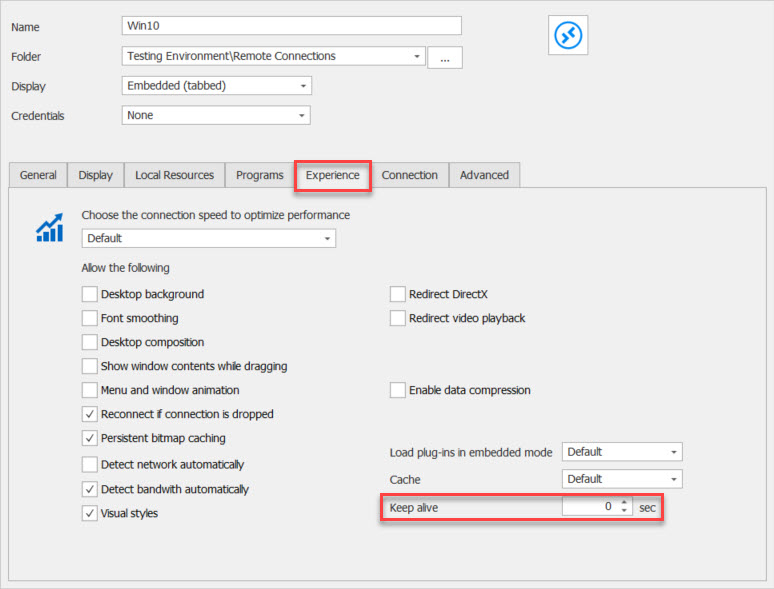
Best Regards,
Etienne Lord
keepalive.jpg
appreciate the pointer - I searched the docs for "keep alive" and found nothing, hence my post.
I tried this and it's not working - my sessions still lock and time out - any thoughts?
Hello,
Are they locking and time out when launching your RDP session in external mode using mstsc.exe?
Best regards,
Jeff Dagenais
Yes, they are timing out in mstsc.exe. These are networks that have inactivity timeouts set domain-wide via GPO, and I'm remoting into them from my home office machine, where not only is it protected by its own inactivity timeout, I live alone. So if the screen locks in a session, it's a pain, because I have to flip to home toolbar, hit copy password, flip to action toolbar, hit type clipboard (it would be super nice to have a type clipboard button right next to the copy credentials segment of the home toolbar, btw.) then find my phone to get a 2FA code. So I was hoping to find something like a "mouse jiggler" type dealie that will create synthetic input to keep the inactivity timeout from happening. There's scripts that will toggle scroll lock once every five minutes for example, or there's a program called Caffeine - I was just hoping to check a box in RDM and avoid introducing a third party into the mix.
Hello,
Unfortunately, if it's timeout in Microsoft as well, there's nothing we can do on our side as a workaround regarding this.
Sorry about that.
Best regards,
Jeff Dagenais
So Caffeine keeps the screensaver lock from timing out after 10 minutes, but the connection drops after an hour, which is coming from the RDP Gateway timeout setting, I think, and happening because the synthetic activity created by Caffeine is happening on the host machine and not coming over RDP. I know you can generate synthetic activity - I've seen it in action when I click Log Off button - you actually hit the start button and run logoff.exe. So we have all the pieces here - and I understand if you don't want to enable this function because you feel its being used to bypass policy - is that the case? I can create a special case policy for me if needed, I guess. Thanks for looking into it.

Disabled
I could certainly use this at times too. Running long DB queries that go beyond the set time limit on the server side.
Hello,
Unfortunately, if it's timeout in Microsoft as well, there's nothing we can do on our side as a workaround regarding this.
Sorry about that.
Best regards,
Hi.
I tried the keep alive feature but no luck - the RDP session gets locked after a few minutes.
Couldn't RDManager not just send random mouse movement from the client device to the server though RDP?
Something like "move mouse one pixel to the left" every xy seconds?
cheers
Michael
Hello Michael,
Since the keep alive feature of RDM does not seem to be sufficient for you, you might be interested in enabling the keep-alive connection policy on your server. To do so, please refer to this topic from Microsoft: https://docs.microsoft.com/en-us/windows-server/remote/remote-desktop-services/troubleshoot/rdp-client-disconnects-cannot-reconnect-same-session
Best regards,
James Lafleur
Often enough I don't have die means to change those settings on the server as they are enforced by some policy.
Therefore it would be nice to have a feature where RDM just emulates mouse movement so the server cannot tell the difference between the keep-alive-feature and real mouse movement ;-)
AND: It would be nice if the feature would be available for the Linux version of RDM :)
Hello Michael,
Thank you for your swift reply!
I will open a ticket with our Engineering Department and see what can be done.
We will be in touch once we will have an update to provide on that matter.
Best regards,
James Lafleur
Any movement on this? it's still a problem for me...
Hello,
At this time, we have no update to provide on that matter.
We will be in touch when we will have new developments to share.
Best regards,
James Lafleur
OK - please do think about doing this, it would make life a lot easier. The one thing in particular that's driving this for me is Duo two factor authentication for Remote Desktop Gateway. This software replaces the RAP and CAP policies on your RDG server with their own, and it's impossible to set your own RDG timeout policy without editing the registry on the server, And in my experience, the software often doesn't honor the registry keys even if you do set it higher, which means you're limited to an hour idle going through the RDG before it times you out. It's just a giant pain in the rear, and Duo seems to have abandoned any updates to this product. So if you could generate synthetic activity that would keep the session alive it would save me from having to log in again over and over every time I work on machines with this software. I know you can do it, since you do it to run logoff.exe, so it would be really helpful if this were available.
Hello,
Thank you again for your valuable feedback, I will add it to the case I have with our Engineering Department and get back to you as soon as I will have an update to provide on that matter.
Best regards,
James Lafleur
OK - please do think about doing this, it would make life a lot easier. The one thing in particular that's driving this for me is Duo two factor authentication for Remote Desktop Gateway. This software replaces the RAP and CAP policies on your RDG server with their own, and it's impossible to set your own RDG timeout policy without editing the registry on the server, And in my experience, the software often doesn't honor the registry keys even if you do set it higher, which means you're limited to an hour idle going through the RDG before it times you out. It's just a giant pain in the rear, and Duo seems to have abandoned any updates to this product. So if you could generate synthetic activity that would keep the session alive it would save me from having to log in again over and over every time I work on machines with this software. I know you can do it, since you do it to run logoff.exe, so it would be really helpful if this were available.
A very inelegant workaround you can use is this simple powershell script:
$WShell = New-Object -Com "Wscript.Shell"
while (1) {$WShell.SendKeys("{left}"); sleep 60}
This will send a key (in this case the left arrow) to the computer where you run it on and simulate activity in an infinite loop. You can just run this until you come back to the same machine, kill the script etc.
SendKeys Class (System.Windows.Forms) | Microsoft Learn - if you want to send other keys instead of {left arrow}
A very inelegant workaround you can use is this simple powershell script:
$WShell = New-Object -Com "Wscript.Shell"
while (1) {$WShell.SendKeys("{left}"); sleep 60}
This will send a key (in this case the left arrow) to the computer where you run it on and simulate activity in an infinite loop. You can just run this until you come back to the same machine, kill the script etc.
SendKeys Class (System.Windows.Forms) | Microsoft Learn - if you want to send other keys instead of {left arrow}
Appreciate the thought, but this won't stop the RDG from timing out, although it may stop the host system from screenlocking. This is similar to running Caffeine or other jiggler-type programs on the local machine - they don't keep the RDG idle timer from timing out, since the activity is all local - RDG isn't seeing it as activity from the remote side.
I see no updates on this tread. Well I'm here to add my vote for Devolutions to add just a feature as there are, in my environment, hundreds of users that have request such a capability. The feedback of using windows GPO's to control timeouts, yes this is possible however our security folks, as well as most of the enterprise world, mandate such timers in screen locks. The only exception would be for the very reason I am requesting such a feature be added to RDM and that is when there are long running operations or troubleshooting efforts, we can't allow the screen to time out. Adjusting a GPO takes too long, adding a custom temp script or even installing or using a portable keep alive app is frowned upon, but building the capability into RDM is acceptable.
Hello Philip,
We still have the feature request open, but there has not yet been any movement on it. We will keep you posted when we have something to report back.
Best regards,
Richard Boisvert
Hi - I started this thread 3 years ago, so here's my thinking - tell me if I'm wrong:
- You can do this. I've seen your program generate synthetic activity. When you click "Log Off", you open Run... dialog on the remote machine, enter logoff and return, and the session ends.
- You can do this pretty quickly. I doubt this feature would take a competent developer more than a day or two to code, especially since most of the code is already in the program per #1 above.
- You don't want to do this despite your users asking repeatedly for it. You don't want to create something in the program that would allow users to bypass a policy - maybe your lawyers have told you that this would represent a liability if this feature was used to bypass a policy and it allowed something to get hacked or something.
- You don't want to tell users you don't want to do this. This is where I get a little peeved. And peeved is the right word for it. It's a minor annoyance, and you could solve it if you wanted to but you don't want to, and that's cool. But maybe what you need here is to tell us that you don't want to, a little transparency would be nice. Some things are simply "won't fix" for reasons that have nothing to do with the software, but it would be nice to know what those are.
The people that use your software live in it by and large. I use Chrome, Outlook, TeamViewer, and RDM *every day all day*. So this is like a dripping faucet the landlord won't fix, and it's a bother. I'd love to hear some communication beyond "the feature request is open", and I don't think this is unreasonable. Looking forward to some comments beyond that.
Hi,
I understand it looks like a simple thing, and it probably is, once you know exactly how to do it. The first problem is we don't know the current mouse position, since the RDP ActiveX window receives those events. The second problem is we need to interact with the RDP ActiveX window to inject mouse events, not keyboard events, unless we can figure out a non-intrusive keyboard sequence that would not cause undesirable side effects.
We are not opposed to implementing this, we just didn't get a chance to really spend the time required to 1) find a suitable strategy that we know would work and 2) implement it properly. That's why this particular feature request keeps sliding, but it's not because we don't want it done. Adding features which are not supported in the RDP ActiveX can require a lot of work, even if it's just another option that looks simple in hindsight: https://blog.devolutions.net/2022/08/extending-the-microsoft-rdp-client-with-api-hooking/
I have taken note of this feature request for our next hackathon and see if I could figure out something in MsRdpEx which we develop for usage in RDM. I can't promise when we'd have a solution, but once we make a breakthrough, we definitely won't hold off on shipping a "mouse jiggler" RDP feature.
Best regards,
Marc-André Moreau
Hi Marc-André - this is all really useful info, and I really appreciate the time you took to explain it, and keep me from spinning theories about lawyers etc :)
If the keyboard thing is easier, that's how Caffeine does it. It simulates an F15 Key up event. See: https://www.zhornsoftware.co.uk/caffeine/. If you send that event through the RDP connection, maybe it keeps RD Gateway from thinking the connection is idle, unlike running Caffeine on the remote host.
No matter what happens, thanks for communicating the issues here.
Andrew
I'm Using a script I run within my target that will regularly press {SCROLLLOCK} 2x. it is very unintrusive, and in the multiple years I run it I've never had any issues with it.
But if this feature request is built, I believe it would be ideal to allow for a fill-in box where users can type in their own requested keyboard presses, in the same syntax you already use with keyboard typing macro's in the different connections, as documented here: Event auto typing macro - Devolutions
I see F15 is also mentioned in there, just like {SCROLLLOCK}. or this should also work: {SCROLLLOCK}{DELAY}{SCROLLLOCK}
This frees 'you' from finding out an unintrusive keyboard sequence, you can fill it with some defaults, but users can then update it to their specific environments if needed.
Regards, and good luck with the hackatlon !
Ben
Hi,
Remote Desktop Manager 2023.3 was officially released today with support for a new RDP mouse jiggler feature that works with both the Microsoft RDP ActiveX (embedded) and with mstsc in external mode. It wasn't a simple thing, it took more than a week of work, and was made possible by our existing RDP API hooking framework.
To enable it globally, go in the RDM options under Types > Sessions > Remote Desktop (RDP) and set "Enable mouse jiggler" to "Yes":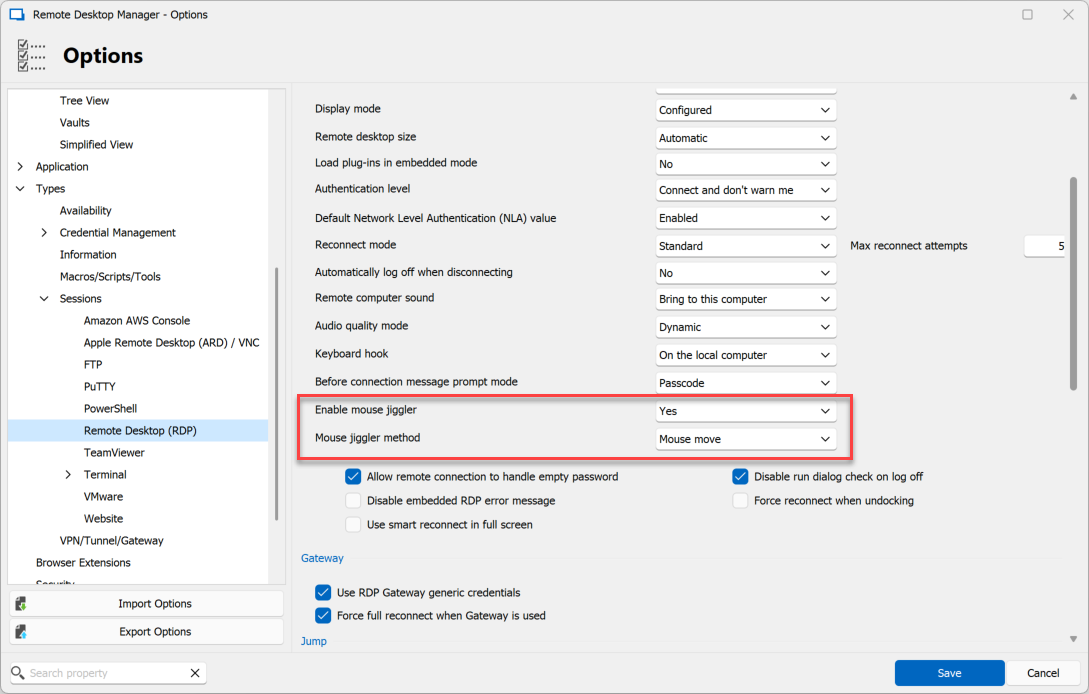
You can also set mouse jiggler preferences in the RDP entry directly: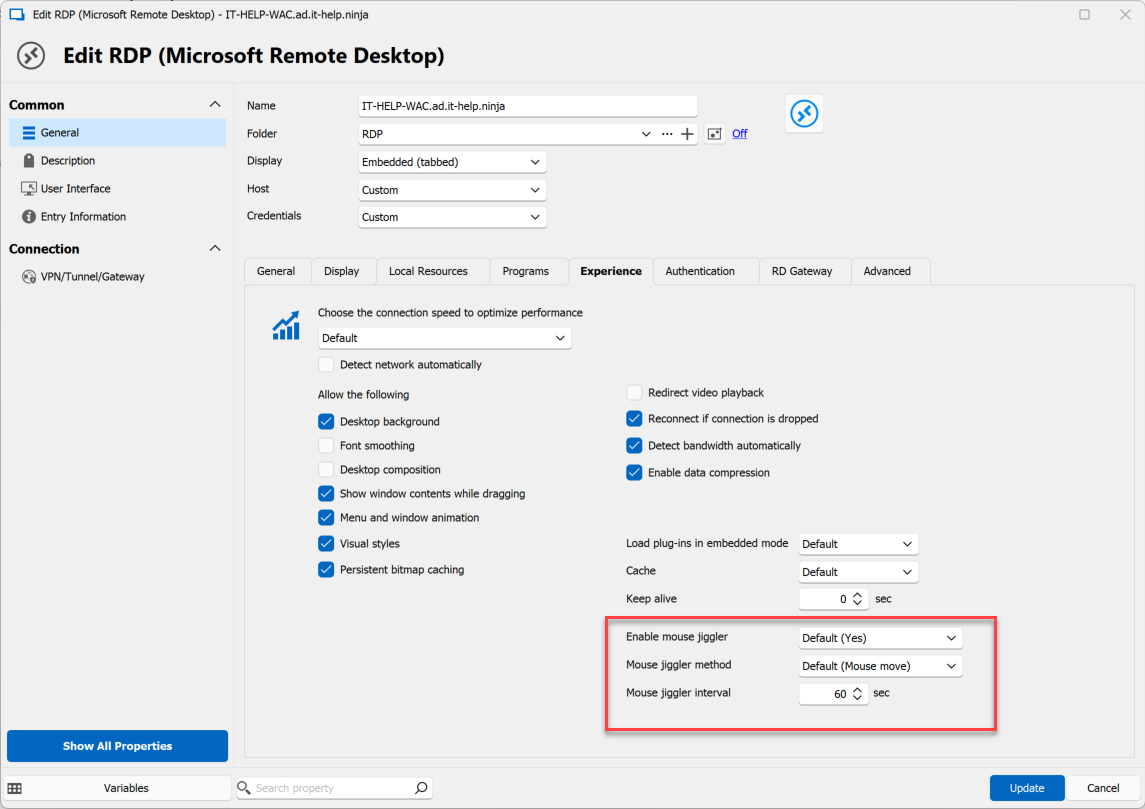
We implemented two mouse jiggler methods: a mouse move, and function key (F15) which is ignored by most applications. We hooked the RDP input window to intercept mouse move events, allowing us to simulate a mouse move that does +1,+1 and then reverts the position back. The function key approach was first implemented and is commonly used as it doesn't need the mouse position, but has potential side effects, even if improbable in practice. Another problem we faced is that the RDP input window normally ignores input events while out of focus - we figured out a way to allow background input events for the RDP mouse jiggler to work.
Even better: this does not require a background thread or additional processes to inject to the events: with the RDP hooking, we were able to register a timer event directly inside the RDP input window. You could close RDM after launching mstsc and it would keep working.
Best regards,
Marc-André Moreau
fb03bc48-fba9-4114-9129-50dca79095f2.png
55f528c2-31ae-4529-a775-618000f08e7e.png
This is so great - thank you so much for doing this!
How can we disable this option completely? I don't see it as enforceable in GPO templates in the current version. Defeating security measures is violation of most company policies.
Thanks
Hello,
We will add a GPO to disable this feature. I have opened a ticket. We will post back here when we have an update on this.
Regards,
Hubert Mireault
Hello,
We've added a GPO to disable the Mouse Jiggler, it's name is DisableMouseJiggler. It should be available for 2023.3.25.
Regards,
Jafran Majeau
This thread is such wonderful proof that you can't please everybody. Thanks for building the feature, thanks for building the GPO, thanks for building RDM. You guys rock...
Thanks for the prompt response. No, you can't please everyone, but this "feature" shouldn't have gone out ENABLED by DEFAULT, and without proper controls and they should know better, they sell a PAM solution.
Hello,
Our primary goal is to offer a productive PAM which is not the case for most other vendors. That's why people choose our products and unfortunately it comes with some trade-off. I chalenge you to get a quick turn around like that from other PAM providers. We will never be perfect but we will always try to improve our solutions with the feedback.
Regards
David Hervieux
Nope, you have always been responsive with issue resolutions. However, this "feature" creates compliance issues for an Enterprise. Thanks again for the quick turnaround.