iDRAC autofill credentials

I have set up an iDRAC connection in RDM, but I cannot get my credentials to autofill. Has anyone else had this issue? Were you able to get autofill to work?
All Comments (12)
Hello,
Would you be able to give it a try with a Web Browser (http/https) session type : 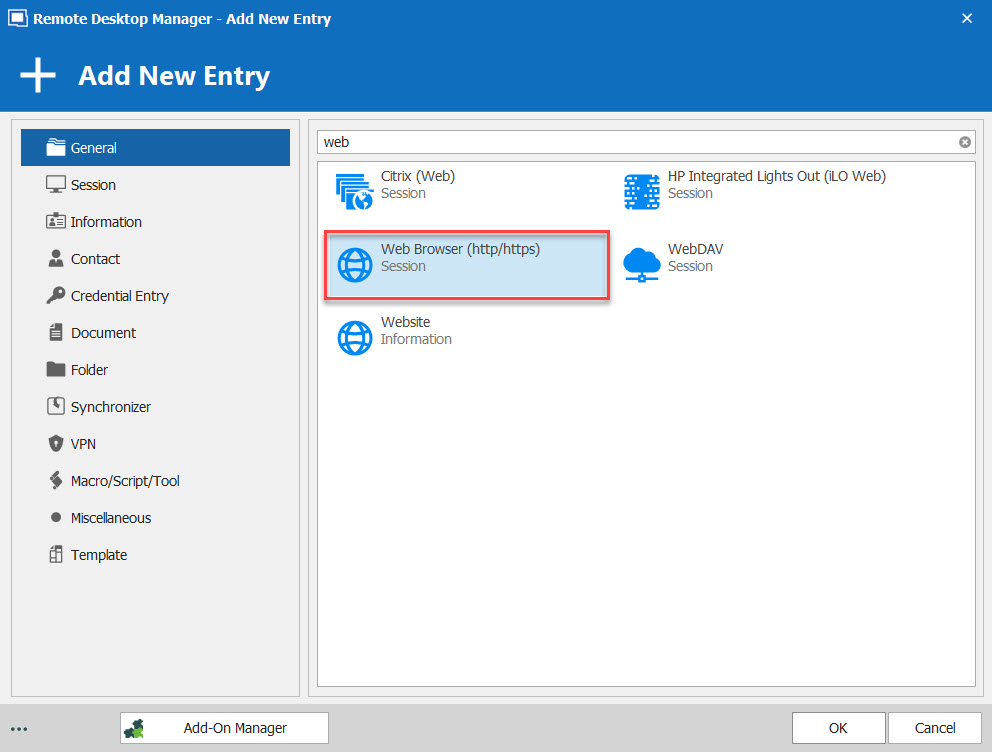
Best Regards,
Etienne Lord
webbrowser.jpg
I have tried with both http/https web browser and iDRAC. Neither work for me.
Hello,
Would you be able to send the iDrac link via private message? I will do some test on my side.
Best Regards,
Etienne Lord
The iDRAC is on our internal network. You won't be able to connect to it.
Hello,
I believe the issue with iDRAC is that there is no input ID for the Username and Password field, therefore they cannot be autofilled.
You could try to follow the second Method in this help topic in order to have a look : https://help.remotedesktopmanager.com/troubleshooting_webauthentication.html
Best Regards,
Etienne Lord
Hi all,, I've been playing with this and although I haven't got it completely working, i have it autofill at least my username & password.
I still must select our domain in the dropdown box, and press the submit button.
Our setup:
(old) Dell server PowerEdge R720, with an iDrac 7.
the iDrac is coupled to our AD domain, so that's why we have to select our domain in the drop down box. (maybe if I logon with local iDrac credentials it may work)
I've captured some highlights from our iDrac login page html below:
<form method="post" onsubmit="sendLoginRequest();" onreset="return false;" name="auth" id="auth" action="">

<input style="width: 150px;" maxlength="512" value="" id="user" name="user" onfocus="javascript:isCancel=false;" type="text" autocomplete="off" />

<input style="width: 150px;" maxlength="128" value="" id="password" name="password" onfocus="javascript:isCancel=false;" type="password" autocomplete="off" />

<input type="hidden" id="ADUserDomain" />

<a class="blackpage_button_emphasized" href="javascript:frmSubmit()" id="btnOK" onfocus="javascript:isCancel=false;">
<a class="blackpage_button" href="javascript:frmCancel()" onfocus="javascript:isCancel=true;">
Now, I couldn't get the built-in Dell iDrac connection working with autologon. (yet?) probably because that entry doesn't let me finetune the HTML controls
I created a (sub)entry of type: website with the following specs:
website: the https url to the iDrac.
More settings: (link)
This gets me at least the username & password filled in that I have attached to this connection entry.
Will try more, but it is a good start :-)
Regards, Ben van Zanten
Ok :-) have been playing with it, and got it working.
You may have to tweak a little bit to get it working in your environment..
My Setup:
Our 'normal' / 'Master' connection entries are of type: RDP and have the Asset-Host and Asset-Domain fields filled with the hostname resp domain.
This allows us to use variables, since I'm using subconnections, we have $PARENT_xx$ variables below. you can always hard-code your values to get it working.
So I created a subconnection of type: Web browser (http/https) below this RDP entry.
Name: $PARENT_NAME$-iDrac-WebBrowser
General:
Website: your URL to your iDrac in our case we have the ILO/iDrac in a 'compute' DNS subdomain of the 'real' computer: https://$PARENT_INFORMATION_MACHINE_NAME$.compute.$PARENT_MACHINE_DOMAIN$
Application: Google Chrome (needed to get the 'Custom script' enabled below)
Login:
Authentication: Form
Login - Settings:
Enable : autofill login
Enable: autofill delay ( 2000 ms test in your environment)
Enable: auto submit
Enable: only send password in HTML password field
Login - Html Control ID:
Profile: default
Form ID: auth
Username ID : user
Domain ID: ADUserDomain
Password ID: password
One time password ID: <empty>
Login button ID : [SUBMIT]
Login - Custom:
Custom script (click on the link) : javascript:frmSubmit()
And then, finally as a cherry on the cake I got around the 'Domain' dropbox in the loginpage by editing on this same entry:
Enable: Advanced Mode (in the left bottom part)
Advanced - Username Format: {User}@{domain}
this last setting caused the logon form to ignore the 'domain' dropdown box,
I had to set the timeout to 2 seconds, AND made sure my 'AD domain' credentials are coupled to this entry.
Good luck! If any more screenprints around the text above are needed, please let me know
Regards, Ben van Zanten
Awesome. I did a slight variation of what you did. I have a lot of RDP connections, but I don't have Asset and Asset-host filled in any of them. I just created a webbrowser session using the settings you show above, and that worked. The credentials autofill and it does an autologon. I suspect I should be able to create a template with those settings and import a bunch of drac connections from a CSV file.
Thank you...this is awesome so far
After playing some more with this, it appears that these settings do not work for iDRAC 9, which i believe is based on HTML5. Specifically, I cannot get it to autopopulate credentials on these. I tried to "inspect" the webpage and look for the Control ID for the username field but couldnt find it. Maybe HTML5 is different in that respect. I will continue to play with it.
thanks
I also have a problem with iDRAC 9. I have no problem to populate the user and password with the settings above. But I am unable to "click" the Log In button. The setting
"Custom script (click on the link) : javascript:frmSubmit()"
does not do the trick.
Was anybody able to achieve this?
Brgds Andreas
I found a way to do it with iDRAC v9. You need to use Google Chrome as the browser. I use it embedded. Then open the HTML Control IDs and set the Login Button ID to "[ENTER]".
Brgds Andreas
iDrac 9 updated settings:
Login delay works at only 1000msec
Under Html Control ID:
Form ID: idracStartScreen
Username ID: username
Password ID: password
Login button ID: [ENTER]