RDM connecting to RDP then delay of about 10 seconds

I don't know when it started, 6-12 months ago, but when I connect to RDP sessions I will connect, login (either manually or with a saved password) then the session is active for 4-5 seconds, then I get the normal RDP "Reconnecting, The connection has been lost. Attempting to reconnect to your session... Connection attempt: 1 of 5" message. Then after 10-11 seconds it reconnects and everything is fine. It does this to every single server I connect to. Any ideas what causes this or what I can do to keep it from happening?
All Comments (26)
We have similar, for us it started to happen ever since we upgraded to windows 10 2004. which was somewhere in April. Although we don't have it all the times. to us it happens occasionally. sometimes multiple times a day, sometimes not for a few days. I wonder if it is RDP or RDM related... haven't dived into it very deep yet. Maybe also worth to ask Microsoft.
Regards, Ben
Hello,
Do you happen to have your Screen Sizing Mode set to "Smart Reconnect" with a delay in your RDP session's display tab? 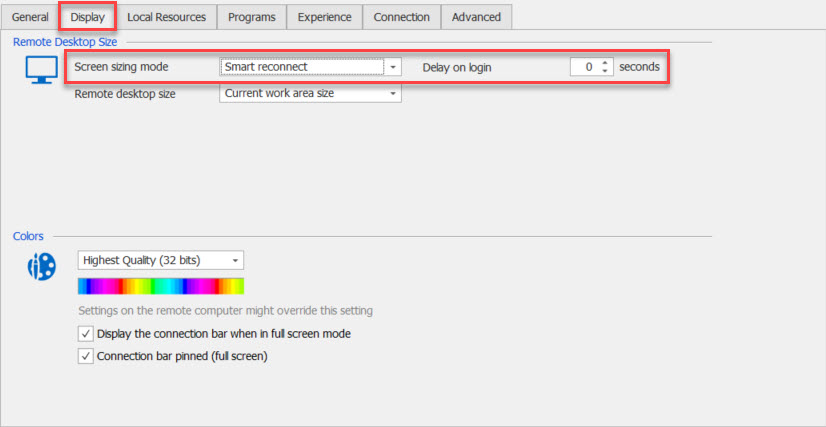
Best Regards,
Etienne Lord
reconnect.jpg
I check both the program options and it was set to smart reconnect with no delay and a few individual servers and they are all set to "Default"

Any other ideas?
Hello,
Does it happen if you try with another web browser type?
Best Regards,
Etienne Lord
I don't follow you, what do you mean by web browser type?
Hello,
Sorry, you can ignore that. Let me look into it.
Best Regards,
Etienne Lord
Hello,
Does it also happen when you launch your connection in External mode?
Best Regards,
Etienne Lord
I just tried one set to External mode and had the same behavior. It probably goes without saying, but I did check and when I use MSTSC.exe to connect I do not get the behavior.
Hello,
This is quite strange since launching in External uses MSTSC.exe.
Would you be able to send an export of one of the session (Right-click on the entry - Export - Export Selection (.rdm).
Simply make sure that "Include Credentials" is unchecked and send it using the link I sent you in Private Message.
Best Regards,
Etienne Lord
I have one and exported. I am not seeing any PM and I am not sure where to go to check for any.
Hello,
You should see it here : https://forum.devolutions.net/mailbox/inbox
If that doesn't work, you can send it to ticket@devolutions.net
Best Regards,
Etienne Lord
Hello,
I did get a strange behavior, would you be able to send a quick recording of the issue using both Docked and External?
You can send the recording using the same link I previously sent you.
Best Regards,
Etienne Lord
Files have been uploaded.
Thank you! I'll look into it :)
Best Regards,
Etienne Lord
Hello,
I got 2 conclusions from the recordings and the session that you sent me.
- In both video, the connection is launched in Undocked mode, which explain why you had the issue in "External" but no in MSTSC. It actually launches in Undocked, not external. You most likely have a User Specific Setting on your session that is set to Undocked. You can change by making a right-click on your session - Edit - User Specific Setting.
- You have some option checked and unchecked from what would be the default settings in the "Experience" tab, after some testing, I was able to prevent the issue by unchecking the "Detect network automatically" option, which was checked in the session you sent me. :

Best Regards,
Etienne Lord
network.jpg
I turned off that option and am still having the issue. I also looked at a number of other profiles and most of mine already have that option off. I can upload another profile that already had that option off if that helps you in anyway. I also tried them with the "Detect bandwith automatically" turned off and that didn't impact anything either. I know this is an odd one and thanks for looking in to it, it is driving me nuts.
A side note the "Detect bandwith automatically" text, Bandwidth is misspelled, it should have a second "d" in it before the "th"
Hello,
Would you be able to give it a try with the Display - Screen Sizing Mode option set to "Smart Sizing"
Also, I will report the Bandwidth error, thank you!
Best Regards,
Etienne Lord
If I set it to Smart Sizing then the delay goes away, but of course I lose the ability to change the resolution on the fly by dragging the edge of a window and expanding the size. I do use the feature of expanding the window size occasionally (few times a week maybe) and really like, but this delay is killing me :-)
Do you think it is something specific to my computer or something with the RDM?
Hello,
The issue seems to come from the Smart Reconnect and Undocked display mode. I will look into it.
Best Regards,
Etienne Lord
Hello,
The issue seems to come from the Smart Reconnect and Undocked display mode. I will look into it.
Best Regards,
Any updates to this? I am also having this issue
Hello,
Do you use the same configuration mentioned above? If so, would it be possible for you to create a portable version of RDM and see if you still experience a delay with it?
To do so, you will need to do the following:
1- Download the .zip file below:
https://remotedesktopmanager.com/home/thankyou/rdmbin
2- Create a new folder on your Desktop
3- Extract the content of the .zip file into the folder created at #2
4- Go in this folder once the .zip file has been extracted and run remotedesktopmanager64.exe
5- Enter your current serial
Please note that if you are using the Free edition of RDM, you will need to use the following .zip file instead:
https://remotedesktopmanager.com/home/thankyou/rdmfreebin
Best regards,
James Lafleur
Yes it appears to have the same behavior: when using smart reconnect, resizing the screen will take 10-15 seconds to reconnect.
Hello,
Thank you for your quick reply!
In that case, would it be possible for you to go under the Help section of RDM's ribbon and use the "Submit a support ticket" button to open a case with us?
Through it, we will be able to request a recording of this behavior and see what can be done.
Just make sure to mention the URL of this forum thread in your ticket.
Best regards,
James Lafleur
w00t! Looks like this is fixed after installing the latest update!
Hello,
We were still doing some test in order to see if everything was fine, glad that it's working! :)
Best Regards,
Etienne Lord