Certificate couldn't be loaded from the CertificateStoreLocation
Certificate couldn't be loaded from the CertificateStoreLocation

Disabled
Good day, colleagues. We have MariaDB with a password database on our server. Works on a certificate. Added a certificate, entered its thumbprint, entered CurrentUser. When connecting, I get the error Certificate couldn't be loaded from the CertificateStoreLocation. What to do?
Screenshot 2020-08-02 at 12.53.56.png
All Comments (6)
Hi,
Can you elaborate on what you mean? How was the certificate configured on the database? Are you talking about a certificate configured via Administration -> Security Provider?
Best regards,
Xavier Fortin
I'm having the same issue. Each time I open RDM I get a certificate error displayed. If I try and install it, Windows reports back that it's installed. Then I get the same error again. I can bypass by clicking Continue but that's not a solution. I like the app but not if I have to constantly bypass this issue. I've checked for the latest version, and the app reports I have it installed. Notice the error "Windows does not have enough information to verify this certificate." I have tried installing as user and to machine, neither way works. I keep geting the RDM error about the cert not being able to be verified.
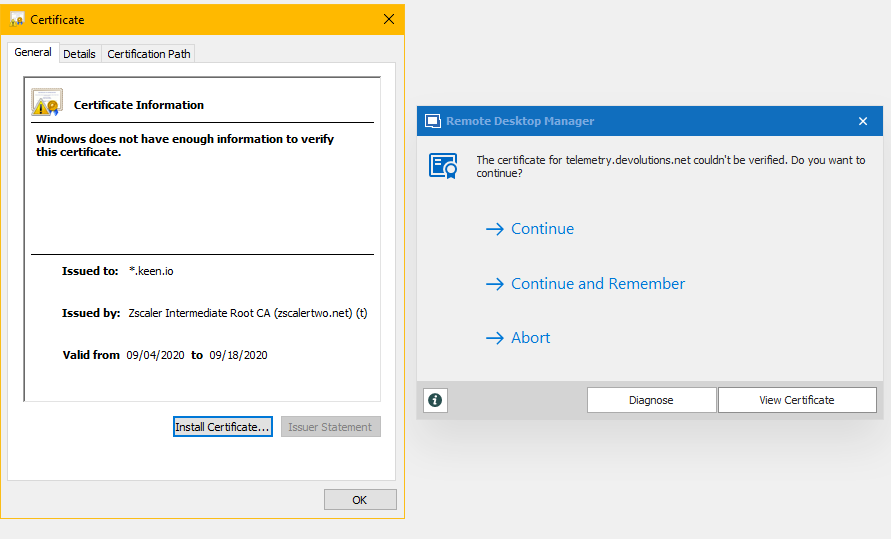
The error captures follows:
Issuer:
CN=Zscaler Intermediate Root CA (zscalertwo.net) (t)
OU=Zscaler Inc.
O=Zscaler Inc.
S=California
C=US
Name Hash(sha1): 5b10df31bf8be16ee76df26cee495f77b870addb
Name Hash(md5): b66049861e8b17000da93c151da6ed39
Subject:
CN=*.keen.io
Name Hash(sha1): 1c570636a0414bca93704d0e582d0d60dfd06bd3
Name Hash(md5): 114a18e77ba78b814e211cc1089e2324
Cert Serial Number: 5f53be404c9c9e6015ea1244850170c8
dwFlags = CA_VERIFY_FLAGS_CONSOLE_TRACE (0x20000000)
dwFlags = CA_VERIFY_FLAGS_DUMP_CHAIN (0x40000000)
ChainFlags = CERT_CHAIN_REVOCATION_CHECK_CHAIN_EXCLUDE_ROOT (0x40000000)
HCCE_LOCAL_MACHINE
CERT_CHAIN_POLICY_BASE
-------- CERT_CHAIN_CONTEXT --------
ChainContext.dwErrorStatus = CERT_TRUST_REVOCATION_STATUS_UNKNOWN (0x40)
ChainContext.dwErrorStatus = CERT_TRUST_IS_OFFLINE_REVOCATION (0x1000000)
ChainContext.dwErrorStatus = CERT_TRUST_IS_PARTIAL_CHAIN (0x10000)
SimpleChain.dwErrorStatus = CERT_TRUST_REVOCATION_STATUS_UNKNOWN (0x40)
SimpleChain.dwErrorStatus = CERT_TRUST_IS_OFFLINE_REVOCATION (0x1000000)
SimpleChain.dwErrorStatus = CERT_TRUST_IS_PARTIAL_CHAIN (0x10000)
CertContext[0][0]: dwInfoStatus=4 dwErrorStatus=1000040
Issuer: CN="Zscaler Intermediate Root CA (zscalertwo.net) (t) ", OU=Zscaler Inc., O=Zscaler Inc., S=California, C=US
NotBefore: 09/04/2020 11:28 PM
NotAfter: 09/18/2020 11:28 PM
Subject: CN=*.keen.io
Serial: 5f53be404c9c9e6015ea1244850170c8
SubjectAltName: DNS Name=*.keen.io, DNS Name=keen-io.mentor.com, DNS Name=vulpix.appcues.com, DNS Name=api.soofa.io, DNS Name=keen.cheatsheet.com, DNS Name=stream.tellimer.com, DNS Name=keen.io, DNS Name=analytics.candid.io, DNS Name=telemetry.devolutions.net
Cert: 1501410970e38a9bcd0bbf0c530b633e39d90854
Element.dwInfoStatus = CERT_TRUST_HAS_NAME_MATCH_ISSUER (0x4)
Element.dwErrorStatus = CERT_TRUST_REVOCATION_STATUS_UNKNOWN (0x40)
Element.dwErrorStatus = CERT_TRUST_IS_OFFLINE_REVOCATION (0x1000000)
Application[0] = 1.3.6.1.5.5.7.3.1 Server Authentication
Application[1] = 1.3.6.1.5.5.7.3.2 Client Authentication
Exclude leaf cert:
Chain: da39a3ee5e6b4b0d3255bfef95601890afd80709
Full chain:
Chain: 1501410970e38a9bcd0bbf0c530b633e39d90854
Missing Issuer: CN="Zscaler Intermediate Root CA (zscalertwo.net) (t) ", OU=Zscaler Inc., O=Zscaler Inc., S=California, C=US
Issuer: CN="Zscaler Intermediate Root CA (zscalertwo.net) (t) ", OU=Zscaler Inc., O=Zscaler Inc., S=California, C=US
NotBefore: 09/04/2020 11:28 PM
NotAfter: 09/18/2020 11:28 PM
Subject: CN=*.keen.io
Serial: 5f53be404c9c9e6015ea1244850170c8
SubjectAltName: DNS Name=*.keen.io, DNS Name=keen-io.mentor.com, DNS Name=vulpix.appcues.com, DNS Name=api.soofa.io, DNS Name=keen.cheatsheet.com, DNS Name=stream.tellimer.com, DNS Name=keen.io, DNS Name=analytics.candid.io, DNS Name=telemetry.devolutions.net
Cert: 1501410970e38a9bcd0bbf0c530b633e39d90854
A certificate chain could not be built to a trusted root authority. 0x800b010a (-2146762486 CERT_E_CHAINING)
------------------------------------
Incomplete certificate chain
Cannot find certificate:
CN="Zscaler Intermediate Root CA (zscalertwo.net) (t) ", OU=Zscaler Inc., O=Zscaler Inc., S=California, C=US
Cert is an End Entity certificate
ERROR: Verifying leaf certificate revocation status returned The revocation function was unable to check revocation because the revocation server was offline. 0x80092013 (-2146885613 CRYPT_E_REVOCATION_OFFLINE)
CertUtil: The revocation function was unable to check revocation because the revocation server was offline.
CertUtil: -verify command completed successfully.
Sincerely,
Todd Crenshaw
2020-09-11_10-21-39.png
@btcrenshaw,
I would recommend consulting this help article concerning the certificate prompt that you get
https://help.remotedesktopmanager.com/kb_security_certificatevalidation.html
Best regards,
Jeff Dagenais
Thanks Jeff. That appears to have resolved the problem!
Sincerely,
Todd Crenshaw
Disabled
Hello,
I'm having the same issue, but when I click on the URL suggested by Jeff, I get:
"The resource you are looking for has been removed, had its name changed, or is temporarily unavailable."
Can you please explain what steps I have to do to solve the issue?
thanks!!!
@koenswolfs
Sorry about this, here is the link you are looking for: https://kb.devolutions.net/rdm_certificate_validation.html
Best regards,
Christine Breault