RDM for Windows at every startup - Unable to Connect to your Data Source
RDM for Windows at every startup - Unable to Connect to your Data Source

Running latest version of RDM, 2020.2.17.0, and have configure RDM starts at startup of Windows.
However for the past month at every startup I am prompted with "Unable to Connect to your Data Source" and underneath that is "Unable to connect to Devolutions account". I then select cancel, File, Data Sources and select Devolution Online Drive and Ok. This connect automatically without entering any further details.
At startup there is full internet connectivity, Outlook is already running, and can ping say 8.8.8.8 immediately.
How can I fix this issue as very annoying having to select Data Source everytime. See below for dump of Details of the Unable to Connect error:
Devolutions.RemoteDesktopManager.Business.TryGoOfflineException: Unable to connect to Devolutions account.
at Devolutions.RemoteDesktopManager.RDMOProxy.RDMOWebApiClient.Login(String username, String datasourceID, Boolean forcePromptLucid, String source, String applicationPassword)
at Devolutions.RemoteDesktopManager.Business.DataSources.DevolutionsOnlineDriveConnectionDataSource.c85b0933bdb8fa0d0832e34a63fb55ffa(Boolean cd008a94e48eab2f6b70411dccafc4d7d)
at Devolutions.RemoteDesktopManager.Business.DataSources.DevolutionsOnlineDriveConnectionDataSource.Login()
at Devolutions.RemoteDesktopManager.RDMOProxy.RDMOWebApiClient.get_WebClient()
at Devolutions.RemoteDesktopManager.RDMOProxy.RDMOWebApiClient.get_BearerToken()
at Devolutions.RemoteDesktopManager.Business.DataSources.DevolutionsOnlineDriveConnectionDataSource.get_FullFileName()
at Devolutions.RemoteDesktopManager.Business.DataSources.DevolutionsOnlineDriveConnectionDataSource.LoadConnectionsFromCustomOfflineFile()
at Devolutions.RemoteDesktopManager.Managers.BaseOfflineEngine.c22284b1097224dc9e13af53a1413e9ec()
at Devolutions.RemoteDesktopManager.Managers.OpenMCDFv2OfflineEngine.cf0d11ec495ac6d5b31c8061684397e9e()
at Devolutions.RemoteDesktopManager.Managers.BaseOfflineEngine.get_HasOfflineChanges()
at Devolutions.RemoteDesktopManager.Managers.OfflineManager.get_HasOfflineChanges()
at Devolutions.RemoteDesktopManager.Managers.ConnectionManager.c265e8ac72a30f4b1f19263ef81d4554c(BaseConnectionDataSource c7f28727fc7a5daa94ba08f688b2a5781)
at Devolutions.RemoteDesktopManager.Managers.ConnectionManager.LoadConnections(BaseConnectionDataSource dataSource, ConnectionEngine currentEngine)
All Comments (10)
Hi Dale,
Because you mention you need to select your Devolution Online Drive at start up, could you validate in File - Data Sources - On start up, and see if it is selected as the default data source.
Best regards,
Christine Breault
Hi Christine,
See screenshot below the default data source that is already set - this is always how we have had it configured.
Is there any issue you can see with our setup or all looks correct?
Hi Dale,
Have you tried recreating the devolutions online drive datasource from scratch ?
Also are you using some sort of proxy ?
Regards,
Alexandre Roy
No I have not tried recreating the Devolutions online drive datasource from scratch - can you detail what I need to do?
And no proxy in use, never have.
Hi again,
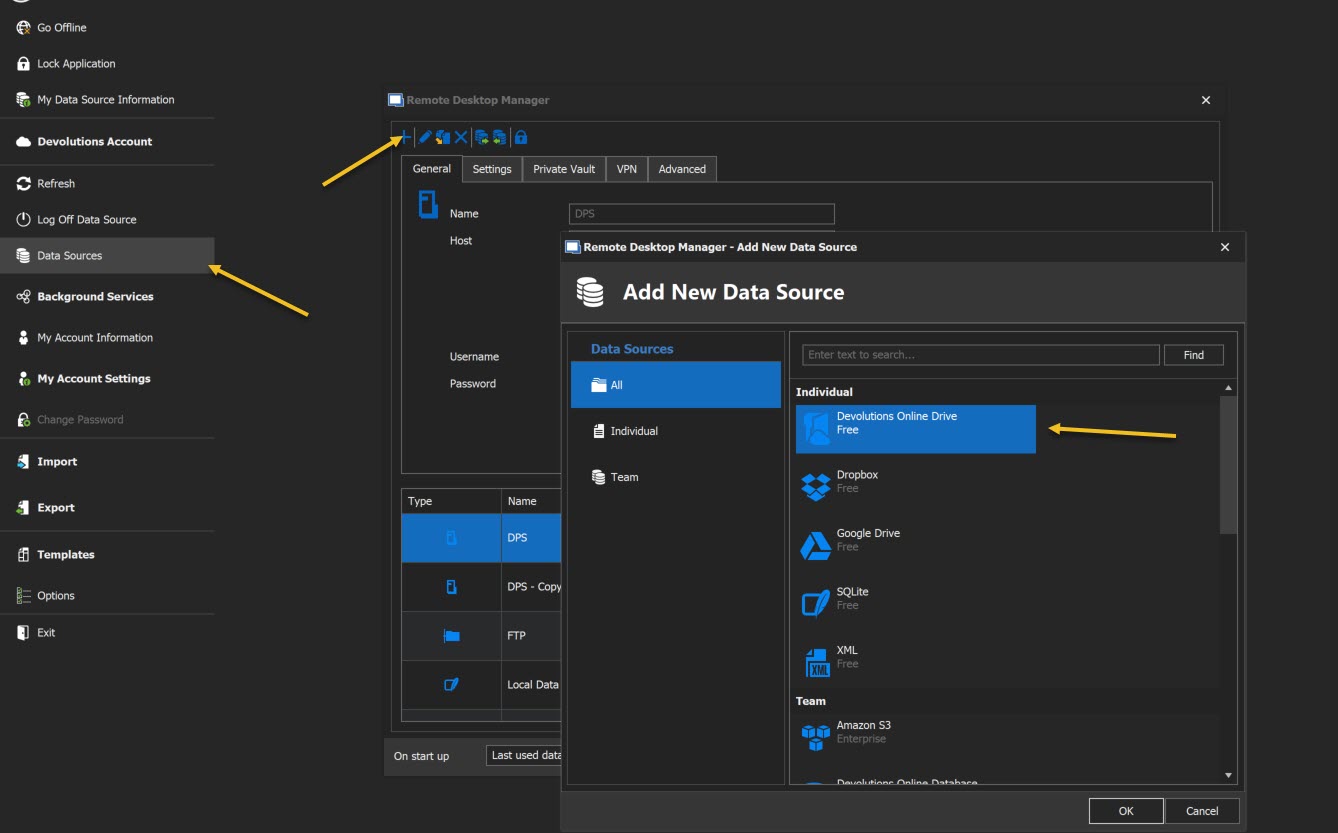
If you go in File > Datasource you simply add a new datasource and select Devolutions Online Drives like you previously did when you first added it.
Then simply fill the the right information.
Regards,
Alexandre Roy
2020-07-21_20-55-11.jpg
And then can you migrate all to that new Online Drive data source?
This won't affect your data, the content will still be in there, basically you're recreating a link to your data with the steps I gave you.
You only have to use the same informations to create it, the data is saved on the cloud.
Regards,
Alexandre Roy
Hello,
Just out of curiousity, did the issue went away or do you require more assistance ?
Regards,
Alexandre Roy
Hi Alexandre,
Recreating the online drive data source seems to have fixed our startup issue - great news. Thank you for your help and I will mark answer as accepted.
Regards,
Dale.
Glad it worked out :), I will investigate, I have my doubt on what the issue could be.
Thanks for reporting this.
Regards,
Alexandre Roy