All time password lost for RDP connection

I have in several cases the same Host, a different user name and a different password for a RDP connection.
However, each time I use one of this two connections with same HOST only my last password is kept.
What need to be adjusted in the right way, that I can maintain two RDP connections which have same Host but different user name and different passwords?
Must be possible with right adjustments
I am working with a German version:
Thank you for your help!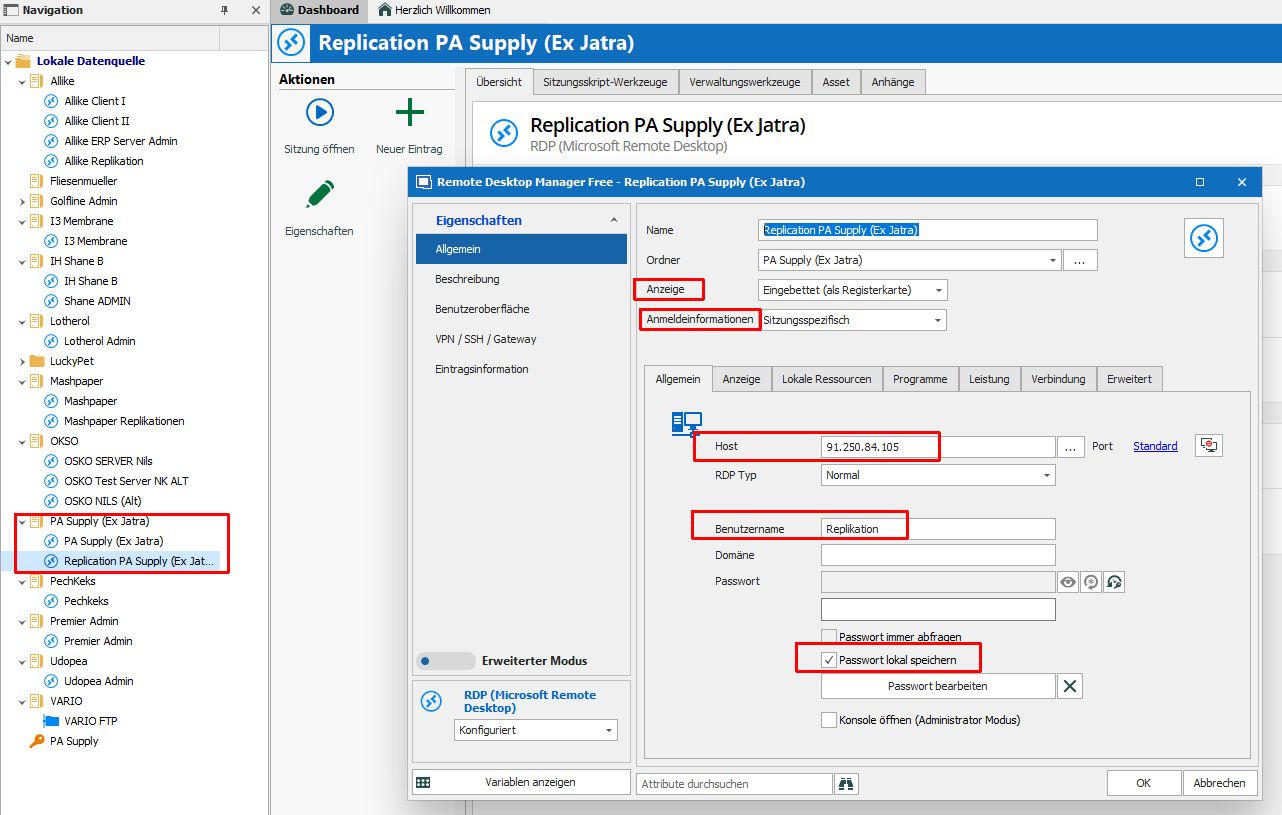
Nils
Devolution.jpg
All Comments (2)
Hi Kalle
I'd solve this as follows: (2 options)
- make a folder structure per password.
- create a shortcut of your RDP connection in each folder. specify 'inherit' as the credentials ( anmeldeninformationen ). to create one, use either:
- edit - create shortcut specify another folder
- edit - edit entry. use the ... button near 'folder' to multiselect multiple folders ( or type them ; separated)
- That will show your single RDP entry in multiple folders.
- specify a credential on each folder structure, either by editing the properties of that folder or editing user specific settings so you can use your personal credentials.
This works. So you have a single connection object, and depending on the folder where you start it, it has different credentials.
Another option would be (never tried) to create a credential object of type: Password list. add your multiple creds in here.
not sure but as far as I tested, that prompts for the cred to use.
Regards, Ben
Hello,
What Ben05 proposed are pretty good solutions.
On a side note, saving the password locally may results in an issue like this because of a limitation with RDP. Saving your credentials in the database should help.
When saving the credentials locally, they are saved in Windows Credential Manager and the key, is the host. This will explain why you encounter an issue when using multiple credentials.
Best regards,
Jeff Dagenais