RDP on MacBook Pro and discrete video card

When I connect to a RDP session, my MacBook Pro 16" switches to the discrete video card
And even after RDP disconnect Macbook can't switch back to Intel integrated GPU as RDM doesn't release it. I have to close RDM and only after that Macbook switches to Intel GPU. It's quite uncomfortable as I have to always remember to close the app or sometimes I have a lot of opened linux ssh console tabs (none of them RDP) and I just don't need to close the app but Macbook still using discrete video card and as consequense I have much higher battery drain.
All Comments (22)
Hi,
Sadly, I do not believe there is not much we can do. As far as I know, this is how macOS handles graphics switching. By default, we use Metal to render RDP sessions. When macOS see the Metal graphics context be created, it switches to the discrete graphics card. I'm not aware of any means to manually notify macOS that the discrete GPU is "no longer necessary" even after the graphic context has been released.
Are you aware of an application that does that? This could be avenue of investigation.
Best regards,
Xavier Fortin
gfxCardStatus
https://gfx.io
features:
- Growl or Notification Center notifications when the GPU changes.
- The Dependencies list: open the gfxCardStatus menu when your discrete GPU is active to see what is turning it on.
- Manually switch to Integrated Only or Discrete Only mode to force one GPU on or the other.
Hi,
Thanks for this, I'll open an issue to investigate this.
Best regards,
Xavier Fortin
Hi
Three years later and this issue still persists.
Drains the battery and burns your lap for absolutely no reason (the Intel UHD GPU is more than enough)
MS RDP app does not have this issue. Even entire VMs are running without discrete GPU - happily.
Please advise on the roadmap, or we'll have to start looking for alternatives.
Thank you
Hi,
Unfortunately, this never got to the top of our list. I've increased the priority and we'll see about scheduling investigating this in the coming months. With an issue like this, it's difficult to give an ETA though.
Best regards,
Xavier Fortin
Hi rishalm,
I didn't have the time to investigate the gfxCardStatus trail, but I did take the time to add a new option in the app Settings -> Advanced -> Advanced -> "Favor low power GPU" option that should prevent the switch altogether. I'm betting here on the integrated graphics being more than enough for the rendering needs of our entries. I'd like you to confirm if, after checking this, the GPU stopped from switching from the integrated to the discrete and if so, if you see any noticeable impact on performances.
I'm asking you this because we no longer have MacBook with discrete GPU in our team (since we've switched to M2 processors MacBook).
RDM Mac 2023.3.8.0 is available with this option.
Best regards,
Xavier Fortin
Oh! Also, here's a screenshot of the new option location: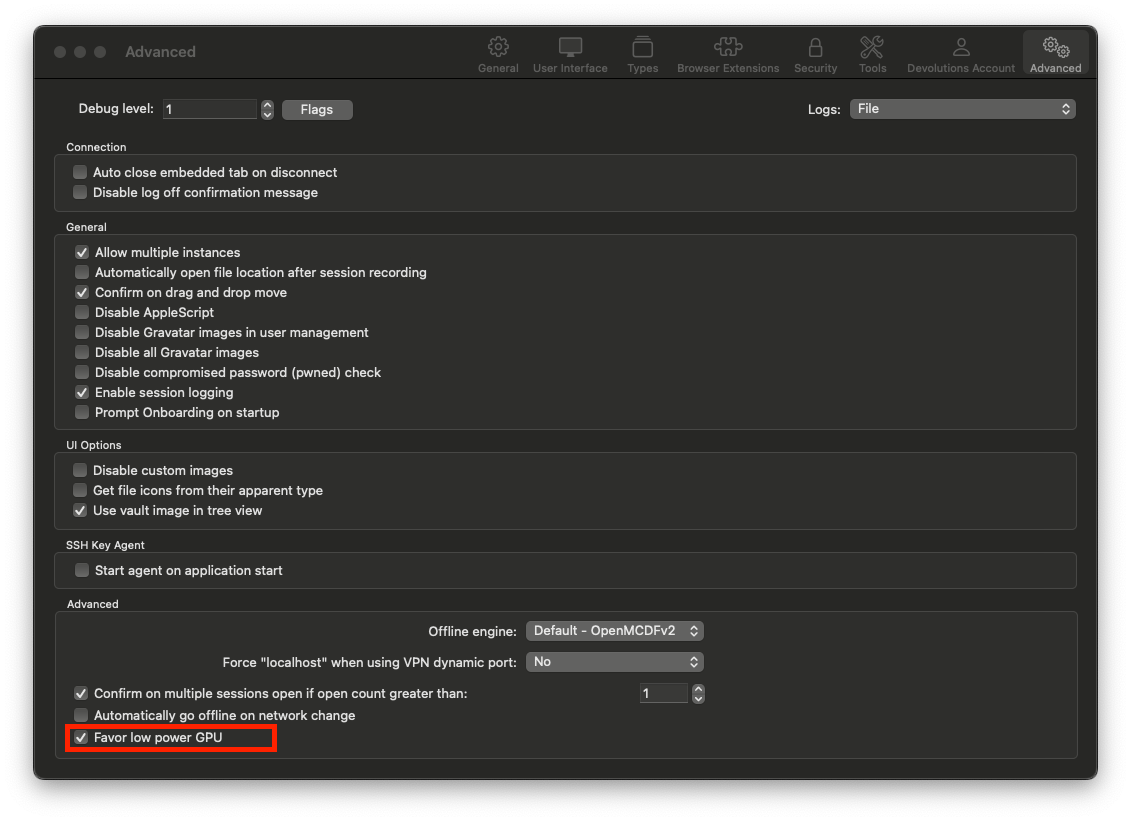 Best regards,
Xavier Fortin
FavorLowPowerGPU.png
I managed to solve the issue the same way - just switched to M Pro CPU and forgot about power draining almost in any software.
WOW! What an unexpected pleasant surprise! Great Community!
Unfortunately, I can't simply migrate my workflow from x86 to arm.
New update seems to be working great!
Thanks a lot.
Hi ciperw0lf,
Glad to hear it!
Do not hesitate if you have any other issues (especially if you notice performance issue with the RDP sessions).
Best regards,
Xavier Fortin
Hi all,
2y old thread, but did not want to open a new one since problem is related.
16" Macbook pro with AMD Radeon Pro 5500M.
Just opening the program (no connections established) and it uses the graphics card. (Favor low power GPU is selected).
It is using a lot of resources just being opened, nothing running.
Can this be improved maybe ?
And sadly, we can't always upgrade the macbooks just because it would work better on the new one ...
Regards.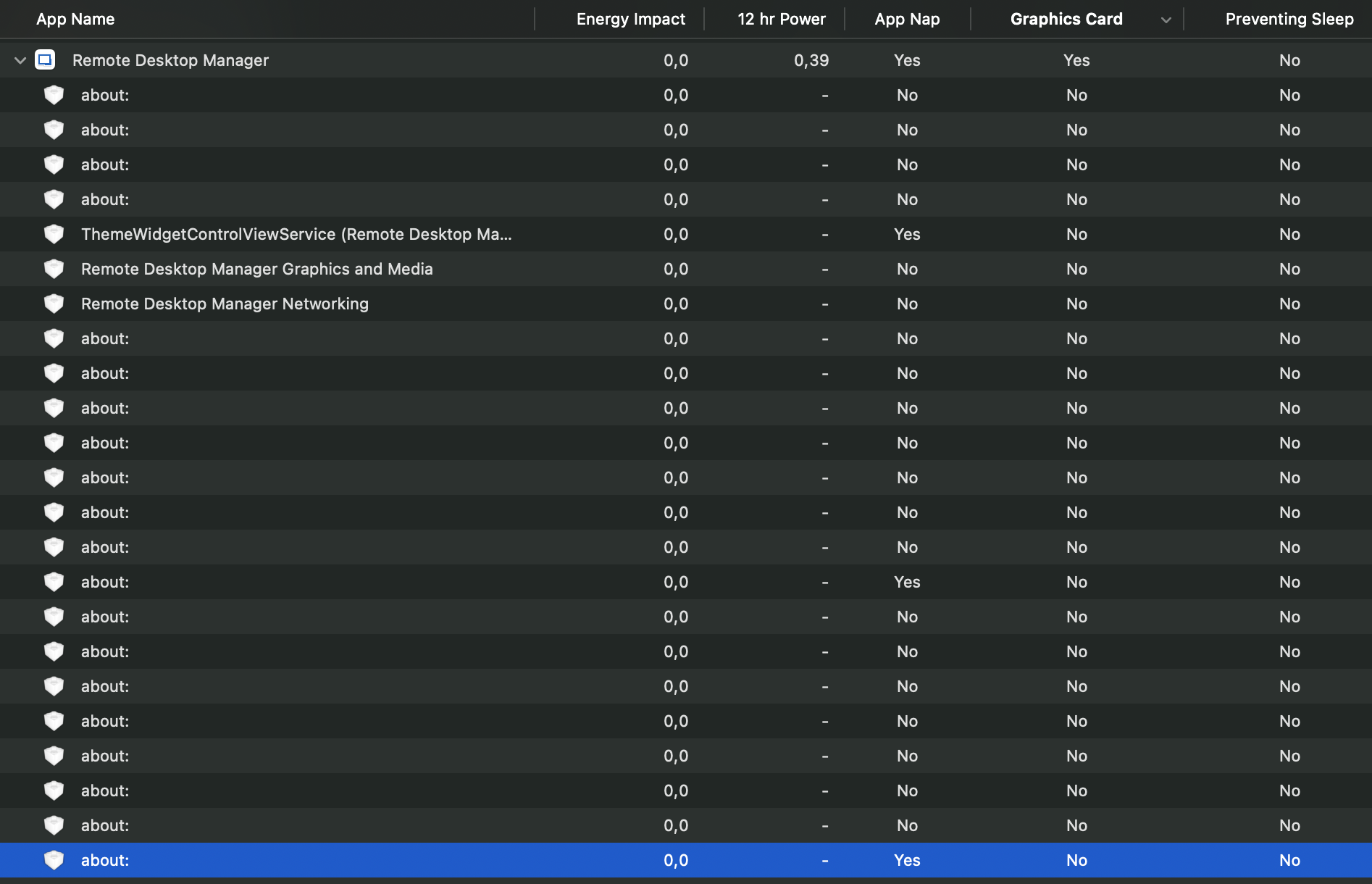 because it would work better on the new one ...
Regards.
Screenshot 2025-06-25 at 04.04.15.png
Hello
The option to "favour low power GPU" is specific to running sessions that use Metal for rendering (e.g. RDP, VNC). It doesn't do anything for the application just in an idle state.
Possibly there are some changes that can be made here, I do feel the pain with the later generation Intel machines that ran hot and noisy under load.
But, your screenshot doesn't help to show the issue; energy impact is zero and App Nap is enabled.
You said it uses a lot of resources, but can you show what? Is it CPU, memory?
Thanks and kind regards,
Richard Markievicz
Hello
The option to "favour low power GPU" is specific to running sessions that use Metal for rendering (e.g. RDP, VNC). It doesn't do anything for the application just in an idle state.
Possibly there are some changes that can be made here, I do feel the pain with the later generation Intel machines that ran hot and noisy under load.
But, your screenshot doesn't help to show the issue; energy impact is zero and App Nap is enabled.
You said it uses a lot of resources, but can you show what? Is it CPU, memory?
Thanks and kind regards,
@Richard Markiewicz
Hi there,
The worst thing is that we open the app, use it just for let's say OTP codes, and after some time, the laptops are hot. Looking over, it triggers the discrete GPU and never let's go.
So there should be something it can be done to stop this behavior.
If we open a remote session (RDP) AND we have configured an option to have "maximum performance" then yes, for the duration of the RDP session, it can use the discrete GPU but when session is stopped, it should let go.
Not much to test, it is the same behavior on different macbooks with similar graphics, so not a specific macbook bug or something.
If you need something I can help with some testing.
Thank you.
Hello
This subject is a little bit complicated and I've started some investigation but I don't have a quick fix. We are also hampered on our side by a lack of test machines for this environment.
In the first case, I need to check if on our side (in our code) we're doing something that prevents the application from using integrated graphics.
The next problem I see, is that any part of the application using Metal for rendering will automatically kick in the discrete graphics card unless it's explicitly opted out from. We've already addressed this in our code (the "favour low power GPU" option) but notably, we've started migrating our products to use AvaloniaUI for parts of the interface. I do believe Avalonia probably renders using Metal by default and it's likely this would also kick in the discrete GPU.
We've had a somewhat similar issue on Windows recently which we were able to address by exposing some additional options from the Avalonia compositor. I wonder if the same approach might help in this situation.
Do you recall if this is a recent or semi-recent regression? Did things behave better on your side, for example, in late 2024 releases or even in 2025.1?
In the meantime you could see if gswitch enables you to force the integrated graphics card.
Thanks and kind regards,
Richard Markievicz
Hello
This subject is a little bit complicated and I've started some investigation but I don't have a quick fix. We are also hampered on our side by a lack of test machines for this environment.
In the first case, I need to check if on our side (in our code) we're doing something that prevents the application from using integrated graphics.
The next problem I see, is that any part of the application using Metal for rendering will automatically kick in the discrete graphics card unless it's explicitly opted out from. We've already addressed this in our code (the "favour low power GPU" option) but notably, we've started migrating our products to use AvaloniaUI for parts of the interface. I do believe Avalonia probably renders using Metal by default and it's likely this would also kick in the discrete GPU.
We've had a somewhat similar issue on Windows recently which we were able to address by exposing some additional options from the Avalonia compositor. I wonder if the same approach might help in this situation.
Do you recall if this is a recent or semi-recent regression? Did things behave better on your side, for example, in late 2024 releases or even in 2025.1?
In the meantime you could see if gswitch enables you to force the integrated graphics card.
Thanks and kind regards,
@Richard Markiewicz
I will be honest, I did not even expected an answer. This tool is still a little mystery to me. I first used it like 6y ago when I had to use both windows an mac and had a lot of RDP's that I needed to not make from scratch when changing platforms.
I really wanted to use it and even promote it in my organization, but some things just did not worked for me. I can't tell exactly what. It is a big tool, with lots of options (maybe to many?) but you know better your users base.
So every year or so I gave it a try. Database on Mac os had a bug and you could just duplicate it to bypass the password (fixed), then I saw you can just see any password, no way to hide it unless you have some paid version (or I think that is how it works). Then, I always recall it was using a lot of resources (GPU mostly but also ram) compared to the light official Microsoft Remote Desktop for Mac - so I used that.
That being said, I don't recall regressions since I probably skip 5 or more versions because I am not using it.
Now, I wanted to give it a try again and I also have a team that was interested but it is 38c outside, and those intel Macs (well, any intel high end) are a pain, you give up any software that produces heat :)
I can, however, try 1-2-3 versions for testing, if you tell me what to try/test or if it makes any sense.
Right now, I am on 2025.2.6.8 and Sequoia 15.5
With no external monitor or any other app running, I just open it and in about 5sec, I can see the AMD graphics card pop up and stars being used.
Oh, also, another issue - If you open a RDP session, and leave it, next day it will be using like 2+GB of ram. Closing the RDP session does not free the RAM. So ... it just feels very "heavy". If you use ALL the features it has (and has a lot) then maybe it makes sense, but for RDP only...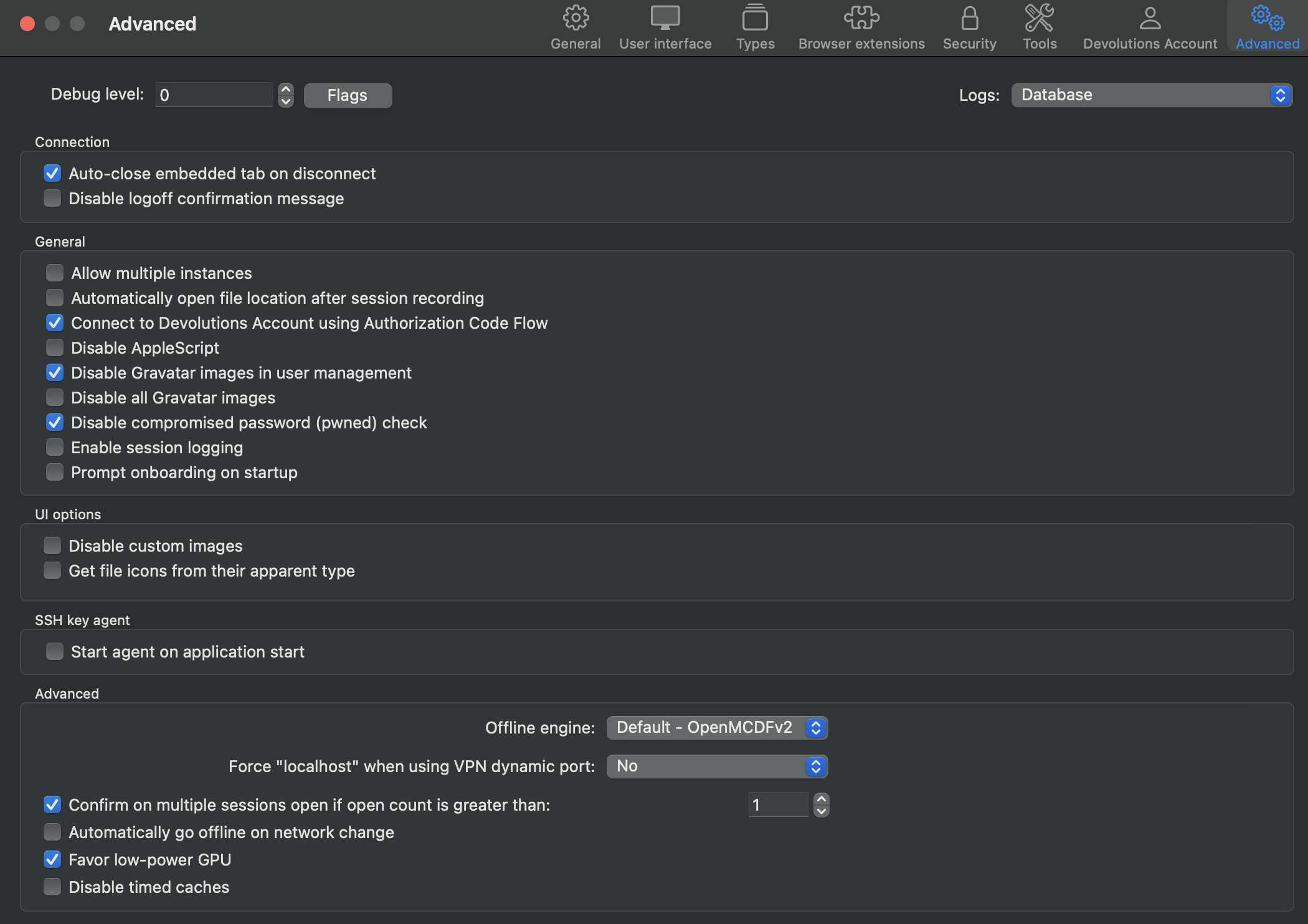
Screenshot 2025-06-25 at 23.19.50.png
Hello
I understand your feeling. RDM is a big complicated tool, a kind of Swiss army knife. My understanding is that previous attempts to produce something like an "RDM-lite" have fallen pretty flat, where the consensus seems to be that most users want a large set of features. I'm not sure where that lies with the future strategy of the product. Quite simply it will always be much more resource heavy than "just" an RDP client, like Windows App. I do encourage you to look at the blog post I linked above ("Modernizing the codebase of RDM"), and I am encouraged that you seem willing to keep testing the waters with RDM Mac to see if it fits for you.
Back to the issue at hand - I and many of the developers don't use Intel Macs at this point, although we have a handful available for QA and testing. I will say that the percentage of RDM Mac users overall still on Intel is meaningful, but small, and decreasing constantly.
If you have the time, I'd ask if you can download 2024.2.10.4. No need to configure a data source or do anything really - does starting the bare application on your Intel Mac start the discrete GPU? It would help me test an assumption about AvaloniaUI.
I'm also interested that you seem to see a memory leak with RDP. Can you tell me if you are using the "sandboxed" mode for RDP? It's in the "Advanced" tab of the RDP session settings.
Thanks and kind regards,
Richard Markievicz
Hello
I understand your feeling. RDM is a big complicated tool, a kind of Swiss army knife. My understanding is that previous attempts to produce something like an "RDM-lite" have fallen pretty flat, where the consensus seems to be that most users want a large set of features. I'm not sure where that lies with the future strategy of the product. Quite simply it will always be much more resource heavy than "just" an RDP client, like Windows App. I do encourage you to look at the blog post I linked above ("Modernizing the codebase of RDM"), and I am encouraged that you seem willing to keep testing the waters with RDM Mac to see if it fits for you.
Back to the issue at hand - I and many of the developers don't use Intel Macs at this point, although we have a handful available for QA and testing. I will say that the percentage of RDM Mac users overall still on Intel is meaningful, but small, and decreasing constantly.
If you have the time, I'd ask if you can download 2024.2.10.4. No need to configure a data source or do anything really - does starting the bare application on your Intel Mac start the discrete GPU? It would help me test an assumption about AvaloniaUI.
I'm also interested that you seem to see a memory leak with RDP. Can you tell me if you are using the "sandboxed" mode for RDP? It's in the "Advanced" tab of the RDP session settings.
Thanks and kind regards,
@Richard Markiewicz
Just to be clear, I don't have any demands, I am just a regular user somewhere on the globe :)
Yes, I know Intel macs are dying, but hey, not everyone can buy the latest and greatest all the time. Less than 5y ago, this mac was top spec, and top price so ...
I will test 2024.2.10.4. and come back with the results (I am leaving soon in vacation so no promises).
And yes, I am using the "sandboxed" option - it says "recommended" so ...
Should I try without it ?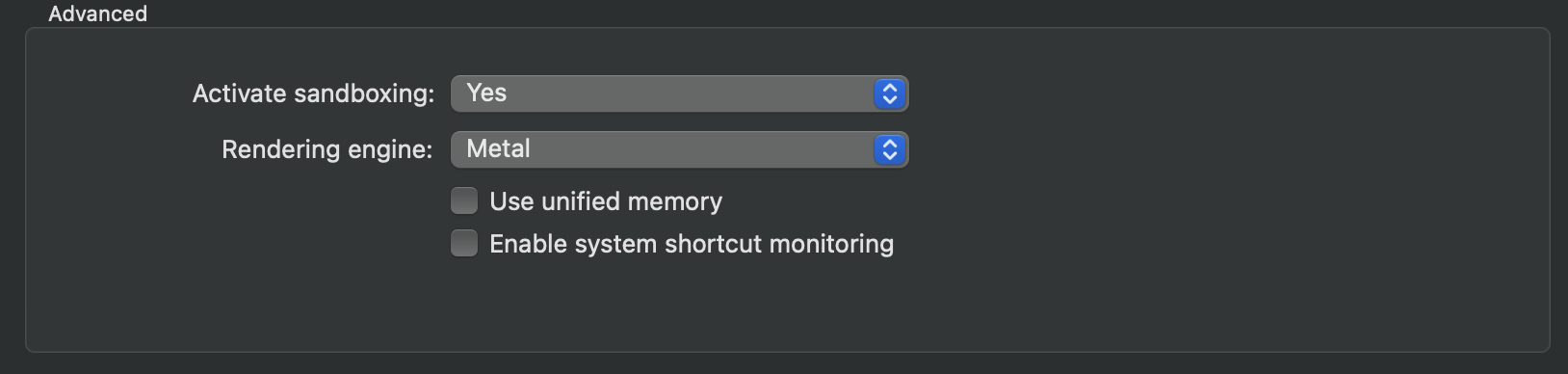
Screenshot 2025-06-26 at 12.51.37.png
Hi
Thanks for the feedback and I'll wait to hear some more from you.
For the sandboxing - that's fine; the main purpose of the sandboxing mode is that it runs the RDP connection in a separate process. This is just to make RDM more resilient if the RDP process crashes, it won't bring down the whole application. Historically we had stability issues here - FreeRDP is a big, complicated chunk of C code and can be hard to integrate in a stable way. That being said, the integration has come on leaps and bounds in the last years and I generally have sandboxing mode turned off.
Anyway, the reason I asked was, if you are seeing a memory leak this tells us which part of the application the leak exists in. Since you're running sandboxed, any leak must be in RDM itself or the rendering engine, not the RDP side itself.
Thanks and kind regards,
Richard Markievicz
Hi
Thanks for the feedback and I'll wait to hear some more from you.
For the sandboxing - that's fine; the main purpose of the sandboxing mode is that it runs the RDP connection in a separate process. This is just to make RDM more resilient if the RDP process crashes, it won't bring down the whole application. Historically we had stability issues here - FreeRDP is a big, complicated chunk of C code and can be hard to integrate in a stable way. That being said, the integration has come on leaps and bounds in the last years and I generally have sandboxing mode turned off.
Anyway, the reason I asked was, if you are seeing a memory leak this tells us which part of the application the leak exists in. Since you're running sandboxed, any leak must be in RDM itself or the rendering engine, not the RDP side itself.
Thanks and kind regards,
@Richard Markiewicz
Hi, had some time and tested 2024.2.10.4 - no issues, discrete gfx is not triggered on open.
(disabling RDP sandboxing on latest version made no difference)
Hello
Thanks for confirming my assumption. I've created a ticket with the upstream project to allow using integrated graphics on macOS. We'll have to wait and see what they think of that, or if it gets any traction.
I've also proposed internally that we add an option to RDM Mac to allow using software rendering instead of hardware. It would prevent the switch to discrete graphics, but performance might be measurably worse (so it would be a case of; fixing one problem to create another - if the CPU usage is too high, then you'll still have the power and thermal cost). Again, we don't really have a good infrastructure to test that with but it's a relatively simple thing to try.
I'll try to post any update back in this thread.
Thanks again and kind regards,
Richard Markievicz
Hello
This subject is a little bit complicated and I've started some investigation but I don't have a quick fix. We are also hampered on our side by a lack of test machines for this environment.
In the first case, I need to check if on our side (in our code) we're doing something that prevents the application from using integrated graphics.
The next problem I see, is that any part of the application using Metal for rendering will automatically kick in the discrete graphics card unless it's explicitly opted out from. We've already addressed this in our code (the "favour low power GPU" option) but notably, we've started migrating our products to use AvaloniaUI for parts of the interface. I do believe Avalonia probably renders using Metal by default and it's likely this would also kick in the discrete GPU.
We've had a somewhat similar issue on Windows recently which we were able to address by exposing some additional options from the Avalonia compositor. I wonder if the same approach might help in this situation.
Do you recall if this is a recent or semi-recent regression? Did things behave better on your side, for example, in late 2024 releases or even in 2025.1?
In the meantime you could see if gswitch enables you to force the integrated graphics card.
Thanks and kind regards,
@Richard Markiewicz
Hi,
Yes, using gswitch with integrated works. Opening RDM keeps the discrete graphics off.
While the RDM is running, using gswitch to switch to default dynamic, immediately triggers the discrete card.
PS: just upgraded to 2025.2.9.0 = same results.
Hello
Thanks for confirming. gswitch could be used as a workaround for now, although I agree it's not ideal. I've opened a ticket with the upstream dependency to get this fixed. It seems they are in agreement; since they are a UI framework and not a game engine; using the discrete GPU by default is unnecessary/ They also have a corresponding option already for their Vulcan backend so there is precedent for this change.
Thanks for your patience
Kind regards,
Richard Markievicz