Importing a theme into ssh shell

I've been using putty which I know is deprecated because I can import my solarized theme. Unfortunately I've been having issues with utilizing private keys and starting to switch over to using ssh shell. I know you can customize colors which is limited and time consuming. Is there a way I can import a colored theme for example solarized which is a fairly common color schema?
All Comments (9)
Hello,
Could you give us an example of the theme format?
Regards
David Hervieux
I would be interested in this as well. The Solarized color scheme can be found here:
https://ethanschoonover.com/solarized/
I would manually adjust all the colors in Options > Types > Terminal > Colors, but the "More colors ..." link in the first tab does not save the color when I punch in RGB or Hex values and hit "OK".
The only additional colors that can be used in Windows RDM are the ones from the "Web" and "System" tab.
Hello,
Thank you for the link. From what I can tell, the closest format to what RDM is using would be the PuTTY tray format: https://github.com/altercation/solarized/tree/master/putty-colors-solarized
I've opened a ticket to allow RDM to import/export terminal color schemes, and we'll make it compatible with that format.
As for not being able to change the colors to their RGB/Hex values, we've opened a bug ticket for this as it should be working.
Regards,
Hubert Mireault
Hello,
The "More colors..." link works as expected for me. Could you make sure the luminance is not set all the way to black when saving ?
Regards
Jonathan Del Signore
Hello,
The "More colors..." link works as expected for me. Could you make sure the luminance is not set all the way to black when saving ?
Regards
Can confirm that this works when I slide luminance up first and not just enter HEX. -Thanks!
Hello,
The import/export feature for PuTTY tray color schemes will be included in version 2020.3.
Regards
Jonathan Del Signore
Is there a way to do this on the Mac? To make use of iTerm themes https://iterm2colorschemes.com ?
Hello,
You should be able to do this on RDM Mac by going under Remote Desktop Manager at the top left -> Preferences -> Types -> Terminal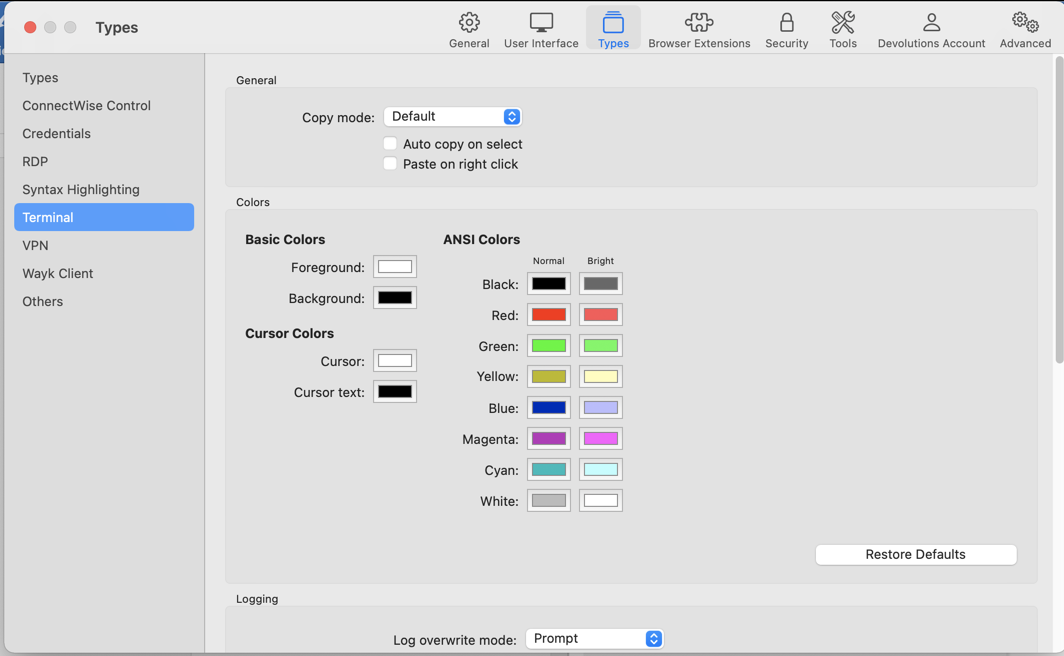
Let me know if this helps! If it is not the case, I would recommend creating another post on the RDM Mac section of our forum to avoid mixing the settings of the Windows and Mac versions of RDM. To do so, you can use the following link: https://forum.devolutions.net/product/rdm-mac
Best regards,
James Lafleur
forum.png
Hi, we have a few Mac's too and there is no import option, but an Eyedropper. So we simply stored a PNG image of the colors and pick them on the Mac.