How to correctly configure remote ESXi session?

Hello,
I need to configure remote sessions to ESXi hosts. I use RDM Ent. version 2019.2.24.0 64-bit. I try to configure remote session to ESXi hosts.
In Display I set: External
In Server IP/DNS: I set IP address
In VM Name/Configuraiton:
I can ping to IP address of ESXi host and I can translate IP address to FQDN and vice versa.
I try connect to session. VMWare Remote Console is opening. I see alert: Invalid Security Certificate ( it´s default cert). I select Connect Anyway. Window (Connect to Server) is opening for credentials entry. I set credentials and select OK.
Now I can see alert: The remote virtual machine on host cannot be opened: The requested virtual machine could not be found..
I don´t want to connect to virtual machine but directly to ESXi host. Is this possible? How can I set up it?
Best regards,
Martin
All Comments (12)
Hello Martin,
what do you want to achieve? Configuring ESXi Host / VM's or connect to a VM?
You can use the VMware Dashboard entry, or if you want to connect to a specific VM also a VMware Remote Console (where the VM-ID correspodence to the virtual machine ID on the host - this ID can be found in a functional VMware Dashboard entry)
Regards,
Min
Hello,
I want to use RDM for configuring the ESXi host. I have installed VMware Remote Console 11 and I tried to set VMware Remote Console session for ESXi host but without success. I don´t know WMware Dashboard and how to configure it :(.
Best regards,
Martin
Hello Martin,
alright - which ESXi version do you want to configure? If you're on ESXi version <6 you can set up a VMware (Player, Workstation, vSphere) session (in your case vSphere). If you're ESXi running version 6.5 and above the configuration is only possible via webbrowser.
( In my first post you'll find a hyperlink to the help topic for the VMWare Dashboard )
The VMware Remote Console is only to establish a connection to a VM.
Regards,
Min
Hello Min,
You are time saver :). I have ESXi v 6.7.x. I set web session to ESXi. Is it possible to set auto login to ESXi host? In the properties of the session, on the Login \ Credentials tab I filled in Username and Password. Unfortunately, after opening the session, the User name and Password in the browser are laundry.
Regards,
Martin
Hello Martin,
With the HTML web site of an ESXi server, it's possible to automatically fill in credentials. Under the Html Control ID, tab click on Discover. It should enter the proper ID for Username, Password and Login button.
Best regards,
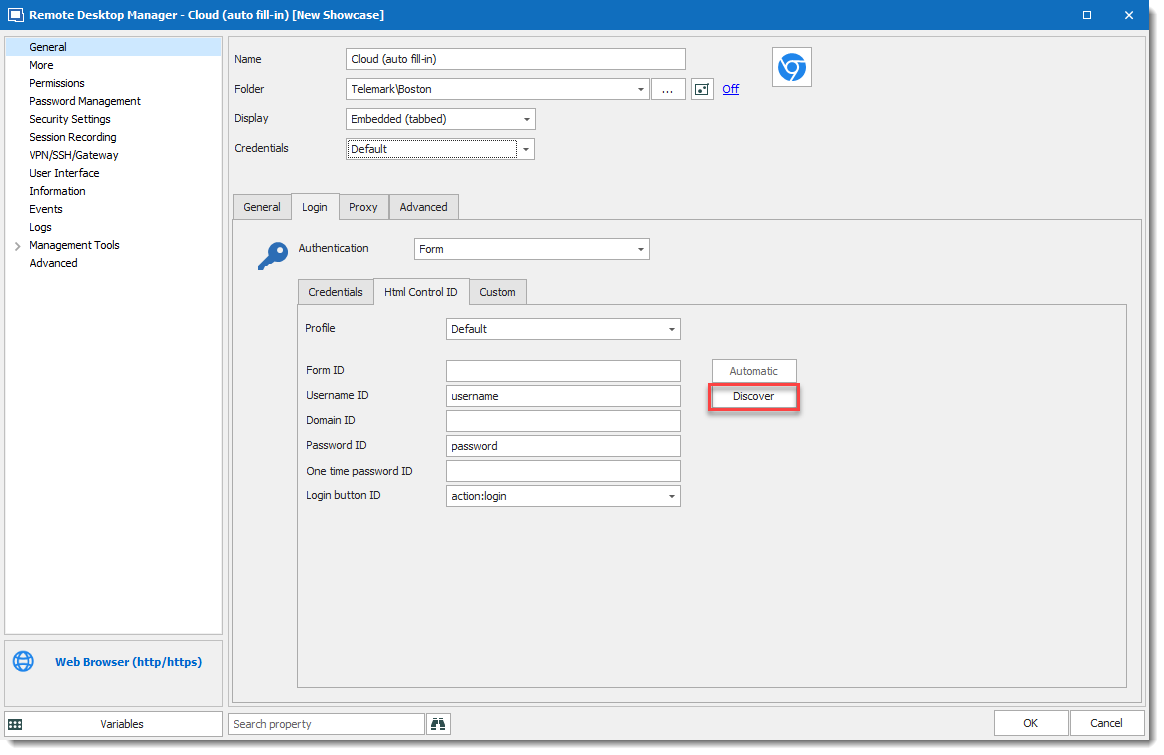
David Grandolfo
Web-browser-discover.png
Hello,
that's exactly what I needed. Thanks.
Best regards,
Martin
Hi David,
I tried your steps but it didnt work.
It connects to the website
it fills the credentials
BUT dont log.
Also, the discover function dont work anymore.
https://i.imgur.com/TWrCnQp.png
Here some screenshots
https://i.imgur.com/gV39yuu.png
https://i.imgur.com/YZ8MQoI.png
Any clues ?
Thanks in advance.
Hello,
As the Discover button doesn't work, you can try to inspect the login button's id in the web page as specified in this article under Method 2 section and set the value in the Login button ID parameter.
https://docs.devolutions.net/kb/workspace-browser-extension/how-to-articles/website-authentication/#method-2
Let me know if that helps.
Best regards,
Érica Poirier
Yé! :D
Thanks Erica.
Your are my time saver of the week. :)
Hello,
As the Discover button doesn't work, you can try to inspect the login button's id in the web page as specified in this article under Method 2 section and set the value in the Login button ID parameter.
https://kb.devolutions.net/rdm_web_browser_web_authentication.html#method-2
Let me know if that helps.
Best regards,
Hi Erica
Can you please update the link
Hello,
Here is the correct link: https://docs.devolutions.net/kb/workspace-browser-extension/how-to-articles/website-authentication/#method-2
Best regards,
Richard Boisvert
Thank you Richard