Ability to create per user Variables.
0 vote
Remote desktop Manager has the ability to create Custom Variables, and that is a really great feature for large deployments.
However, it would be awesome for a user to have the ability to create their own Variables unique to them. For example in my Cyberark Deployment, there is a "Privileged account" setting that needs to be specified. However the entry can not be user specific (Design flaw, already opened a ticket on that)
However if users could create unique variables we could say use the variable $CA_User_Admin$ in the record then create the setting such that that variable, $CA_User_admin$ can be set to the account that user would use.
This is just an example of what could be done. Would be great if these kind of Variables could also exist in a users private vault.
All Comments (39)
Hello,
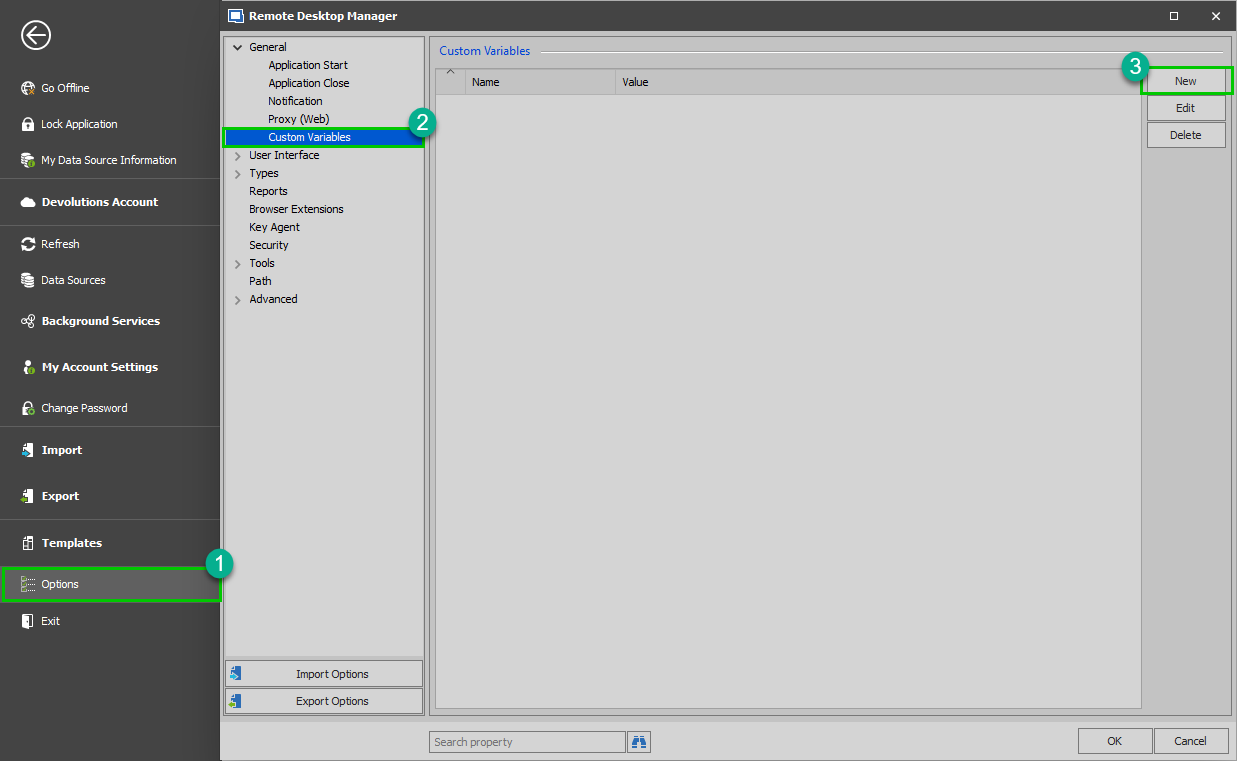
It's already possible to accomplish this in RDM. Simply go in File -> Options -> General -> Custom Variables.
This will allow your users to create custom variables locally.
Best regards,
Jeff Dagenais
image (6).png
But they are not unique to the User, they are for the system.
Example if I have 10 users I would like to have the variable be different things for different users.
SO User 1 could set $CA_User_Admin$ = "admin1", User 2 could set $CA_User_Admin$ = "admin2", user 3 could set $CA_User_Admin$ = "Admin3" ….
This is how I thought the custom Variables worked. I was surprised to see 'my custom Variables' in a session for another user.
Hello,
Thank you for the explanation.
The request has been added to the ToDo list of our engineering department.
Best regards,
Jeff Dagenais
Having Personal Variables would be helpful on many layers. Would be great if someone could create a variable in their personal Vault. This could be used to circumvent the current shortcoming in the CyberArk integration.
For example for today in 2019.2.19.0 anyway, you can not edit your Users Specific Settings for PSM connections. The feature request is to fix that!
The ability to use individualized variables could be used to work around this and future missing features.
psm2.png
Hello,
Is it possible to provide us more information's on which field(s) would you like to override via the User Specific Settings for CyberArk?
Best regards,
Jeff Dagenais
"Privileged Account" We have different accounts for people to use based on their roles, sometimes unique accounts per user.
We need the ability to set a custom "Privileged account" name for each record to be Customized per user (like you would for username on a normal server).
Hello,
We will add specific settings for CyberArk PSM. We'll let you know once the changes have been made, it shouldn't be difficult.
For the per-user variables, we will open a ticket but I can't give you an estimate on when it will be available.
Regards,
Hubert Mireault
The CyberArk Settings are the real goal. The per-user setting was a work around for that and potentially future stuff.
Just to be clear the setting is in the "CyberrArk PSM Connection", not the "CyberAKr PSM Server" entries.
I can't tell you how outstanding this news is to me as this feature is really holding up my Devolutions deployment. DO you have any kind of timeline I could communicate with management as to when we might be able to expect this?
I think we should be able to squeeze in this change by February 20th, which is our planned release date for RDM 2020.
If there are other missing settings like that for the CyberArk PSM 'workflow', please let us know. Your feedback is appreciated! :)
Regards,
Hubert Mireault
OK you really made me think on how this could be improved so this may be pretty far out there but you asked... LOL:
We have multi-site PSM Deployment in a Mesh design. It would be awesome to create a "Cyberark PSM Server Pool" each record would have a site designation.
This Site designation would also be an optional record in the "CyberArk PSM connection" entries.
When you launch a connection it would prioritize the "PSM Serverr" where the site records match. If the connection failed (meaning could not connect to the PSM Server) it would try the next server in the pool.
Like I said that may be too much to ask for but just throwing that out there.
P.S. this would be a good feature for "Remote Desktop Gateway" servers too.
Hello Vincent,
Thank you for your feedback, we'll see what we can do to implement these features.
I had a talk with Maurice and I have to amend what I said earlier—while we will be ready to push the change by February 20th, our integration with CyberArk requires us to get their approval regarding any change we make in the integration, which would include adding these specific settings. This means I can't give you an accurate estimate, but we'll try to get the approval as soon as possible.
Regards,
Hubert Mireault
Hi all, let me add to this
I have the impression Vincent03 and me are about on the same track since on a lot of feature requests I see both of our names popping up often.
Please note that we are using RSA tokens for our CyberArk Multifactor authentiction. Meaning that in either a CyberArk web connection, or a direct CyberArk PSM connection (From Devolutions RDM) we connect to the CyberArk server, and login with a username and one-time RSA token code.
The technical background behind this is Radius, so RDM can use this as Radius username/password and it will work. However up till now we have had no luck of creating 'RSA type' credential entries (like: username and password, where the password is requested every time since it expires after 30 secs) so we had to set the credentials on the 'CyberArk PSM Server' to 'none' in order to get this work.
Would be nice if we could fill this in with some credential type of RSA or user variable.
As for the additional feature request of PSM Server pool: we also have a primary and standby PSM server, we now need to manually switch over these two in case of failover. "would be nice" if in the future this can be done automatically.
Thanks for the response... As indicated I understand the back and forth needed from Cyberark to get your features approved and I am very eager for all that to be resolved.
But this is where we circle back to the per user Variables Idea. It is something customers can use in interim where Devolutions is involved in the back and forth with a particular partner. It can be a work around for missing or yet to be introduced features.
Hello,
For now, the per-user variable feature isn't planned for RDM 2020.1, but we'll add it to our roadmap for RDM 2020.2.
Regards,
Hubert Mireault
Total bummer, but thanks for keeping me informed!
Hello, just found this thread and wondered if the per-user variable ever got implemented?
Hello Richard,
Unfortunately it's not implemented. We have been able to fixed the case for other the users with another solution. Could you elaborate on the scenario you have in mind to use the user variables?
Regards
David Hervieux
The use case is SSH sessions via CyberArk, This would have been a very simple way to substitute the relevant portion of the command line (highlighted here) 
Hello,
I'll open another ticket for the SSH username field.
Best regards,
Maurice
Hello,
I'll open another ticket for the SSH username field.
Best regards,
Thanks Maurice. Is there an estimate as to when this might be available? I thought of a workaround, using a user defined environment variable, but that isn't ideal as users would need to set that manually on each device they launch RDM from.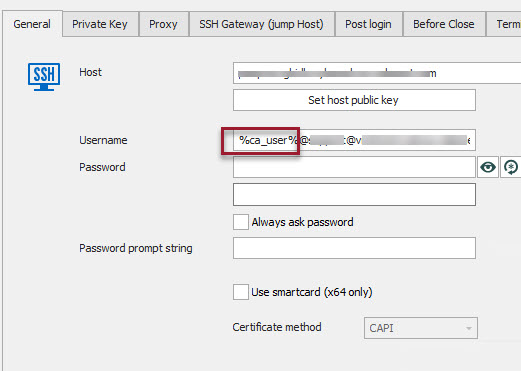
RDMSSH2.jpg
Richard I had tried that and it didn't' work a couple of years ago....
My work around (which sucks) is to have the users Batch Edit the User specific settings and put the account name in the "Custom 1" field.
Then in RDM use that variable $CUSTOM_FIELD1$ for username.
This is a poor solution as there is no way to set it and use inheritance thusly every time a new Session is added it doesn't work and all the users need to know how to go in and edit their user specific setting again. It is frustrating and many of my users have decided RDM is not worth it and I look like a fool for pushing management to buy a global license.
Having the ability to store Variable in your private vault would be a huge improvement to the product. Not just for this use case.
Hello,
We are discussing the best solution for all workflows, but in the mean time, I think that the best workaround would be to use our user profile variables.
Something like $DATA_SOURCE_USERPROFILE_FIRSTNAME$
This is unique per user AND usable in expressions. It seems to me the path of least resistance. Obviously, it depends on using a Team datasource (SQL, DVLS, etc) in order to have user profiles. Also, it has to be set by an admin.
Would one of you care to try to see if its an acceptable workaround?
Maurice
Hello Maurice,
That does work, but it's far from ideal (overhead of entering that for every user)
Regards,
Richard
Hi Richard
in our setup we are using 'my credentials' for this. you can set your 'my personal credentials' to different kind of credential types... we have set them to 'RSA SecureID' although another value might be used to enter user specific usernames in your connection.
And what about another option: on the connection itself, edit - User specific settings. in the user specific settings there is a custom fields tab where you could enter your (hopefully? have to test..) user-specific custom fields.
Regards, Ben van Zanten
Maurice, When I originally opened this request it was for the ability to create per user variables.
So what you're saying may work but I don't understand how to create them, unless you are referring to OS variables, then no.
I am really surprised this can't easily be added to a users private vault. It could be used for so many things in a multi user environment.
$pv_custom1$ or whatever.
Ben, yes you're correct using the "Custom 1" on the user specific setting. However the problem there is it doesn't work with inheritance as such it requires every user edit every record.... It just isn't a good solution (but it is the only option we currently have)
Every time someone creates a new session when a user tries to connect it doesn't work. Then they have to go troubleshoot why it doesn't work to finally figure out the record is new and the User Specific Custom Fields is wrong. This is why I think it would be great to be able to have these user specific variables in the private vault. Then the Record could be like $PVault_Custom1$ or something like that. Or the ability to create "Custom Variable" as a record.. SO I could create $PV_Agency1Account$ then in the DB shared record it would reference that account and the users would only be responsible for creating that record one time, rather then edit every record.

Disabled
Just a quick note to tell you that there had been a few suggestions in our internal discussions, and that your $pv_custom1$ has been added to our list.
Again, my suggestion was a workaround.
well, all of these ideas got David's head boiling and he came up with a solution!!!
Had to create a few screens, but it seems to be quite elegant and flexible. It should be tested and available in a few releases of the beta.
Thank you for you input!
Maurice
Hi all,
The latest beta contains the improvements, they are :
- Introduction of VAULT variables (allows the admin to set defaults)
- Possibility for a user to override them within their USER VAULT
I haven't even installed the beta yet, but if you are in a position to test it out (either not using DVLS or unable to copy your datasource...) please give it a spin
Maurice
Hi Maurice,
This is good news. I note in the release notes that a database upgrade is required, is that likely to cause any compatibility issues with some older versions we still have installed in the environment?
@richardbrett,
There's indeed a database upgrade if you install RDM Beta. We always recommend upgrading all your workstations to the same version to avoid any incompatibility issue.
What version are you currently using? Are you running different version(s) of RDM in your organization or all of your users are using the same version as you?
Best regards,
Jeff Dagenais
Looking for a way to test this out. Unfortunately we can not use Beta Software in our production environments. Our Dev instances do not have a Database to use.
@richardbrett,
There's indeed a database upgrade if you install RDM Beta. We always recommend upgrading all your workstations to the same version to avoid any incompatibility issue.
What version are you currently using? Are you running different version(s) of RDM in your organization or all of your users are using the same version as you?
Best regards,
We've got 2020.3.27.0 and I see some 2020.2.16.0 too
Hello,
If you would like to upgrade RDM to 2022.1.7.0, you would also need to upgrade all of your RDM to avoid incompatibility issue with the database upgrade.
You can manage the version of RDM that your users can use via the Version Management feature
https://help.remotedesktopmanager.com/datasourcesettings_versionmanagement.html
I would recommend enabling it so that all your users can use/upgrade to the same version.
Best regards,
Jeff Dagenais
I installed 2022.1.12.0 with a new database to test the user variables out while we work out an upgrade plan, where is the setting?
Hello Richard,
The "Variables" section can be found under Administration -> Vault -> Settings -> Variables: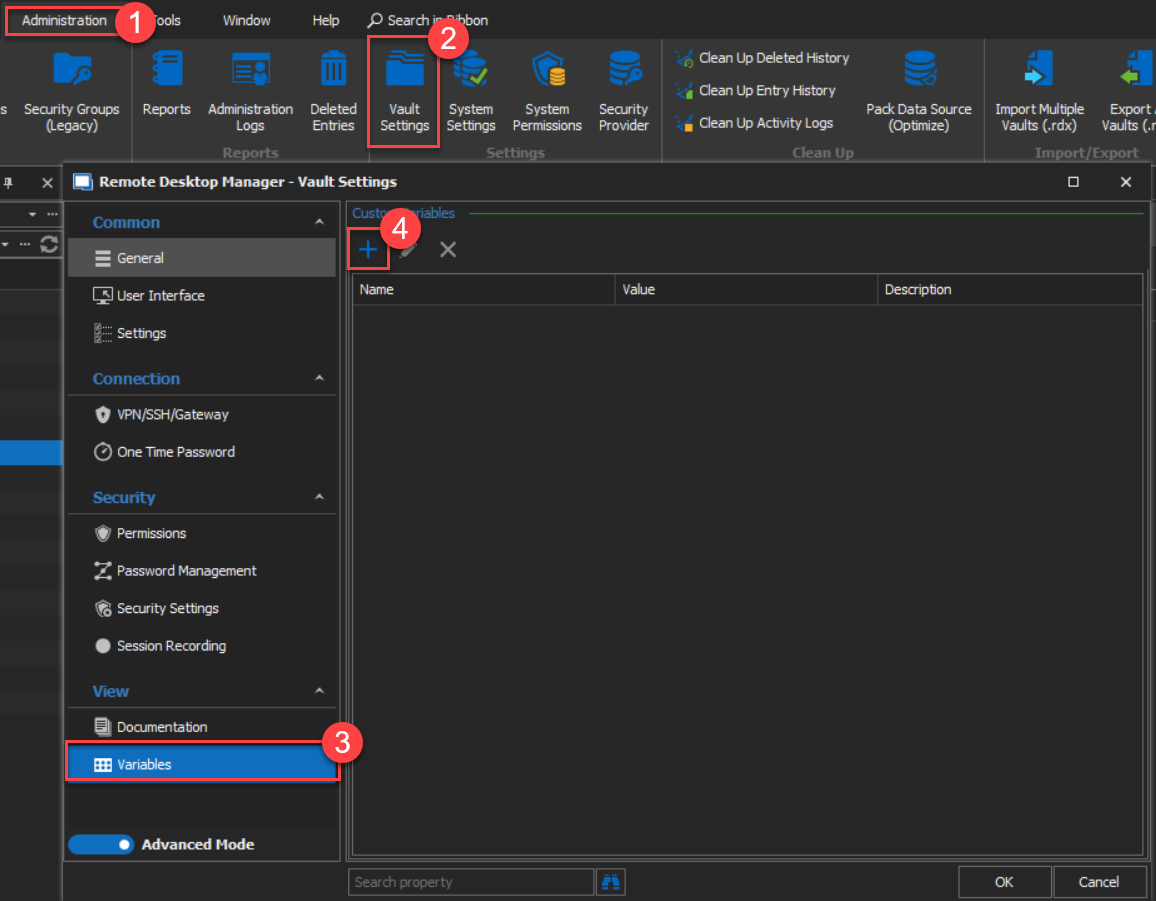
Best regards,
James Lafleur
Vault_Settings_Variables.png
Looking at the screen shot, but how is that Per User? That seems to be storing a variable in the vault.
The object would be in a session record, we create link to a per user variable such as "%PersonaVariable1%"
Then each User can create their entry for that Variable. So I could have "vince@rdm.com" as %personalVariable1% you would go into your entry and say "james@rdm.com" as "%PersonalVariable1%"
so when we launch the session entry the correct assigned account will be used.
Hello Vince,
My apologies for the confusion, the correct path to create user variables would require that you go in your User Vault -> Right-click on your Vault Folder -> Properties -> Variables and use the "+" to create a custom variable.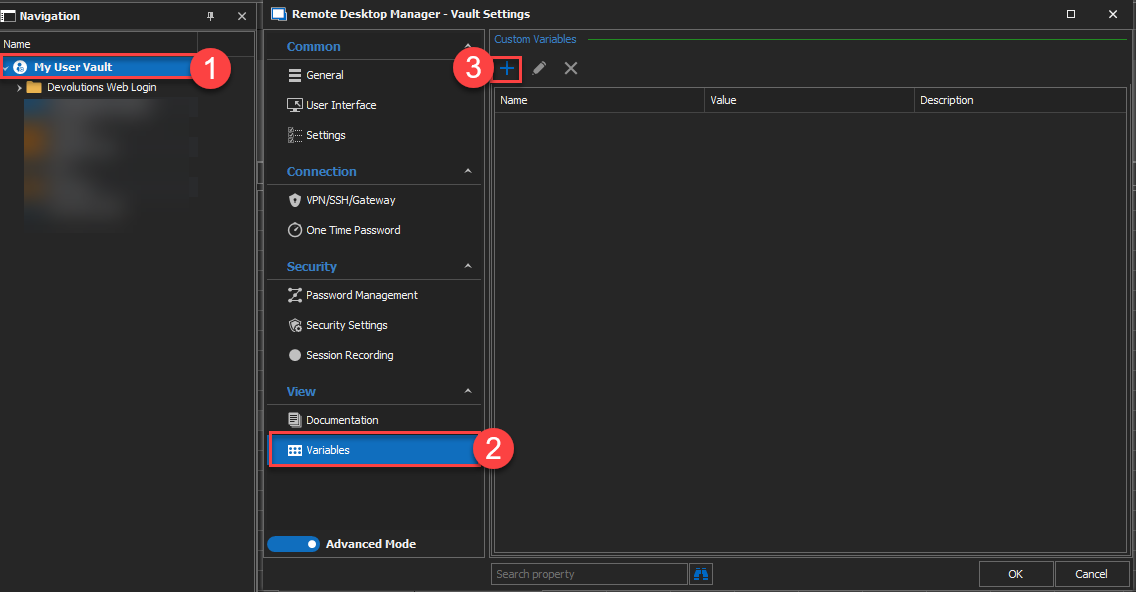
By creating your variables under that location, only you will have access to them.
Let me know if that helps!
Best regards,
James Lafleur
UserVariables.png
5 years later, and I just want to let you know. Yes that helps, great feature!