SSH Copy & Paste Question

Hi Devolutions Team,
i'm missing the option to auto copy a selected text with the mouse into the clipboard and with ctrl-v or middle mouse button to paste it back.
And by the way, is there a key shortcut to reconnect to a disconnected ssh shell? On the Chrome Secure Shell App or MobaXterm I can reconnect with the r key.
I'm on the Mac Free Version 2019.1.9.0
All Comments (15)
Hi Blacky,
In the macOS Terminal app, I can select a piece of text and pressing the mouse middle button will paste it directly. Is that the feature you are referring to?
As for the Ctrl+V, what do you mean exactly? I can copy/paste normally with Command+C/Command+V, but I can't seem to do anything with Ctrl+V.
As for reconnecting with the "r" key, do you mean a keyboard shortcut like Command+R? We have a Reconnect menu item, but it doesn't seem to work on logged out SSH Shell. The menu item itself does not have a shortcut associated with it, so we'd have to bind one. Command+R and Command+Shift+R are already bound, so it could be Command+Alt+R, that or another key.
Best regards,
Xavier Fortin
Hi Xavier Fortin,
thanks for your fast answer.
Yes this is the feature I missed. But with the option to past the selected text with command+V (this is on macOS terminal not possible)
Sorry for the Crtl+V on macOS is Command+V (I work in different Worlds (Windows, Linux and macOS)) ;)
For the reconnect, when I disconnect the shell with Ctrl+D I get the overview from my last shell, now I want to connect I must click the Open Session icon.
Or I google and found this page https://help.remotedesktopmanager.com/index.html?support_keyboardshortcuts.htm
and now I can reopen the connection with command+enter :D
So now I miss only the feature like macOS Terminal :)
Sorry for the long text
Best regards
Blacky
Hi Blacky,
If I understand correctly, the Command+Enter shortcut for opening session is what you were searching for?
As for the first point, I tested with Chrome Secure Shell App and it auto copies the selection when it is selected. I assume this is the feature you want us to implement? I'll file the enhancement request and post back when there is progress.
Best regards,
Xavier Fortin
Hi Xavier Fortin,
in both ways a big YES :)
Thank you for the greate support.
Hi Xavier Fortin,
I installed on Windows Remote Desktop Manger Free too, and I see here is the feature implemented...
I can select a text with the mouse and with the right button i can paste it back into the shell.
Why are there different functions for mac and windows?
Hi Blacky,
RDM (both in Windows and Mac) are very large application that contains many (and I mean many) features. Keeping one and the other at 100% perfect feature parity is not really realist. So we mainly work on a per request basis, where, when a user request a feature, if it's not on the TODO list, it get there and if it's already there, the priority gets raised.
I'll be honest with you, until you requested the feature and I talked to our SSH Shell terminal developper, I was not even aware that this feature was already implemented in RDM Windows.
Also, we phased out our Putty terminal in RDM Windows with our own in-house SSH Shell terminal. Since Windows user were already used to many of the Putty feature, we had to be more proactif in supporting the same set of features which, amongst other thing, include the Copy on Selection feature.
Best regards,
Xavier Fortin
Hi Blacky,
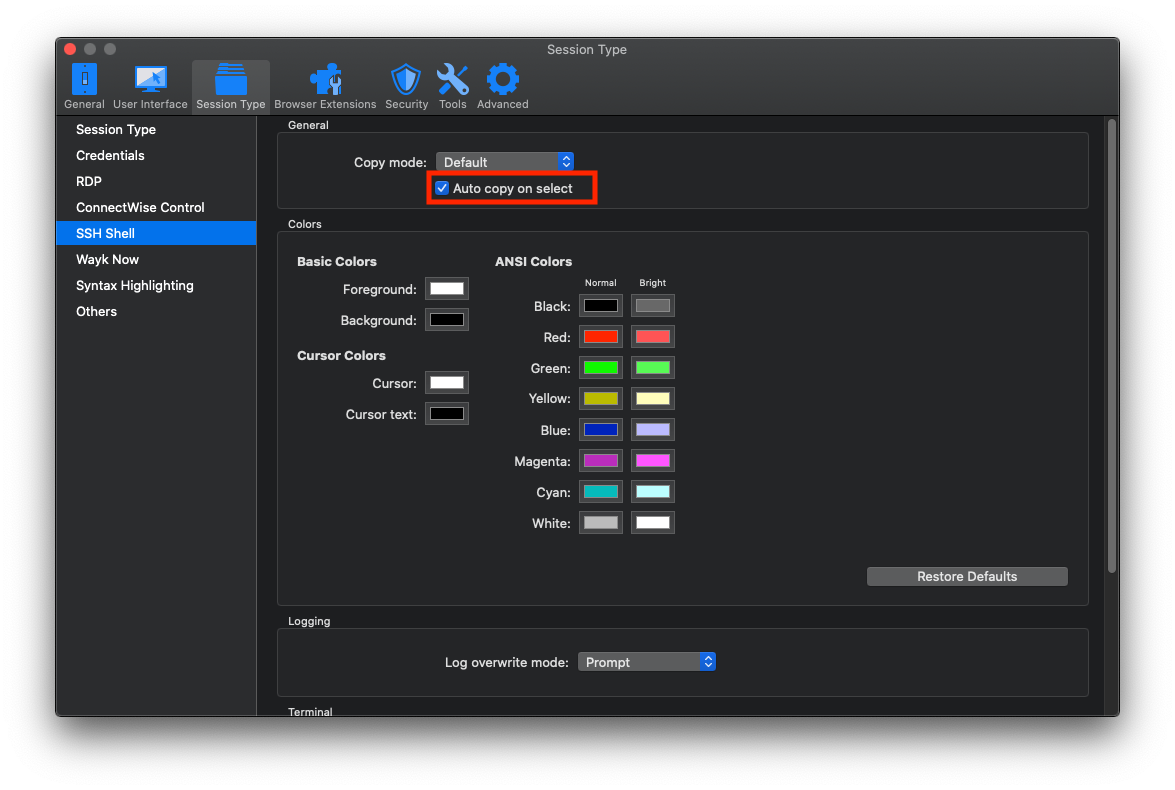
The Copy on Select feature will be available in the next release of RDM Mac (2019.2.1.0). It will be disabled by default, you will be able to enable it in the Preferences (Session Type -> SSH Shell -> General -> "Auto copy on select".
Best regards,
Xavier Fortin
AutoCopyOnSelect.png
Perfect Thx for the greate support
Is the feature Auto-Copy on Select removed in Remote Desktop Manager Free 2020.2.4.0 for SSH sessions?
Hi vivek,
Not as far as I know. I've just tested on my side and it seems to work properly.
Best regards,
Xavier Fortin
Hi Vivek,
The auto-copy on select is still available in the Free 2020.2.4.0 version, has mention by Xavier, but make sure it is activated in File - Preferences - Session Type - SSH Shell in the general section.
Best regards,
Christine Breault
Great.. Thanks for quick response. I was looking inside individual session.
You are welcome, have a nice day!
Christine Breault
I have a related question, when I copy paste from the SSH Shell the paste output has a white background and it is really hard to read, is there a way to change this? I would like to be able to paste text only.

Hi ZeekWorld,
The reply to your question is here.
Best regards,
Xavier Fortin