Problem with Copy Username and Password
Hello
Having a strange issue with Copy Username and Password
Clicking CUaP and Pasting into notepad works fine. Clicking CUaP and pasting into Chrome (or Edge 80.0.320.3, so it's likely to be a Chromium issue) just pastes the password. Seems to work properly in IE, although nothing happens in Edge 40. I've tried both Clipboard copy methods. Copy Username and Copy Password both work as expected.
Thanks
All Comments (46)
What version of RDM are you running? Is the clipboard history (Windows(keys)+V) enabled?
Stéfane Lavergne
Hi Stefane
I thought to myself "I must remember it include the version number", then clearly forgot!
It's version 2019.2.15.0 64-bit.
Clipboard history is turned off
Thanks
Thank you,
So, what most likely is happening, something is taking/stealing the content of the clipboard.
With CUnP we first put a promise of text (Username) into the clipboard, wait for some other app to request (paste) the text for which we then get called to supply. We then clear the clipboard and start over with the Password.
So my guess is some other app is asking for the Username, prior to your paste in Chrome/Edge...
Why are Copy Username & Copy password working? They don't work exactly the same that is unless you change the File > Options > Clipboard copy method > Paste once (secure)
I can't reproduce here with RDM but I have a script that might help us diagnose the issue on your side.
Could you please download and install this tool: https://www.linqpad.net/Download.aspx (LINQPad 5) Installer or xcopy (zip)
Then download the attached file, open it in LinqPad and hit F5
Press the Copy Username Password button and try the scenarios that you outline above (paste in Notepad, Chrome...). One at a time (close the window between tests), copy the result from LinqPad and please send us the results.
Best regards,
(edited : removed LinqPad script)

Stéfane Lavergne
2019-11-06_9-34-55.png
Thanks Stefane
The first two requests are two pastes to give:
as expected.
The two Chrome requests happen at the same time and paste just 'LINQPad - Password'.
I've turned off all extensions. Edge Dev shows the same behaviour. Pasting in the Omnibar works as expected, but pasting in the main Window generates two requests. Perculiar.
It's obviously a Chrome problem however. Have you tested in Version 78.0.3904.87 (Official Build) (64-bit)?

I have the exact same issue, can replicate.
Chrome 78 build adds this "Shared Clipboard" feature.
https://support.google.com/chrome/a/answer/7679408?hl=en
Shared clipboard between computers and Android devicesA limited number of users might see the option to share their clipboard content between their computers and Android devices. To share, they need to have Chrome installed, sign in on both devices with the same account, and enable Chrome Sync.
The text is end-to-end encrypted, and Google can’t see the contents.
This functionality will be released to all users in a future version of Chrome. In the full release, admins will be able to control it with an enterprise policy.
I'm having the same problem.
Nice spotted in the Chrome changelog, rolflobker - could sound like a possible cause.
I suggest you turn off the Clipboard sync in Chrome;
chrome://flags
Thank you all for the amazing investigative work.
I just got back from a week outside the office. I will try to test/debug the "copy username & password" to see if I can get it work nicely/properly with the Chrome "Shared Clipboard" feature enabled. We already set the two flags, specified by Windows, that identifies the clipboard data "private/sensitive" and that it shouldn't be stored/processed in any clipboard history local or cloud-based. So why is Chrome still doing it? One can only speculate.
My feeling is disabling the "Shared Clipboard" might be our only choice and may also be the safest. I'm not sure I want my usernames & passwords to be sent/shared across my devices via Chrome. There are more secure ways of sharing credentials other than giving them to Google via my copy/paste buffer in clear text.
Best regards,
Stéfane Lavergne
Does anyone know if there's a similar setting in the new Edge? I've searched and tried turning off anything remotely related to the clipboard with no change in behavior.
Whilst I agree it's best to be turned off for those that aren't using it, I've turned off shared clipboard and it hasn't fixed the original issue for me.
Hasn't fixed it for me as well.
I will also investigate a bit more when I have the time.
I think I found the solution. It should be included in the RDM build v2019.2.20.
If you want to test, I've attached the "improved" LinqPad test script that should work with Chrome.
Give it a try and let me know.
Best regards,
(edited : removed LinqPad script)
Stéfane Lavergne
Cool! But....:)
I have tested LinqPad with your improved test script with the new Edge - I get the same result - I only get the password.
Notepad works fine.
I don't have Chrome installed.
Some others have to do some testing of Chrome and also see if they get the same result in the new Edge, as I do.
Small update:
In the new Edge. If I try to do it in the address bar - it works (first username, then password). But trying in a web page (like this comment box I'm typing my answer in), only the password comes out.
The output of the clipboard test still shows both:
Requester: msedge (262656) - Value: LINQPad - UserName
Pushed LINQPad - UserName
Requester: msedge (262656) - Value: LINQPad - Password
Pushed LINQPad - Password
Please try this version.
(edited : removed LinqPad script)
Stéfane Lavergne
After further testing, Chrome should work but not Edge.
Edge looks and acts like the Windows Clipboard History service. It actually calls a thread of the Clipboard service to do the clipboard code for it instead of calling the clipboard directly.
Back to the drawing board...
Stéfane Lavergne
Please try this version with Edge
(edited : removed LinqPad script)
Stéfane Lavergne
Have tested it in New Edge Beta (Version 79.0.309.25 (Official build) beta (64-bit))... and it works!
When I get to work I'll test it in New Edge Dev.
Works fine in Chrome. It doesn't work in the Omnibox, but I can't imagine that being an issue for many.
Thanks Stefane
Just tested with New Edge Dev Version 80.0.328.4 (Official build) dev (64-bit) and Clipboard Test v4 seems to work everywhere (address/search bar and on web pages!
Cool - and thank you! :)
Wow it worked I'm honestly surprised.
Thank you all for the updates.
@roger01 - for Omnibox, send the output of the LinqPad script while you try to paste into Omnibox, I might be able to fix it.
Best regards,
Stéfane Lavergne
Hi Stefane
It's:
Requester: chrome (1314564 - 16308)
Pushed LINQPad - UserName
Requester: chrome (1314564 - 16308)
Pushed LINQPad - Password
The first two lines appear on right click in the Omnibox, the second two on Paste.
Thanks
P.S. I don't actually need to paste usernames or passwords into the Omnibox, just happened to notice
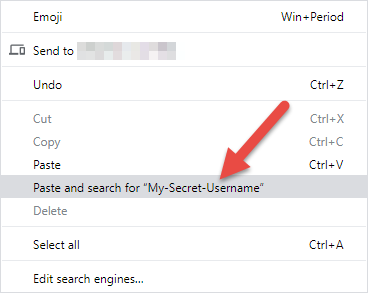
Here is why it doesn't work with the right-click in the omnibox.
It reads/fetches/steals the value of the clipboard to put in the "Paste and search for..." menu option forcing RDM to move onto the password value prematurely.
Stéfane Lavergne
Omnibox.png
Hello.
I have the same problem with version RDM 2019.2.22.0 (but also with the previous one). With chrome (I only use chrome), when "copy username and password", RDM only copy password in the embedded tab. If I try the same copying to notepad, for example, I could paste username first and next the password without problem.
Chrome is updated to version 79.0.3945.88 (Build official) (64 bits).
I have tried to enable disable chrome flags about clipboard. Also, with Windows clipboard history enabled/disabled.
Thanks
@jac
There must be something "stealing" the contents of the clipboard prior to the first paste.
I've been meaning to add a clipboard diagnostic tool with configuration parameters into RDM with cases like this. You could test and tweak the parameters so that it works on your machine.
In the meantime, you could try to disable Chrome add-ons (one by one) to see if that helps.
Best regards,
Stéfane Lavergne
Hello, Stefane.
I have done a test: I have created a virtual machine with windows 10 1903 and I have installed VMware tools plus Chrome. Nothing more, no updates or another software and the result is the same. When copy username and password, the first time copy username but no password and the other times always copy password but nothing more.
I tried also to uninstall vmware tools and the result is the same.
I’m working with Windows and chrome in Spanish language. I think is the only difference with the environment you could have…
Best regards,
Hi,
I've a similar issue now since a week. the CUaP isn't working at all anymore. no username, no password. using the seperate copies works fine.
Upgraded now from version 2019.1.41.0 to 2020.1.20.0 but still the same.
@tvdv,
What type of datasource are you using? If it's a standalone datasource like XML or SQLite, maybe you can try our latest beta release, which is 2020.2.4.0.
This version is available here https://remotedesktopmanager.com/home/download#Beta
Best regards,
Jeff Dagenais
no I'm using MS SQL as datasource
I'm starting to experience the same problem, that original thread was about - Copy Username and Password started to only paste the password.... anybody else seeing the same thing? It is not all places, but when I run a PowerShell script that requires login to Azure, the "web UI" that pops out failes to copy paste username and password - only password is seen. Doing it into a regular Notepad works as expected. Problem seen in other programs (like Logmein that Microsoft support uses).
I've done no more testing or investigating as I'm short on time currently (but this forum post popped up).
Running RDM version 2020.1.20.0 on Windows 10 Insider Slow Ring and Clipboard history is not turned on.
@all,
I've been working on a "Clipboard Diagnostic" form within RDM where you will be able to see clipboard requests in real time. This will allow you to identify who is taking/stealing the values from the clipboard. It will also allow you to block (blacklist) certain applications from accessing the clipboard. Very exciting stuff, I've been working on it over the weekend and hope to have something to share later today.
Best regards,
Stéfane Lavergne
@all,
The Clipboard Diagnostic is done, and will be available in beta builds v2020.2.7 or grater.
So how does it work?
- Help > Clipboard Diagnostic
- Hit "Copy Username & Password"
- Paste into notepad
You should see something like this in the diagnostic window:
- Processes block from receiving paste commands (blacklisted)
- In this screen shot you see "svchost" Windows Clipboard History (WindowsKey + V), it's blocked by default.
- Processes allowed to receive paste commands (whitelisted)
In your case notepad should be whitelisted but you most likely have another process either blacklisted or whitelisted.
The process is either or depending on their behavior and what they actually tried to get from the clipboard. This can be controlled and configured, I will get to that soon.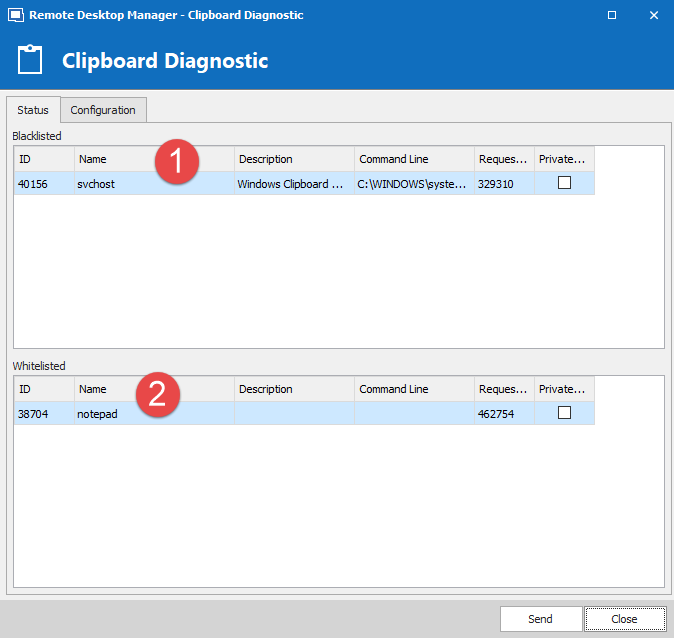
What you want to do now is to blacklist any process that wasn't notepad from viewing the content of the clipboard. So right-click on the whitelisted process you want to block and select "Add Blacklist", enter the Description (not required) and leave the process name as is. Do you have a command line? Most won't, no worries. You might want to remove it or set the first part to "contains" and only keep part of the command line.
The "Add Blacklist" created a persistent rule to always ignore clipboard request from that process. In my case, I created a rule to block notepad. So now if I copy from now on if I try to paste into notepad, nothing will be pasted. You can delete the rule. Configuration tab, select to rule in the bottom section and delete, make sure you hit save.
Now that's not all. You will notice in the Configuration tab there is a section called "Delay" this is useful for applications like Chrome that asks for the clipboard content more than once. That is we can set a delay for how long we will allow chrome for example to ask for the content of the clipboard. The same logic applies to select which rules is used. We match on process and if supplied the command line and apply the delay. The default is 100 ms, so if for some reason you paste into chrome but only the password is pasted, try increasing the delay for chrome, start with say 150 ms, SAVE then try, "Copy Username & Password". Did it work? If so you are done, if not try 200 ms.
If you can seem to figure it out there is also a send button on the bottom of the form that will send us the "Clipboard Diagnostic Report" essentially everything you see on both tabs. From there we can advise how to configure your app.
You can also configure the clipboard delay/blacklist via File > Options > User Interface > Clipboard > Advanced.
If you have any question please let me know.
Best regards,
Stéfane Lavergne
Clipboard-Diagnostic-Status.png
The latest beta version with the Clipboard Diagnostic is now available for download.
https://remotedesktopmanager.com/home/downloadenterprise#Beta
Please note that a database upgrade is required. Make sure that your user has enough privileges to perform the upgrade.
Best regards,
Stéfane Lavergne
Thank you Stéfane.
I'm busy at the moment, so I'm not going to test the Clipboard Diagnostic right now. But I have added it to my todo-list.
Hello,
very old Thread, but the problem still exists in an odd way.
Copy username and password does often not work in the following scenario:
VPN -> RDP connection to server -> Open Web-UI (Virusscan UI etc.) -> RDM: Copy username and password *1 -> Click "Paste in Username", but password is pasted instead of username
Trying again:
... Nothing is pasted (to be clear - the RDM message/hint appears, 
*1 The weird:
This only happens from time to time (most of the time) and I think, it is a focus related issue... e.g:
You are in the RDP session, opened a browser switch back to the password object, copy user/pw and switch back to the RDP session (clicking on the corresponding RDP-Session tab).
Copying one after another works. Allways.
Best regards,
Daniel
Hi Daniel
I see the same thing and have tried turning off the history paste in Windows (Win key + v) and it does not make a difference. I now always copy username and password one at a time. I thought about bringing it up here but you beat me to it.
RDM: 2022.2.23.0
Windows 11: 22622.601
/Anders
Hi all,
Anything in Clipboard Diagnostic while this is happening?
Chances are some other app is stealing/peeking the clipboard content hence the username is no longer available for the paste.
The "Copy Username & Password" relies on the fact that other apps are well behaved when it comes to the clipboard content consumption. You see, with the clipboard you can promise content which is what RDM does but then once it receives a request for the content it will simply it once (and only once'ish, with a delay) then move to the next value. So if you can only paste once, chances are, by the time you come to paste, some other app took the first value (the username) and you are only left with the password.
With the Clipboard diagnostic, you should be able to identify the application and either block it or delay the clearing of the username giving you more time to paste the username before moving onto the password.
The other option is to completely remove the "Copy username & password" button from the UI in File > Options > Application > Clipboard > Advanced > Credential copy options and set it to "Copy Username and Copy Password buttons (2 buttons)"
Best regards,
Stéfane Lavergne
Hi Stéfane
Just tried 10 times in a row, pasting into different apps, and it just works 🤷♂️ next time I run into it I will give Clipboard Diagnostic a go.
Hello all,
I did not mention, but nothing steals the clipboard entries - as far, as the tool shows.
I tried to reproduce it today. It sometimes works 10 times in a row and then suddenly it stops working.
It seemed to me, that it could be some sort of focus-problem. When switching entries in the tree-view and then using tabs (top of the screen)
to go back into a RDP session. But I can not 100% prove that. It does not fail everytime.
I use it 50%/50% - copying and pasting in RDP-Sessions (and then into a web UI) and into desktop-applications (not within the mentioned RDP-sessions)
If "removing the option" would be an "option" ... well, I don't know. ;-)
It would be great if we could narrow down the issue, because the function itself is realy great!
Best regards,
Daniel
Hi Daniel,
Very interesting.
There is an issue that I observed a few weeks ago in RDM that I have yet to fix. More of an anomaly in the way RDM reacts when apps are removed from the Clipboard chain. At first I was not too worried about it but thinking about it now and how you describe your issue, they might be related. RDP sessions interact with the Clipboard, so it could it be that opening/closing of RDP sessions causes RDM to break the Clipboard chain that then causes the issue.
The only way to know is to fix the issue and see if your issue goes away.
We are in the stabilization phase for the next release. So will bump up the priority of this issue and get it fixed so that you can test it and see if it helps.
Best regards,
Stéfane Lavergne
Hi Stéfane,
feedback/status-update:
- Issue still exists
- RDP-Session to server -> opening a web-gui -> username & password mask -> RDM: Copy username and password
- 1st try: strg+v -> password was entered into the username field
- 2nd and 3rd try: strg + v -> nothing is pasted into the fields
- 4th try: It works. strg + v -> username pasted -> strg+v -> password pasted
- 5th, 6th, 7th try: strg + v -> nothing is pasted into the fields
- 8th try: It works
Strange.
Best regards,
Daniel
Hi Daniel,
If you perform the same testing scenario but with the Clipboard Diagnostic form opened and paste into NotePad on the remote host instead of a web browser. Do you see anything strange in the diagnostic screen? Does it work better or more consistently?
A lot of things are at play here. With an open RDP session open, you have the RDP protocol monitoring the clipboard, you might also have clipboard monitor running on the local & remote host and finally since the web browser is not local we can't control the paste like we do locally (delay the clear 100ms for example) since for RDM it all looks like we are pasting into the RDP session not the web browser.
Your only option might be to not use (you can even disable) the Copy Username & Password button and only use Copy Username & Copy Password with the setting set to Clipboard copy method set to Legacy in Help > Clipboard Diagnostic > Configuration (make sure you save)
There is an issue that I observed a few weeks ago in RDM that I have yet to fix. More of an anomaly in the way RDM reacts when apps are removed from the Clipboard chain. At first I was not too worried about it but thinking about it now and how you describe your issue, they might be related. RDP sessions interact with the Clipboard, so it could it be that opening/closing of RDP sessions causes RDM to break the Clipboard chain that then causes the issue.
FYI - This fix for this is done and in the latest release.
Best regards,
Stéfane Lavergne
Hello Stéfane,
I will test it. Give me some days and I'll report back.
Regards,
Daniel
Hello Stéfane,
I did testings.
Test1: Local Copy and Paste test (user/password) into notepad,
------------------------------------------------------------------------------------------------------------------------------------------------
Test 2: VPN to customer -> RDP to server -> Copy and Paste test (user/password) into notepad in RDP session,
Worked several times.
------------------------------------------------------------------------------------------------------------------------------------------------
Test 3: Same as Test 2, except notepad. I pasted into the web-fronend/webpage.
Result: Clipboard Diag Tool shows the same, but the password was entered into the username field
------------------------------------------------------------------------------------------------------------------------------------------------
Test 4: Repeated step 3.
Result: Username was entered, but no password.
Test 5: Same as in Test 3
The Diag Tool allways displayed the same:
Best regards,
Daniel
Try adding a 100ms delay on RemoteDesktopManager (see image below). Make sure you save (bottom right).
Now test again with the web browser. You can even try the delay 250ms & 500ms to see if it helps. The only thing to keep in mind is you must wait at least the delay before pasting into the second field. If, for example, you paste quickly multiple times into NotePad you will get the username multiple times and once the delay over you will get the password.
Stéfane Lavergne
Hello Stéfane,
I did no comprehensive testings, but about 10-15 quick tests.
With this setting - it worked most of the time.
2-3 tests resulted in a recognizable delay when hitting "ctrl+v", so that the password got pasted into the username field, but that was maybe another issue.
The 2-3 "failed" tests where, when I was connected to another customer.
All in all, it looks like, if it got better/good - I will observe it.
I also checked, that the clipboard setting is saved generally:
Regards,
Daniel