doe not login to Cisco switch event by saving password

hi
i am using RDM 14 for managing my enterprise,
i have configure more that 50 cisco device that work correctly by saving password. cisco device are 2690,3750, 3850
recently we bought cisco sg350-28mp.
i added sg350 to RDM but for connecting to this device each time it is asking user name and password.
how can i solve this problem ?
All Comments (15)
Hello,
What type of entry is used to connect to the cisco switch? Is it an SSH Shell or a Putty entry?
Could you confirm that the username and the password are correctly entered in the session?
Best regards,
David Grandolfo
hello david
connection type is SSH Shell, user name and password are correct. SSH Shell Credential for cisco 2960 is set to inherited and it working well.
by configuring Post Login command by username and password i could login but that is not my favorite.
Hello,
Could you test our latest version of RDM, many improvements are available in it.
RDM 2019.1.41.0 is available from here , if you are currently working in a team data source. You can install RDM in the portable version.
Best regards,
David Grandolfo
hi David
thanks for your reply
i upgrade my RDM, but still RDM not using my username and password and i use command option to enter user name and password.
Hi
Thanks for the test, I had a customer yesterday with a similar issue and he told me that he was using a manage account instead of using the default or root account of the switch. It seems that a certain type of account can't automatically log-in to switches with direct command.
Could you try with another account on the same switch if the issue is the same?
If so, under the advanced tab, you can enable the Verbose and the Logs. Then try to log on the switch and send me the logs by private message or I can provide you a secure links.
Regards,
David Grandolfo
hi
i test by username: TEST password:******* still ask me the username and password.
where can i upload Logfile ?
Hi,
Please use the link below to send us your logs:
https://devolutions.sharefile.com/filedrop
Best regards,
David Grandolfo
hi,
please check
file name : soheil.amiri_RDM.log
Hello,
Thanks for the log, I opened a ticket with the engineering department for investigation. I will notify you when I get further information.
Best regards,
David Grandolfo
Hi David
thanks for your attention.
i am waiting for Solution
Hi,
The engineering department is currently investigating the issue. Could you test a workaround?
Go under File -> Options -> Terminal -> Under the Advanced section, check Use Legacy Terminal.
It is important to note that using this workaround will prevent you from using the new features that will soon be available with the SSH Shell entry type.
Best regards,
David Grandolfo
hi,
enabling Legacy Terminal is not working in my case.
After enabling the Deprecated entries is the Putty entry works?
We didn't saw the authentication type before and base on the logs it seems that the server accepts any connection and the shell (putty) will grant the authorization.
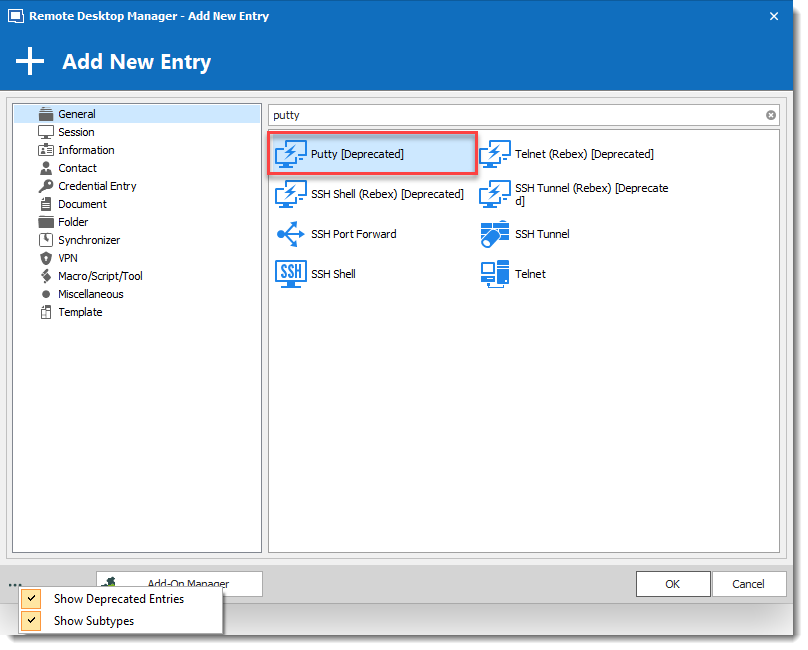
David Grandolfo
Putty_session.png
hi
i test putty as client adds-on
still not working
1.JPG
Hello,
Base on the test, it doesn't look like a bug more than something the switch isn't supporting. Could you confirm in the configuration of the switch if any protection against injecting automatically username and password works?
You could also test to inject username only with external Putty application.
And another test is to check the box Skip environment variable in the Advanced tab of our SSH Shell entry.
All these steps are a long shot as we are trying to see what is working for this switch. It could be tested in RDM or outside of RDM.
Best regards,
David Grandolfo