Support for GCP (Google) Cloud IAP authentication?
0 vote

Have you plans for supporting Google Cloud Plattform Cloud IAP (Identity Aware Proxy) authentication and connection method?
Would be nice to have it in Remote Desktop Connection Manager.
All Comments (32)
Hello,
What do we need to do in RDM to support it? Is it a web site?
Regards
David Hervieux
IAP Docs: https://cloud.google.com/iap/docs/
TCP forwarding is what I think must be integrated: https://cloud.google.com/iap/docs/tcp-forwarding-overview
API section: https://cloud.google.com/iap/docs/using-tcp-forwarding
Not exactly sure how to best integrate but I can do like this by using GCP SDK tools:
First setup a tunnel:
gcloud --project=<PROJECTNAME> beta compute start-iap-tunnel <VM NAME> 3389 --zone=<ZONE, eg: europe-north1-b> --local-host-port=localhost:13389
Then use:
mstsc → localhost:13389
Could be that I can create this today but I then need to manage what port I do use locally and getting a lot of VM's it can be difficult to have a structure of local port numbers.
Thanks and let me know if you need more information. Or let me know if I can do this easily today since integration can be much harder.
Cheers
Michael
Hello,
You could try to create a custom VPN and invoke the command line. This could be a good starting point for us if it works.
Regards
David Hervieux
Hi
That is working, not optimal.
Opens a window with:
Testing if tunnel connection works.
Listening on port [13389].
(gcloud output)
Connection works fine
Problem is that this window requires CTRL+C to exit so it have to be done manually
Have not tested this plugin for MS RDCM:
https://github.com/GoogleCloudPlatform/iap-windows-rdc-plugin
BR
Michael
Thank you for the test. Could you try the disconnect to use taskkill?
https://tweaks.com/windows/39559/kill-processes-from-command-prompt/
Regards
David Hervieux
Will try to test soon, will let you know how it goes
Sorry for very slow followup!
Yes it is possible to kill but from what I can tell it starts a phyton.exe but I'm not exactly sure how to implement it in VPN/SSH/Gateway setup
@michael40,
How is your session + VPN is setup for now? Could you post some screenshots?
Best regards,
Jeff Dagenais
Excuse me if I'm totally wrong
2019-10-10 07_08_23-Window.png
Hello,
Is the screenshot that you've sent us is from a Custom VPN Entry that you have created?
If yes, inside your remote session, click on VPN/SSH/Gateway on your left. Then, in the General tab, you will select Connect if unable to ping in the Open dropdown and Session in the Type dropdown. After, go in the Settings tab and select your custom vpn entry.
Best regards,
Jeff Dagenais
Hi,
This is on the remote session, not custom VPN. Since I need to enter host and project information I have not created a common VPN entry.
The problem is also that I have one executable for setting this up but there is really no closing argument to that application.
Kill the window and it stops the connection. To manage different connections ports from localhost could also be an issue that is hard to solve? 20 RDP sessions and they all need different local port...
Thank you for your support so far
Br
Michael
Hello,
You last post confused me a little bit. As of now, I don't understand what's the issue anymore. Is it that you are not able to launch the VPN? Or close it?
Maybe a small video could help.
Best regards,
Jeff Dagenais
Hi
Launching is OK, but I cannot close it with a command.
Starting the "VPN" gives this:
Testing if tunnel connection works.
Listening on port [13389].
Then RDM connects to local port 13389 (as I specified in the setting - this number need to be random/different for each connection, if not it will fail when reusing the port number)
This window is present for ever, terminating the remote session wil try to start the termination command, but it should simply just kill the window it started at first. Pressing CTRL+C in the window give you:
Server shutdown complete.
Terminate batch job (Y/N)?
Not sure if I need to make a video but if you have a GCP account (trial USD 300) then it is simple to test yourself
Best regards
Michael
Hello,
We don't use this type of VPN internally, this is why I asked for a video so that we can have a look at it with our engineering department and see if it's possible to close it as you request or not.
Best regards,
Jeff Dagenais
Sure, where can I upload the video so it is not available to everyone on the internet.
Does not contain classified information but prefer not to post it on public forum anyway
Hi Michael,
you can upload the video through this link: https://devolutions.sharefile.com/filedrop
Regards,
Min
Done
2019-10-23 at 08-48-55.mp4
Hello,
Thank you for the video,
I opened a ticket to our engineering department to see if something can be done regarding this.
The ticket number is RDMW-3869.
Best regards,
Jeff Dagenais
Hello,
I had a chat with our engineering department and we may have a solution regarding your closing issue.
Now, I have a quick question for you: If you close the executable of the VPN, this will close the connection right? If yes, this may help finding a solution regarding your scenario.
Best regards,
Jeff Dagenais
Yes. Closing the window/connection stops the tunnel to GCP/VM
Hello,
The option to kill the task instead of sending arguments has been added to the custom VPN settings. It will be available as soon as the beta version 2019.2.12.0 is released.
Regards
Jonathan Del Signore
Hello,
The option to kill the task instead of sending arguments has been added to the custom VPN settings. It will be available as soon as the beta version 2019.2.12.0 is released.
Regards
I'm using RDM v.2023.3.9.2 on MacOS. I was unable to find the "kill task" option in Custom VPN, or anywhere else for that matter.
I understand from what I've read in this thread, that it is possible to use Devolutions RDM on MacOS to connect to the Windows VM in Google Cloud. Could you please share the step by step instructions or send a link to a doc describing how this can be done (or at least how to kill a shell process after closing the connection).
Hi yurikhodos,
I'm unfortunately not familiar with what you are attempting to do. RDM Mac does not currently support the the "Use taskkill to close the VPN" option for VPNs. Is that the only thing you need for your use case?
Best regards,
Xavier Fortin
Hi Xavier Fortin,
As Jonathan Del Signore mentioned some time ago, "The option to kill the task instead of sending arguments has been added to the custom VPN settings. It will be available as soon as the beta version 2019.2.12.0 is released. "
Was this option removed? Can it be brought back? Is there a "proper way" to set up a GCP Windows VM connection using RDM on MacOS?
Hi,
This option never was implemented in RDM Mac, I can open a ticket to investigate this.
As for your other question, as mentioned, I am not familiar with what you are trying to do. I'm specifically unfamiliar with Windows VMs in Google Cloud, so I have no clue as to the requirement for it to work through RDM. How would you proceed if you were not using Remote Desktop Manager? You would use Microsoft Remote Desktop? Is there anything special you have to do to make it worth through this?
Best regards,
Xavier Fortin
Hi Xavier Fortin,
I'm a bit confused with your answers. As you can see from one of Jonathan Del Signore's comments above, he specifically said that task kill option was implemented, and mentioned a specific version in which it was implemented. Can you please check with him? Anyway, please open a ticket for that.
Regarding the GCP connection in general, I specifically posted my question to this thread, because it was initially raised for this specific functionality. If you go to the beginning of the thread and read through you will see what it is and what the requirements are. Have a look here https://cloud.google.com/compute/docs/instances/connecting-to-windows and here https://cloud.google.com/iap/docs/using-tcp-forwarding#gcloud_2 for more information. Your colleagues Jonathan Del Signore, Jeff Dagenais, David Hervieux were replying to the initial question they might remember some details. Please ask them.
Hi yurikhodos,
This is a forum thread in the RDM Windows section of the forum, not RDM Mac. The taskkill was specifically implemented for RDM Windows for this case, but never ported to the other platforms.
I've already read the thread, but to my understanding, the only person really in the know of how the functionality should work is the original poster. The only thing that we ended up doing was add the taskkill option (in RDM Windows) at the request of the user who used the Custom VPN entry to launch, with command line, his proxy. In this post, the user shares a screenshot of how he configures his Custom VPN entry. You could start there and see if you can replicate for macOS. Obviously, for it to work, a macOS version of the application must exists, and must support command line argument.
A Custom VPN can be added like other entry types: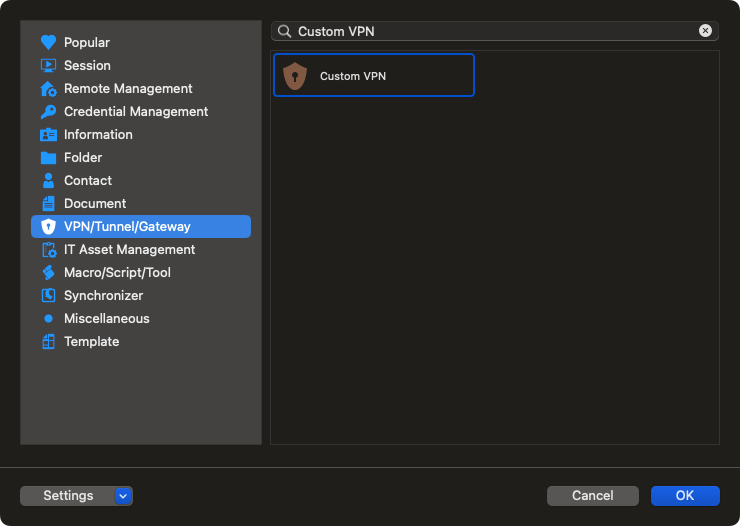
Outside of this, we unfortunately have no documentation or information on how to set this up. To the extent that we helped the original poster, it was in accompanying him on how to use the Custom VPN entry to plug his commands into it.
Best regards,
Xavier Fortin
CustomVPN.png
Hi Xavier Fortin,
Thank you for your answer. I didn't realise that this thread was related to Windows RDM. There is another , much easier way to connect to GCP Windows VM using IAP Desktop.
Anyway, since the taskkill functionality was added to RDM on Windows, I assume it shouldn't be a beg task to port it the MacOS RDM ? Can you please raise this request ?
Thank you !
Yuri
Hi,
I've already opened the ticket. I can't provide an ETA yet, but we will look into it.
Best regards,
Xavier Fortin
Hi Xavier Fortin,
Thank you! Please let me know when this feature is implemented.
Thanks!
Yuri
Hi,
The option to taskkill vpn in Custom VPN should now be available in the latest version of RDM Mac (2023.3.11.4)
It is available in VPN Details in the general section.
Best regards,
Michel Lambert
Screenshot 2024-01-10 at 4.23.37 PM.png
Hi Michel Lambert,
Great stuff! I was finally able to connect to GCP VM from Mac machine.
Awesome work guys!
Thanks!