RDM and SSL Inspection

Since testing with SSL Inspection on our new firewall, I get a notification that a certificate cannot be verified at startup of RDM.
The certificate is however issued to *.keen.io as listed in the certificate view.
I have to choose Cancel twice to be able to continue RDM ( "Afbreken" in the screenshot ). If I choose Continue ( "Doorgaan" ) or Continue and Remember RDM seems to get stuck on some code and hangs. Need Task Manager to kill the process.
(PS. RDM is in English, but it shows 2 options in the popup in Dutch (my regional settings))
rdmstartcert.jpg
All Comments (15)
Looks like your new firewall is doing DPI on TLS/SSL traffic.
This means the firewall acts as a sort-of man in the middle (mitm) which replaces the certificate.
You need to import the Root CA from the Firewall , but I also suggest to talk to the guys who manage the firewall, because the "issued to" should not be replaced, only the Issuer would be replaced.
This is not an RDM issue, the same would apply to any HTTPS website or other TLS traffic.
(I should have said that I'm the one configuring and testing the ssl inspection functionality on the firewall :) )
Yes, I do SSL decryption/encryption on the firewall, with some basic traffic checks. Yes, it's a MitM setup, using a valid and trusted certificate from our internal PKI. So clients all recognize it.
So far everything seems to work fine, except for the (login service?) certificate check RDM does at startup.
I also don't know where the apparently changed "issued to" comes from. But is it really replaced? What if the dialog with the error message got it wrong? Or what if it uses multiple certificates for the services?
But the main issue I wanted to report here is that selecting continue on the error dialog results in RDM hanging.
It's not really an issue for me, as I'm the only one using RDM and cancelling works just fine for now. Just figured I would report it.
Hello,
The hang is an issue and I have reported it. This is not the expected behavior.
Regards
David Hervieux
@David - Why is the product connecting to these sites? I would prefer to not send any telemetry data, and if my company's going to expand our use of the product (which I'm personally pushing for), that's going to be an issue.
Can I opt out of the telemetry data collection? Will this stop the product from reaching out and generating the cert errors? I've been having issues where the cert error will show behind RDM not allowing me to input anything into RDM or bring the error forward, requiring me to kill the process.
Hello,
If you don't want to send any data, I would recommend enabling the Disable Analytics option located in File -> Options -> Adavanced.
Please note that RDM 2019.2 will offer you the possibility to disable this option via GPO.
https://help.remotedesktopmanager.com/how_to_modify_the_group_policy.htm
Best regards,
Jeff Dagenais
I also experience the same issue after enabling the SSL Decryption from the firewall. Do you have any time frame for the resolution?
@kelvin02,
What is your issue exactly? Could you post some screenshots please.
Best regards,
Jeff Dagenais
Regarding your response above, "The hang is an issue and I have reported it. This is not the expected behaviour"
If we enabled the SSL traffic inspection from our firewall. The RDM unable to launch at hang during application startup. Thanks in advance
@kelvin02,
What version of RDM are you running?
What type of data source are you using?
Best regards,
Jeff Dagenais
We currently using version 2019.2.10.0 64-bit with the data source using SQL Azure
We tried to capture the network packet and found no issue on SQL Azure, the problem is the decryption of the devolution.net and/or devolution.com certificate during RDM startup, as I think RDM will attempt to login devolution and check version update.
Hello,
Could you try the follwing steps:
Let me know if you are now able to start RDM.
Best regards,
Jeff Dagenais
Hi Kelvin,
We've found an issue that could cause RDM to hang at startup with mitm(ssl inspection/deep packet inspection) networks and we fixed it.
It should be available in the next release. (2019.2.15.0 released today)
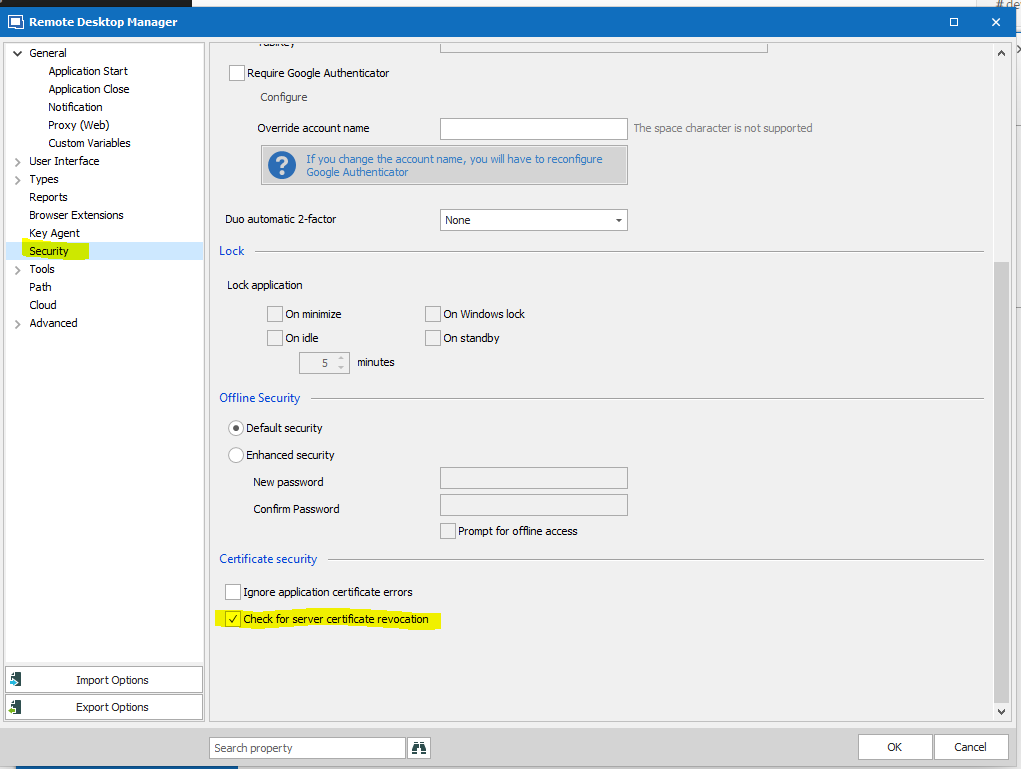
For the time being, does your firewall let the OCSP protocol through? If not can you try unchecking the following option (Check for server certificate revocation):
Best regards
Mathieu Morrissette
Capture.PNG
We have tested and seems the root cause is not related to Analytics Log Sending
It is related to mitm, before the release of 2019.2.15.0, we checked both option under security section and able to launch the application
After the upgrade, we unchecked both option and application still able to launch without any issues.
The OCSP Protocol allows through the firewall from Day 1
Million thanks for your assistance and this issue is resolved.
@kelvin02,
Thank you for your feedback.
Glad that is now working!
Best regards,
Jeff Dagenais
Hi,
This Mathieu Morrissette from the Devolutions Security Team.
I just wanted to let you know that we have made changes to the certificate validation mechanism in RDM 2021.2.9.0 and above that should solve issues some users were experiencing.
Let us know if you still have the certificate warning message.
Best regards,
Mathieu Morrissette