Update RDM to latest UVNC to latest version and features

I have been testing RDM free and using the embedded VNC UltraVNC viewer, and I noticed that there is a DSM security issue when trying to connect to a uvnc 1.2.2.4 version, there is also a feature not present on the RDM UVNC embedded version that not provide multiple display switching as in the uvnc viewer. Is it something that can be tweaked.
All Comments (5)
Hello,
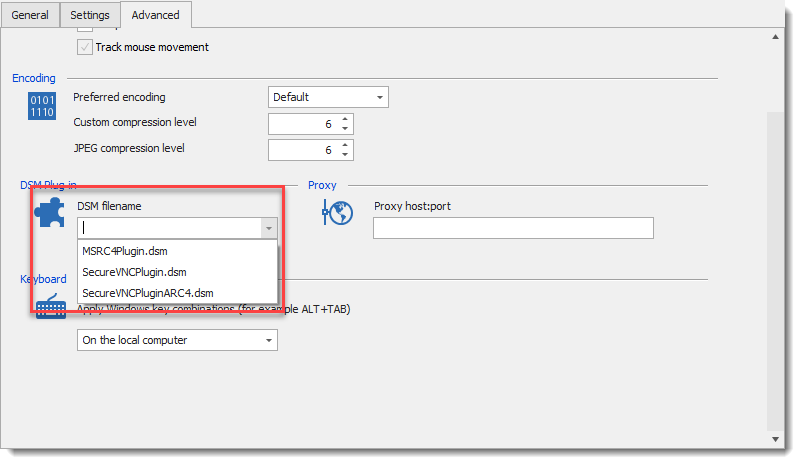
Is the DSM security features you are looking for UVNC 1.2.2.4 is the plug-in we integrate under the Advanced tab?
Otherwise, could you detail what the security issue is, I don't find any documentation related to this.
Regarding the feature request, could I recommend opening a feature request at https://forum.devolutions.net/forum17-remote-desktop-manager--feature-request.aspx
This will allow the community to demonstrate interest in your idea. We use this interest to prioritize the features we implement.
Best regards,
David Grandolfo
UVNC_DSM.png
Hello @David,
I am using RDM version 2019.1.41.0 64-bit and when trying to use the SecureVNCPlugin.dsm that is included in the RDM app the VNC viewer pops up with error saying no plugin detected. Picture #1 and 2.
If I copy the DSM included in UVNC it works. Picture #3.
I have attached some pictures and also included the DSM included with RDM and the one included in UVNC .
I thing that as a work around is to try to copy the DSM from the actual version of UVNC to the RDM folder meanwhile you create a fix on this.
The other issue (If calling that way correct) is that the RDM VNC viewer does not include the Display switching and that way move between remote screens, please see attached picture #4.
I have attached also the DSM files.
SecureVNCPlugin-UltraVNC.dsm
SecureVNCPlugin-RDM.dsm
4.png
3.png
2.png
1.png
hi axaeaxam
I will update the DSM plugin in RDM to the version distributed by UltraVNC.
As for your other issue, I think we already support it.
While connected to a UltraVNC server using the RDM viewer, right click on the connection's tab, and click on "Select Full desktop/ Switch Monitor" in the Special Command sub menu.
Regards
Jonathan Lafontaine
Hi Jonatha,
I too have run into the issue regarding the "Select Full desktop/ Switch Monitor" are you able to assist further with how to find this option as I'm unable to find it?
Regards,
Ben
Hi Ben,
"Select Full desktop / Switch Monitor" is in the Special Commands sub menu.
To access this menu, right click on the session's tab.
This menu entry will only be available if your are using our vnc view.
In the entry's properties, make sure the VNC application is set to Default and not UltraVNC [deprecated].
Let me know if this helps.
Regards
Jonathan Lafontaine