How do you RDP/logon to a Azure Active Directory (AAD) joined system?
How do you RDP/logon to a Azure Active Directory (AAD) joined system?
I've tried every single combination I can think of and non work:
test.user3@domain.com
azuread\test.user3@domain.com
azuread\testuser3
azuread\test.user3
This is the error I get:
All Comments (6)
Do you open the connection in external mode or embedded?
Regards
David Hervieux

I'm going to answer for him since I have same issue.
Embedded.
This works for me with RDP client:
http://www.bradleyschacht.com/remote-desktop-to-azure-ad-joined-computer/
But I can't get it to work in RDM.
Subject is possibly miss leading, I can use RDM to login to this particular machine with a local account but not using my azureAD logon account.
I solved this by importing the .rdp that was created in the link above.
For the next guy go to Files\Import then select .rdp type. What you end up with is a connection that runs external to RDM so you will need to modify those settings or in my case I just got the settings I needed from the imported connection and applied to the connection I was already trying to use.
Hi,
Here is the procedure to make it work with the current version of RDM, but we have simplified the configuration process for the upcoming 2020.3 release. This was answered in another thread (https://forum.devolutions.net/topics/30447/enable-credssp-support--false-enablecredsspsupporti0-is-ignored-in-emb) but the solution is deep within the exchange, so here it is for convenience:
I have an Azure AD joined virtual machine, and I managed to create an RDM RDP entry that can correctly connect to it. For the username format, I found the solution in the following blog post (http://www.bradleyschacht.com/remote-desktop-to-azure-ad-joined-computer/). You should use the following username format:
.\AzureAD\username@domain.com
And leave the domain field empty. I'm not sure what exactly strips part of the username without the ".\", it could be the ActiveX or even the remote winlogon, but adding ".\" forces it to remain untouched and makes it work.
You then need to change a few settings in the RDP entry.
In the Connection tab:
- Change "If the actual verification does not meet minimum policy requirements" to "Warn me"
- Uncheck "Activate network level authentication NLA (SingleSignOn)"
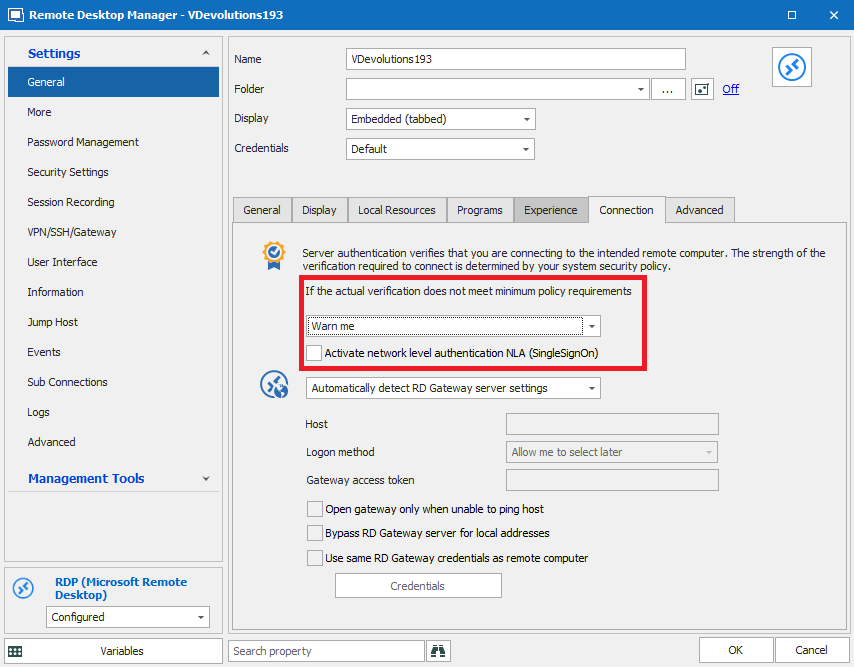
In the Advanced tab:
- Enable CredSSP support: False

Once these default settings have been modified, you should now be able to connect through RDM. Let me know if it works for you.
Best regards,
Marc-André Moreau
I've just installed the latest version, 20203.12.0 and it broke my Azure AD logon. I noted in the release notes that there was an improvement to this kind of logon. I enabled the Azure AD host option, and that didn't work. I went to the credential and broke out the username and domain into the associated fields, that didn't work either. What should I be doing to get this working again with the new changes?
Hello Lowell,
Thank you for contacting us on that matter!
Would it be possible for you to open RDM and then go under Help -> Submit a Support ticket to open a case with us? Through it, we will be able to gather more details about this issue and see what might cause this.
Just make sure to check both options in the creation window and to mention the URL of this forum in the description of your case.
Best regards,
James Lafleur