Where is the setting "Allow reveal password in properties"?

If a user watches your YouTube video from Jessica Grosman (https://youtu.be/fZju2RVPhyA) discussing the difference between using your RDM legacy "Security Groups" and your new "Role Based Security System" a person would think that they should NOT use "Legacy Security Groups" if they are setting up a brand new Data Store (using SQL Server for example). Is this true? I ask because that is exactly what I did, but now I cannot find certain settings unless "Use legacy security" is enabled.
For example, I cannot find the "Allow reveal password in properties" settings withing Role Management > Privileges because the entire "Privileges" section is not there unless I enable "Use legacy security" in Data Source Settings > Security section. This is confusing. Am I missing something? Is the "Allow reveal password in properties" setting located somewhere else when the "Use legacy security" setting is disabled?
All Comments (5)
Hello,
The Allow reveal password in properties is indeed only available when Legacy Security is checked.
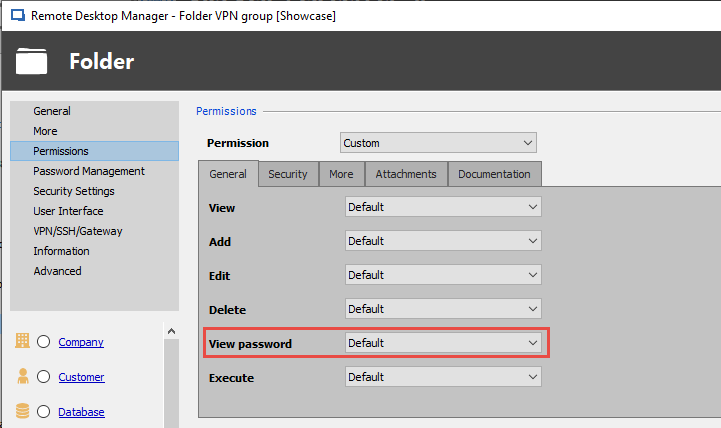
What we could propose is when you give permission to a certain role on a folder, you can give them the right to view the password, which will allow them to view the password without being able to edit it.
Best Regards,
Etienne Lord