SSH Shell and SSH Gateway (Jump Host) - you have to enter password twice for SSH Gateway
SSH Shell and SSH Gateway (Jump Host) - you have to enter password twice for SSH Gateway

Hello,
if you are using the integrated SSH Shell with Option SSH Gateway (Jump Host) and you are only saving username for both systems, i get asked for the password of the jump host twice and after that one time for the actual system when connecting to the system.
I double, tripple checked if i maybe enter the password wrong everytime the first time, but this is not the case.
Can anyone confirm this?
Regards
All Comments (8)
Hello,
What version of RDM are you running?
Could you post a small video showing us your configuration as well as the issue please?
Best regards,
Jeff Dagenais
Hi,
i am using 5.1.3.0 Free Version.
I recorded the issue, i hope this helps.
Regards
SSH2.png
SSH1.png
REC_SSH.mp4
Hi,
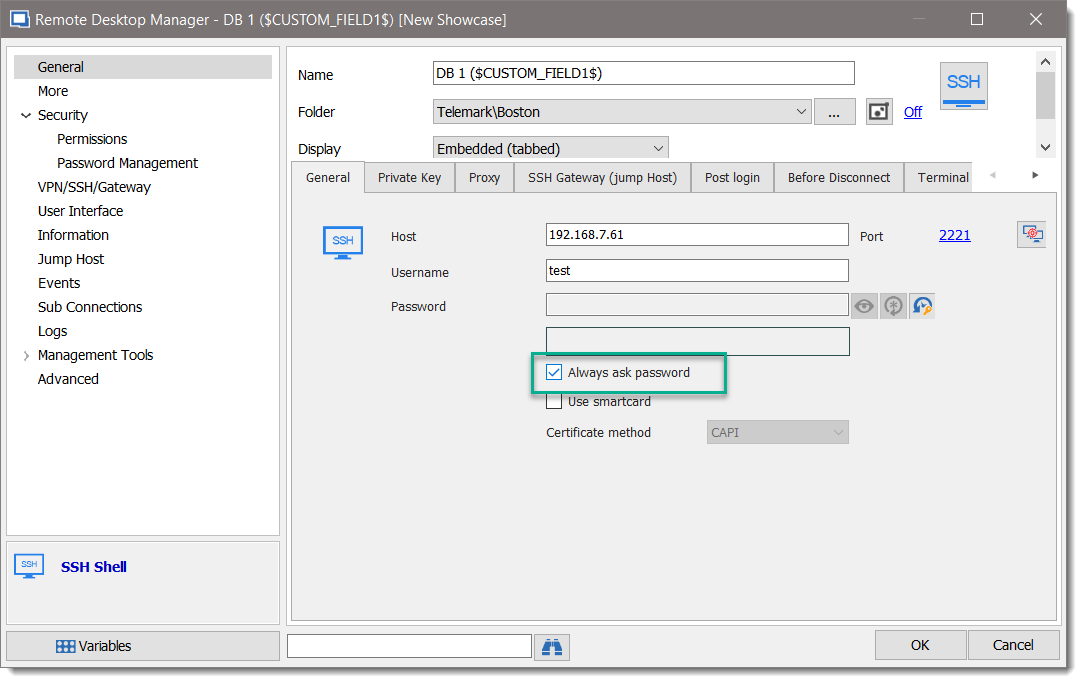
Thanks for the recording, I was not able to reproduce the issue but could you as the first step check Always ask password for the Host and for the SSH Gateway credential.
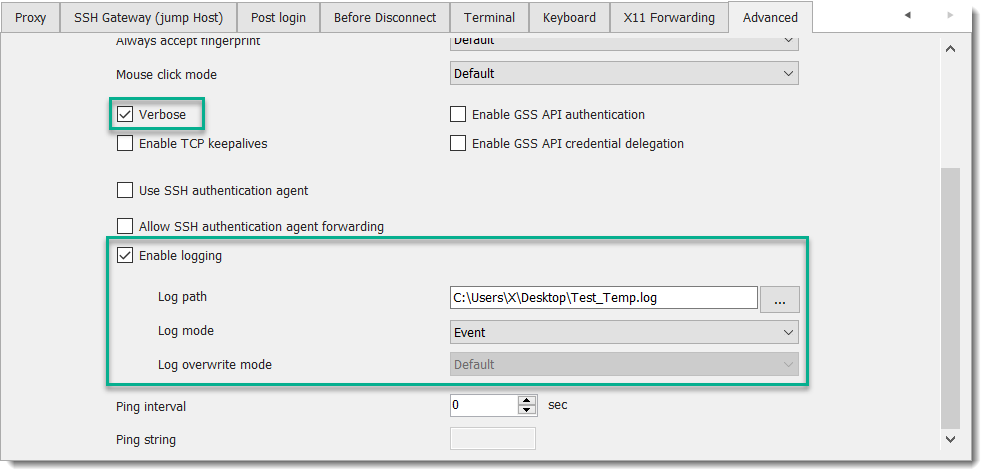
If that doesn't change solve the issue, go to Advanced tab, enable Verbose and Enable logging with the Log mode as Event.
After please send us the report at support@devolutions.net.
Best regards,
David Grandolfo
SSH_Ask_Password.png
SSH_Log.png
Hey,
with the checkmark "always ask for password" the behavior remains the same.
i have sent you the log files.
Between first password attempt and second there were unfortunately no new log entries, I hope they help none the less.
temp.log
Thanks for the log,
We were able to reproduce the issue when the SSH Gateway server prefer interactive authentication.
To reproduce the issue, I set "ChallengeResponseAuthentication" to yes in my SSH Gateway server config file (/etc/ssh/sshd_config).
I open a ticket with the engineering department to report the issue.
Best regards,
David Grandolfo
Hi,
great news!
Side question:
Is it possible to define this jump host on folder level or for many entries at once?
Also, is it possible to use tab groups based on the folder structure or do i have to manually edit every entry?
Regards
Hi,
SSH Gateway server has to be configured directly on each session, you could ask a feature request to be able to centralize the configuration of this SSH gateway server.
For feature requests, kindly post them on the forums at https://forum.devolutions.net/forum17-remote-desktop-manager--feature-request.aspx
This will allow the community to demonstrate interest in your idea. We use this interest to prioritize the features we implement.
Regarding the tab groups, you could use group variables in the field. So if the type of the folder above the entry is a "site", the variable $SITE_NAME$ could be used in the sessions.
Best regards,
David Grandolfo
Hello,
In our latest beta, RDM 2019.1.5 a fix has been applied.
If you want to test the beta, please note that a database requires an update.
RDM can be downloaded at https://remotedesktopmanager.com/home/download
Best regards,
David Grandolfo