automate 'load from inventory'
0 vote

Is it possible to do a 'load from inventory' periodically and silently update all RDP entries, to get current IP addresses, etc?
All Comments (12)
Hello,
If you have the information's that you would like to sync periodically in a CSV file, it would be possible for you to use our CSV Synchronizer feature to sync your data inside RDM - https://help.remotedesktopmanager.com/synchronizer_csv.htm
Best regards,
Jeff Dagenais
Hello,
Are you familiar with PowerShell?
If so, you can use the Invoke-RDMLoadFromInventorySession cmdlet to update the information.
Here is a sample script you could use to update the information on a regular basis. You must adapt the data source name (File - Data Sources) in the following script with the one you are using. Remote Desktop Manager must be installed on the machine where the script will run. Finally, the data source must exist in the user profile that will run this script periodically.Import-Module 'C:\Program Files (x86)\Devolutions\Remote Desktop Manager\RemoteDesktopManager.PowerShellModule.psd1'$ds = Get-RDMDataSource -Name "NameOfYourDataSourceHere"Set-RDMCurrentDataSource $ds$sessions = Get-RDMSession | where {$_.ConnectionType -eq "RDPConfigured"}foreach ($session in $sessions){ Invoke-RDMLoadFromInventorySession $session Set-RDMSession $session -Refresh}Update-RDMUI
Best regards,
Érica Poirier
You guys are great! Thanks Erica and Jeff for the helpful suggestions.
Any idea why I might be receiving the following error whenever running this as an embedded powershell script:
Get-RDMSession : Connection not found.
At C:\Users[i]user[/i]\AppData\Local\Temp\RDM\eeb99569-5f04-42eb-a6f9-3ebb2d998123.ps1:6 char:13
+ $sessions = Get-RDMSession | where {$_.ConnectionType -eq "RDPConfigu ...
+ ~~~~~~~~~~~~~~
+ CategoryInfo : InvalidOperation: (:) [Get-RDMSession], Exception
+ FullyQualifiedErrorId : 0,RemoteDesktopManager.PowerShellModule.GetRDMSessionCommand
Hello,
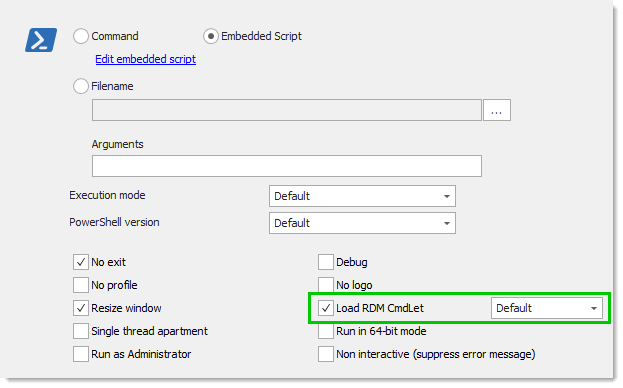
Have you enabled the Load RDM CmdLet option in the PowerShell entry's properties?
If so, the first 3 lines of the provided script above are not required as the module will be already loaded and the script already run on the right data source.
Best regards,
Érica Poirier
2019-05-17_7-52-03.png
I had it enabled, so I removed the first 3 lines of the script. I then received this error:
By the way, in the UI that I see, the options in your screenshot above are separated over a 'general' and 'advanced' tab. Looks like it's all on one page in yours. Is that a new build?
Nvm on the second part of that question. I see you were using a different entry. I tried it with that as well, but resulted in the same error.
Hello,
What RDM version are you using?
What data source type are you connected to?
Could you please open PowerShell in the Tools menu and run the following commands?Get-RDMCurrentDataSourceGet-RDMCurrentRepository
Do you get the current data source and current repository or an error?
If you do not get any error, can you get the sessions list with Get-RDMSession?
Best regards,
Érica Poirier
I am using 2019.1.20.0 and am connected to a Devolutions Online Drive data source.
For the first command, I get the current data source.
For the second command, I get the following message:
WARNING: Command available with an advanced data source only.
With Get-RDMSession, I am able to see all entries in the data source.
Hello,
Have you replaced the name of the data source in the script with the one you have set in File - Data Sources?
This line in the script, you must put the right data source name.
$ds = Get-RDMDataSource -Name "NameOfYourDataSourceHere"
Best regards,
Érica Poirier
Following this and attempted the setup, but I'm receiving this error:
The specified module 'C:\Program Files (x86)\Devolutions\Remote Desktop Manager\RemoteDesktopManager.PowerShellModule.psd1' was not loaded because no valid module file was found in any
module directory.
- it does exist on the RDM vm
for the 4 commands after that one, I receive:
"The term 'Get-RDMDataSource' is not recognized as the name of a cmdlet, function, script file, or operable program. Check the spelling of the name, or if a path was included, verify that the
path is correct and try again."
Also,who ever manages these support sites needs to make sure links to other articles are not dead.
The resource you are looking for has been removed, had its name changed, or is temporarily unavailable.
Hello,
Thank you for mentioning that the link is broken. I have removed the link in the post. For your information, all cmdlet help pages has been removed from the RDM online help documentation as those cmdlets can be available using the Get-Help cmdlet in PowerShell.
What RDM version and edition are you using?
About your main issue, what PowerShell version are you using?
Do you have enough privileges on that machine to run PowerShell scripts according to the execution policies?
Best regards,
Érica Poirier