Struggling with the powershell module

I'm still beating my head against the wall trying to understand how to use the powershell module to recursively create a folder structure with the RDP sessions in it.
Basically, I'm going to have a list of folders to input with a data structure like this:
folder1a/folder2a/folder3a
folder1a/folder2a/folder3a/folder4a
folder1b/folder2b/folder3b
folder1b/folder2b/folder3b/folder4b/folder5b
folder1c/folder2c
All of those will reside under the "correct" parent folder.. i.e.
a/folder1a/folder2a/folder3a
b/folder1b/folder2b/folder3b etc..
And each of those folders may have a series of RDP sessions to add based on retrieving the names from an outside source. (I can do the retrieval very easily).
I think can precreate the main parent folders..
'a','b','c' | foreach-object {
$Session = New-RDMSession -Name $_ -Type Group
$Session.ConnectionCredentialID = [guid]'1310CF82-6FAB-4B7A-9EEA-3E2E451CA2CF'
Set-RDMSession -Session $Session -Refresh
}
Update-RDMUI
But I can't really figure out how to create those folder structures beneath them.. I constantly get errors about the parent not existing..
Unfortunately, the whole structure for the new module still just does not make sense to me.
RDM Enterprise, 64bit, local data source,
v14.1.1.0
PS.. it would be awesome if you guys would add an enum for the credential types.. something like [rdm.credentialtype]::Inherited, [rdm.credentialtype]::Personal etc..
Thank you all again :-)
David F.
All Comments (13)
Hello,
I'll get back to you with a working example of the creation of a folder and a child folder as soon as I can.
For the enumerals, I would recommend you post you idea on our Feature Request section.
Regards,
Alex Belisle
Thank you. I will add my suggestion to the Feature Requests...
David F.
Hello,
I kind of ran into the same issue as you did...
For now, I think that this might be a bug, but could you try something on your side?
I got this working :
'aa','bb','cc' | foreach-object {
$Session = New-RDMSession -Name $_ -Type Group
# Since i did not have credentials to link, i commented the line
# $Session.ConnectionCredentialID = [guid]'1310CF82-6FAB-4B7A-9EEA-3E2E451CA2CF'
Set-RDMSession $Session -Refresh
$grpName = $_
Update-RDMUI
'1','2','3' | foreach-object {
$grp = $grpName + '\' + $_
$SubSession = New-RDMSession -Name $_ -Type Group -Group $grpName
Set-RDMSession $SubSession -Refresh
Update-RDMUI
}
}
I just used double letters folder, it seems that there is something with naming folder with a single letter (to be confirmed)
Thoughts?
Regards,
Alex Belisle
The single letters were just an example.. the folders I'll be using definitely have names longer than that :-)
But, I will give this a shot in the morning. Thank you!
David F.
I am working on it now, and so far, I am making progress.
One thing - when the first folder is created, it does get set, and the CredentialConnecitonID gets set properly. However, when I check the folder Properties in the UI, I get an error saying "Unable to find the credential entry, this setting will be lost!", and the Credentials setting is set to Credential Repository with no credential selected.
I have the root folder set to use the correct ID (95% of my uses), which is should inherit.
Thank you again :-)
David F.
Hello,
I'm sorry for the delay.
I think you might be interested in this article : https://forum.devolutions.net/topic23912-programmatically-assigning-various-credentials-to-entries.aspx.
I hope this helps!
Best regards,
Alex Belisle
That's one of my goto articles to get those references :-) I still don't understand where the lost credential prompt is coming from :-(
David F.
Hello,
Sorry for the long delay, I'm very curious to see the script, would it be possible for you to share it with me? (maybe through email if your not comfortable here support@devolutions.net)
If you could just trim it a little to get it at its simplest, that be appreciated.
Best regards,
Alex Belisle
I should finally have some time to get back to this and hopefully finish it up. I'll be happy to share it once I get it right.
I'll post the key snippets and attach the real thing.
Thank you again for your help..
David F.
Arrggh.. I finally got a chance to go back and work on this.. and the link you provided is going 404 with an ASP.Net error..
Server Error in '/' Application.The resource cannot be found.Description: HTTP 404. The resource you are looking for (or one of its dependencies) could have been removed, had its name changed, or is temporarily unavailable. Please review the following URL and make sure that it is spelled correctly.
Requested URL: /topic23912-programmatically-assigning-various-credentials-to-entries.aspx.
Version Information: Microsoft .NET Framework Version:4.0.30319; ASP.NET Version:4.7.3282.0
I have to admit, so far, this has been the hardest PS thing I've tried to do... It seems to me to be just a lot harder than it should be.. :-( I'd refer back to my original post about the PS module (except I haven't figured out the search engine in the forum).
Are there any good sample scripts of creating folders & entries in powershell using the current PS module?
Also, right now, I can't seem to do anything unless I use the embedded tab session (Powershell (RDM CmdLet)) otherwise, I get access denied, and with the issue of the embedded tab screwing up 99% of the time, I'm really struggling with this. (I have put this up as an issue.. I thought I had tracked it down, but I was wrong. I've used this across several environments, and it is virtually always a problem.
David F.
Hello,
The link i provided had included a final dot that broke it. please try : https://forum.devolutions.net/topic23912-programmatically-assigning-various-credentials-to-entries.aspx
Since the powershell module hasn't changed much, most of what you'll find will work.
The PowerShell Repository section of the forum can be found here: https://forum.devolutions.net/forum42-remote-desktop-manager--powershell-repository.aspx (i guess you already figured that out).
When you perform a search on our forum, you can filter the result by selecting the appropriate channel (Remote Desktop Manager - PowerShell Repository)
Would you mind sending me a screen capture of your Access denied error?
Thanks for your cooperation.
Best regards,
Alex Belisle
Ok.. I attached the picture I get when trying to connect to the server, and the settings for that connection. This connection always worked until I had to change my password.
And here are the settings from powershell.. (sanitized)DocumentData : HostResolved : SERVERNAMEPsPlaylistLocal : SubConnections : {}UserSpecficSettings : AllowClipboard : FalseAllowPasswordVariable : FalseAllowViewPasswordAction : FalseAlternalteHostVPNBefore : FalseAlternateHostAllowCustomHost : FalseAlwaysAskForResources : FalseAutomaticallyClose : FalseAutoReconnection : TrueCommandLineWaitForApplicationToExit : FalseConsole : FalseDesktopComposition : FalseDisableBitmapCache : FalseDisableCursorSetting : FalseDisableFullWindowDrag : FalseDisableMenuAnims : FalseDisableThemes : FalseDisableWallpaper : FalseDisplayConnectionBar : TrueDomainHostOverride : FalseEmbedded32DebugMode : FalseEncrypt : FalseExcludeFromNotifications : FalseExludeFromOpenedSession : FalseFontSmoothing : FalseGoOfflineOnConnect : FalseIncludeInFavorite : FalseOpenEmbedded : TruePromptCredentials : TrueSharedTemplate : FalseShowFooterEmbedded : FalseShowInTrayIcon : TrueSpan : FalseUndocked : FalseUsesClipboard : TrueUsesDevices : FalseUsesHardDrives : TrueUsesPrinters : FalseUsesSerialPorts : TrueUsesSmartDevices : FalseUseVPN : FalseImage : TemplateGroupData : AlternateHostMode : DefaultApplicationIntegrationMode : DefaultAuthentificationLevel : ConnectDontWarnMeConnectionType : RDPConfiguredCredentialInheritedMode : DefaultDescriptionMode : TextDisplayMonitor : DefaultDomainOverrideType : DefaultForeColorStyle : StatusIntelligentCacheAction : AddUpdateKeyboardHook : OnTheLocalComputerPinEmbeddedMode : DefaultPingConnectionMethod : DefaultPingConnectionMode : DefaultPrivateVaultGlobalAvailability : DefaultReconnectMode : DefaultScreenColor : C32BitsScreenSize : DefaultSoundHook : BringToThisComputerUndockMaximized : DefaultUserNameFormat : DefaultVisibility : DefaultWebBrowserApplication : DefaultJumpType : DefaultVNCType : RealVNCAutomaticallyCloseInterval : 0HostPort : -1PingConnectionScanPort : 0SortPriority : 0SubMode : 0WakeOnLANPort : 0ID : 8ec1cf5d-8275-407e-9da0-5b83fa0eeacaSecurityGroup : 00000000-0000-0000-0000-000000000000JumpConnectionID : 00000000-0000-0000-0000-000000000000AlternateHosts : AlternateShell : ClearTextPassword : Color : CommandLine : CommandLineWorkingDirectory : ConnectionStringConnectionID : ConnectionSubType : CreatedBy : DOMAIN\USERNAMECreationSource : CredentialConnectionGroup : CredentialConnectionID : 1310CF82-6FAB-4B7A-9EEA-3E2E451CA2CFCredentialConnectionSavedPath : CredentialDynamicDescription : CredentialDynamicValue : CredentialPrivateVaultSearchString : CustomPort : CustomStatus : Data : DataFileName : Description : DescriptionRtf : DescriptionUrl : DocumentLinkConnectionID : ForeColor : Group : <FolderPath>GroupCredentialPrompt : GroupTab : Host : SERVERNAMEHostDomain : HostFull : SERVERNAMEHostNetworkInterfaceMac : en0HostUrl : HostUserName : HostWithPort : SERVERNAMEImageMD5 : ImageName : Name : SERVERNAMEPersonalConnectionID : PrivateKeyConnectionID : RDPFileName : ShellWorkingDirectory : Stamp : be7fece9-a29e-41ae-a3af-ea8e7d8db60dStatus : StatusLockedBy : StatusMessage : SwitchDataSourceID : SwitchDataSourceName : SwitchRepositoryFolder : SwitchRepositoryID : SwitchRepositoryName : TabTitle : TemplateName : TemplateSecurityGroup : TemplateSourceID : UpdatedBy : DOMAIN\USERNAMEUrl : SERVERNAMEWakeOnLANBroadcastIPAddress : WebBrowserUrl : Domain : UserName : VNCOptions : VNCUrl : VPNDomain : VPNName : VPNSafePassword : VPNUserName : CreationDateTime : 11/13/2018 10:30:45 AMUpdateDateTime : 11/26/2018 1:40:39 PMActiveDirectoryConsole : RemoteDesktopManager.PowerShellModule.PSOutputObject.PSActiveDirectoryConsoleConnectionAddOn : RemoteDesktopManager.PowerShellModule.PSOutputObject.PSAddOnConnectionAgent : RemoteDesktopManager.PowerShellModule.PSOutputObject.PSAgentConnectionAws : RemoteDesktopManager.PowerShellModule.PSOutputObject.PSAwsConnectionAzure : RemoteDesktopManager.PowerShellModule.PSOutputObject.PSAzureConsoleConnectionRecording : RemoteDesktopManager.PowerShellModule.PSOutputObject.PSRecordingConnectionAzureStorage : RemoteDesktopManager.PowerShellModule.PSOutputObject.PSAzureStorageConnectionBeyondTrustPasswordSafeConsole : RemoteDesktopManager.PowerShellModule.PSOutputObject.PSBeyondTrustPasswordSafeConsoleConnectionBoxNet : RemoteDesktopManager.PowerShellModule.PSOutputObject.PSBoxNetConnectionChromeRemoteDesktop : RemoteDesktopManager.PowerShellModule.PSOutputObject.PSChromeRemoteDesktopConnectionCitrix : RemoteDesktopManager.PowerShellModule.PSOutputObject.PSCitrixConnectionCmd : RemoteDesktopManager.PowerShellModule.PSOutputObject.PSCmdConnectionControlUp : RemoteDesktopManager.PowerShellModule.PSOutputObject.PSControlUpConnectionCredentials : RemoteDesktopManager.PowerShellModule.PSOutputObject.PSCredentialsConnectionCustomer : RemoteDesktopManager.PowerShellModule.PSOutputObject.PSCustomerConnectionDameware : RemoteDesktopManager.PowerShellModule.PSOutputObject.PSDamewareConnectionDataEntry : RemoteDesktopManager.PowerShellModule.PSOutputObject.PSDataEntryConnectionDataReport : RemoteDesktopManager.PowerShellModule.PSOutputObject.PSDataReportConnectionDeskRoll : RemoteDesktopManager.PowerShellModule.PSOutputObject.PSDeskRollConnectionDocument : RemoteDesktopManager.PowerShellModule.PSOutputObject.PSDocumentConnectionDropBox : RemoteDesktopManager.PowerShellModule.PSOutputObject.PSDropBoxConnectionEvents : RemoteDesktopManager.PowerShellModule.PSOutputObject.PSConnectionEventsFileExplorer : RemoteDesktopManager.PowerShellModule.PSOutputObject.PSFileExplorerConnectionFtp : RemoteDesktopManager.PowerShellModule.PSOutputObject.PSFtpConnectionGoogleCloud : RemoteDesktopManager.PowerShellModule.PSOutputObject.PSGoogleCloudConnectionCloudBerryRemoteAssistant : RemoteDesktopManager.PowerShellModule.PSOutputObject.PSCloudBerryRemoteAssistantConnectionGoogleDrive : RemoteDesktopManager.PowerShellModule.PSOutputObject.PSGoogleDriveConnectionGotoAssist : RemoteDesktopManager.PowerShellModule.PSOutputObject.PSGoToAssistConnectionGroupDetails : RemoteDesktopManager.PowerShellModule.PSOutputObject.PSGroupConnectionHostDetails : RemoteDesktopManager.PowerShellModule.PSOutputObject.PSHostConnectionHpRGS : RemoteDesktopManager.PowerShellModule.PSOutputObject.PSHpRGSConnectionHyperV : RemoteDesktopManager.PowerShellModule.PSOutputObject.PSHyperVConnectionIDrac : RemoteDesktopManager.PowerShellModule.PSOutputObject.PSIDracConnectionILO : RemoteDesktopManager.PowerShellModule.PSOutputObject.PSILOConnectionIntel : RemoteDesktopManager.PowerShellModule.PSOutputObject.PSIntelConnectionInventoryReport : RemoteDesktopManager.PowerShellModule.PSOutputObject.PSInventoryReportConnectionITerm : RemoteDesktopManager.PowerShellModule.PSOutputObject.PSITermConnectionJump : RemoteDesktopManager.PowerShellModule.PSOutputObject.PSJumpConnectionJumpCommand : RemoteDesktopManager.PowerShellModule.PSOutputObject.PSJumpCommandJumpDesktop : RemoteDesktopManager.PowerShellModule.PSOutputObject.PSJumpDesktopConnectionLogMeIn : RemoteDesktopManager.PowerShellModule.PSOutputObject.PSLogMeInConnectionMetaInformation : RemoteDesktopManager.PowerShellModule.PSOutputObject.PSConnectionMetaInformationPCAnywhere : RemoteDesktopManager.PowerShellModule.PSOutputObject.PSPCAnywhereConnectionPlayList : RemoteDesktopManager.PowerShellModule.PSOutputObject.PSPlayListConnectionPowerShell : RemoteDesktopManager.PowerShellModule.PSOutputObject.PSPowerShellConnectionProxyServer : RemoteDesktopManager.PowerShellModule.PSOutputObject.PSProxyServerConnectionProxyTunnel : RemoteDesktopManager.PowerShellModule.PSOutputObject.PSProxyTunnelConnectionProxyTunnelMac : RemoteDesktopManager.PowerShellModule.PSOutputObject.PSProxyTunnelConnectionMacPutty : RemoteDesktopManager.PowerShellModule.PSOutputObject.PSPuttyConnectionRadmin : RemoteDesktopManager.PowerShellModule.PSOutputObject.PSRadminConnectionRDCommander : RemoteDesktopManager.PowerShellModule.PSOutputObject.PSRDCommanderConnectionRDP : RemoteDesktopManager.PowerShellModule.PSOutputObject.PSRDPConnectionRemoteAssistance : RemoteDesktopManager.PowerShellModule.PSOutputObject.PSRemoteAssistanceConnectionRemoteCommand : RemoteDesktopManager.PowerShellModule.PSOutputObject.PSRemoteCommandConnectionReportTool : RemoteDesktopManager.PowerShellModule.PSOutputObject.PSReportToolConnectionRoot : RemoteDesktopManager.PowerShellModule.PSOutputObject.PSRootConnectionRunAsConnection : RemoteDesktopManager.PowerShellModule.PSOutputObject.PSRunAsConnectionS3 : RemoteDesktopManager.PowerShellModule.PSOutputObject.PSS3ConnectionScp : RemoteDesktopManager.PowerShellModule.PSOutputObject.PSScpConnectionScreenConnect : RemoteDesktopManager.PowerShellModule.PSOutputObject.PSScreenConnectConnectionScript : RemoteDesktopManager.PowerShellModule.PSOutputObject.PSScriptConnectionSecurity : RemoteDesktopManager.PowerShellModule.PSOutputObject.PSSecurityConnectionShortcut : RemoteDesktopManager.PowerShellModule.PSOutputObject.PSShortcutConnectionSkyDrive : RemoteDesktopManager.PowerShellModule.PSOutputObject.PSSkyDriveConnectionSNMPReport : RemoteDesktopManager.PowerShellModule.PSOutputObject.PSSNMPReportConnectionSpiceworks : RemoteDesktopManager.PowerShellModule.PSOutputObject.PSSpiceworksConnectionSplunk : RemoteDesktopManager.PowerShellModule.PSOutputObject.PSSplunkConnectionStats : RemoteDesktopManager.PowerShellModule.PSOutputObject.PSStatsConnectionSync : RemoteDesktopManager.PowerShellModule.PSOutputObject.PSSyncConnectionTeamViewer : RemoteDesktopManager.PowerShellModule.PSOutputObject.PSTeamViewerConnectionTeamViewerConsole : RemoteDesktopManager.PowerShellModule.PSOutputObject.PSTeamViewerConsoleConnectionTemplate : RemoteDesktopManager.PowerShellModule.PSOutputObject.PSTemplateConnectionTerminal : RemoteDesktopManager.PowerShellModule.PSOutputObject.PSTerminalConnectionTerminalConsole : RemoteDesktopManager.PowerShellModule.PSOutputObject.PSTerminalServerConnectionTerminalMac : RemoteDesktopManager.PowerShellModule.PSOutputObject.PSTerminalConnectionMacTools : RemoteDesktopManager.PowerShellModule.PSOutputObject.PSToolConnectionVirtualBox : RemoteDesktopManager.PowerShellModule.PSOutputObject.PSVirtualBoxConnectionVirtualPC : RemoteDesktopManager.PowerShellModule.PSOutputObject.PSVirtualPCConnectionVMRC : RemoteDesktopManager.PowerShellModule.PSOutputObject.PSVMRCConnectionVMWare : RemoteDesktopManager.PowerShellModule.PSOutputObject.PSVMWareConnectionVNC : RemoteDesktopManager.PowerShellModule.PSOutputObject.PSVNCConnectionVPN : RemoteDesktopManager.PowerShellModule.PSOutputObject.PSVPNConnectionVPNMac : RemoteDesktopManager.PowerShellModule.PSOutputObject.PSVPNConnectionMacWayk : RemoteDesktopManager.PowerShellModule.PSOutputObject.PSWaykConnectionWeb : RemoteDesktopManager.PowerShellModule.PSOutputObject.PSWebConnectionWebDav : RemoteDesktopManager.PowerShellModule.PSOutputObject.PSWebDavConnectionWindowsVirtualPC : RemoteDesktopManager.PowerShellModule.PSOutputObject.PSWindowsVirtualPCConnectionXenServer : RemoteDesktopManager.PowerShellModule.PSOutputObject.PSXenServerConnectionXWindow : RemoteDesktopManager.PowerShellModule.PSOutputObject.PSXWindowConnection
Devolutions_PasswordSettings.png
Devolutions_BadPassword.png
Hello,
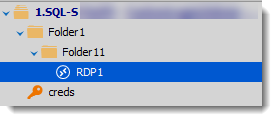
I can't figure out what can be wrong on your implementation, but here's a tiny piece of code that create a Folder, a sub folder, and a RDP connection, all set to inherited for the credentials, I have set a credential entry that I linked to the root, and all works fine.
$folder1 = New-RDMSession -Type Group -Name "Folder1"
$folder1.CredentialConnectionID = "1310CF82-6FAB-4B7A-9EEA-3E2E451CA2CF"
Set-RDMSession $folder1 -Refresh
Update-RDMUI
$folder11 = New-RDMSession -Type Group -Name "Folder11" -Group $folder1.Group
$folder11.CredentialConnectionID = "1310CF82-6FAB-4B7A-9EEA-3E2E451CA2CF"
Set-RDMSession $folder11 -Refresh
Update-RDMUI
$ns = New-RDMSession -Group $folder11.Group -Type RDPConfigured -Host "qa-w107.westeros.loc" -Name "RDP1"
$ns.CredentialConnectionID = "1310CF82-6FAB-4B7A-9EEA-3E2E451CA2CF"
Set-RDMSession $ns -Refresh
Here's the result :
Thoughts?
Best regards,
Alex Belisle
2019-04-08_15-43-50.png