RDP fails to open in embedded (works fine when opened in external mode)
RDP fails to open in embedded (works fine when opened in external mode)

Hi,
We are using Microsoft Remote Desktop behind a gateway, because we actually have 2 hosts on which we do load balancing.
I imported my session.rdp within RDM. It works fine if I setup the display as external.
When I set it up as Embedded(tabbed) it does not work anymore. I have the 2 popups for credential, one for gateway and one for final host, but after entering my credentials, the tab just close itself.
I really need to make it work embedded, do you have any idea what I should do ? I tried playing with many parameters but this did not solve my issue.
I also tried to get the temporary .rdp file that RDM generates when I try to login (C:\Users\your_name\AppData\Local\Temp\RDM) and it works fine.
Thanks in advance for your help !
Thomas
All Comments (9)
First of all, is it possible to verify if it works in RDCMan? I'm asking the question because we use the same core component and I would like to see if it's in RDM directly or in the integration of the ActiveX?
Regards
David Hervieux
Hello,
Yes it works fine when using the standard windows RDCMan.
(both the classic version, as well as the Win10 RDC manager)
I mean Microsoft Remote Desktop Connection Manager
https://www.microsoft.com/en-ca/download/details.aspx?id=44989
And not mstsc.exe
David Hervieux
OK sorry.
I did try it and indeed it's not working. I get "Unknown extended disconnection reason 1040" which from MS support seems to translate into:
1040
Extended Reason: Your computer can't connect to the remote computer because the Connection Broker couldn't validate the settings specified in your RDP file
[/table]
I get that you'll say it's not a bug within RemoteDesktopManager, but do you have any idea why it's not working on RDCMan but is working with mstsc.exe ?
Thanks for the help :)
It means that it might be more complicated to fix but behind the scene, mstsc share some of the libraries. Could you post the .rdp file (without the sensitive information, just replace it with fake values)
Regards
David Hervieux
I just sent it through Private Msg to you.
Rgds,
Thomas
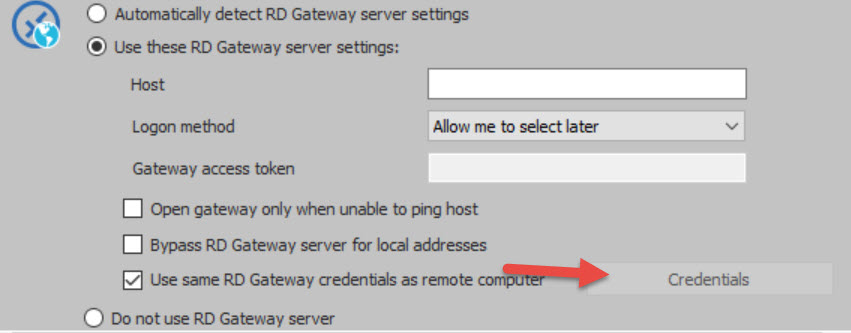
We've recently discovered a bug in external with gateway settings on RDP sessions. If you have the box (Use same RD Gateway credentials as remote computer) checked out, it will use the info in the credentials sections as displayed by a red arrow in the screenshot. If no info are set in this section you will be asked a password at the connection attempt.
Using Embedded with this option check will correctly use the checkbox setting discarding the info from the credentials section.
We are currently investigating the issue.
Regards,
Alexandre Roy
RD gateway.jpg
did this get resolved, as im having this issue and have opened a new post for it,
@Paul Sexstone,
We will continue to chat together in post https://forum.devolutions.net/topic30641-prompted-for-credentials-when-using-remote-desktop-gateway.aspx?lastpage=1#post123621
Jeff Dagenais