Blank window after save as

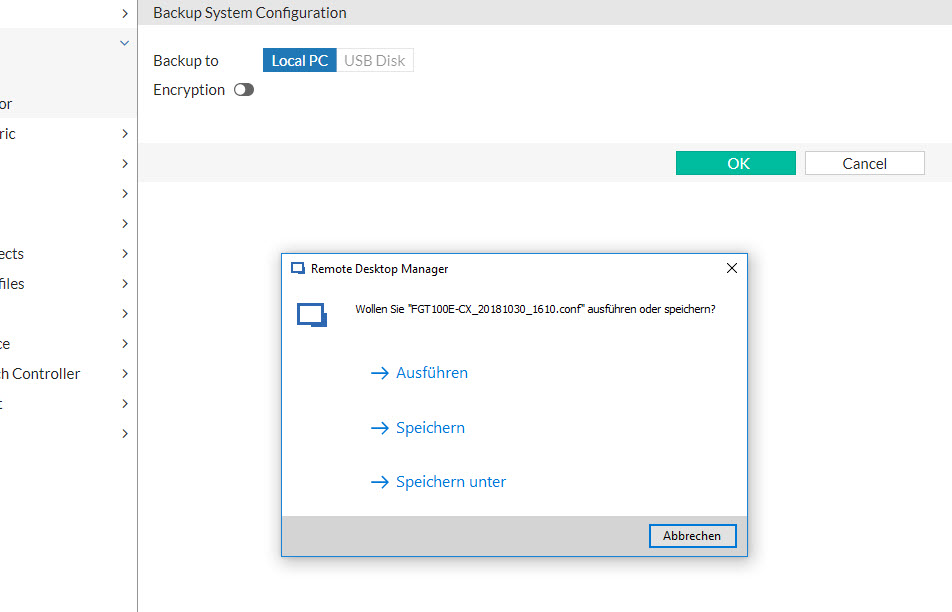
When we download something from a web-browser session. it shows the normal save as dialog as before, but after saving, it resets the whole window and it's just a white blank screen. You need to close the tab and open it again.
I attached two screen shots:
Version 14.0.2
blank-screen.jpg
Save-dialog.jpg
All Comments (9)
Hello,
Thank you for reporting this issue. We'll try to reproduce it on our end to find what's wrong.
Regards,
Hubert Mireault
Hi patrick,
Thanks for reporting this we have been able to reproduce the issue.
We will investigate and get back to you when we have some news :).
Best regards,
Alexandre Roy
Hi Alexandre
Has this been fixed?
Best regards.
Patrick
Hi,
We believed we had fixed the issue. But when the issue was tested on internal build we had to reject it as it was still doing the same result.
We are still working on it currently.
sorry for the waiting.
Best regards,
Alexandre Roy
Hello Patrick,
We haven't had the time to fix this yet but we have bumped it up to a high priority issue.
We have found a workaround which you may be able to use in the meantime. If you can start RDM as administrator, the "blank page" issue should be gone. This would be the best way to get this feature to work until we have fixed the problem.
Regards,
Michaël Beaudin
We got in touch with the third party and they identified the issue. We need to wait for them to release a new version so we can implement it in RDM.
Regards,
Hubert Mireault
Hi Hubert,
Is there an update to this already? It is very annoying not being able to use this feature.
Cheers!
Sjoerd
Hello,
The release for the third party's library was planned for mid-january, but they haven't published their update yet. We've asked them if they can give us an expected release date so that we can integrate the change as fast as possible.
Regards,
Hubert Mireault
Hello,
The third party released their 2019 version and with it comes the fix for this issue. We've updated the library internally and it seems resolved. This should be available in the next RDM update.
Regards,
Hubert Mireault