RDM - Slow performance navigating around

Howdy,
I noticed a slowness issue a while ago and found a fix that was something about turning off the ability to check in and out information from the database while making changes. We turned that off and things sped back up. However, i can't find where that setting is or if it's a global setting or something each person has to set.
Does anyone recall that and where it is? I have a user complaining that his RDM program hangs all the time and am wondering if that setting needs to be modified again.
Thanks
All Comments (11)
Greetings,
Check in/out and entries states can be found in Administration > Data Source Settings > General section, (Allow entry state (Lock, Running Checkout) (EDIT)
Also,
If your datasource offline cache is set to (Disabled) in Administration > Data Source Settings > Offline, could you switch it to cache only ?
High volume of entries without the offline cache set to disabled can result in slower performance of the application.
and if the option is not available to you please download the lastest version of RDM beta which should be 13.9.4.0.
Regards,
Alexandre Roy
Our Offline Mode setting is set to Read-only with Expiration at 7 days.
What is the difference between Cache Only and Read Only?
The main problem that we're having is when people are working from home, they seem to have slower response. It may just be one person having issues but he states when he navigates between sessions or clicking around it's very slow. If he changes to Offline mode it seems to work much better.
If it times out a bit, eventually he can jsut click to go offline but getting to that point it somewhat slow.
Just looking for any performance related tweaks he could make for when he's at home on VPN.
Hello,
Cache only is basicaclly the same thing as Disabled cache, which does not give you access to the offline mode but creates a cache which are used to load connection faster. So if you have around 3000 + entries it just helps towards the performance without allowing users to go in offline mode.
If he switch to offline mode he is using the offline cache which is saved locally on his computer, so will be faster.
Depending on his needs from home, if he only needs to see those connection, Read only is the way to go, if he needs to do modifications such as editing entries, Read and write offline mode would be the way to go.
Note: If you use read/write offline permission, whenever he will connect to the datasource in online mode on the network, he will be prompt for changes that he made while being at home, the cache will be compared with the entries on the server and will ask him confirmation if he want to push or deny those changes.
I belive internet speed is important working from home depending on how far he lives off the server or even the speed that the VPN allows him to have on the network. This might be one reason why it is slow for him.
If you have any other question regarding those feature or if something I mentioned is not clear, I'll be glade to formulate this in a better way to make sure you understand.
Glad to help,
Best regards,
Alexandre Roy
I am sorry to re-up this old post but I have just installed the latest version and I also notice slow performance navigating around (e.g. while I switch among the tabs of an item's Dashboad (i.e. Overview <-> Macros/Scripts/Tools <-> Asset). That's quite odd imho. Please advise, thanks.
EDIT: sorry, forget it! The culprit is the RDP session I launch to reach the machine where the RDM is installed. By using RDM while logged in locally, operations are much faster!
It is extremely slow, takes a lot of time to start (reminds me of my old Win98/Pentium2 PC), does not report the current status, like "working", "connecting," or similar, it just hangs and does not respond to any clicks for 5 seconds.
Extremely frustrating!
I have an 11th generation i7CPU with 32GB RAM and an NVME disk with a 2GB/s read speed.
How many resources do you need, honestly?
It's not only me, all my colleagues also complain.
I would certainly look for alternatives, I don't need software that would make me frustrated on a daily basis!
I would honestly be ashamed to put this product on the market in this condition!
I would honestly be ashamed to put this product on the market in this condition!
I wouldn't express it that hard, cause all in all it is a good product and although I find it annoying to wait 5 or more seconds for the program to start up I would have a hard time without it.. I could imagine this has to do with synchronizing online database.. Don't know if it would be faster if the database was a local one.. If this would be the case, then I would suggest Devolutions to load a cached local Database first and then online sync in the background.. This would have the benefit, that you could use it offline and still reach local services not depending on the internet.
@all,
it just hangs and does not respond to any clicks for 5 seconds.
Slow while you click? Have a look here: https://forum.devolutions.net/topics/41523/rdm-freezing-during-normal-use#195962
For startup times DevOps have been working on adding ReadyToRun to the build process ton help improve startup times. Like with anything this has tradeoffs and in this case it would increase (2-3x) the size of the install (download). More info here from Microsoft: https://learn.microsoft.com/en-us/dotnet/core/deploying/ready-to-run (I'm not sure where we are at with this process)
Don't know if it would be faster if the database was a local one.. If this would be the case, then I would suggest Devolutions to load a cached local Database first and then online sync in the background.. This would have the benefit, that you could use it offline and still reach local services not depending on the internet.
This is already what RDM does if you have offline caching enabled. We pre-load from offline than sync changes (if any) from the server.
If you want you can send us your startup profiler traces to see if we can spot anything that looks slow in your particular startup.
- Run "C:\Program Files\Devolutions\Remote Desktop Manager\RemoteDesktopManager.exe" /profiler -2097153
- Send us the profiler trace
Best regards,
Stéfane Lavergne
This is already what RDM does if you have offline caching enabled. We pre-load from offline than sync changes (if any) from the server.
Is this really the case for Devolutions Hub Data Source? Cause I cannot find the option in my RDM, after reading the link you provided..
@sweise
Yes, Hub Data Source supports caching, we will need to update the documentation and UI/app. You can validate using the profiler.
- Help > Profiler
- Set profiler level = 513
- Refresh (using the icon)
- Have a look a the output (you can send me your profiler trace via private message if you want me to have a look)
Sample trace (things to look for "<== here")
Main thread (UI)
----------------------------------------
ActionManager.RefreshConnections...
    RefreshConnections...
        LoadConnections UI - [Devolutions Hub Business : xyz] - ReadOnly - 64-bit...
                > DataSource : xyz
                > DataSource.CachingMode : File                       <== here
                > PolicyManager.Policy.OfflineMode : ReadWrite        <== here
                > DataSource.OfflineMode : ReadOnly                   <== here
                > dataSource.SupportOfflineMode : True
                > dataSource.Repository?.IsAllowedOffline : null
                > AllowOfflineCheck : True
                > dataSource.Engine.IsDataSourceSettingsLoaded : True
                > dataSource.Engine.DataSourceSettings.OfflineMode : ReadOnly
                > dataSource.IsSecuritySupported : True
            HasSecurityChanged : 111 ms
            Reload: False - HasSecurityChanged: False - HasChanged: False   <== here (false, false, false) means client is upto date
            Load connection overrides...
                Reload : 19 ms
            Load connection overrides : 19 ms
            LoadConnections [Devolutions Hub Business : xyz - Global Vault] - ReadOnly - 64-bit...
                    > DataSource : xyz - Global Vault
                    > DataSource.CachingMode : File
                    > PolicyManager.Policy.OfflineMode : ReadWrite
                    > DataSource.OfflineMode : ReadOnly
                    > dataSource.SupportOfflineMode : True
                    > dataSource.Repository?.IsAllowedOffline : null
                    > AllowOfflineCheck : True
                    > dataSource.Engine.IsDataSourceSettingsLoaded : True
                    > dataSource.Engine.DataSourceSettings.OfflineMode : ReadOnly
                    > dataSource.IsSecuritySupported : True
            LoadConnections [Devolutions Hub Business : xyz - Global Vault] - ReadOnly - 64-bit : 363 ms
            RefreshRepositories : 1 ms
            FavoriteManager.LoadFolders : 45 ms
        LoadConnections UI - [Devolutions Hub Business : xyz] - ReadOnly - 64-bit : 678 ms
    RefreshConnections : 681 ms                                                                         <= here - refresh total time 681 ms
    Connection States: Refresh...
        GetOpenedConnections...
            Opened - by process : 8 ms
        GetOpenedConnections : 8 ms
    Connection States: Refresh : 162 ms
    TreeView.LoadConnectionList...
        BeginUpdate...
            PreCreateGroups : 0 ms - Run count : 1
        BeginUpdate : 5 ms
    TreeView.LoadConnectionList : 5 ms
    Load Expand States...
        Expanded: 0 - Nodes : 445
        Nodes...
            Expand : 0 ms - Run count : 1
            Collapse : 0 ms - Run count : 0
        Nodes : 0 ms
    Load Expand States : 0 ms
ActionManager.RefreshConnections : 885 ms
SelectionChanged - Default...
    RootDashboardOverviewManager.LoadRootDashboardOverView - Quick Load : 60 ms
SelectionChanged - Default : 88 ms

Thread : 3
----------------------------------------
3 - OfflineManager.SaveMeta...
3 -     Expiration : 39 ms
3 - OfflineManager.SaveMeta : 39 ms

Thread : 13
----------------------------------------
13 - Sync to Offline : 21 ms - Count : 1
13 - Sync to Offline : 6 ms - Count : 2
13 - Sync to Offline : 8 ms
Stéfane Lavergne
Hang on this is with Hub Business, I'm having a look at Hub Personal, it doesn't look supported... I'm talking with the team.
Stéfane Lavergne
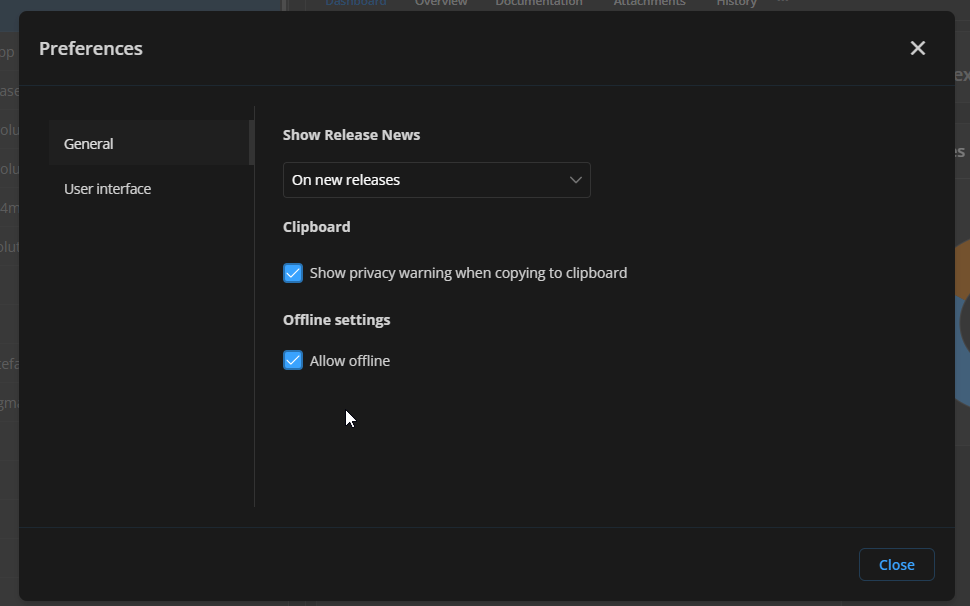
Ok, so for Hub Personal you must configure your account to support caching, not sure what the default is.
- Login https://hub.devolutions.com/
- click on your avatar - top right corner
- Preferences
- check "Allow offline"
Main thread (UI)
----------------------------------------
ActionManager.RefreshConnections...
    RefreshConnections...
        LoadConnections UI - [Devolutions Hub Personal : Hub Personal] - ReadOnly - 64-bit...
                > DataSource : Hub Personal
                > DataSource.CachingMode : File                  <== here
                > PolicyManager.Policy.OfflineMode : ReadWrite   <== here
                > DataSource.OfflineMode : ReadOnly              <== here
                > dataSource.SupportOfflineMode : True
                > dataSource.Repository?.IsAllowedOffline : null
                > AllowOfflineCheck : True
                > dataSource.Engine.IsDataSourceSettingsLoaded : True
                > dataSource.Engine.DataSourceSettings.OfflineMode : ReadOnly
                > dataSource.IsSecuritySupported : False
            Reload: False - HasSecurityChanged: False - HasChanged: False      <== here (false,false,false) is good, no changes
            Load connection overrides...
                Reload : 17 ms
            Load connection overrides : 17 ms
            LoadConnections [Devolutions Hub Personal : Hub Personal - Global Vault] - ReadOnly - 64-bit...
                    > DataSource : Hub Personal - Global Vault
                    > DataSource.CachingMode : File
                    > PolicyManager.Policy.OfflineMode : ReadWrite
                    > DataSource.OfflineMode : ReadOnly
                    > dataSource.SupportOfflineMode : True
                    > dataSource.Repository?.IsAllowedOffline : null
                    > AllowOfflineCheck : True
                    > dataSource.Engine.IsDataSourceSettingsLoaded : True
                    > dataSource.Engine.DataSourceSettings.OfflineMode : ReadOnly
                    > dataSource.IsSecuritySupported : False
            LoadConnections [Devolutions Hub Personal : Hub Personal - Global Vault] - ReadOnly - 64-bit : 3 ms
            FavoriteManager.LoadFolders : 151 ms
        LoadConnections UI - [Devolutions Hub Personal : Hub Personal] - ReadOnly - 64-bit : 190 ms
    RefreshConnections : 192 ms                                                <== here - total refresh time
    TreeView.LoadConnectionList...
        BeginUpdate...
            PreCreateGroups : 0 ms - Run count : 1
        BeginUpdate : 4 ms
    TreeView.LoadConnectionList : 4 ms
    Load Expand States...
        Expanded: 0 - Nodes : 112
        Nodes...
            Expand : 0 ms - Run count : 1
            Collapse : 0 ms - Run count : 1
        Nodes : 0 ms
    Load Expand States : 0 ms
ActionManager.RefreshConnections : 226 ms
SelectionChanged - Default...
    RootDashboardOverviewManager.LoadRootDashboardOverView - Quick Load : 49 ms
SelectionChanged - Default : 65 ms

Stéfane Lavergne
2f17bdc1-21aa-4e86-a054-b837e66ec745.png
36091028-f330-4500-9167-99b06cc38a8e.png
2024-08-05_10-37-33.PNG
2024-08-05_10-37-17.PNG