Prompt for the value of a variable in the typing Macro
Prompt for the value of a variable in the typing Macro
0 vote

Hi Guys
In our enviroment, it' snot possible, to copy/paste something in the RDP-Session. Due to this, we are using the typing macro for password insert, which works great. But there is now a problem: When we would like to change the passwort, we have to insert the new password manually. As we do this quiet often for quiet a lot of entries, it would be grat, if we could use the typing macro for this. But the problem is: I see no comfortable way, how the user can insert the new passwort which should be inserted by the typing macro. Due to this I would request this as a new feature:
This could look like for the username/Password entry, where you have the option "ask everytime for the password"-checkbox.
This would help us a lot!
Thanks!
All Comments (10)
Hello,
Where is the password stored? Could you post some screenshots of your configuration please.
Best regards,
Jeff Dagenais
Hi,
It doesn't matter where the password is stored. We will manually update the password vault with the new passwort. But we would like to use the typing macro to insert the password in a remote session. Thius could also be used for use cases, where the clip board is not working/disabled, so the rdm users can use the macro as workaround for pasting text somewhere.
Regards
Hello,
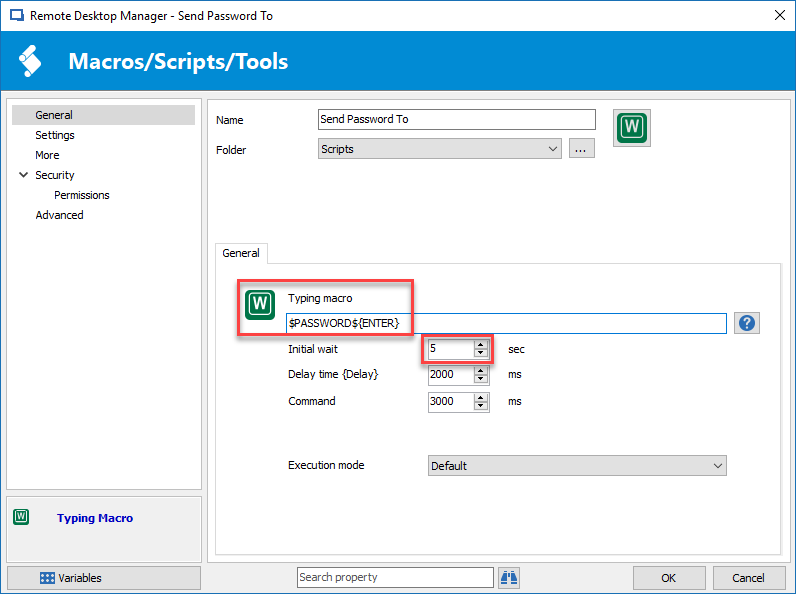
If you want to use a macro to send a password in a remote session, you can create a Typing Macro session and run this session on the credential entry that you would like to paste the password in the remote session to get the password.
https://help.remotedesktopmanager.com/macroscripttools_macro.htm
Here's what your typing macro session will looks like
Don't forget to adjust the Initial wait option to get enough time to put the cursor in the appropriate field.
You would also need to allow the password to be sent in a variable.
Best regards,
Jeff Dagenais
2018-06-08_10-33-52.png
Jeff, I think you don't got me.
PLEASE BE AWARE: My Use-Case is about changing the Password. With your suggested way it's mostly and in a comfortable wa< not possible, to set a new value for the password in the password entry, as the session caches the password.
As this is a generic Feature request, not only usable for Password typing, as example when the clipboard is deactivated, the most easy way in my view is to create a macro with a pop-up where a user can insert his value he would like to let be typed by de macro.
Hello,
Thank you for the explanation, sorry that I didn't understand properly the first time.
I have assigned this to our engineering department so they can verify/validate what can be done.
Best regards,
Jeff Dagenais
Hello,
I have entered a feature request for that.
Regards
David Hervieux
Hi David
Sounds like a good plan, thanks!
Cheers
Hi David
Any updates on this?
Thanks
Hello,
We have nothing new but I think that I have an idea how we could add this quickly. Do you need only one variable?
Regards
David Hervieux
Hello,
We've added an option in the before open events to prompt for the value of a variable. 
The value you enter when prompted will be saved in the variable $PROMPT_VARIABLE$, which you can then use in your typing macro as long as the session in opened.
This feature will be available in version 2020.3.9.0. Please tell us this solves you problem.
Regards
Jonathan Del Signore