Slightly different approach to the search function
0 vote

Disabled
Hello dev team,
I manage about 1500 devices through RDM, so the search is very important for me. The thing that bothers me is that when looking for e.g. 'DC Paris' I only get machines with specifically the string 'DC Paris' in one of the DB fields. More interesting it would be to get a list of all machines that both have a tag or description with DC and one with Paris. Right now I search for DCs only or Paris only, but in both cases I have to look for my stuff in a big list with irrelevant hits.
So basically, I'd like the space in the search to be interpreted not literally but as a delimiter between search terms. For literal interpretation quotes could be used, like in most search engines.
Thank you for considering.
All Comments (30)
Hello,
It's possible to use the boolean filter in RDM, like mentioned here
https://help.remotedesktopmanager.com/view_searchfilter.htm
Could you give it a try?
Best regards,
Jeff Dagenais
Disabled
Hello,
It's possible to use the boolean filter in RDM, like mentioned here
https://help.remotedesktopmanager.com/view_searchfilter.htm
Could you give it a try?
Best regards,
Hi. I wasn't aware of this. Works like a charm. I think && should be default behaviour personally, but I'm happy with this solution for myself, thanks a lot.
Hello Jeff
Could you add the option, that it is the default search option? Like it is possible in the Workspace app, where we can set it to "treat space as AND" ? That would really save us a lot of time, typing && ;-)
Thanks!
Patrick
Hello Patrick,
Assuming you're talking about the filter in the status bar, you can go in File > Settings > User interface > Filter, and change the mode to "treat space as AND":
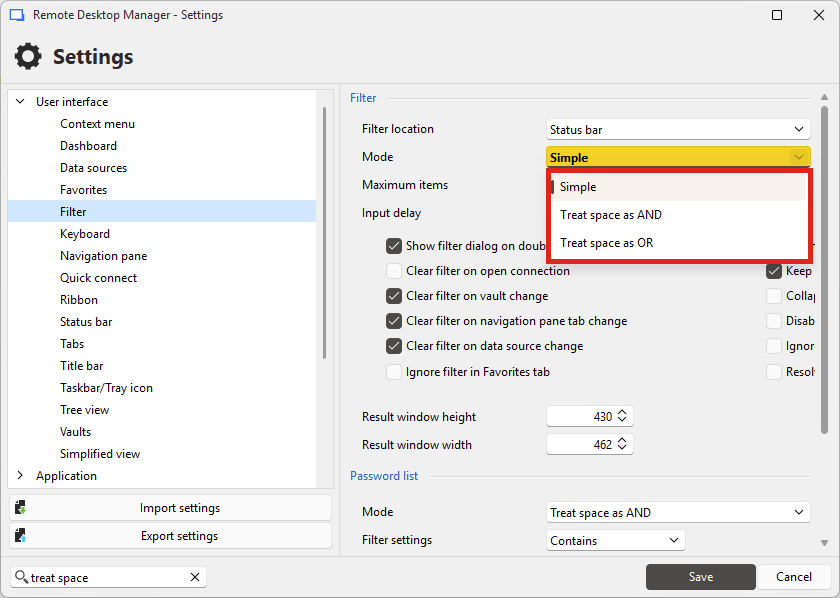
Regards,
Hubert Mireault
Thank you Hubert! YOU ARE THE MAN! Thanks a lot!
Perhaps this could be added here in the manual: https://docs.devolutions.net/rdm/user-interface/status-bar/search-filter/
Best regards.
Happy I could help! Good point for the documentation page, I'll let our documentation team know.
Regards,
Hubert Mireault
Hi Hubert
One more thing regarding the search. There are folders where we have entries in it, which we normalle don't want to search trough. Is there a way to mark a folder as "non-searchable" so it is not included when we do the search via the search bar? Perhaps with an option like "disabled" or "expired"? But they should stay accessible if we want to open them manually.
Thanks and best regards.
Patrick