Slightly different approach to the search function
0 vote

Disabled
Hello dev team,
I manage about 1500 devices through RDM, so the search is very important for me. The thing that bothers me is that when looking for e.g. 'DC Paris' I only get machines with specifically the string 'DC Paris' in one of the DB fields. More interesting it would be to get a list of all machines that both have a tag or description with DC and one with Paris. Right now I search for DCs only or Paris only, but in both cases I have to look for my stuff in a big list with irrelevant hits.
So basically, I'd like the space in the search to be interpreted not literally but as a delimiter between search terms. For literal interpretation quotes could be used, like in most search engines.
Thank you for considering.
All Comments (30)
Hello,
It's possible to use the boolean filter in RDM, like mentioned here
https://help.remotedesktopmanager.com/view_searchfilter.htm
Could you give it a try?
Best regards,
Jeff Dagenais
Hi. I wasn't aware of this. Works like a charm. I think && should be default behaviour personally, but I'm happy with this solution for myself, thanks a lot.
Hello Jeff
Could you add the option, that it is the default search option? Like it is possible in the Workspace app, where we can set it to "treat space as AND" ? That would really save us a lot of time, typing && ;-)
Thanks!
Patrick
Hello Patrick,
Assuming you're talking about the filter in the status bar, you can go in File > Settings > User interface > Filter, and change the mode to "treat space as AND":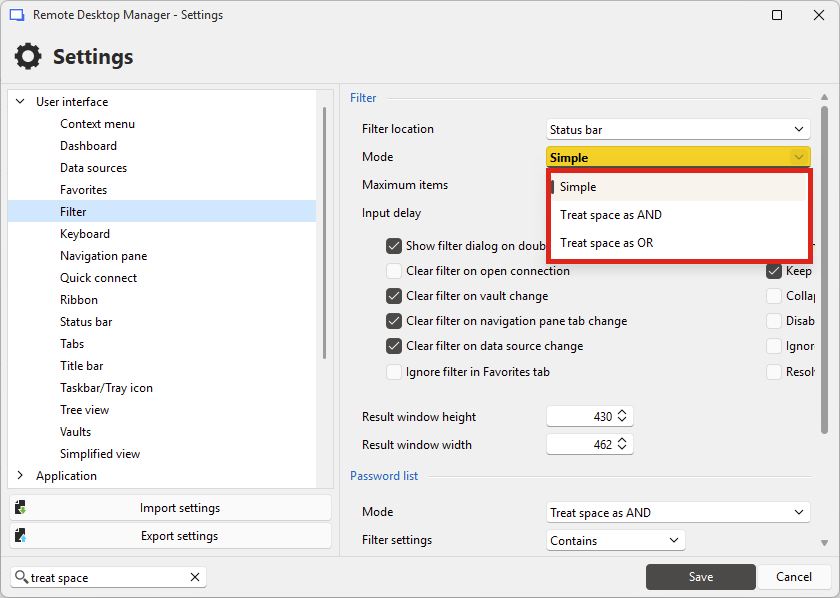
Regards,
Hubert Mireault
b1ce240e-3dae-433e-8b8a-37fb425c748f.png
Thank you Hubert! YOU ARE THE MAN! Thanks a lot!
Perhaps this could be added here in the manual: https://docs.devolutions.net/rdm/user-interface/status-bar/search-filter/
Best regards.
Happy I could help! Good point for the documentation page, I'll let our documentation team know.
Regards,
Hubert Mireault
Hi Hubert
One more thing regarding the search. There are folders where we have entries in it, which we normalle don't want to search trough. Is there a way to mark a folder as "non-searchable" so it is not included when we do the search via the search bar? Perhaps with an option like "disabled" or "expired"? But they should stay accessible if we want to open them manually.
Thanks and best regards.
Patrick
Hello,
At the moment the closest we have is these options to exclude archived/expired/disabled entries from the filter: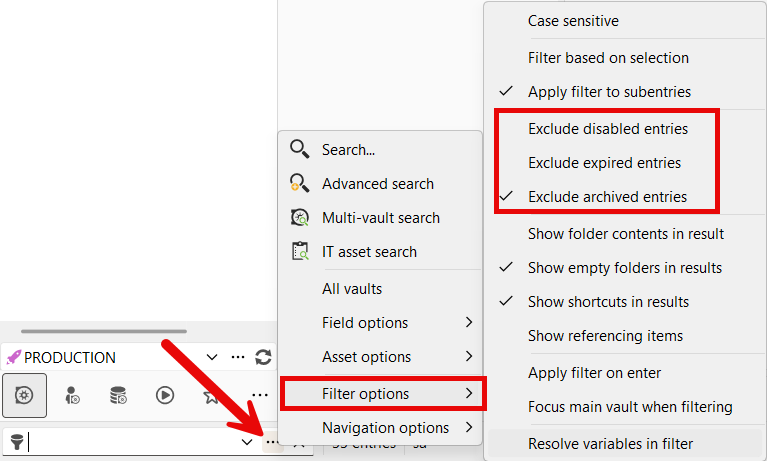
These don't apply directly on the folder, but would apply to entries contained within. If all the entries in a folder are of that status and you exclude them, they would not show up in the result.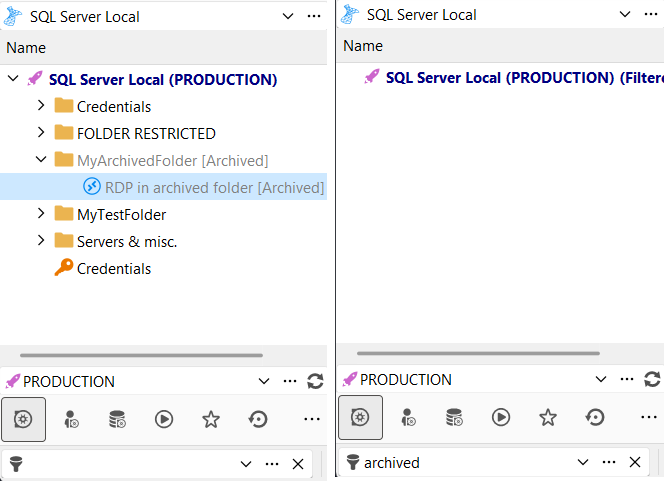
Do you think this is enough in your scenario, or would you prefer only setting the status on the folder itself and not the entries to achieve this? At the moment if you right click a folder and set the status, it will also be set on its child entries, which in theory should make this scenario work for you quite simply.
Regards,
Hubert Mireault
f6199533-f38a-4c2a-972b-b890127a8af8.png
a95caa66-79dc-4580-ac79-2ef46236a959.png
Hello Hubert
Thanks for the reply. When we set such a setting to a folder and the containing entries, are there any others implication if an entry is Disabled / Archived or Expired? For example if an entry is disabled, can we still open it? Is there an overview what these status are setting when selected. For example when we are running scripts, that such entries are ignored or something like that.
To your question, if these status don't change anything else, than thats a working solution for us. Otherwise a status for a folder with just "ignore from search" would be better.
Thanks and best regards
Patrick
Hello,
Sorry about the delay in my response, I was on vacation last week, and it's been busy with the latest release.
I've performed some tests and unless you're an administrator, the archived/disabled/expired statuses will prevent you from opening the entry, so it wouldn't be appropriate for your usage. I don't think there's any other way to achieve what you need at the moment, so I will open a ticket so we can add something to support this behavior.
Regards,
Hubert Mireault
Hello Hubert
Ok, so yes a new status like "Unused" oder "Depreciate" which can than be excluded in the filter.
"At the moment if you right click a folder and set the status, it will also be set on its child entries" .-> I tried it with "Archived" on a folder, and the folder went grey, but all entries below it are still looking normal and are still showing up in the search.. (the entries are set to Inherited)
So at the moment this filter does not work for entries in a folder.
Thanks and best regards
f767fa5d-190e-4798-88e4-2ebe9bf0515f.png
I think I understand under what circumstances only the folder is modified. It seems to be related to what entries are visible when performing the action to set the status. If you filter the tree and only see the folder, it won't apply to its contents, only the folder itself.
Regardless, I'll open a ticket to improve this and we will see what we can do to improve this. I think a new status like you mention which has no restrictions but can be filtered out more easily would make sense.
Regards,
Hubert Mireault
Hey Hubert
Any news on the new status? It would really help a lot if for the example credential entries in a folder could be excluded from the search.
Thanks for checking.
Best regards
Patrick
Hello Patrick,
Nothing new for now, we will have to discuss if it can be planned for the second part of our development cycle for version 2026.1. We need to synchronize this feature between our products, so while it's not a complex addition, it involves more moving pieces than if it were strictly an improvement on the RDM-side.
Regards,
Hubert Mireault
Hello Hubert
Thanks for the timeframe. For the time beeing, I tried to Archive existing entries which are all in a folder, but it looks like it only sets the Folder to archived, not the entries within. How can we accomplish, that the entries are also changed to archived, when the main folder is, and all entry have the inherited option on? Here is an example, I set the first entry to archived manually: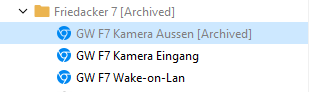
Thanks and best regards
Patrick
3ef1ff46-ee82-4ee5-9215-af88f510d7de.png
Hello Patrick,
In my testing, if you select your folder and change the status, it should apply to all visible entries underneath it. If you had a filter that removed some of its child entries, that might explain why it didn't change the status on those entries.
Regards,
Hubert Mireault
Hi Hubert
I just tested it again, and I saw all entries below it and changed it do disabled. No change vor the entries within. Changed it back to archived, still nothing.
We are on version 2025.3.15 was there a bugfix after that? Couldn't find it in the change logs.
I don't believe we made a fix specifically for this behavior.
Here's a short gif of what happens when I perform the action in my environment: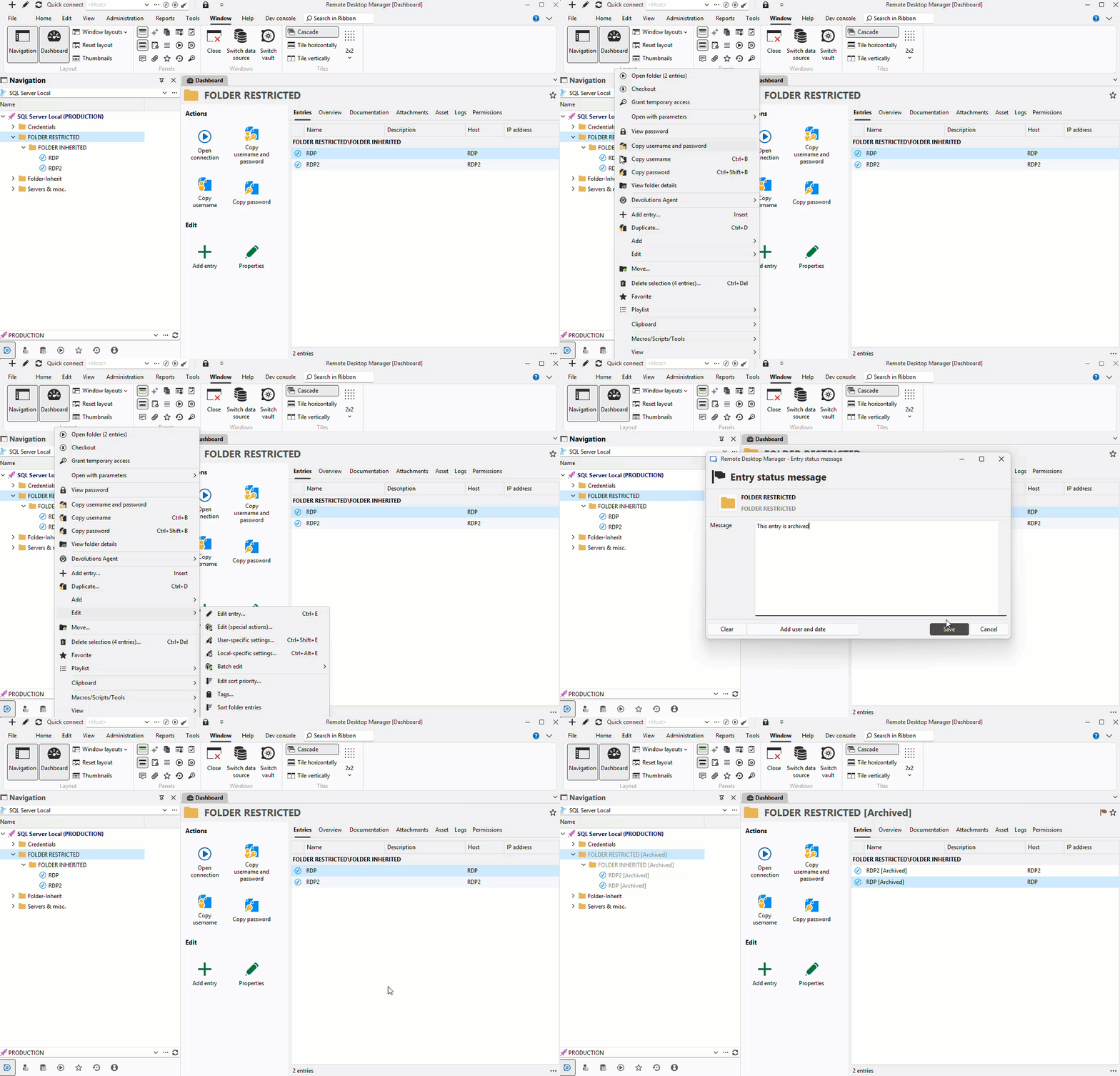
Maybe in your case if you multi-select all the entries beneath it will work? You can shift-click or ctrl-click to help you select multiple entries. This is slightly more inconvenient to do, but I'm really unsure why it wouldn't be working as it does for me.
Regards,
Hubert Mireault
ArchiveFolder.gif
Hi Hubert
Thanks for the video, it works like that. I did set the status on the properties of the folder and thought it will be inherited down. But I think it does not inherit, the field above is only for the expiration.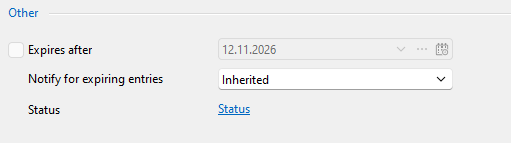
dd2d667e-a445-4e00-880b-17b054ef770e.png
Ah, yes, I see what you mean. In this case I would say it's the expected behavior, since you're specifically editing the folder's properties, and the field above as you say is strictly for the expiration. If you want to more easily change the status of many entries at once, the manipulation I did in my previous post would be the way to go for now.
Regards,
Hubert Mireault
HI Hubert
I have a few questions regarding the Archive Property (which we use temporray until we have a better solution).
When we set a Website or Credential entry as archived, so it won't show Credentials from customers when we do a search (as we have way to many hits with the customer name, which they don't need in RDM, as they are looking for Server entries not credentials) are these credentials still usable in the Workspace plugin of the browser? A quick test, says yes, but I just want to make sure.
Also are these archived credentials still usable in Server entries, as linked credentials? Or can only Administrator still use them?
What is the behaviour of the Expired and Disabled setting? Any difference to the archived one?
We just need one, which we can exlude from the search but can still use in the entries.
Thanks and best regards
Patrick
Hello,
I performed more tests on my end and yes, entries set to the "archived" status should still be usable. I think I made the mistake of testing expired and disabled statuses, and assuming that the archived status would act the same as them. The expired and disabled entries are indeed not usable by non-admins, but archived should be fine.
Knowing this, I believe the filter option I mentioned to hide the archived entries should work for what you need. Can you confirm that?
Regards,
Hubert Mireault
Hello Hubert
We are testing it now, and I will give you some feedback after that.
How can I set the archived state to all entries in hundred folders at once? I only have the word credentials in the folder name, not in the entries below them. So I can filter for all folders, but how to set the status archived to alle entries?
One other question, will they be completly ignored in the Workspace Browser Plugin, as we have a delay since we imported all these entries, and hope when they are set to archived, that they won't delay the search anymore.
Best regards
Patrick
Hello Patrick,
For performing this change on hundreds of folders, I would recommend two ways:
- The simple way is using the advanced search to return only the folders you want to change, selecting them, and changing the status on them. Note that this will only change the status on the folder itself, which means this will only achieve what you need starting with RDM 2026.1 when paired with the "Hide archived entries" setting.
- You could also construct a powershell script and use our powershell module to achieve this. It would be more complex but more thorough, and you could also build it in a way that you could go through all your vaults to make the change.
For your question about the Workspace browser extension, I asked the dev team and I wanted to ask you a few questions.
- Is your goal here only to improve the performance, or stop showing the result from archived entries as well?
- Are you using Devolutions Server as your source in the extension, with the multi-vault feature enabled? I asked Olivier who is the lead on the browser extension, and the next minor version of the extension should have a performance improvement in this scenario.
I want to make sure to understand where exactly the pain point is for the browser extension as the technical challenges there may not be the same.
I may have missed something or not understand the behavior you need, so don't hesitate to correct me if that's the case.
Regards,
Hubert Mireault
Hello Hubert,
Thanks for your reply. Like that we can change the status of the folders, but is there also a way to change all entries within these folders with like a mass mutation, to "archived" as they all also have the possibility to set this status under Description. (as we can't wait until version 2026.1 for that, or when is the release date planned?) At the moment it's also just one vault we are talking about.
Regarding the Web plugin:
There are two goals:
- We don't need to see ANY credentials when searching in the Web Plugin, as these entries don't have websites to open in them. So I don't know why they are displayed anyway. I also think I tested, that sometime ago, and it would not give me back credentials entry when I searched in the plugin, so I don't know if that's changed or if there is a setting, so it would only show and search for the type "website" and not "credentials". If if does not matter if they are archived or not, we need another possibility to not search for them in the web plugin.
- Even before we imported the new entries, the Web plugin got slower over the past month. As more entries were added, when searching for something, it takes now about 11 seconds until the results are displayed. In the beginning this was very fast, and we got results instantly. So that's the main thing, where we hope, when we set all the credentials as archived, that they are not searched anymore in the Webplugin (alont within RDM were we also don't want to search for them as default) and we hope the performance will get better. If it does not matter if they are searched or not, there is a general perfromace increas needed, perhaps an index or something, which is faster.
- Yes we search mutliple vaults. There is one for the whole company, one for finance, one personal and so on. But it's the company vault which has the most entries, and I think it is because of the amount of entries.
Thanks and best regards
Patrick
Hello,
I would recommend the powershell script if you need to also change it for all of your entries, as I don't believe there's an easy way to achieve this for multiple folders in RDM. We don't have a script already made for this, but if you need help with this I can ask someone in our support team to help you out.
Thank you for your additional information about your pain points with the browser extension. For the performance issues, the next minor update for the extension is currently planned to release either next week or the week of January 5th. My colleague is telling me that it will improve the performance by a significant amount so I encourage you to try it out when it'll be available.
As for your first point, the reason why the search returns these entries is because other extensions for password managers like Bitwarden, 1Password, LastPass and others also return all entries when searching, so it was done this way for us as well so users had a smoother experience. I understand that in your case this is not a behavior you enjoy. We could open a ticket to add an option to change this behavior. Let me know what you think.
Regards,
Hubert Mireault
Hi Hubert
Yes it would be great if someone from support could help me out with a sample script. Thanks!
I will test the new version regarding the performance.
Will archived entries still be displayed in the web browser extension?
And yes an option to only display browser entries would be great.
Thanks!
Hello,
Perfect, I will let them know to either contact you directly or reply to this thread to further help with the script.
As for the archived entries, I believe they will show up unless you've checked the "Hide archived entries" in your user preferences: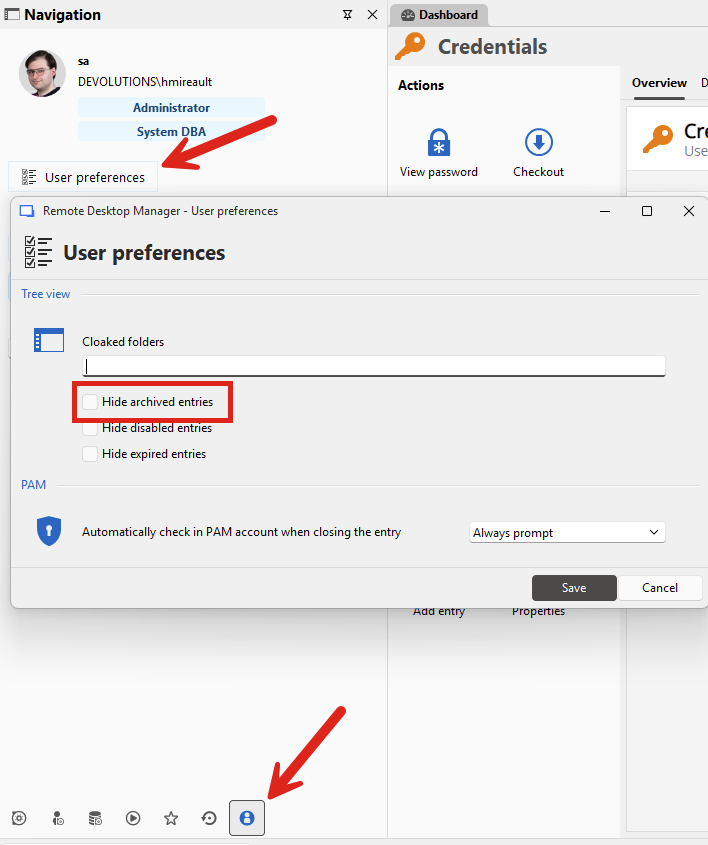
But hiding them this way will also remove them from the navigation pane, even if you aren't performing a search. I don't believe there's as many options for filtering in the Workspace extension when compared to RDM.
We could add the two following filter options to the browser extension to help you:
- An option not to show Archived entries when searching
- An option to only show entries with the appropriate URL when searching
Would this work for you?
Regards,
Hubert Mireault
7c136cba-65c4-4615-a626-48c9b24a1717.png
Hello Hubert
Thanks a lot!
Yes that's perfect, the third option we discussed earlier, would be "only show entries with type Website" (or was that the second option you meant bellow?)
We could add the two following filter options to the browser extension to help you:
- An option not to show Archived entries when searching
- An option to only show entries with the appropriate URL when searching
- An option to only show entries with type Website
Best regards
Patrick
You're correct, the second option I mentioned is effectively ignoring entries that aren't Websites, as other types don't have an URL to compare with. So, I think we're aligned as to what you'd like. I will make sure to mention it in the ticket so it's not lost in translation.
Regards,
Hubert Mireault