Active Directory Import

I am using the Import Session Wizard for AD and it appears to just hang. We have approximately 2000 servers that it needs to import and I have left it running for 3 hours and it will just sit there saying "Loading computer list, please wait". Can it not handle that many servers?
All Comments (25)
Hello,
Honestly I've never tried with 2000 servers. I will check the code to verify if I can see something that could be the problem.
Regards
David Hervieux
Is it a blank data source or it already contains some entries?
Regards
David Hervieux
Ok. it did finish! The issue which I never thought about were the 6000+ workstations it was going to import. Is there a way that I can only import a specific OU?
We have on our todo list to improve it and filter with OU.
Regards
David Hervieux
ah Pooh :)
Hello, has there been any progress on this?
I would like to be able to import connections from a specific OU like the original poster.
Hello Hamilton,
This is still on our TODO list. We will bump up the priority for this feature.
Regards,
Michaël Beaudin
That would be awesome!
Thanks!
Hello,
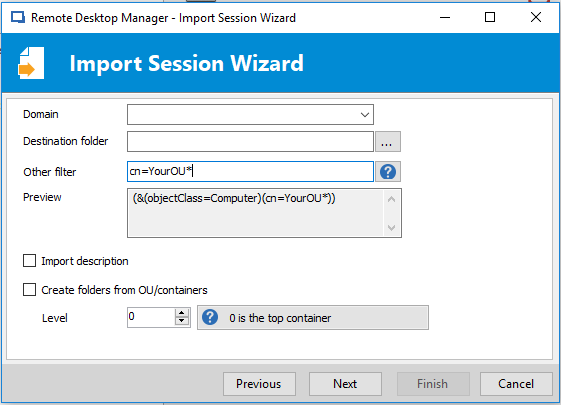
An "Other filter" field has been added to the import form. If you follow the example in the following image, you will be able to filter the import with the specified OU.
Text written in the "Other filter" field : cn=YourOU*
For now these changes are only completed internally and should be available starting from the beta of RDM 14.
Regards,
Michaël Beaudin
FilterApplication.PNG
Awesome!
Thanks!
Sorry to post to such an old thread, but, this doesn't seem to work?
Hello,
What RDM version are you using?
Do you get an error massage? If so, could you please post it here?
Best regards,
Érica Poirier
Hello, i need to import only *Servers* objects from Active Directory from only a specific OU.
This is so far working : (&(objectCategory=computer)
(operatingSystem=*server*))
But i need only the entrys of the following structure : OU=Servers,OU=PROD,dc=xx,dc=yy,dc=com
Can someone help me figure it out
thanks
D
Hello,
As I cannot get it working, I will investigate if it's a problem with the filter or a bug in RDM.
I will get back to you with my findings.
Thank you for your patience.
Best regards,
Érica Poirier
Hello,
Thank you for your patience and sorry for that late reply.
It seems to be a bug with the import wizard. I have submitted a ticket to our engineering team. Once an update will be available, we will post it here.
Best regards,
Érica Poirier
Hello,
Could you please try to put the OU search string in the Domain field like this sample? That should work.
Let me know if that works.
Best regards,
Érica Poirier
That does actually work Erica, however, it does not preserve the folder structure even when selecting the checkbox for Create folders from OU/containers.
And I am extremely glad I found this thread, because I need to do exactly this.
Thanks,
David F.
Hi David,
Thank you for your information and glad that it works on your side.
Regarding the folder structure and all other options, our engineering team will modify this dialog to have the same dialog as an AD Sync entry. I cannot provide any ETA for this modification but as soon it will be available, we will post it here.
Thank you for your patience!
Best regards,
Érica Poirier
I'd rather it just work the way it sounds :-) It finds an OU and creates a folder with the same name.
David F.
Hello David,
That's the main goal of this dialog refactoring to also get the same behaviour. It will create a folder with the name of the OU if the option is enabled.
Best regards,
Érica Poirier
Fantastic :-) Thank you, and I look forward to it.
David F.
I'd like to add a +1 to the folder level import working. Any updates from the Devolutions team on this?
Hello,
Thank you for your comment on this improvement request.
The ticket is still in the backlog. I will ask our engineering if they can raise the priority on it.
Once an update will be available, we will post it here.
Thank you for your patience.
Best regards,
Érica Poirier
Oh man. We added a new Domain and I thought this might be a great way to quickly get all the servers in. But if it's just one giant list, it's going to be more work to clean it up than to just import them in batches via OU manually. I'm currently stuck on the Loading Computer List, but am I going to find that it does NOT create folders based on OU like the checkbox says it should?
Thanks.
Update: When I just had our Domain in the box, like someone posted above, I got tons of laptops. I then changed it to the OU,DC,DC format but now I don't get anything. I know I'm a bit behind on version. I'm on 2022.2.29.0. Was a change made since then that might be causing my problems?
Update2: Well, I tried to add all the machines but it only ended up adding one. Not sure why. If anyone has a better way of doing this. Let me know.
Hello,
@kelemvor What parameters have you enabled when trying to import the servers in RDM? Is it possible to share some screen captures to help us investigate why you get these results?
At the moment, no new updates or fixes has been made. The engineering ticket is still in the to do list.
Best regards,
Érica Poirier