[ Multiple RDP via one SSH Tunnel ] - Is it possible to have Dynamic SSH port forwarding ?
[ Multiple RDP via one SSH Tunnel ] - Is it possible to have Dynamic SSH port forwarding ?

Dear Support,
I am new to your RemoteDesktopManager (Enterprise version).
1\
Until Today, I am using Royal TS in order to connect via SSH Tunnel.
In Royal TS, I am using the built-in Putty SSH client.
and I must pre-configure the local-port mapping in the Putty SSH tunnel .
e.g.
1) local Port 50001 will be mapped into RemoteServer01_IP:3389
2) local Port 50002 will be mapped into RemoteServer02_IP:3389
3) local Port 50003 will be mapped into RemoteServer03_IP:3389
...
Next, when I create RDP object on Royal TS, I must set the destination IP to 127.0.0.1:50001 for RemoteServer01 ....
2\
I search your different guides on how to setup RDP via SSH tunnel on RDM product.
Indeed I could see several methods.
e.g. SSH VPN ; SSH Tunnel ; SSH port-forwarding ......
But,
Recently I saw a nice implementation of this on SecureCRT version 8, as followed:
3\
So, my question to you please :-)
Is there a way to declare several RDP server on your product,
and configure the real server IP (and not 127.0.0.1)
and it will use the SSH dynamically , based on the fact that In the VPN - Settings tab, we can click on the drop down menu next to Session and select your SSH Tunnel entry previously created ...:- )
Thank you!
All Comments (25)
Hello,
I think the information's that you are looking for is described in the article below
https://help.remotedesktopmanager.com/howto-setupsshtunnel.htm
Best regards,
Jeff Dagenais
Hello,
Thanks for the feedback.
But, it is not what I am looking for.
Based on this procedure, I MUST:
I am looking for a solution like in SecureCRT.
In the RDP object you configure the actual IP address of the remote server.
And via Generic setting, it will know to route through the SSH tunnel.
I don't want to manage local ports mapping if I have for example 50 RDP objects to configure on my Servers Tree...
Thanks!
Hello,
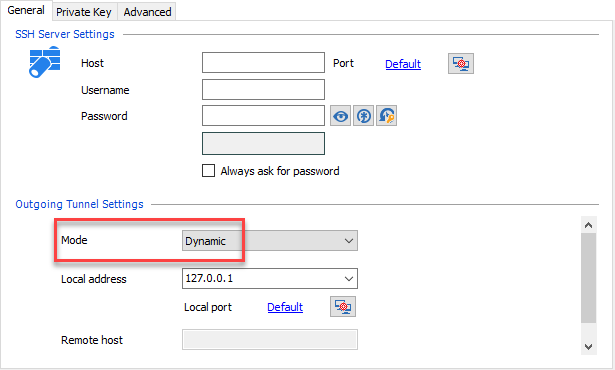
Inside the SSH Tunnel session, it's possible to select Dynamic regarding the port fowarding
It's also possible to configure several sessions at the same time to use the same SSH Tunnel if you would like.
This is possible using the Batch Edit feature.
https://help.remotedesktopmanager.com/edit_batch.htm
Best regards,
Jeff Dagenais
2018-03-20_08-29-26.png
Hi Jeff,
I am not sure you understood what I asked.
Thanks.
Hi,
We aren't sure about the technology used to perform what you explained, but is it similar to this step? https://www.vandyke.com/support/tips/socksproxy.html
If yes, in SecureCRT the local port 127.0.0.1 is also bound to let you link to a remote server.
Otherwise, if you do not bind anywhere the localhost IP, it looks more to be a VPN connection.
What is the step performs with the external application. Base on this I could confirm if RDM have that feature?
Best regards,
David Grandolfo
Hi David,
Thank you for your feedback.
Indeed the link you provide is what I am looking for.
Specifically, pay attention to the following statement from this SecreCRT link:
So indeed as you say, also SecureCRT bind local port 1080 with 127.0.0.1
But,
Every new client session that you create, you configure it with the actual remote ip that you want to reach. (And not 127.0.0.1 + specific local port).
In SecureCRT, the way you associate any new client connections via local port , via tunnel,
Is simply select to connect via the firewall (firewall = existing SSH TUNNEL).
In RDM,
You can set a folder of 50 RDP servers which need to connect via tcp port 3389,
To connect via existing SSH session.
But in all your tutorials/examples, it specify to configure each RDP with remote ip as 127.0.0.1
And I don’t want to do that. I don’t want to manage 50 RDP servers, each of them set with different local port, and have their real IP somewhere in the SSH TUNNEL object.
Hope my question is clear enough.
Thanks
Hi,
This looks very nice, but I do not see/understand how to configure the RDP connection to connect through the SOCKS proxy.
Are you able to send us your configuration "Outside of RDM" to perform the RDP connection through Secure CRT.
Best regards,
David Grandolfo
Hi David,
Thank you for your support.
To clarify: I do not have this nice feature for anywhere in relation to RDP! It is working on SecureCRT for SSH connections, and also I was able to test Dynamic HTTP from Chrome Browser through this SecureCRT connection.
To clarify#2, I do not need it to be specific SecureCRT SOCKS proxy.
Let me try to rephrase/start over :-)
Lets assume that I have a remote platform with 10 Windows Servers (i.e. Windows Server 2012) + 10 Ubuntu Servers.
Lets assume that their IP Addressed are :
172.182.70.01
172.182.70.02
172.182.70.03
172.182.70.04
...
172.182.70.20
Lets assume that first 10 IPs are windows Servers (172.182.70.01-172.182.70.10 , and 172.182.70.11-172.182.70.20 are Ubuntu).
And Lets Assume that I have to use SSH Tunnel with IP 202.202.182.182 in order to be able to access the above 20 IPs.
Today,
On Royal TS, I need to create SSH connection to a SSH TUNNEL connection.
On this SSH Tunnel Object,
I MUST configure MANUALLY a local port mapping.
for example:
Source port 30001 will be mapped to windows server IP 172.182.70.01 on port 3389.
Source port 30002 will be mapped to windows server IP 172.182.70.02 on port 3389.
Source port 30003 will be mapped to windows server IP 172.182.70.03 on port 3389.
Source port 30004 will be mapped to windows server IP 172.182.70.04 on port 3389.
Source port 30005 will be mapped to windows server IP 172.182.70.05 on port 3389.
...
Source port 30010 will be mapped to windows server IP 172.182.70.10 on port 3389.
AND all the Ubuntu servers should be:
Source port 30011 will be mapped to windows server IP 172.182.70.11 on port 22.
Source port 30012 will be mapped to windows server IP 172.182.70.12 on port 22.
Source port 30013 will be mapped to windows server IP 172.182.70.13 on port 22.
Source port 30014 will be mapped to windows server IP 172.182.70.14 on port 22.
Source port 30015 will be mapped to windows server IP 172.182.70.15 on port 22.
...
Source port 30020 will be mapped to windows server IP 172.182.70.20 on port 22.
Next,
As Step#2, I need to create a tree with all these 20 servers.
And each of the servers on the tree, MUST be configured to connect toward destination IP 127.0.0.1 and the relevant local mapped port.
e.g.
Server#01 (representing 172.182.70.01) , will be created with remote IP 127.0.0.1 and port 30001
Server#02 (representing 172.182.70.02) , will be created with remote IP 127.0.0.1 and port 30002
Server#03 (representing 172.182.70.03) , will be created with remote IP 127.0.0.1 and port 30003
Server#04 (representing 172.182.70.04) , will be created with remote IP 127.0.0.1 and port 30004
...
Server#20 (representing 172.182.70.20) , will be created with remote IP 127.0.0.1 and port 30020
To summarize:
This type of configuration is complicated :-)
It require me to remember that local port 30007 for example, represent the platform SQL DB.
i.e. The server representation is through specific port and not by the real IP. All servers are configured with 127.0.0.1 ...
And it is hard to manage environment like this....
The point I am trying to make is the following:
Assuming it is currently not supported in RDM,
it would be nice to configure all the servers with their real IP address.
And at the Folder that contains all these 20 servers, specify that they MUST connect via specific SSH Tunnel object.
And by doing this, the RDM will know to perform this local mapping automatically !
e.g.
I will create the 20 objects with the servers real IP address and real ports:
Server#01 (representing 172.182.70.01) , will be created with remote IP 172.182.70.01 and port 3389
Server#02 (representing 172.182.70.02) , will be created with remote IP 172.182.70.02 and port 3389
...
Server#10 (representing 172.182.70.10) , will be created with remote IP 172.182.70.10 and port 3389
Server#11 (representing 172.182.70.11) , will be created with remote IP 172.182.70.11 and port 22
Server#12 (representing 172.182.70.12) , will be created with remote IP 172.182.70.12 and port 22
Server#13 (representing 172.182.70.13) , will be created with remote IP 172.182.70.13 and port 22
...
Server#20 (representing 172.182.70.20) , will be created with remote IP 172.182.70.20 and port 22
And the fact that we specify the folder to go through another existing SSH Object ,
means that RDM will know to perform this local mapping automatically !
Meaning:
- when I will create the RDM built-in SSH-Tunnel object / SSH-Port Forwarding object,
I will only need to configure it with the remote server Credentials and Destination IP address (in this example , 202.202.182.182 ).
- I should not need to specify it with any information about local port mapping and 127.0.0.1 ...
- This way,
the configuration is much more easier , and not complicated like with Royal TS.
Please let me know if this is currently supported ? Or perhaps you can move this to the feature request area ?
Thanks a lot!
Hi,
Wow what an explanation, thanks. I will take all this information and try to test it without RDM and with RDM.
Please let me 2 days to test everything and to come back with a clear answer.
Best regards,
David Grandolfo
I was following this post and I'm also interested in this feature. I also went back to my Royal Tx installation and tried the tunneling there. I'm not sure your statement is correct that you need to create a tunnel object for each connection. In fact you can reuse the tunnel object there for all your connections and it will assign the local ports automatically. So in general, it would be cool if RDM can do the same...
Hi Guys,
Thanks for the explanation (again), I was confused with the RDP via the Secure CRT.
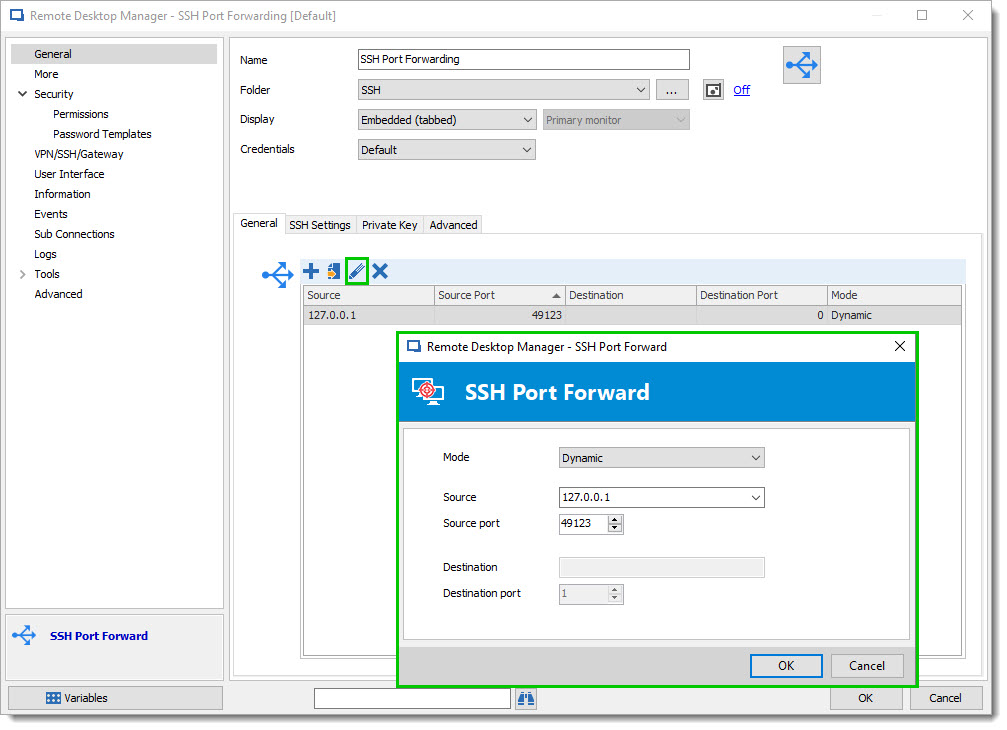
So first of all, for your information @Yishay the SSH Tunnel Object in Royal TS is the same in RDM but the name is different. We call it SSH Port Forwarding. In this entry you could create a full list of local tunnels with a specific port.
Secondly, we support in RDM the Dynamic Proxy that will help you to connect to a distant server without the 127.0.0.1 and the specific port that you need to remember. As @unprofessionals said we need in this case to configure a Dynamic tunnel.
The way to do it is pretty simple, first you open an SSH Port Forwarding entry and you add a SSH Port Forward with this specific option. Note: That the port used will be the port to use as a Proxy.
That being said, the engineering department explain to me that they are currently finishing the integration for every SSH session and this is by using the Proxy table.
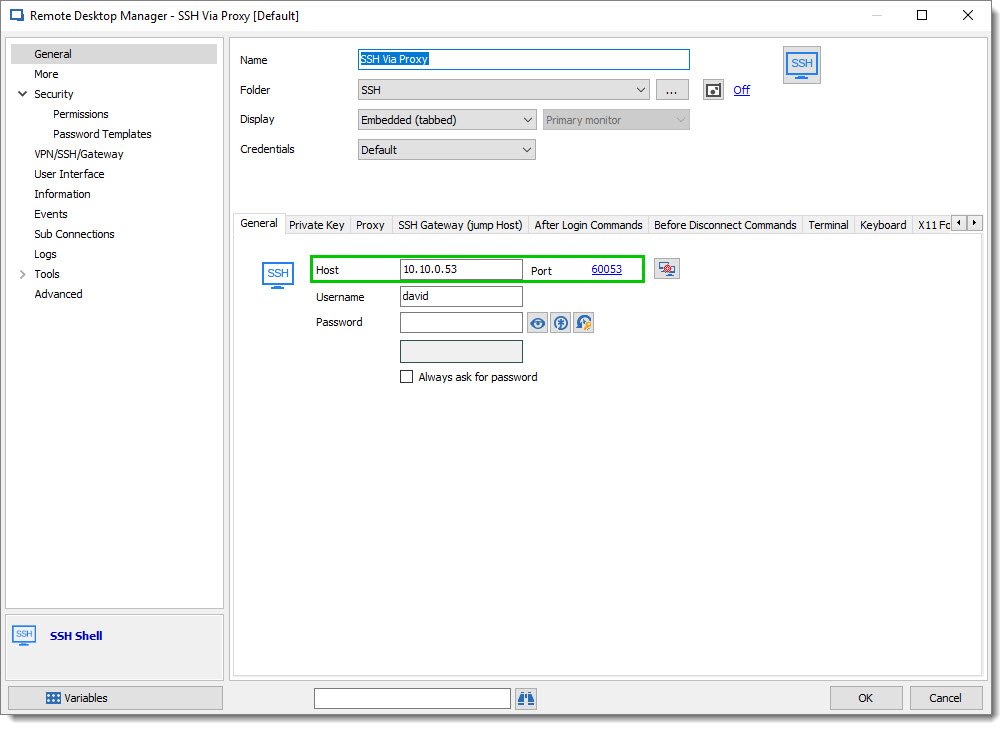
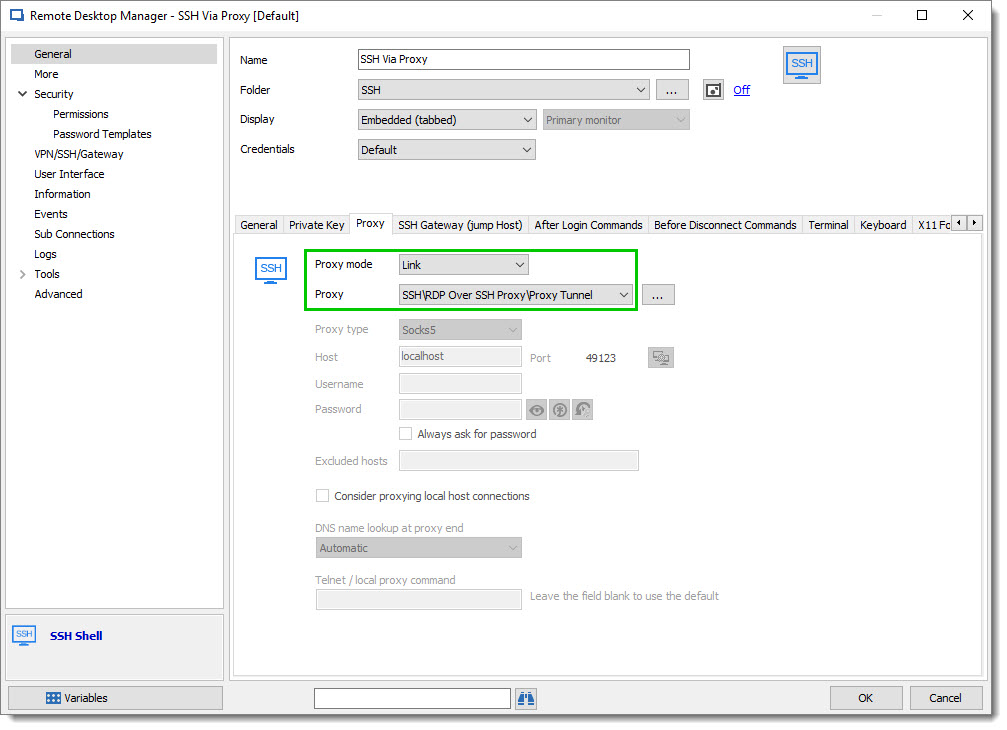
But as soon as the integration will be finish, in a SSH Shell entry you will be able to connect to a remote server by using his local IP (ex. 10.10.0.53 and I'm in another network 192.168.0.X).
After you will need to point the Proxy to your SSH Port Forward entry previously created.
This part is true for SSH connection. In the term of RDP, we know that a proxy tools exist to perform the same steps but for our RDP connection as we use the Microsoft ActiveX or the MSTSC launcher the Proxy is unfortunately not supported.
So in this case the classic setup with a line per Server needs to be used. The same step as you explained previously. Here is an example of the SSH Port Forwarding configuration.
I will let you know as soon as the engineering department comes back to me for the SSH Shell.
Regarding the RDP connection, if you have any other options available that we didn't talk please do not hesitate to let me know. We are always open for feature requests that our community looks for.
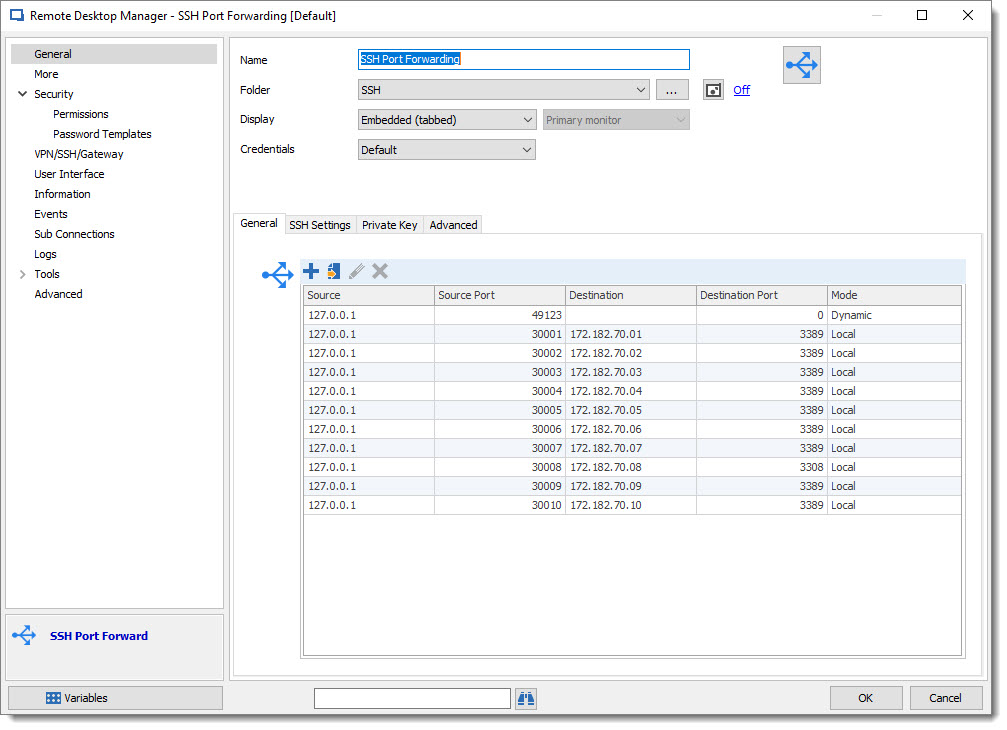
David Grandolfo
SSH_Port_Forwarding_example.jpg
SSH_Proxy_Tab.jpg
SSH_End_point.jpg
SSH_Port_Forward.jpg
Hi @David,
Thank you very much for your efforts & feedback!
Please do update me about Dynamic option, in relation to the SSH connections.
To clarify: Using RDM , I created 'SSH Port Forward' instance. Next I Create 'SSH SHELL' instance,
But As you can see in the attached Screenshot:
Under Proxy TAB, the Under the LINK option , I have no option available.
So, I guess there is a missing step...?
As for the RDP ,
Do you think I should open this as a Feature Request?
Generally speaking, it doesn't look so complicated to me.
e.g.
- In the SSH Port Forwarding object, you can add an option to define a range of local ports , and set the Type to RDP.
- Next, Under the Folder where I have 100 RDP servers, I will be able to set under the SSH/VPN area, to specify it is routed through the SSH Port-Forward Object Tunnel session.
What do you think?
The goal is only to allow better server management on the RDP folder. Each Server Object will have it's own IP amd not 127.0.0.1 with a specific/Unique local port...
-----------------------------
Hi @unprofessionals
Thank you for your feedback.
I'm not to understand your comment about Dynamic port forwarding in Royal TS.
In Royal TS, I have one Terminal Object , based on PuTTY (not Rebex).
And as you can see in the following example, I am able to specify local port mapping for SSH port forwarding...
I am aware that you have the option to specific SOCKS Proxy...
But, Does the remote SSH must have specific support if I want to set Dynamic port forwarding Tunneling toward SSH/RDP Remote Servers ?
Did you indeed meant that you can set Dynamic port forwarding for both RDP & SSH ? (or it requeire specific configuration on the Platform SSH TUNNEL server?)
If Yes, Can you please clarify how ?
Thanks.


RoyalTS_PuTTY_Tunnel_example.png
Proxy_Empty.png
In Royal it's called "secure gateway". I found this blog post:
http://blog.royalapplications.com/2015/04/21/new-feature-secure-gateway-ssh-tunnels/
There's no need to create the putty connection for the tunnels. Last time I checked, it worked well with Royal Ts
Hi Yishay,
Regarding the configuration of the entry, you won't be able to configure it at the moment because the feature isn't yet implemented. With this topic I made multiple tests and found also an issue. So the engineering department are working to solve it.
Concerning the RDP session as you said, generally speaking, it's very easy, but Microsoft doesn't support it by default and an external tools need to be used to perform that step. If you found any of these tools that could work and if you tested it on your side and it's working, you could post a feature request. Unfortunately we did not find any of these tools.
For feature requests, kindly post them on the forums at https://forum.devolutions.net/forum17-remote-desktop-manager--feature-request.aspx
This will allow the community to demonstrate interest in your idea. We use this interest to prioritize the features we implement.
That being said, as soon as it works, I will update this topic with a full procedure how to configure it.
Best regards,
David Grandolfo
Hi David,
Thanks again for your efforts & feedback!
I understand.
Regarding RDP, I will consider to open a feature request in the future.
Regarding SSH,
I understand that this option is yet not available and being checked by you and your engineering department.
Just one more point to clarify/emphasis with you:
From my point of view, the goal is to be able to configure Ubuntu(example) SSH-shell easily and with real IP for better management
Meaning:
If I will try to illustrate the FULL Procedure to create a Folder of 50 SSH servers that all MUST be routed through local port , via SSH Tunnel:
BTW:
I guess you know it, but FYI: I created 'SSH Port-Forward' instance, and configured manually a list of local ports toward several RDP server + several SSH remote servers.
I used for example local port mapping of 30001,30002,....
I have tested successfully that I was able to connect both SSH and RDP remote servers , via this SSH Tunnel.
But, I also noticed on the "SSH Port-Forward" instance log that even that I set the local ports with 30001;30002;...
the connection toward the remote side is done with a different & Random local ports :-)
Perhaps this is related to the range '49152-65535' for 'Dynamic Port Forwarding'.
So, I guess the usage with the local ports is only for internal mapping inside RDM , to link the SSH instance with the SSH Port-Forward instance..
Again, thanks a lot for your efforts , making sure it is working well before releasing it!
Hi unprofessionals,
Thank you for your feedback.
But, please note that this feature is only helpful if the Royal-TS Secure Gateway is deployed and configured on the Customer SSH-Tunnel instance. (the actual Gateway that I need to connect, in order to be routed into the platforms servers.
MY usage in Royal TS , comparing to FREE mRemote is only because Royal TS client has more features...
I cannot use the 'Secure Gateway' option as it is not supported on the remote SSH Tunnel GW.
Thanks.
Hello All,
Good news,
In the latest RDM version 13.6.5, the dynamic Socks 5 tunnel via an SSH server is now supported.
One of the good configurations is to create an SSH Tunnel entry like below:
1: SSH Server for Socks 5 tunnel
2: Mode as Dynamic
3: Local Address can be set as a local host address with a specific port (use a port outside of Windows port usage)
And then connect your SSH Shell, with the Proxy tab information:
1: in the SSH Shell entry go to Proxy tab.
2: Proxy Type: Socks 5
Host/Port: set the same host/port as setup on the SSH Tunnel above.
Best regards,


David Grandolfo
SSH_Shell_Proxy.jpg
SSH_Tunnel_Socks.jpg
Is it now posible to do the ssh port forwards dynamic instead of creating a port forward for every rdp server?
Hello,
It isn't possible right now, but we are working on this. This is currently planned for version 2020.1 of RDM, which should come at the end of January / start of February.
Regards,
Hubert Mireault
Hi,
We are now running 2020.1, is it now possible ?
best regards,
Nicolas
Hi Nicolas,
In RDM 2020.1 we add a new feature call Secure Gateway which is exactly what you are looking for. Could you have a look at this topic and tell me if it works well for you?
https://devolutions.atlassian.net/servicedesk/customer/portal/1/article/880181513?src=-776657933
Best regards,
David Grandolfo
Hi David,
Thanks for this quick answer :).
I'm using Mac OS version and I do not have the exact menu described in this KB.
I tried to follow the steps but it doesnt work.
I can see the SSH tunnel connecting but the RDP session fails to connect.
Is there any log I can check to see what is not working ?
best regards,
Nicolas
Hi Nicolas,
This has not been implemented in the macOS version yet. We are working on it though.
Best regards,
Xavier Fortin
ok. Is there an ETA for macOS compatibility ?
Hi Nicolas,
Nothing assured yet, but I've started working on this yesterday. If everything goes fine, it should be available in the next release of RDM Mac.
There are no defined dates for the release of RDM Mac 2020.1.8.0, but it should come in the next few weeks.
Best regards,
Xavier Fortin