Favorites view keeps reverting and removing shared favorites

Each new version that comes out the Favorites view keeps reverting to NOT showing any shared favorites. The context menu to add shared favorites back keeps moving to new places and now doesn't even exist no matter where you click/right click in the Navigation pane.
WHERE ARE SHARED FAVORITES? Why does this keep changing EVERY time an update comes out???
All Comments (12)
Hi,
What RDM version do you use and what data source type? The shared favorites are deprecated in RDM 13 and are now replaced by the roaming favorites.
Regards
David Hervieux
Data source is SQL, version is 13.0.1.0
Where was this communicated? It's not in the changelogs for v13.
How are we supposed to know about these types of changes?
What are roaming favorites? Nothing in your documentation mentions roaming favorites.. Nothing in the UI mentions Roaming Favorites. Nothing in a connection properties mentions Roaming Favorites. What are you talk about?
If you go in the Favorite tree, you can now organize your favorite into folders. Those favorites are saved in your user and it's no longer saved locally. This means you will have the same favorites on multiple machines as long as you use the same user.
Could you post a print screen of what you have in the favorite navigation?
Regards
David Hervieux
There is nothing under Favorites.
If I right click in the pane, everything is grayed out (and I confirmed online).
I can't add anything to the Favorites other than folders by clicking New Folder.
There are no options on any connection entries to add to any favorites. There are no context menu items that say anything about favorites if I right click a connection.
navigation-grayed_out.png
navigation.PNG
Exactly. You can click on the dashboard to add the item into the favorite section:

David Hervieux
Favorite.png
Not sure where in the UI you've taken a screenshot but there are no options on the 'Dashboard' either for adding to favorites, doesn't matter which tab I select..
no favorites.PNG
Hi,
Could you try to verify if you have this option enabled?
Regards
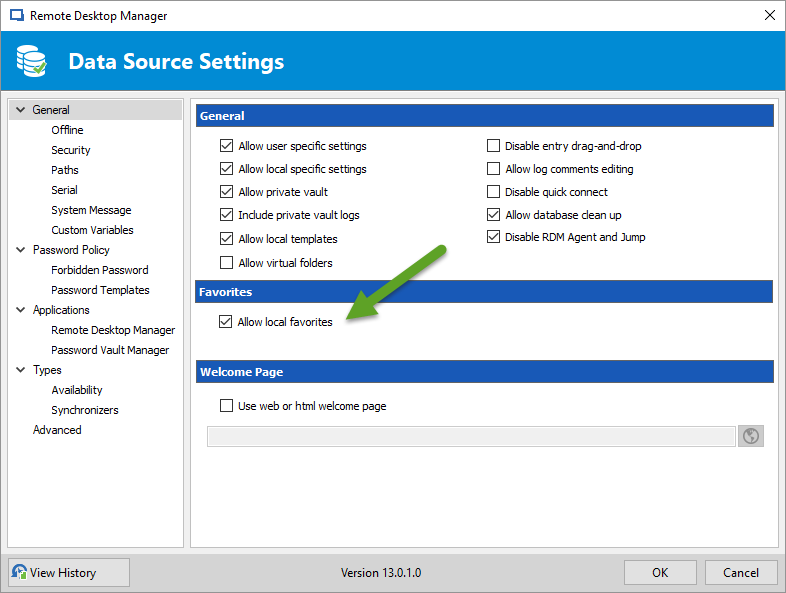
David Hervieux
AllowLocalFavorites.png
Yes, it's enabled.. but I don't want local favorites that need to be distributed to individual computers..
We will change the label for Allow favorites since it's not longer per machine favorites. Do you see in the context menu the Flag as Favorite?
Regards
David Hervieux
Working for me. But...
What a shame you removed the ability to add a group/folder structure to favorites. Now you have to build a folder structure manually and add the connection afterwards. Useless in my opinion :-(
I will check what I can do for the group.
Regards
David Hervieux